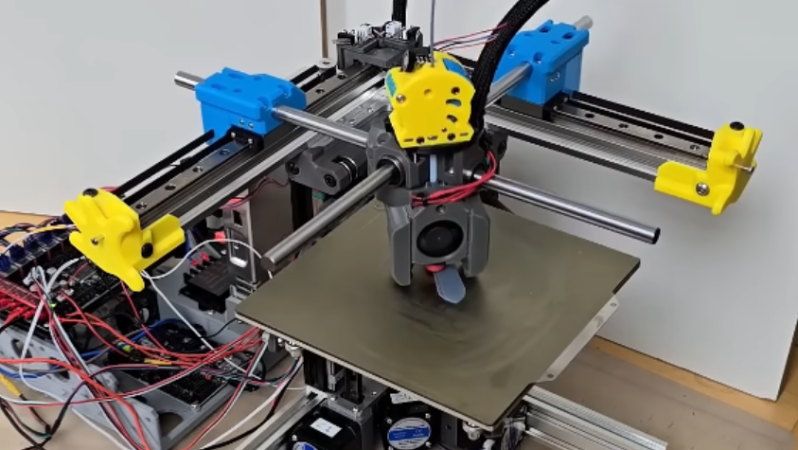
In this era of cheap turn-key machines, the idea of actually building your own desktop 3D printer might seem odd to some. But if you’re looking for a challenge, and want to end up with a printer that legitimately sets itself apart from what they’re stocking on Amazon these days, then take a look at the Lemontron.
We’ve been keeping tabs on the development of this open source 3D printer for some time now, and just before Christmas, the files finally were released for anyone who wants to try putting one together themselves. There’s currently no formal kit available, but once you’ve printed out all the parts, there’s a very nice bill of materials you can find on the website which will tell you everything you need to complete the assembly — and critically — where you can get it.
You can buy motorized camera sliders off-the-shelf, but they’re pretty costly. Alternatively, you can make one yourself, and it’s not even that hard if you’re kitted out with a 3D printer. [Creative 3D Printing] did just that with a nifty design that adds rotation into the mix. Check it out in the video below.
Why should a camera get all the fun? Try your phone.
The basic slider is built out of 3D-printed components and some good old aluminum extrusion. A small 12-volt motor trucks the camera cart back and forth using a leadscrew. It’s torquey enough and slow enough that there isn’t much need for more advanced control—the motor just does the job. There’s also a limit switch set up to trigger a neat auto-reverse function.
The neat part, though, is the rotational mechanism. A smooth steel rod is attached to the slider’s housing, which can be set up in a straight line or aligned diagonally if desired. In the latter case, it rotates the mounting on the camera cart via a crank, panning the camera as it moves along the slider’s trajectory.
It’s a mechanically sophisticated design and quite unlike most of the camera sliders we feature around these parts.
Camera sliders are a popular project for makers—especially those who document their projects on video. They’re fun and accessible to build, and they can really create some beautiful shots. [Lechnology] set about to follow in this fine tradition and built a rather capable example of his own. Check it out in the video below.
The slider relies on V-slot rails, perhaps most familiar for their heavy use in modern 3D printers. The rails are paired with a 3D-printed camera carriage, which runs on smooth rubber rollers. A chunky stepper motor provides drive via a toothed belt. Trinamic motor controllers were chosen for their step interpolation feature, making the motion much smoother.
The slider doesn’t just move linearly, either. It can rotate the camera, too, since it has an additional motor in the carriage itself. In a nice retro touch, the wires for this motor are run with an old coiled telephone cable. It’s perfect for the job since it easily extends and retracts with the slider’s motion. Controlling everything is an Arduino, with speed and rotational modes set via a tiny screen and a rotary encoder control.
Many of us grew up with dreams of piloting a forklift one day. Sadly, most warehouses take a dim view of horseplay with these machines, so few of us get to live out those fantasies. Playing with this desk-sized RC model from [ProfessorBoots] is probably a safer way to get those kicks instead. You can check it out in the video below.
The 3D-printed body of the forklift is the first thing you see. It’s great quality, and it instantly puts you in mind of the real thing. The build is true to the dynamics of a real forklift, too, with proper rear steering. Inside, there’s a custom circuit board hosting an ESP32 that serves as the brain of the operation. Its onboard wireless hardware allows remote control of the forklift via a smartphone app, PS4 controller, or many other options. It controls the drive motors and steering servo, along with another motor driving a threaded rod to move the forks up and down. The whole thing is powered by two Fenix 16340 batteries—small lithium-ion cells that can be recharged with an integral micro USB port.
The project video is very thorough about the design and build. It’s worth watching just to understand the specifics of how forklifts actually raise their forks up and down. It’s good stuff.
The heart of the slider is the 4020 V-slot aluminum profile. It’s upon this that the camera carriage rides, running on rubber rollers to keep things smooth. A stepper motor and belt are then used to move the slider at a constant speed up or down the rail while the camera gets the necessary shot. The build relies almost entirely on salvaged components, save for an ESP32, OLED screen, and a few buttons to act as the control interface. There are also the TMC2208 stepper motor drivers, of course, but they came from the salvaged Ender 3 unit as well.
This is a classic project. Many old 3D printers have pretty much the perfect set of parts to build a camera slider, making this build a no-brainer. Indeed, others have tread the same path. There are plenty of other potential uses around the lab or for soldering.
Meanwhile, the proof is in the pudding. Scope the slider’s performance in the video below.
In most natural environments, fish are able to feed themselves. However, if you wanted to help them out with some extra food, you could always build a 3D-printed boat to do the job for you, as [gokux] did.
The concept is simple enough—it’s a small radio-controlled boat that gets around the water with the aid of two paddle wheels. Driven together, the paddle wheels provide thrust, and driven in opposite directions, they provide steering. A SeeedStudio XIAO ESP32 is the brains of the operation. It listens into commands from the controller and runs the paddle drive motors with the aid of a DRV8833 motor driver module. The custom radio controller is it itself running on another ESP32, and [gokux] built it with a nice industrial style joystick which looks very satisfying to use. The two ESP32s use their onboard wireless hardware to communicate, which keeps things nicely integrated. The boat is able to putter around on the water’s surface, while using a servo-driven to deliver small doses of food when desired.
It’s a neat build, and shows just what you can whip up when you put your 3D printer to good use. If you’d like to build a bigger plastic watercraft, though, you can do that too. Video after the break.
The 3D structure of origami-inspired designs comes from mountain and valley fold lines in a flat material. Origami designs classically assume a material of zero thickness. Paper is fine, but as the material gets thicker things get less cooperative. This technique helps avoid such problems.
An example of a load-bearing thick-film structure.
The research focuses on creating so-called “thick-panel origami” that wraps rigid panels in a softer, flexible material like TPU. This creates a soft hinge point between panels that has some compliance and elasticity, shifting the mechanics of the folds away from the panels themselves. These hinge areas can also be biased in different ways, depending on how they are made. For example, putting the material further to one side or the other will mechanically bias that hinge to fold into either a mountain, or a valley.
Thick-panel origami made in this way paves the way towards self-locking structures. The research paper describes several different load-bearing designs made by folding sheets and adding small rigid pieces (which are themselves 3D printed) to act as latches or stoppers. There are plenty of examples, so give them a peek and see if you get any ideas.
We recently saw a breakdown of what does (and doesn’t) stick to what when it comes to 3D printing, which seems worth keeping in mind if one wishes to do some of their own thick-panel experiments. Being able to produce a multi-material object as a single piece highlights the potential for 3D printing to create complex and functional structures that don’t need separate assembly. Especially since printing a flat structure that can transform into a 3D shape is significantly more efficient than printing the finished 3D shape.