Hackaday Prize 2023: Gen5X A Generatively Designed 5-Axis 3D Printer

[Ric Real] is entering the 2023 Hackaday Prize with the Gen5X, a generatively designed 3D printed five-axis 3D printer. The concept is not a new one, with the type of construction being seen a few times here and there. In addition to the usual three directions of motion, we’re familiar with, with the cartesian bot design, these types of machines add an additional two rotation axes, one which can swing the build platform front and back around the X-axis, and a second that provides rotation around the Z-axis. These combined motions give rise to some very interesting capabilities, outside of our familiar 3D printing design constraints.

As for the generative side of things, this is a largely theoretical idea. Essentially the concept is that the machine’s design can be iteratively updated and optimised for performance to fit into the constraints of available hardware such as motors and other ‘vitamins’ needed to create the next generation of machines. The design files should be parameterised enough such that this optimisation process can be automated, potentially via input from AI, but we suspect we’re a way off from that yet. Whether this project as yet satisfies any of these lofty goals remains to be seen, but do keep an eye on it if you’re so inclined. There is a Fusion 360 project here to dig into, but if you’re not interested in the research side of the project, but just want to build a 5-axis machine to play with, then you can find the project source on the GitHub Page.

If this feels familiar, you’d be on the right track, as we covered at least one other 5D printer recently. We have also touched upon generative design at least once. We’re sure we will see more on this topic in the future.

Continue reading “Hackaday Prize 2023: Gen5X A Generatively Designed 5-Axis 3D Printer”

Solar Powered Flower Chases The Light

Many plants are capable of tracking the sun in order to get the most possible light. [hannu_hell] built a solar powered sculpture that replicates this light sensitivity for the benefit of better charging its own batteries, allowing it to run theoretically indefinitely where suitable light was available.

The 3D-printed flower features six movable petals mounted on an articulated stem. The flower’s leaves themselves bear solar panels that collect energy, analogous to leaves on a plant. A Raspberry Pi Pico is at the heart of the show, which is outfitted with a DS1307 real-time clock and a ST7735 TFT display for displaying date and time information. It’s also responsible for controlling servos that aim the flower’s solar panels towards the brightest light source available. This is achieved by using the Pico to read several photoresistors to determine light levels and adjust the leaves accordingly.

It’s a fun build, and one that could teach useful lessons relevant to even large-scale solar arrays. Video after the break.

Continue reading “Solar Powered Flower Chases The Light”

Art of 3D printer in the middle of printing a Hackaday Jolly Wrencher logo

Make Better 3D Printed Molds, For Thermoforming Plastics

Thermoforming — which includes vacuum-forming — has its place in a well-rounded workshop, and Mayku (makers of desktop thermoforming machines) have a short list of tips for getting the best results when 3D printing molds on filament-based printers.

A mold is put into direct, prolonged contact with a hot sheet of semi-molten plastic. If one needs a mold to work more than once, there are a few considerations to take into account. The good news is that a few simple guidelines will help get excellent results. Here are the biggest ones:

  1. The smoother the vertical surfaces, the better. Since thermoforming sucks (or pushes) plastic onto and into a mold like a second skin, keeping layer heights between 0.1 mm and 0.2 mm will make de-molding considerably easier.
  2. Generous draft angles. Aim for a 5 degree draft angle. Draft angles of 1-2 degrees are common in injection molding, but a more aggressive one is appropriate due to layer lines giving FDM prints an inherently non-smooth surface.
  3. Thick perimeters and top layers for added strength. The outside of a mold is in contact with the most heat for the longest time. Mayku suggests walls and top layer between 3 mm to 5 mm thick. Don’t forget vent holes!
  4. Use a high infill to better resist stress. Molds need to stand up to mechanical stress as well as heat. Aim for a 50% or higher infill to make a robust part that helps resist deformation.
  5. Ensure your printer can do the job. 3D printing big pieces with high infill can sometimes lift or warp during printing. Use enclosures or draft shields as needed, depending on your printer and material.
  6. Make the mold out of the right material. Mayku recommends that production molds be printed in nylon, which stands up best to the heat and stress a thermoforming mold will be put under. That being said, other materials will work for prototyping. In my experience, even a PLA mold (which deforms readily under thermoforming heat) is good for at least one molding.

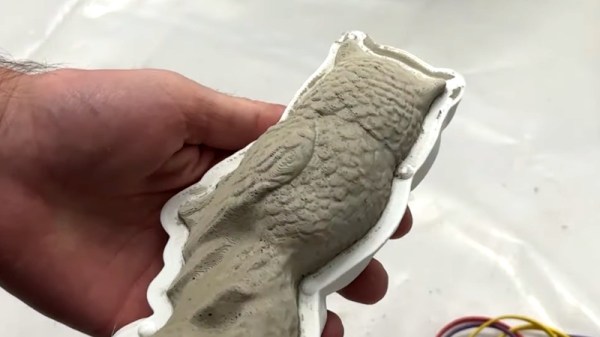
Thermoforming open doors for an enterprising hacker, and 3D printing molds is a great complement. If you’re happy being limited to small parts, small “dental” formers like the one pictured here are available from every discount overseas retailer.  And of course, thermoforming is great for costumes and props. If you want to get more unusual with your application, how about forming your very own custom-shaped mirrors by thermoforming laminated polystyrene?

Hefty 3D Printed Quadcopter Meets Nasty End

You can readily buy all kinds of quadcopters off the shelf these days, but sometimes it’s more fun to build your own. [Michael Rechtin] did just that, with a hefty design of his own creation.

The build is an exploration of all kinds of interesting techniques. The frame itself uses generative design techniques to reduce weight while maintaining strength, while the motors themselves make heavy use of 3D-printed components. The design is modular and much of it slots together, too, and it uses a homebrewed flight controller running dRehmflight. It draws 2.5 kW from its lithium polymer batteries and weighs over 5 kg.

The DIY ethos led to some hurdles, but taught [Michael] plenty along the way. Tuning the PID control loop posed some challenges, as did one of the hand-wound motors being 5% down on thrust.  Eventually, though, the quad flew well enough to crash into a rectangular gate, before hitting the ground. Any quad pilot will tell you that these things happen. Drilling into the quad with a battery still inside then led to a fire, which did plenty of further damage.

[Michael’s] quad doesn’t appear to be specifically optimized to any one task, and it’s easy to see many ways in which it could be lightened or otherwise upgraded. However, as a freeform engineering thinking exercise, it’s interesting to watch as he tackles various problems and iteratively improves the design. Video after the break.

Continue reading “Hefty 3D Printed Quadcopter Meets Nasty End”

IKEA’s Billy Bookshelf Is A Useful 3D Printing Enclosure

The results from your 3D printer may be improved if you use a dedicated enclosure for the job. This is particularly helpful for printing certain materials which are more sensitive to cold drafts or other thermal disruptions to the working area.  If you want an elegant solution to the problem, consider getting yourself an IKEA Billy bookshelf, says [wavlew].

The Billy makes a remarkably elegant 3D printing workstation, overall. It’s got a nifty slide-out drawer that makes a perfect mounting point for a 3D printer. It lets you slide out the printer for maintenance, using the controls, or extracting finished prints. It also naturally features plenty of storage for your filament, tools, and other accoutrements. When it comes to the business of actually printing though, you just slide the printer inside and shut the door. Its thermal and noise isolating performance can also be further improved by adding a silicone door seal.

We love this idea. Too often, 3D printers are left chugging away on messy desks, where they’re subject to blasts from AC vents and other disruptions. Having everything tidily tucked away in a cupboard neatens things significantly, and could also prove helpful if you pursue fume extraction, too.

If you’ve identified any other nifty maker applications for IKEA furniture, be sure to let us know!

Checking Belt Tension Gets Easier For (Some) Prusa 3D Printers

Belts on a 3D printer should be tight enough, but not too tight. That can be an iffy thing to get right for someone who lacks familiarity with CNC platforms. Prusa Research aims to make it a bit easier with a web app that can measure tension via your mobile phone’s microphone and diagnose belt tightness, at least for their MK4 and XL printers.

Using different tools to analyze belt tightness (including belt acoustics) have been tried in the past with mixed results, but this is a pretty focused approach that aims to give exact guidance for specific printer models. It’s pretty useful to provide someone with a reliable go/no-go number, after all.

What happens to a printer if a belt’s tension is not right? Well, there’s actually a pretty forgiving range within which the printer will mostly work fine, but not as well as it could be. Loose belts can have novices chasing other problems, and overly-tightened belts definitely put extra strain on parts. It’s one of those things that’s worth a little extra work to get right.

3D printable tension meter is a different option for Prusa MK3 and Mini printers, if one has some Prusament PETG to print it in.

Everything about belt tension for Prusa printers is covered in their documentation, but did you know there’s also neat 3D printable tension meter for Prusa MK3 and Mini printers? It’s meant to be printed in Prusament PETG (printing in other materials may have different results) but it’s a pretty neat idea for a tool.

If you have a Prusa MK4 or XL and want to try their new method, go here and allow access to your device’s microphone. Then select a printer model and an axis to test. Gently strum the upper part of the belt (avoid touching the bottom belt in the process) and watch live results telling you whether the belt is too tight, too loose, or just right. Prusa have a video demonstrating the process, also embedded below.

Continue reading “Checking Belt Tension Gets Easier For (Some) Prusa 3D Printers”

It’s A Sander! No, It’s A Toothbrush! Relax, Relax, It’s Both

We always enjoy a project that transforms some common object into something useful for us. [Modelkitsdeluxe] fits the bill by modifying a power toothbrush into a miniature sander. If you want to practice your Spanish, you can watch the video below. Or you can try the automatically translated captions.

As you can guess from the user name, he is mainly interested in working with small models, but it struck us that this might also be useful for general 3D printing. Honestly, once you have the idea, there isn’t much to it. You mutilate a brush head that fits the toothbrush to accept a small sanding disk.

There are probably a dozen ways to attach your sandpaper or emery cloth to the head. [Modelkitdeluxe] used double-sided tape and Velcro. While we applaud the upcycling, we’ll probably stick with a hobby tool. Our toothbrush makes an annoying buzz every 30 seconds or so to remind you to move to another part of your mouth. That doesn’t seem like a great feature when doing precision sanding. On the other hand, you could probably yank the controller out of the toothbrush and use it for the motor, drive, and batteries to avoid that.

If you want to tackle that, here’s something to get you started. If sanding doesn’t turn your crank, maybe you can try turning your deadbolt.

Continue reading “It’s A Sander! No, It’s A Toothbrush! Relax, Relax, It’s Both”