Personal Energy Orb Prevents Your Life From Being Swallowed By The Internets

We love the Internet, but we are definitely guilty of losing track of the time we spend traipsing around our virtual haunts. This project will not only remind you to get out and exercise, it will cripple your digital experience if you don’t heed its colorful warning.

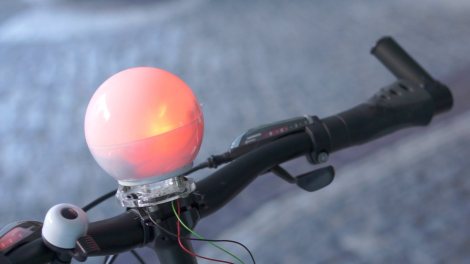
[Janko Hofmann] calls it the Personal Energy Orb. It’s really just an Arduino and an RGB LED. But as with most creations, the idea is what makes it great. The orb has a dock next to your computer. It tracks how much time you spend online, changing colors as you rack up the hours. If you don’t heed the warning signs of overuse it will even start to slow down your mouse cursor. But never fear. Full functionality can be restored by topping off your personal energy. As you can see above, there’s also a docking station on [Janko’s] bicycle. The orb monitors your mileage, moving out of the red zone so that your computer will be unencumbered the next time you sit down for a long session of flash games. Don’t miss his video presentation embedded after the break.

Continue reading “Personal Energy Orb Prevents Your Life From Being Swallowed By The Internets”
3D Printed Exoskeleton Helps This Little Girl Develop More Normal Body Function

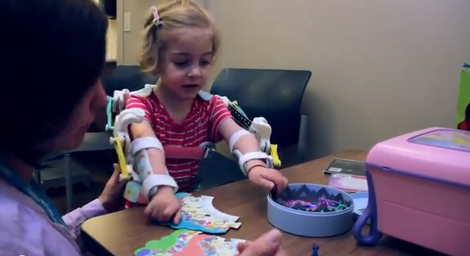
This 2-year-old girl has a condition called arthrogryposis which causes her not to be able to move her arms. But with a little help, her muscles can be strengthened to achieve more normal use of her limbs. This is not the first time that an exoskeleton has been used, but the advent of 3D printed parts makes the skeleton work much better.

Previous exoskeletons were made of metal and were quite heavy. When you’re talking about a 25 pound child every extra ounce counts. Moving to plastic parts lightened the load. Now the structure can be mounted on her torso, using rubber bands to aid her movement until her muscles are strong enough to do it on their own.

Of course to [Emma] this isn’t an exoskeleton. It’s her set of magic arms.

Continue reading “3D Printed Exoskeleton Helps This Little Girl Develop More Normal Body Function”

Sip-and-Puff Ipod Dock Highlights Assistive Technology

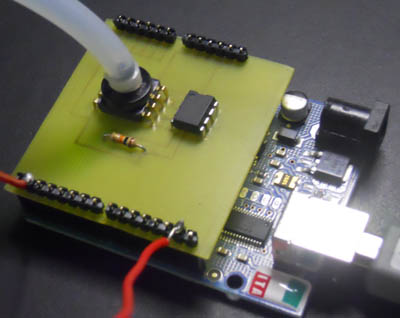
Check it out, a Sip-and-Puff Arduino shield. This is an assistive technology that allows the physically challenged to control things using a plastic air tube. Different combinations of sucking (Sip) or blowing (Puff) differentiate between control commands.

In this case the device is used to control an iPod dock, but [Bob Johnson’s] Kickstarter project seeks to put the Sip-and-Puff functionality out there so that it can bridge the control gap no matter what the need. One example that he mentions in the video after the break is a Morse Code keyboard.

This shield uses a pressure sensor to receive input from the plastic tubing. But we’ve also seen it done using mechanical pressure switches. That technique is what was used in the Sip-and-Puff Kayak build.

Continue reading “Sip-and-Puff Ipod Dock Highlights Assistive Technology”

Reduced-cost Braille Display For Use With Computers

Apparently a Braille computer display can cost several thousand dollars. That’s why [David Pankhurst] is working on a low-cost alternative. His offering is an open source version he calls the Audrey Braille Display.

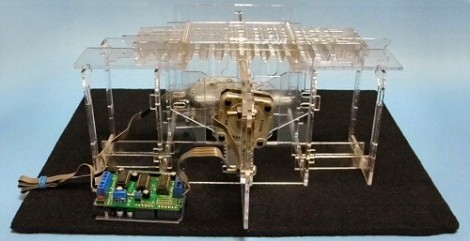
The concept is quite good. This prototype has one line of six Braille characters. Each character is made of two sliding strips containing eight arrangements of bumps. These can make up any character when positioned correctly. Two motors do all the work, one engages a single strip to reposition it, the other moves the first motor to select which strip should move. This is explained quite well in [David’s] most recent post. Or you can get a preview of the physical build here.

The concept is sound, but the refresh rate must be very slow. We wonder if there’s a way to keep one motor stationary and use solenoids to engage a drive shaft on the individual slide rods? This way, every row could be changed at the same time, disengaging when the appropriate slot is reached.

This hardware is much needed until developing Braille technologies actually come to market.

[via Dangerous Prototypes]

DIY RFID Shielded Wallet Keeps Data Thieves At Bay

diy_rf_shielded_wallet

[Serge] was in search of a new wallet, but he was concerned about ne’er do wells with RFID readers stealing his data. He could have gone out to the store and plunked down $20-$30 for a shielded walled, but where’s the fun in that? Instead, he decided to make his own.

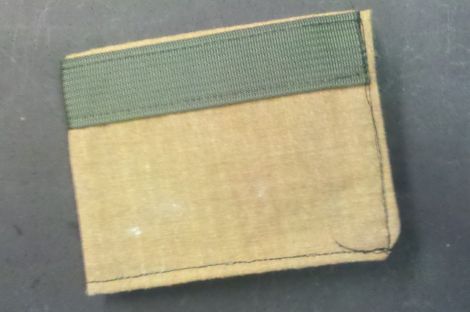
Using Kevlar-Nomex fabric, he laid out the general structure for his wallet. This ultra-strong fabric has a breaking strength of 500lbs, but blocking RF isn’t exactly its forte. To provide some electromagnetic shielding, [Serge] added a nice uniform layer of silver epoxy to the Kevlar, which carries an added bonus of strengthening the material. He fired up the sewing machine, adding a nylon strip to the exterior of the wallet for reinforcement, then he worked on forming the bill pouch and card holders.

The final result is a plain yet incredibly rugged wallet that’s sure to keep his various RFID-enabled cards safe. We really dig how unassuming the wallet is – no flash, all function. Nice job, we’ll take one!

This Marriage Proposal Is The Best PCB Design Ever

best_pcb_design_ever

While you will often see hacks on this site that feature high voltage, fire, and metal, that doesn’t mean that hackers, makers, and electronics geeks don’t have a soft side. In fact, we find the opposite to be true the vast majority of the time.

Take for instance [Bill Porter].

You may have seen his projects and tutorials featured here a time or two, and though I have never met him, he seems like a great guy whose heart is in the right place.

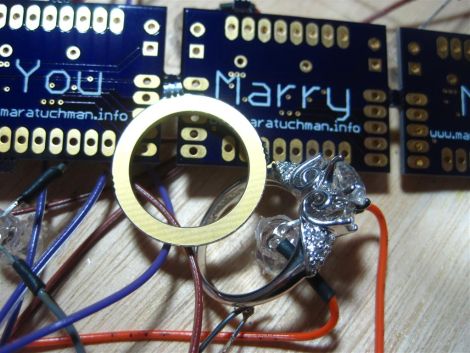
He recently decided that his college sweetheart was “the one” and had to think of a clever and surprising way to pop the question to a girl who is always one step ahead of the curve. [Mara (soon to be) Porter] was working on a project that required a custom PCB, and having never ordered one before, [Bill] was happy to help her get things in order. After sending the schematics off to [Laen] at DorkbotPDX, [Bill] fired off another email asking to have his proposal silk screened on the boards. [Laen] said he was happy to help, and so the wait began.

The boards arrived a few weeks later, and the rest, they say, was history.

How did it go? We’re guessing you’ve figured it out by now, but be sure to swing by [Bill’s] site to see how it all went down.

You know you want to…you big softie!

Barcode Tattoo Has A Lot Of Thought Put Into It

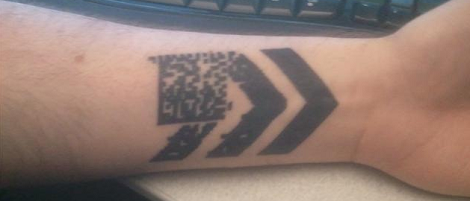
This bar code tattoo was sent into us by [Lifespan]. Before going under the needle, [Lifespan] didn’t care much for tattoos. After seeing this video he realized that a tattoo could have dynamic content through domain redirection.

[Lifespan] spent a lot of time going over the different styles of 2D bar codes. QR codes were deemed ugly because of the three large squares in the corners. An EZ Code, like the one in his YouTube inspiration, are a proprietary format that must be read with a ScanLife app. He eventually settled on a Data Matrix bar code because of its open format and ubiquity in business and industry. To make the tattoo dynamic, [Lifespan] made the tattoo point to 5id5.com. With a little bit of smart phone wizardry, that domain can be redirected to any URL in a moments notice.

Like all well-planned tattoos, he found himself a very good artist to do the piece. [Connor Moore] managed to ink some skin at 15 dpi, which was a little risky, but the results came out great. While it’s not scarification via a laser cutter, barring fading this tattoo is technologically future proof.