For some types of embedded systems — especially those that are safety-critical — it’s considered bad form to dynamically allocate memory during operation. While you can usually arrange for your own code to behave, it’s the libraries that get you. In particular, it is hard to find a TCP/IP stack that doesn’t allocate and free memory all over the place. Unless you’ve found wolfIP.
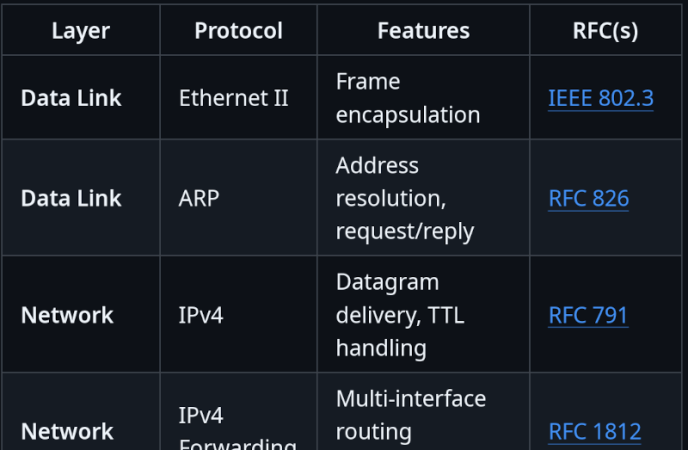
The library supports a BSD-like non-blocking socket API. It can act as an endpoint, but can also support multiple interfaces and forwarding if you were building something like a router. It doesn’t appear to be bare-bones either. In addition to the normal things you’d expect for IPv4, there’s also ICMP, IPSEC, ARP, DHCP, DNS, and HTTP with or without SSL TLS. There is also a FIPS-compliant implementation of WireGuard for VPN, although it is not directly compatible with standard WireGuard, only with other instances of itself (known as wolfGuard). There is a Linux kernel module for WolfGuard, though.
The code should be fairly easy to port, and it includes a binding for FreeRTOS already. If you’ve used wolfIP, let us know in the comments.
If you’ve ever bought a suspiciously cheap Ethernet cable from an online listing, there’s a decent chance you’ve encountered Copper Clad Aluminum. Better known as CCA, it’s exactly what it sounds like—an aluminium conductor with a thin skin of copper deposited on the outside. Externally, cables made with this material look largely like any other, with perhaps the only obvious tell being that they feel somewhat lighter in the hand.
CCA is cheaper than proper copper cabling, and it conducts signals well enough to function in an Ethernet cable. And yet, it’s a prime example of corner-cutting that keeps standards bodies and professional installers up at night. But just how dangerous is this silent scourge, found lurking in so many network cabinets around the world?
Not Up To Scratch
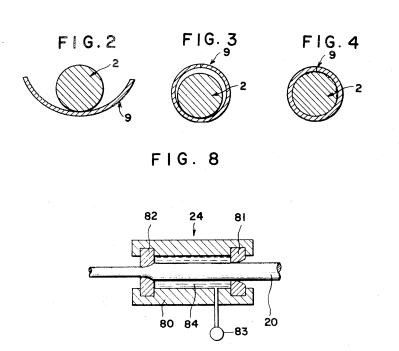
CCA wire is typically made by wrapping an aluminium core with copper strip and then extruding it through a die. Credit: USPTO
Everything you need to know about CCA is in the name—it refers to an aluminium wire with a thin copper cladding, typically applied through a die extrusion process. The reasoning behind this exploits a real physical phenomenon called the skin effect, wherein higher-frequency AC signals tend to travel along the outer surface of a conductor. The idea goes that since most of the current moves through the outer copper skin layer anyway, the less-conductive aluminium core doesn’t unduly impact the wire’s performance. Using copper-clad aluminium wiring is, in theory, desirable because aluminium is much cheaper than copper, which can really add up over long cable runs. Imagine you’re wiring a building with with hundreds of miles of Ethernet cabling, all with eight conductors each—the savings add up pretty quickly.
There’s a problem with CCA cabling in these contexts, though. Due to prevailing cabling standards, any cable made with CCA is technically not even a real Ethernet cable at all. The relevant documents are unambiguous.
ANSI/TIA-568.2-D requires conductors in Category-rated cable to be solid or stranded copper. No other materials are acceptable, and thus CCA is explicitly excluded from use in Category cable applications. A cable with CCA conductors cannot legitimately carry a Cat5e, Cat6, or any related designation under any circumstances. Similarly, ISO/IEC 11801 has the same requirement. The U.S. National Electrical Code also states that conductors in communications cables, other than coaxial cable, shall be copper. This isn’t a suggestion or a best practice; it’s the letter of the code. Anything lesser is simply not allowed. Continue reading “CCA Ethernet Cables: Not Up To Scratch, But Are They Dangerous?”→
If you’re an American and you use the Internet at home, it seems probable that routers are going to be in short supply. The US government recently mandated all such devices be home grown for security reasons, which would be fine were it not that the US has next-to-no consumer-grade router manufacturing industry.
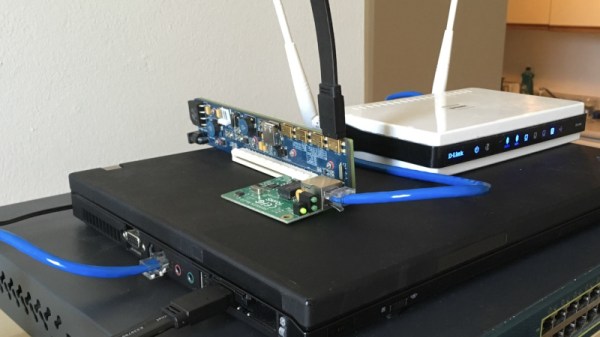
The piece is really a guide to setting up a Linux router, which he does on a small form factor PC and a hacked-together assembly of old laptop, PCI-express extender, and scrap network kit. In its most basic form a router doesn’t need the latest and greatest hardware, so there exists we’re guessing almost two decades of old PCs just waiting to be pressed into service. Perhaps it won’t help the non-technical Man In The Street much, but maybe it’ll inspire a few people to save themselves a hefty bill when they need to connect.
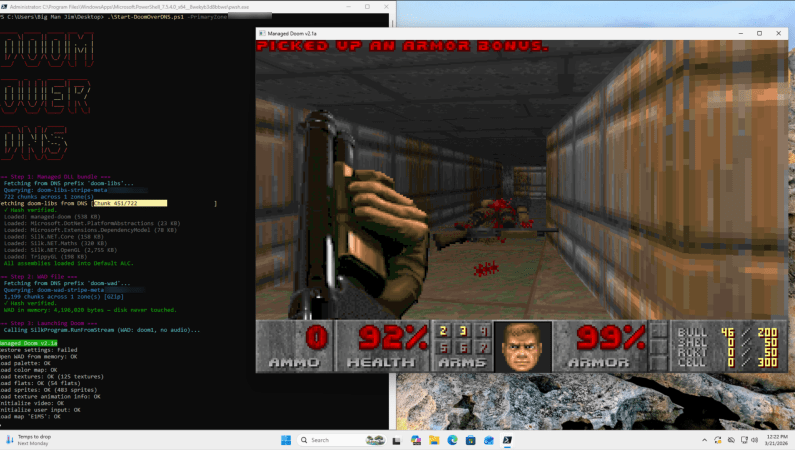
As literally everything ought to be able to play DOOM in some fashion, [Adam Rice] recently set out to make the venerable DNS finally play the game after far too many decades of being DOOM-less. You may be wondering how video games and a boring domain records database relate to each other. This is where DNS TXT records come into play, which are essentially fields for arbitrary data with no requirements or limitations on this payload, other than a 2,000 character limit.
Add to this the concept of DNS zones which can contain thousands of records and the inkling of a plan begins to form. Essentially the entire game (in C#) is fetched from TXT records, loaded into memory and run from there. This is in some ways a benign form of how DNS TXT records can be abused by people with less harmless intentions, though [Adam] admits to using the Claude chatbot to help with the code, so YMMV.
The engine and WAD file with the game’s resources are compressed to fit into 1.7 MB along with a 1.2 MB DLL bundle, requiring 1,966 TXT records in Base64 encoding on a Cloudflare Pro DNS zone. With a free Cloudflare account you’d need to split it across multiple zones. With the TXT records synced across the globe, every caching DNS server in the world now has a copy of DOOM on it, for better or worse.
You can find the project source on GitHub if you want to give this a shake yourself.
If you’ve ever run a game server or used BitTorrent, you probably know that life is easier if your router supports UPnP (Universal Plug and Play). This is a fairly old tech — created by a standards group in 1999 — that allows a program to open an incoming port into your home network. Of course, most routers let you do this manually, but outside of the Hackaday universe, most people don’t know how to log into their routers, much less how to configure an open UDP port.
I recently found myself using a temporary setup where I could not access the router directly, but I needed some open ports. That got me thinking: if a program can open a port using UPnP, why can’t I? Turns out, of course, you can. Maybe.
Caveats
The first thing, of course, is that you need your firewall open, but that’s true no matter how you open up the router. If the firewall is in the router, then you are at the mercy of the router firmware to realize that if UPnP opens something up, it needs to open the firewall, too.
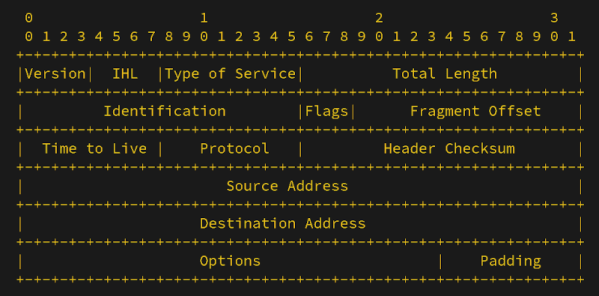
If you have ever read science fiction, you’ve probably seen “alternate history” stories. You know, where Europeans didn’t discover the New World until the 19th century, or the ancient Egyptians stumbled upon electricity. Maybe those things happened in an alternate universe. [BillPG] has an alternate history tale for us that imagines IPv6 was shot down and a protocol called IPv4x became prominent instead.
The key idea is that in 1993, the IP-Next-Generation working group could have decided that any solution that would break the existing network wouldn’t work. There is precedent. Stereo records play on mono players and vice versa. Color TV signals play on black and white sets just as well as black and white signals play on color TVs. It would have made perfect sense.
How could this be? The idea was to make everyone who “owns” an IPv4 address the stewards of a 96-bit sub-address block. IPv4x-aware equipment extracts the entire 128-bit address. IPv4-only equipment routes the packet to the controlling IPv4 address. Wasteful? Sure. Most people don’t need 79 octillion addresses. But if everyone has that many, then why not?
The fictional timeline has DNS and DHCP, along with dial-up stacks, changing to accommodate the new addresses. Again, you had to assume some parts of the network were still IPv4-only. DNS would return both addresses, and it was up to you to pick the IPv4x address if you understood it.
Your ISP would probably not offer you the entire extra space. A regional router could handle all traffic for your neighborhood and then direct it to your specific 128-bit address or your pool of addresses, if you have multiple devices. No need for NAT to hide your devices, nor strange router configurations to punch traffic through.
Of course, back in the real world, we have two incompatible systems: IPv4 and IPv6. IPv6 adoption has been slow and painful. We wondered why [BillPG] wrote about this future that never was. Turns out, he’s proposed a gateway that IPv6 hosts can provide to allow access from IPv4-only networks. Pretty sneaky, but we can admire it. If reading all this makes you wonder what happened to IPv5, we wondered that, too.
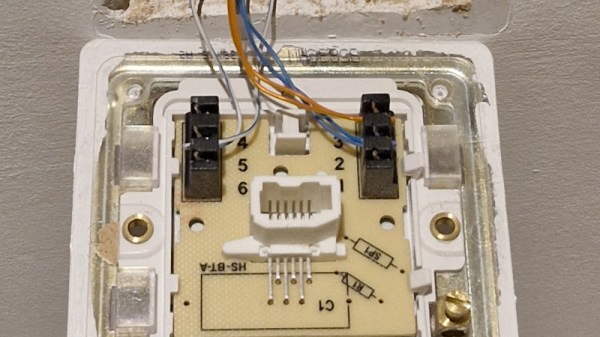
A quiet shift over the last couple of decades in many places has been the disappearance of the traditional copper phone line. First the corded landline phone was replaced by cordless, then the phone migrated to a mobile device, and finally DSL connections are being supplanted by fiber. This leaves copper-era infrastructure in houses, which [TheHFTguy] decided to use for Ethernet.
The hack here isn’t that he bought some specialized network boxes from Germany, though knowing they exist is useful. Instead it comes in his suggestion that they use the same technology as mains networking. Mains network plugs are a dime a dozen, but noisy power lines can make them of limited use. Our hacking curiosity is whetted by the question of whether a cheap mains networking plug can have its networking — in reality a set of RF subcarriers — separated from its mains power supply, and persuaded to do the same job at a fraction of the cost. Come on commenters – has anyone ever tried this?