LED Hourglass Is A Great Learning Project

An hourglass tells you what it is in the name — a glass that you use to measure an hour of time passing by. [EDISON SCIENCE CORNER] has built a digital project that mimics such a thing, with little beads of light emulating falling sand in the timekeepers of old.

The build is designed around the Arduino platform, and can be constructed with an Arduino Uno, Nano, or Pro Mini if so desired. The microcontroller board is hooked up with an ADXL335 three-axis accelerometer, which is used for tracking the orientation and movement of the digital hourglass. These movements are used to influence the movement of emulated grains of sand, displayed on a pair of 8×8 LED matrixes driven by a MAX7219 driver IC. Power is courtesy of a 3.7 V lithium-ion cell, with a charge/boost module included for good measure. Everything is wrapped up in a vaguely hourglass-shaped 3D printed enclosure.

The operation is simple. When the hourglass is turned, the simulated grains of sand move as if responding to gravity. The movement is a little janky — no surprise given the limited resolution of the 8×8 displays. You also probably wouldn’t use such a device as a timer when more elegant solutions exist. However, that’s not to say builds like this don’t have a purpose. They’re actually a great way to get to grips with a microcontroller platform, as well as to learn about interfacing external hardware and working with LED matrixes. You can pick up a great deal of basic skills building something like this.

Would you believe this isn’t the first digital hourglass we’ve featured on the site?

Continue reading “LED Hourglass Is A Great Learning Project”

Garage Fridge Gets New DIY Controller

[Rick] had a problem. His garage refrigerator was tasked with a critical duty—keeping refreshing beverages at low temperature. Unfortunately, it had failed—the condenser was forever running, or not running at all. The beverages were either frozen, or lukewarm, regardless of the thermostat setting. There was nothing for it—the controller had to be rebuilt from scratch.

Thankfully, [Rick]’s junk drawer was obliging. He was able to find an Arduino Uno R4, complete with WiFi connectivity courtesy of the ESP32 microcontroller onboard. This was paired with a DHT11 sensor, which provided temperature and humidity measurements. [Rick] began testing the hardware by spitting out temperature readings on the Uno’s LED matrix.

Once that was working, the microcontroller had to be given control over the fridge itself. This was achieved by programming it to activate a Kasa brand smart plug, which could switch mains power to the fridge as needed. The Uno simply emulated the action of the Kasa phone app to switch the smart plug on and off to control the fridge’s temperature, with the fridge essentially running flat out whenever it was switched on. The Uno also logs temperature to a server so [Rick] can make sure temperatures remain in the proper range.

We’ve seen some great beverage-cooling hacks over the years. If you’ve mastered your own hacky methods of keeping the colas chilled, don’t hesitate to let us know on the tipsline.

Build Your Own Glasshole Detector

Connected devices are ubiquitous in our era of wireless chips heavily relying on streaming data to someone else’s servers. This sentence might already start to sound dodgy, and it doesn’t get better when you think about today’s smart glasses, like the ones built by Meta (aka Facebook).

[sh4d0wm45k] doesn’t shy away from fighting fire with fire, and shows you how to build a wireless device detecting Meta’s smart glasses – or any other company’s Bluetooth devices, really, as long as you can match them by the beginning of the Bluetooth MAC address.

[sh4d0wm45k]’s device is a mini light-up sign saying “GLASSHOLE”, that turns bright white as soon as a pair of Meta glasses is detected in the vicinity. Under the hood, a commonly found ESP32 devboard suffices for the task, coupled to two lines of white LEDs on a custom PCB. The code is super simple, sifting through packets flying through the air, and lets you easily contribute with your own OUIs (Organizationally Unique Identifier, first three bytes of a MAC address). It wouldn’t be hard to add such a feature to any device of your own with Arduino code under its hood, or to rewrite it to fit a platform of your choice.

We’ve been talking about smart glasses ever since Google Glass, but recently, with Meta’s offerings, the smart glasses debate has reignited. Due to inherent anti-social aspects of the technology, we can see what’d motivate one to build such a hack. Perhaps, the next thing we’ll see is some sort of spoofed packets shutting off the glasses, making them temporarily inoperable in your presence in a similar way we’ve seen with spamming proximity pairing packets onto iPhones.

A small, colorful synth built for a 3-year-old. It has five pots, four sliders, and a tiny screen.

Baby’s First Synth Was Daddy’s First Project

We absolutely adore inspired labor-of-love tales such as this one. [Alastair] wanted to build a synth for his daughter’s third birthday in spite of having no prior hardware knowledge. It became the perfect excuse to learn about CAD, microcontrollers, PCB design, and of course, 3D printing.

So, why a synth for a toddler? Aside from plain old ‘why not?’, the story goes that she received a Montessori busy-type board which she seemed to enjoy, and it reminded [Alastair] of the control surface of a synth. He wondered how hard it could be to build something similar that made sound and didn’t require constant button presses.

[Alastair] began his journey by dusting off a 15-year-old Arduino Inventors Kit. The initial goal was to get potentiometer readings and map them to 12 discrete values, and then emit MIDI messages. This was easy enough, and it was time to move to a synth module and an Elegoo Nano.

The full adventure is definitely worth the read. Be sure to check out the pink version in action after the break. You really don’t wanna miss the lil’ panda bear. Trust us.

Continue reading “Baby’s First Synth Was Daddy’s First Project”

Dark lab setup with scientific looking drink dispenser

Scared For A Drink?

Halloween is about tricks and treats, but who wouldn’t fancy a bit to drink with that? [John Sutley] decided to complete his Halloween party with a drink dispenser looking as though it was dumped by a backstreet laboratory. It’s not only an impressive looking separating funnel, it even runs on an Arduino. The setup combines lab glassware, servo motors, and an industrial control panel straight from a process plant.

The power management appeared the most challenging part. The three servos drew more current than one Arduino could handle. [John] overcame voltage sag, brownouts, and ghostly resets. A healthy 1000 µF capacitor across the 5-volt rail fixed it. With a bit of PWM control and some C++, [John] managed to finish up his interactive bar system where guests could seal their own doom by pressing simple buttons.

This combines the thrill of Halloween with ‘the ghost in the machine’. Going past the question whether you should ever drink from a test tube – what color would you pick? Lingonberry juice or aqua regia, who could tell? From this video, we wouldn’t trust the bartender on it – but build it yourself and see what it brings you!

Continue reading “Scared For A Drink?”

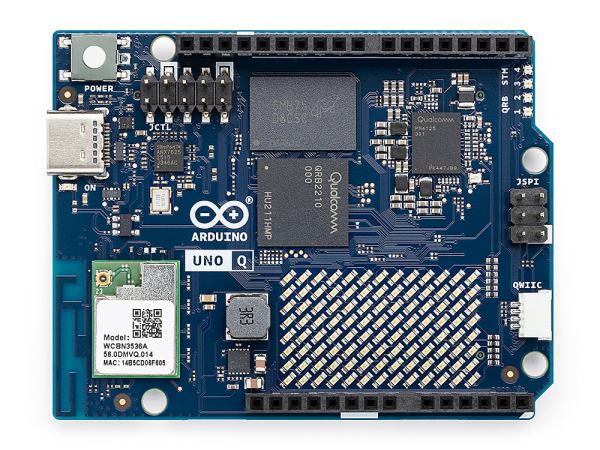
Qualcomm Introduces The Arduino Uno Q Linux-Capable SBC

Generally people equate the Arduino hardware platforms with MCU-centric options that are great for things like low-powered embedded computing, but less for running desktop operating systems. This looks about to change with the Arduino Uno Q, which keeps the familiar Uno formfactor, but features both a single-core Cortex-M33 STM32U575 MCU and a quad-core Cortex-A53 Qualcomm Dragonwing QRB2210 SoC.

According to the store page the board will ship starting October 24, with the price being $44 USD. This gets you a board with the aforementioned SoC and MCU, as well as 2 GB of LPDDR4 and 16 GB of eMMC. There’s also a WiFi and Bluetooth module present, which can be used with whatever OS you decide to install on the Qualcomm SoC.

This new product comes right on the heels of Arduino being acquired by Qualcomm. Whether the Uno Q is a worthy purchase mostly depends on what you intend to use the board for, with the SoC’s I/O going via a single USB-C connector which is also used for its power supply. This means that a USB-C expansion hub is basically required if you want to have video output, additional USB connectors, etc. If you wish to run a headless OS install this would of course be much less of a concern.

WALL-E’s Forgotten Sibling Rebuilt

Do you remember the movie WALL-E? Apparently, [Leviathan engineering] did, and he wasn’t as struck by the title character, or Eva, or even the Captain. He was captivated by BURN-E. His working model shows up in the video below.

We’ll be honest. BURN-E didn’t ring a bell for us, though we remember the movie. He grabbed a 3D design for the robot on the Internet and planned out holes for some servos and other hardware.

Continue reading “WALL-E’s Forgotten Sibling Rebuilt”