What’s the most thrilling part of rocketry? Well, the liftoff, naturally. But what about the sweet anticipation in those tense moments leading up to liftoff? In other words, the countdown. Where did it come from?
Far from being simply a dramatic device, the countdown clock serves a definite purpose — it lets the technicians and the astronauts synchronize their actions during the launch sequence. But where did the countdown — those famed ten seconds of here we go! that seem to mark the point of no return — come from? Doesn’t it all seem a little theatrical for scientists?
It may surprise you to learn that neither technicians nor astronauts conceived of the countdown. In their book, “Lunar Landings and Rocket Fever: Rediscovering Woman in the Moon”, media scholars Tom Gunning and Katharina Loew reveal that a little-known Fritz Lang movie called Woman In the Moon both “predicted the future of rocketry” and “played an effective role in its early development”.
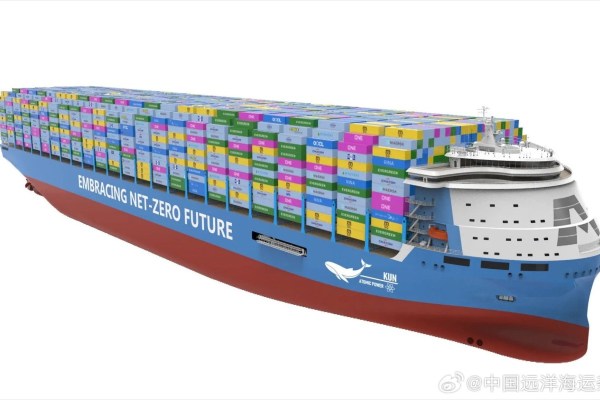
Since China State Shipbuilding Corporation (CSSC) unveiled its KUN-24AP containership at the Marintec China Expo in Shanghai in early December of 2023, the internet has been abuzz about it. Not just because it’s the world’s largest container ship at a massive 24,000 TEU, but primarily because of the power source that will power this behemoth: a molten salt reactor of Chinese design that is said to use a thorium fuel cycle. Not only would this provide the immense amount of electrical power needed to propel the ship, it would eliminate harmful emissions and allow the ship to travel much faster than other containerships.
Meanwhile the Norwegian classification society, DNV, has already issued an approval-in-principle to CSSC Jiangnan Shipbuilding shipyard, which would be a clear sign that we may see the first of this kind of ship being launched. Although the shipping industry is currently struggling with falling demand and too many conventionally-powered ships that it had built when demand surged in 2020, this kind of new container ship might be just the game changer it needs to meet today’s economic reality.
That said, although a lot about the KUN-24AP is not public information, we can glean some information about the molten salt reactor design that will be used, along with how this fits into the whole picture of nuclear marine propulsion.
Last time, I talked about racing the beam, a type of graphics used when memory was scarce. Now it’s time to step into the future with more memory and talk about what modern 2D games still do to this day: rasterization.
Just in time Memory
Continuing the trend set by racing the beam, rasterized graphics are also on a grid, just a much tinier one. Though not unique to rasterized, the “frame buffer” is the logical conclusion of bitmap mode fidelity: enough memory is allocated so that every pixel can have its own color. What’s different about a frame buffer is that everything is drawn before it is shown and, crucially, this doesn’t have to happen in the same order as the pixels are displayed. Rasterization draws entire shapes — triangles, lines and rectangles — into the frame buffer and the screen is typically updated all at once. Continue reading “Game Graphics: Rasterization”→
Data retention is a funny thing. Atmel will gladly tell you that the flash memory in an ATmega32A will retain its data for 100 years at room temperature. Microchip says its EEPROMs will retain data for over 200 years. And yet, humanity has barely had a good grasp on electricity for that long. Heck, the silicon chip itself was only invented in 1958. EEPROMs and flash storage are altogether younger themselves.
How can these manufacturers make such wild claims when there’s no way they could have tested their parts for such long periods of time? Are they just betting on the fact you won’t be around to chastise them in 2216 when your project suddenly fails due to bit rot.
Well, actually, there’s a very scientific answer. Enter the practice of accelerated wear testing.
Will Rogers once said that veterinarians are the best doctors because their patients can’t tell them where it hurts. I’ve often thought that electronic people have a similar problem. In many cases, what’s wrong with our circuits isn’t visible. Sure, you can visually identify a backward diode, a bad solder joint, or a blown fuse. But you can’t look at a battery and see that it is dead or that a clock signal isn’t reaching some voltage. There are lots of ways to look at what’s really going on, but there is no substitute for a scope. It used to be hard for the average person to own a scope, but these days, it doesn’t require much. If you aren’t shopping for the best tech or you are willing to use it with a PC, oscilloscopes are quite affordable. If you spend even a little, you can now get scopes that are surprisingly capable with features undreamed of in years past. For example, many modern scopes have a dizzying array of triggering options. Do you need them? What do they do? Let’s find out.
I’ll be using a relatively new Rigol DHO924S, but none of the triggering modes are unique to that instrument. Sometimes, they have different names, and, of course, their setup might look different than my pictures, but you should be able to figure it out.
What is Triggering?
In simple terms, an oscilloscope plots time across the X-axis and voltage vertically on the Y-axis. So you can look at two peaks, for example, and measure the distance between them to understand how far apart they are in time. If the signal you are measuring happens repeatedly — like a square or sine wave, for example — it hardly matters which set of peaks you look at. After all, they are all the same for practical purposes.
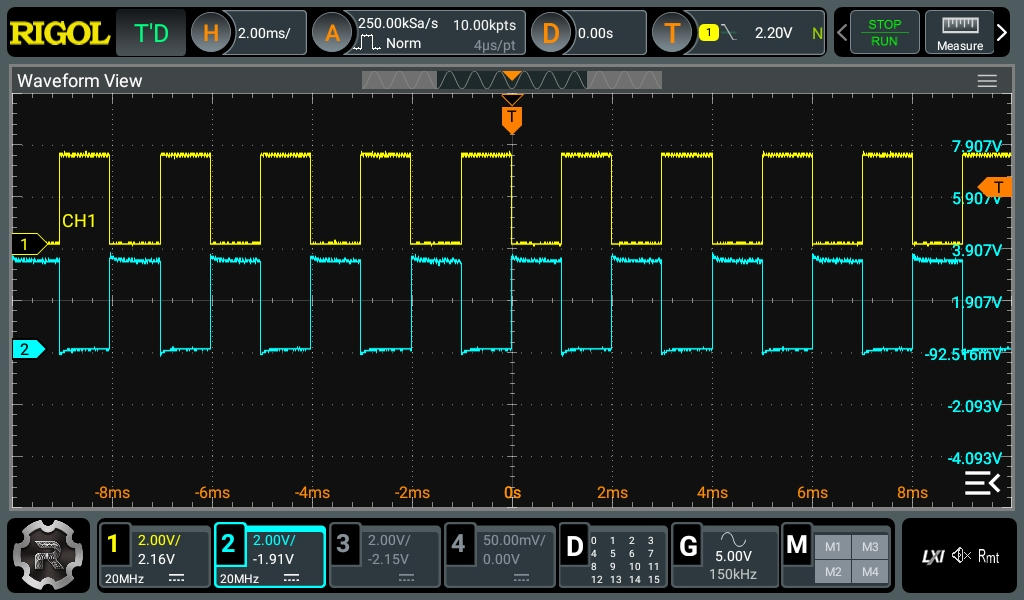
Pretty square waves all in a row. Channel 2 is 180 degrees out of phase (inverted). But is that all there is?
The problem occurs when you want to see something relative to a particular event. Basic scopes often have level triggering. They “start” when the input voltage goes above or below a certain value. Suppose you are looking at a square wave that goes from 0 V to 5 V. You could trigger at about 2.5 V, and the scope will never start in the middle of a cycle.
Digital scopes tend to capture data before and after the trigger, so the center of the screen will be right on an edge, and you’ll be able to see the square waves on either side. The picture shows two square waves on the screen with the trigger point marked with a T in the top center of the display. You can see the level in the top bar and also marked with a T on the right side of the screen.
What happens if there are no pulses on the trigger source channel? That depends. If you are in auto mode, the scope will eventually get impatient and trigger at random. This lets you see what’s going on, but there’s no reference. If you are in normal mode, though, the scope will either show nothing or show the last thing it displayed. Either way, the green text near the top left corner will read WAIT until the trigger event occurs. Then it will say T’D.
Once upon a time, when the earliest spy satellites were developed, there wasn’t an easy way to send high-quality image data over the air. The satellites would capture images on film and dump out cartridges back to earth with parachutes that would be recovered by military planes.
It all sounds so archaic, so Rube Goldberg, so 1957. And yet, it’s still a viable method for recovering big globs of data from high altitude missions today. Really, you ask? Oh, yes indeed—why, NASA’s gotten back into the habit just recently!
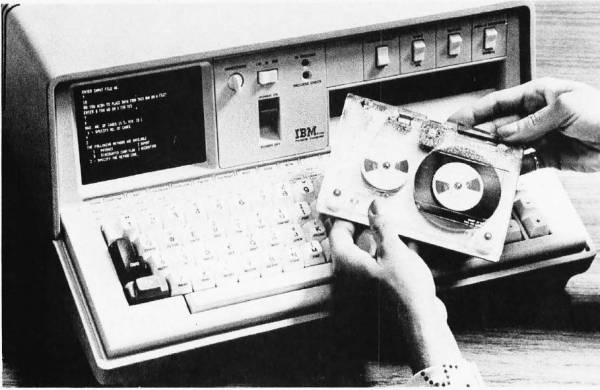
The 1970s was a somewhat awkward phase for the computer industry — as hulking, room-sized mainframes became ever smaller and the concept of home and portable computers more capable than a basic calculator began to gain traction. Amidst all of this, two interpreted programming languages saw themselves being used the most: BASIC and APL, with the latter being IBM’s programming language of choice for its mainframes. The advantages of being able to run APL on a single-user, portable system, eventually led to the IBM 5100. Its story is succinctly summarized by [Bradford Morgan White] in a recent article.
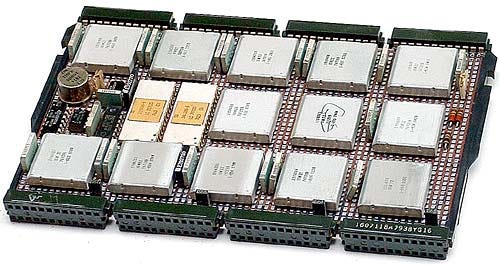
The IBM PALM processor.
Although probably not well-known to the average computer use, APL (A Programming Language) is a multi-dimensional array-based language that uses a range of special graphic symbols that are often imprinted on the keyboard for ease of entry.
It excels at concisely describing complex functions, such as the example provided on the APL Wikipedia entry for picking 6 pseudo-random, non-repeating integers between 1 and 40 and sorting them in ascending order:
x[⍋x←6?40]
Part of what made it possible to bring the power of APL processing to a portable system like the IBM 5100 was the IBM PALM processor, which implemented an emulator in microcode to allow e.g. running System/360 APL code on a 5100, as well as BASIC.
Despite [Bradford]’s claim that the 5100 was not a commercial success, it’s important to remember the target market. With a price tag of tens of thousands of (inflation-adjusted 2023) dollars, it bridged the gap between a multi-user mainframe with APL and far less capable single-user systems that generally only managed BASIC. This is reflected in that the Commodore SuperPET supported APL, and the 5100 was followed by the 5110 and 5120 systems, and that today you can download GNU APL which implements the ISO/IEC 13751:2001 (APL2) standard.