HMD Upgrade

[Banfield Design] has put together this instructable on how to upgrade or re build a head mounted display to be more immersive and add features.  Though you can already buy glasses style viewers for your media devices, they can use some upgrades. For one, you have to supply your own sound, and putting headphones on, over bulky glasses can be painful on your ears. Another area that could use improvement is the light that comes in around the glasses. The current trend is to make them as small as possible, but that tends to let your peripheral vision see the outside world. [Banfield design] wanted to make them more immersive, so he built them into some ski goggles. This not only helped block the light, but allowed for an over the ear style headphone assembly which is much easier on the ears.

A functional improvement came next, by adding a webcam front and center. He could now switch between a live feed of his environment and whatever other inputs he wanted. This could be really fun with some augmented reality. He has a list of future improvements, but he doesn’t mention adding a second camera for stereoscopic viewing of his surroundings. Why would you do that? because it would make augmented reality much cooler.

Precision Erector Set Connects Multiple Cameras

[youtube=http://www.youtube.com/watch?v=nIWGKowjuIo]

Check out the exoskeleton that [Curt von Badinski] built for filming driving scenes. This extremely configurable wrap-around frame resembles a children’s toy from the past but allows an almost unlimited set of configurations. Five cameras simultaneous capture the driving scene. The current setup is used to shoot the television show 24.

[Thanks Robert]

Hardware Store Follow Focus

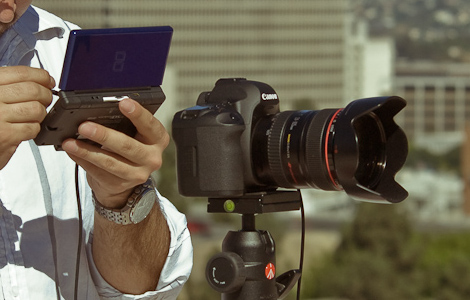
Want to do quick and accurate focus change with your DSLR? Here’s a discussion thread covering dirt-cheap solutions. It starts with a broccoli rubber-band and a couple of zip ties. That being a bit chintzy, the more popular build seen above uses a hose clamp, rubber band for padding, a drawer pull, a nut, and some threaded rod. If you build it, be very careful not to over-tighten the clamp and crush your focus ring! After the break we’ve embedded a video of what follow focus looks like through the lens and what is happening with the camera during the shoot.

Continue reading “Hardware Store Follow Focus”

Spherical And Stereoscopic Photography

[Ryubin’s] experiments with spherical video continue. This time around he’s using two cameras, both with fisheye lenses, to capture 360 degree by 360 degree video. The two cameras mount back to back and each record a 360 degree vertical view in a 180 degree horizontal range. By stitching the two recordings together and synchronizing them by comparing moving objects a seamless spherical video is produced.

He’s got one more trick up his sleeve with this setup. The tripod mount has a pivot point that allows the two cameras to shoot side-by-side instead of back-to-back. This produces a hemispherical video that is stereoscopic. That’s a pretty cheap way to make this type of 3D imaging compared to some of the CES offerings.

There are a few example videos up on his webpage. If you missed it earlier this month, he’s the guy that build a spherical video setup using a light bulb.

2-axis Motion Timelapse Photography

[Milapse] picked up a motorized telescope base a few years ago. He’s using it to add motion to time-lapse photography. The base provides two-axis rotation controlled with a handheld keypad. Custom firmware and a bit of software allow for computer control. [Milapse] is pretty well-known in the time-lapse photography circles of the Inter-web. He’s posted a ten minute video explaining his setup and programming work for the hardware.

His use of a quality camera produces some nice video.However cost at $200 for the base, if you just want to play around with the concept you might want to stick to a webcam and LEGO setup.

[Thanks Jack]

360 Degree Video For Next-to-nothing

[Luis], a regular Hackaday reader, sent in some info about his 360 degree video experiments. He wanted a cheap device to use with a video camera, producing video that can be displayed using a free Flash software library.

The hardware consists of a mirrored light bulb, a square of glass, and some threaded rod. The camera lens attaches to the glass with the rod right in the middle. The lens will capture a donut image reflected in the mirror of the bulb. [Luis] then processes the result and uses Ryubin’s Flash Panorama to handle playback. He’s posted two clips as examples, the first of an “Existentialist Suburb Walker” and the second is some test footage while setting up for a shot. You can click-and-rotate the video while it’s playing to look around the area.

This could produce some great driving videos, without the need for multiple cameras. [Luis] does point out some problems with oscillation as the mirror on the end of a rod will amplify the effect of movement on the image.

Update: Realtime 3D For You Too!

[Kyle McDonald] has kept himself busy working on 3D scanning in realtime. He’s posted a writeup that takes us through the concepts, tools, and assembly of a DIY 3d scanning camera. You should remember a preview of this method posted earlier this month, but now it’s time to build your own. You’ll need a camera, a projector, and some open source software to process the image data. Using these simple tools, [Kyle] turned out much better video than before. Take a look after the break to see his results from scanning at 60 fps using a PS3 Eye. The trick to this setup is getting the correct synchronization between the projector and the camera, something that could be improved with a bit of extra hacking.

Does [Kyle’s] name sound familiar? It should, he’s got a long history of quality hacks that we’ve featured over the years. If you’re looking to use a scanner as a multitouch, add some music to tea time, or play with your skittles his work will give you a shove in the right direction.

Continue reading “Update: Realtime 3D For You Too!”