Digitizing Domesday Disks

After the Norman invasion of England, William the Conqueror ordered a great reckoning of all the lands and assets owned. Tax assessors went out into the country, counted sheep and chickens, and compiled everything into one great tome. This was the Domesday Book, an accounting of everything owned in England nearly 1000 years ago. It is a vital source for historians and economists, and one of the most important texts of the Middle Ages.

In the early 1980s, the BBC set upon a new Domesday Project. Over one million people took part in compiling writings on history, geography, and social issues. Maps were cataloged, and census data recorded. All of this was printed on a LaserDisk, meant to be played on an Acorn BBC Master. Now, 30 years on, hardly anyone can read the BBC Domesday Project. Let that be a lesson, kids: follow [Jason Scott] on Twitter.

Even though Acorn computers and SCSI LaserDisks and coprocessors are dying, that doesn’t mean the modern Domesday Disk is lost to the sands of time. This project aims to duplicate the Domesday Disk, and in the process provide a means to archive all LaserDisks. It’s a capture card for LaserDisks, and it also means we can finally make a good rip of the un-specalized Star Wars.

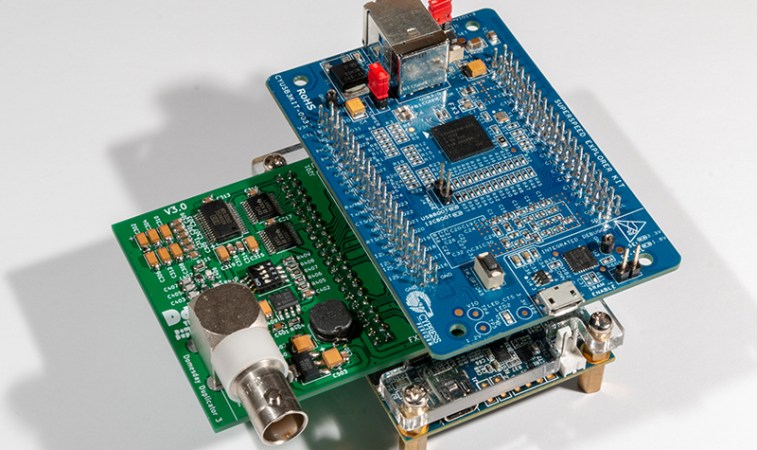
The Domesday Duplicator is a shield that plugs into an Altera DE-0 Nano FPGA board and a Cypress FX3 USB board. The Duplicator itself serves as an analog capture card complete with an RF amplifier and a 40 MSPS ADC — fast enough for any analog video signal. With the 50 Ohm input, it will work with most LaserDisk players, ultimately preserving this incredible historical archive from the early 80s.

Getting Good At FPGAs: Real World Pipelining

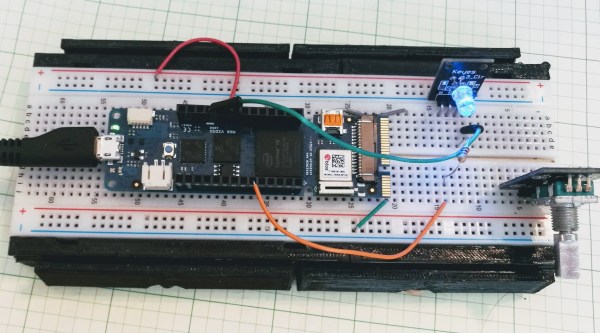
Parallelism is your friend when working with FPGAs. In fact, it’s often the biggest benefit of choosing an FPGA. The dragons hiding in programmable logic usually involve timing — chaining together numerous logic gates certainly affects clock timing. Earlier, I looked at how to split up logic to take better advantage of parallelism inside an FPGA. Now I’m going to walk through a practical example by modeling some functions. Using Verilog with some fake delays we can show how it all works. You should follow along with a Verilog simulator, I’m using EDAPlayground which runs in your browser. The code for this entire article is been pre-loaded into the simulator.

If you’re used to C syntax, chances are good you’ll be able to read simple Verilog. If you already use Verilog mostly for synthesis, you may not be familiar with using it to model delays. That’s important here because the delay through gates is what motivates us to break up a lot of gates into a pipeline to start with. You use delays in test benches, but in that context they mostly just cause the simulator to pause a bit before introducing more stimulus. So it makes sense to start with a bit of background on delays.

Continue reading “Getting Good At FPGAs: Real World Pipelining”

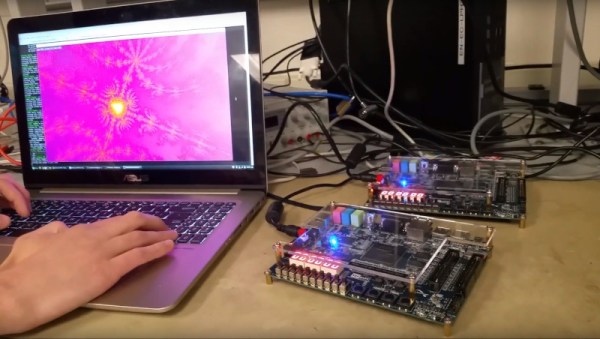
FPGA Persistently Rick Rolls You

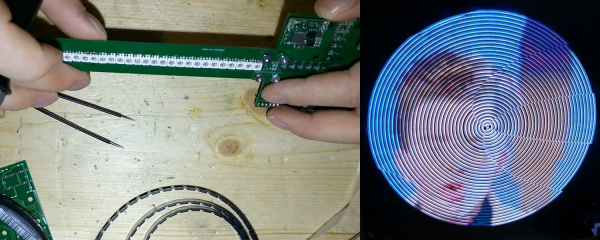
When [Im-pro] wants a display, he wants it to spin.  So he built a persistence of vision (POV) display capable of showing a 12-bit color image of 131 x 131 pixels at 16 frames per second. You can see a video about the project below, but don’t worry, you can view it on your normal monitor.

The project starts with a Java-based screen capture on a PC. Data goes to the display wirelessly to an ESP8266. However, the actual display drive is done by an FPGA that drives the motor, reads a hall effect index sensor, and lights the LEDs.

Continue reading “FPGA Persistently Rick Rolls You”

Pipelining Digital Logic In FPGAs

When you first learn about digital logic, it probably seems like it is easy. You learn about AND and OR gates and figure that’s not very hard. However, going from a few basic gates to something like a CPU or another complex system is a whole different story. It is like going from “Hello World!” to writing an operating system. There’s a lot to understand before you can make that leap. In this set of articles, I want to talk about a way to organize more complex FPGA designs like CPUs using a technique called pipelining.

These days a complex digital logic system is likely to be on an FPGA. And part of the reason we can get fooled into thinking digital is simple is because of the modern FPGA tools. They hide a lot of complexity from you, which is great until they can’t do what you want and then you are stuck. A good example of that is where you are trying to hit a certain clock frequency. If you aren’t careful, you’ll get a complaint from the tool that you can’t meet timing constraints.

Continue reading “Pipelining Digital Logic In FPGAs”

Retro Rebuild Recreates SGI Workstation Demos On The Go

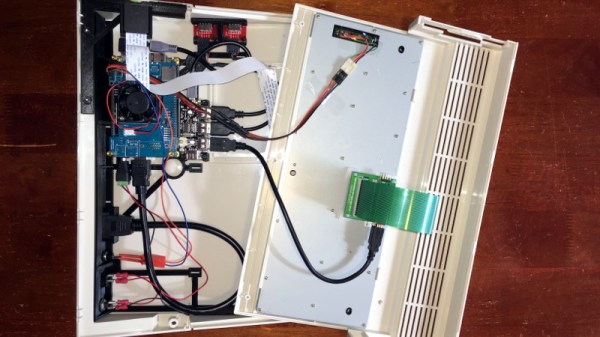
When [Lawrence] showed us the Alice4 after Maker Faire Bay Area last weekend it wasn’t apparent how special the system was. The case is clean and white, adorned only with a big red button below a 7″ screen with a power switch around the back. When the switch is flicked the system boots to display a familiar animation and drops you at a menu. Poking around from here elicits a variety of self-contained graphics demos, some interactive. So this is a Raspberry Pi in a box playing videos, right? Not even close.

Often retro computing focuses on personal computer systems. When they were new the 8-bit graphics or intricate 2D sprites were state of the art, but now their appeal tends towards learning opportunities and the thrill of nostalgia. This may still be true of Alice4, the system [Brad, Lawrence, Mike, and Chris] put together to run Silicon Graphics (SGI) demos from the mid 1980’s but it’s not the whole story. [Lawrence] and [Brad] had both worked at SGI during its heyday and had fond memories of the graphics demos that shipped with those mammoth workstation. So they built Alice4 from the FPGA up to run those very same demos in real-time.

Thanks to Moore’s law, today’s embedded systems put yesterday’s powerhouses within reach. [Lawrence] and [Brad] found the old demo code in a ratty FTP server, and tailor-made Alice4’s software and hardware to run them natively. [Brad] wrote a libgl which implements the subset of the IrisGL API needed to support their selected set of demos. The libgl emits sets of triangles to the SDRAM where [Lawrence’s] HDL running on the onboard FPGA fetches them to interpolate color and depth and draw the result on-screen. Together they allow the $99 Altera Cyclone V development board at Alice4’s heart to run these state of the art demos in the palm of your hand.

Alice4 is open source and extensively documented. Peruse the archeology of reverse engineering the graphics API or the discussion of FIFO design in the FPGA. If those don’t sate your appetite check out a video of Alice4 in action after the break.

Continue reading “Retro Rebuild Recreates SGI Workstation Demos On The Go”

Parallel Programming For FPGAs

One of the best features of using FPGAs for a design is the inherent parallelism. Sure, you can write software to take advantage of multiple CPUs. But with an FPGA you can enjoy massive parallelism since all the pieces are just hardware. Every light switch in your house operates in parallel with the others. There’s a new edition of a book, titled Parallel Programming for FPGAs that explores that topic in depth and it is under the Creative Commons license. In particular, the book focuses on using Vivado HLS instead of the more traditional Verilog or VHDL.

HLS allows a designer to express a high-level algorithm in C, C++, or SystemC. Given a bit more information, HLS will convert that into an FPGA configuration. That doesn’t mean, though, that you can just cut and paste ordinary C code. HLS has several restrictions due to the fact that it is compiling to logic gates, not lines of code. Actually, it also generates Verilog or VHDL, but if you do it right, that should be transparent to you.

After the introduction, the book is more like a series of monographs on very specific topics, but the depth of each is very impressive. There’s plenty of DSP examples, of course. There’s also general math, so if you ever wondered how to compute a sine or cosine in an FPGA, read chapter 3.

Continue reading “Parallel Programming For FPGAs”

Vector Network Analyzer Uses SoC FPGA

If you are working with AC circuits a vector network analyzer (VNA) is quite handy. As an entry to the InnovateFPGA competition for students, [Evgenii Vostrikov], [Danila Nikiforovskii], and [Daniil Smirnov] created a VNA using a DE10-Nano, high-speed analog to digital and digital to analog converters, and a circulator. Most of the details are in the video below, and on the project’s GitHub page.

The DE10-Nano has a dual-core ARM processor and an Altera FPGA in one package. That allows you to use the CPUs where that makes sense and still leverage the FPGA where you need high performance.

The circulator uses an op-amp to allow the test signal to route to the device under test, while steering any reflected signal back to the device for measurement. The design also uses a lock-in amplifier, something we’ve talked about a few times recently. This allows less expensive converters to generate magnitude and phase information.

Judging by the fan in the video, we suspect the setup gets a little toasty. The GitHub page has a lot of Russian on it, so we aren’t sure how much we could puzzle out since our Russian skills were mostly from watching the Adventures of Moose and Squirrel.

If you are interested in a VNA, they aren’t as expensive as they used to be. Particularly, if you roll your own and already have some things in your junk box.

Continue reading “Vector Network Analyzer Uses SoC FPGA”