So Long, Firefox, Part One

It’s likely that Hackaday readers have among them a greater than average number of people who can name one special thing they did on September 23rd, 2002. On that day a new web browser was released, Phoenix version 0.1, and it was a lightweight browser-only derivative of the hugely bloated Mozilla suite. Renamed a few times to become Firefox, it rose to challenge the once-mighty Microsoft Internet Explorer, only to in turn be overtaken by Google’s Chrome.

Now in 2025 it’s a minority browser with an estimated market share just over 2%, and it’s safe to say that Mozilla’s take on AI and the use of advertising data has put them at odds with many of us who’ve kept the faith since that September day 23 years ago. Over the last few months I’ve been actively chasing alternatives, and it’s with sadness that in November 2025, I can finally say I’m Firefox-free.

Continue reading “So Long, Firefox, Part One”

FLOSS Weekly Episode 855: Get In The Minecart, Loser!

This week Jonathan chats with Kevin, Colin, and Curtis about Cataclysm: Dark Days Ahead! It’s a rogue-like post-apocalyptic survival game that you can play in the terminal, over SSH if you really want to! Part of the story is a Kickstarter that resulted in a graphics tile-set. And then there’s the mods!

Continue reading “FLOSS Weekly Episode 855: Get In The Minecart, Loser!”

Hackers Can’t Spend A Penny

We aren’t here to praise the penny, but rather, to bury it. The penny, and its counterparts, have been vanishing all around the world as the cost of minting one far outweighs its value. But hackers had already lost a big asset: real copper pennies, and now even the cheaply made ones are doomed to extinction.

If you check your pockets and find a pre-1982 penny, it’s almost all copper. Well, 95% of its slightly-more-than-3-gram heft is pure copper. Since then, the copper penny’s been a fraud, weighing 2.5 g and containing only a 2.5% copper plate over a zinc core. During WWII, they did make some oddball steel pennies, but that was just a temporary measure.

Continue reading “Hackers Can’t Spend A Penny”

Congratulations To The 2025 Component Abuse Challenge Winners

For the Component Abuse Challenge, we asked you to do the wrong thing with electrical parts, but nonetheless come out with the right result. It’s probably the most Hackaday challenge we have run in a long time, and you all delivered! The judging was tight, but in the end three projects rose up to the top, and will each be taking home a $150 DigiKey gift certificate, but that doesn’t mean you shouldn’t give all of the projects a look.

So without further ado, let’s check out the winners and all the others that tickled the hacky regions of our judges’ brains. Continue reading “Congratulations To The 2025 Component Abuse Challenge Winners”

Illustrated Kristina with an IBM Model M keyboard floating between her hands.

Keebin’ With Kristina: The One With The Cipher-Capable Typewriter

I must confess that my mouth froze in an O when I saw [Jeff]’s Typeframe PX-88 Portable Computing System, and I continue to stare in slack-jawed wonder as I find the words to share it with you. Let me give it a shot.

[Jeff] tells us that he designed Typeframe for his spouse to use as a writer deck. That’s good spousing, if you ask me. Amazingly, this is [Jeff]’s first project of this type and scope, and somehow it’s an elegant, yet easy build that’s quite well documented to boot. Whatever Typeframe’s design may borrow, it seems to give back in spades.

The Typeframe PX-88 Portable Computing System.
Image by [Jeff] via Typeframe.net
Use Typeframe for what you will — cyberdeck, writer deck, travel PC — this baby can handle whatever you throw at it. And of course, it’s open source from front to back.

This Raspberry Pi 4B-based productivity machine has all sorts of neat features. The touch screen flips upward at an angle, so you don’t have to hunch over it or carry a mouse around. Want to sit back a bit while you work? The aesthetically spot-on keyboard is detachable. Yeah.

If that’s not enough to get you interested, Typeframe is designed for simple construction with minimal soldering, and the sliding panels make maintenance a breeze.

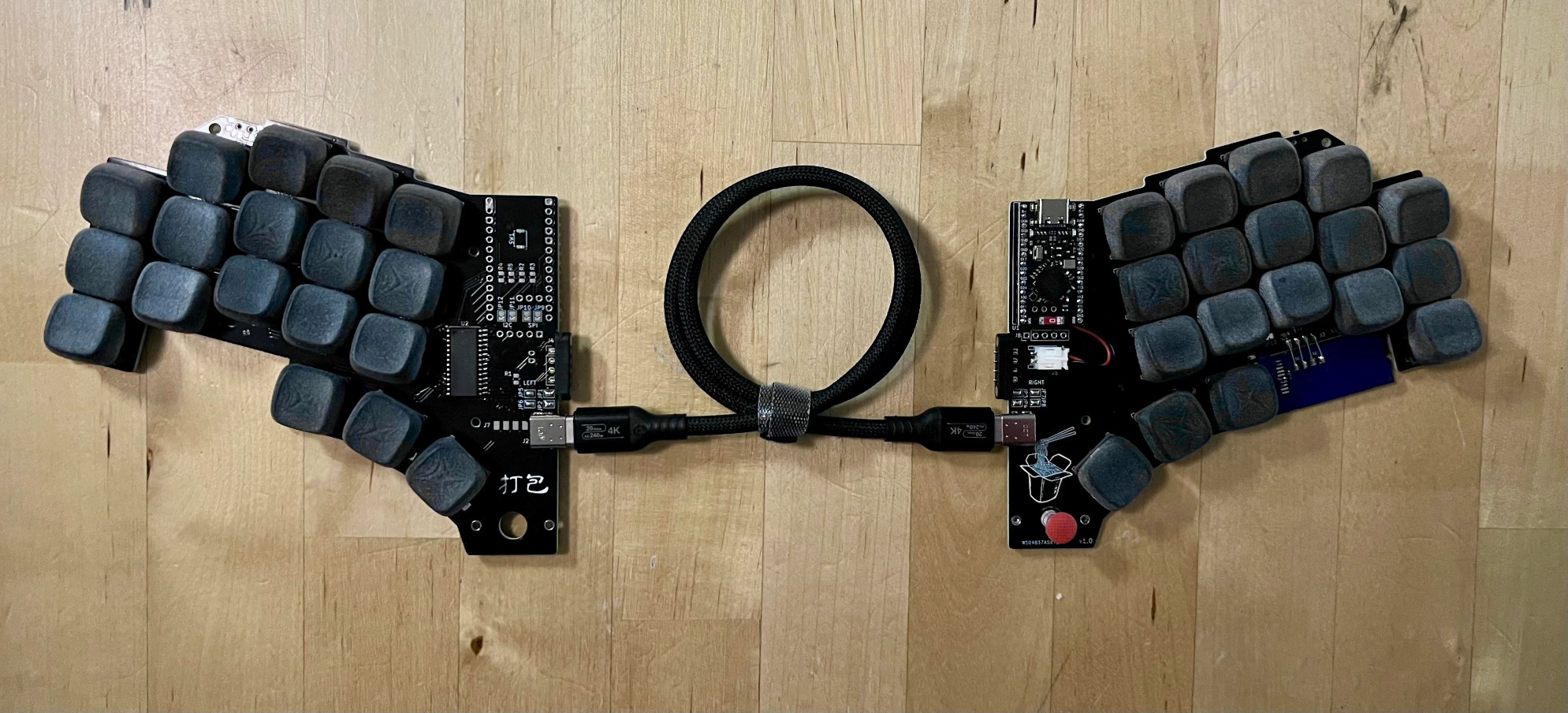
A little more about that keyboard — this is Keebin’, after all. It’s an MK Point 65, which boasts hot-swap sockets under those DSA Dolch keycaps. See? Minimal soldering. In fact, the only things you have to solder to make the Typeframe your own are the power switch and the status light. Incredible.

Continue reading “Keebin’ With Kristina: The One With The Cipher-Capable Typewriter”

Hackaday Links Column Banner

Hackaday Links: November 16, 2025

We make no claims to be an expert on anything, but we do know that rule number one of working with big, expensive, mission-critical equipment is: Don’t break the big, expensive, mission-critical equipment. Unfortunately, though, that’s just what happened to the Deep Space Network’s 70-meter dish antenna at Goldstone, California. NASA announced the outage this week, but the accident that damaged the dish occurred much earlier, in mid-September. DSS-14, as the antenna is known, is a vital part of the Deep Space Network, which uses huge antennas at three sites (Goldstone, Madrid, and Canberra) to stay in touch with satellites and probes from the Moon to the edge of the solar system. The three sites are located roughly 120 degrees apart on the globe, which gives the network full coverage of the sky regardless of the local time.

Continue reading “Hackaday Links: November 16, 2025”

The Value Of A Worked Example

I was looking over the week’s posts on Hackaday – it’s part of my job after all – and this gem caught my eye: a post about how to make your own RP2040 development board from scratch. And I’ll admit that my first thought was “why would you ever want to do that?” (Not a very Hackaday-appropriate question, honestly.) The end result will certainly cost more than just buying a Pi Pico off the shelf!

Then it hit me: this isn’t a project per se, but rather [Kai] was using it as an test run to learn the PCB-production toolchain. And for that, replicating a Pico board is perfect, because the schematics are easily available. While I definitely think that a project like this is a bit complicated for a first PCB project – I’d recommend making something fun like an SAO – the advantage of making something slightly more involved is that you run into all of the accompanying problems learning experiences. What a marvelous post-complete-beginner finger exercise!

And then it hit me again. [Kai]’s documentation of everything learned during the project was absolutely brilliant. It’s part KiCAD tutorial, part journal about all the hurdles of getting a PCB made, and just chock-full of helpful tips along the way. The quality of the write-up turns it from being just a personal project into something that can help other people who are in exactly the same boat, and I’m guessing that’s a number of you out there.

In the end, this was a perfect Hackaday project. Yes, it was “too simple” for those who have made their 30th PCB design. (Although I’d bet you could still pick up a KiCAD tip or two.) And yes, it doesn’t make economic sense to replicate mass-market devices in one-off. And of course, it doesn’t need that fun art on the board either. But wrap all these up together, and you get a superbly documented guide to a useful project that would walk you through 95% of what you’ll need to make more elaborate projects later on. Superb!

Surely you do “finger exercises” too. Why not write them up, and share the learning? And send them our way – we know just the audience who will want to read it.