Tech In Plain Sight: Field Guide To Power Plugs

It is the bane of worldwide travel: there isn’t just one way to get AC power from the wall. The exact connector — and what you can expect when you plug in — differs from country to country. Even if you stay home, you must account for this if your designs go places and expect to plug into the wall. If you’ve ever looked at a universal adapter, it is full of prongs and pins like a metallic porcupine. Where do all those pins go?

Of course, there are some easy ways to sidestep the whole issue if you don’t need AC power. Much low-power gear now just provides a USB or barrel connector. Then you can use an area-appropriate adapter or charger to power your device. Batteries work, too. But if you need to plug in, you will run into other kinds of plugs.

Switching power supplies have helped. In the old days, many things expected either 125V or 250V and didn’t work with the opposite voltage. Switching power supplies often allow a wide input range or have a switch to select one range or the other. These two voltages will cover almost any situation. If you have something that must have one voltage or the other, you’ll need a transformer — also called a converter — to step the voltage up or down. But most often, these days, you just need an adapter. There are slight variations. For example, some countries supply 100V or 110V, but that usually doesn’t make much difference. You also need to understand if your equipment cares if the AC is 50 Hz or 60 Hz.

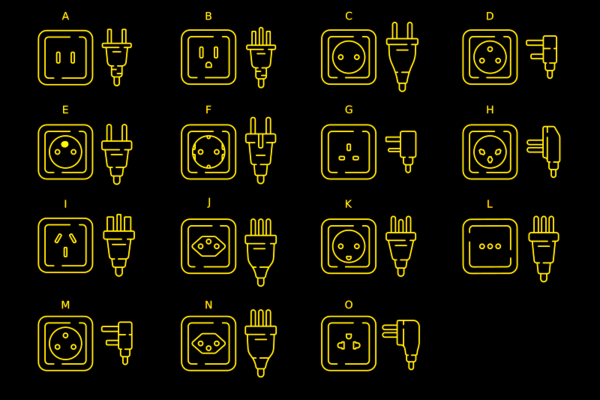
Most of the power sockets you’ll find around the world will fall into one of several categories. The categories range from A to N. Even among these, however, there are variations.

Type A

For example, the common type A plug and socket are what Americans call “two prong.” If you live in the US, you’ve probably noticed that the plug is polarized. That is, one pin is slightly wider than the other so the plug can only go in one way. The wide pin is connected to the circuit neutral. The maximum load for this connector is 15A. It is difficult to find type A sockets anymore, other than on cheap extension cords or things like lamps that pass through their electrical connections to a second socket. Type B is far more common and type A plug will fit in a type B socket.

Continue reading “Tech In Plain Sight: Field Guide To Power Plugs”

Analog Anoraks: The Op Amp Contest Starts Now!

We thought it was time to give the analog side of Hackaday their chance to shine, and what’s the quintessential analog IC? The op amp! Whether you’re doing tricky signal conditioning, analog computations like it’s 1960, or just making music sound good, op amps are at the heart of many designs. This contest, starting right now, is your chance to show off what you can do with a good op amp, or a few.

And for everyone else, here’s your chance to dip your toes into the warm analog waters. Whether you’ve always wanted to build a Chua’s chaos circuit or just to listen to music, there’s probably an op-amp project that will fit your personal bill. All you have to do to enter is set up a project on Hackaday.io, and use the pull-down menu to enter. We welcome shows of op-amp bravado, naturally, but we’re also stoked to see your simple projects that might help our digital friends leave their world of black and white, and enter into the shades of grey.

Thanks to Digi-Key, our sponsor for the challenge, there are three $150 shopping sprees on the line for the winners. And as always, there are some honorable mention categories to help whet your analog whistle, and to give us an excuse to feature a lot of great projects. You’ve got until June 6, to get your entry in, but these aren’t necessarily simple builds, so get going now.

Continue reading “Analog Anoraks: The Op Amp Contest Starts Now!”

Supercon 2022: Aedan Cullen Is Creating An AR System To Beat The Big Boys

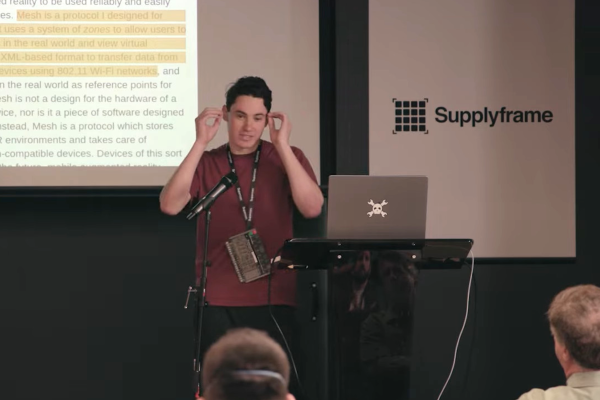
There’s something very tantalizing about an augmented reality (AR) overlay that can provide information in daily life without having to glance at a smartphone display, even if it’s just for that sci-fi vibe. Creating a system that is both practical and useful is however far from easy, which is where Aedan Cullen‘s attempt at creating what he terms a ‘practical augmented reality device’.

In terms of requirements, this device would need to have a visual resolution comparable to that of a smartphone (50 pixels/degree) and with a comparable field of view (20 degrees diagonal). User input would need to be as versatile as a touchscreen, but ‘faster’, along with a battery life of at least 8 hours, and all of this in a package weighing less than 50 grams.

Continue reading “Supercon 2022: Aedan Cullen Is Creating An AR System To Beat The Big Boys”

Hackaday Links Column Banner

Hackaday Links: April 9, 2023

When it comes to cryptocurrency security, what’s the best way to secure the private key? Obviously, the correct answer is to write it on a sticky note and put it on the bezel of your monitor; nobody’ll ever think of looking there. But, if you’re slightly more paranoid, and you have access to a Falcon 9, you might just choose to send it to the Moon. That’s what is supposed to happen in a few months’ time, as private firm Lunar Outpost’s MAPP, or Mobile Autonomous Prospecting Platform, heads to the Moon. The goal is to etch the private key of a wallet, cheekily named “Nakamoto_1,” on the rover and fund it with 62 Bitcoins, worth about $1.5 million now. The wallet will be funded by an NFT sale of space-themed electronic art, because apparently the project didn’t have enough Web3.0 buzzwords yet. So whoever visits the lunar rover first gets to claim the contents of the wallet, whatever they happen to be worth at the time. Of course, it doesn’t have to be a human who visits.

Continue reading “Hackaday Links: April 9, 2023”

Design For People

We all make things. Sometimes we make things for ourselves, sometimes for the broader hacker community, and sometimes we make things for normal folks. It’s this last category where it gets tricky, and critical. I was reminded of all of this watching Chris Combs’ excellent Supercon 2022 talk on how to make it as an artist.

“But I’m not making art!” I hear you say? About half of Chris’ talk is about how he makes his tech art worry-free for galleries to install, and that essentially means making it normie-proof – making sure it runs as soon as the power is turned on, day in, day out, without hacker intervention, because venues hate having you on site to debug. As Tom joked in the podcast, it’s a little bit like designing for space: it’s a strange environment, you can’t send out repair teams, and it has to have failsafes that make sure it works.

What is striking about the talk is that there is a common core of practices that make our hardware projects more reliable, whatever their destination. Things like having a watchdog that’ll reboot if it goes wrong, designing for modularity whenever possible, building in hanging or mounting options if that’s relevant, and writing up at least a simple, single-page info sheet with everything that you need to know to keep it running. Of course with art, aesthetics matters more than usual. Or does it?

So suppose you’re making a thing for a normal person, that must run without your babysitting. What is the common core of precautionary design steps you take?

Hackaday Podcast 213: Not Your Grandfather’s Grandfather Clock, The Engineering Behind Art, Hydrogen Powered Flight

Join Hackaday Editors Elliot Williams and Tom Nardi as they review some of their favorite hacks and projects of the past week. The episode starts with a discussion about the recently announced Artemis II crew, and how their mission compares to the Apollo program of the 1960s and 70s.

From there, the pair theorize as to why Amazon’s family of Echo devices have managed to evade eager hardware hackers, take a look at a very impressive SMD soldering jig created with some fascinating OpenSCAD code, marvel at the intersection of art and electronic design, and wonder aloud where all the cheap motorized satellite dishes are hiding. Stick around for some questionable PCB design ideas, a Raspberry Pi expansion that can read your mind, and the first flight of a (semi) hydrogen-powered aircraft.

Check out the links below if you want to follow along, and as always, tell us what you think about this episode in the comments!

Download your own personal copy!

Continue reading “Hackaday Podcast 213: Not Your Grandfather’s Grandfather Clock, The Engineering Behind Art, Hydrogen Powered Flight”

This Week In Security: Cookie Monster, CyberGhost, NEXX, And Dead Angles

“Operation Cookie Monster” ranks as one of the best code names in recent memory. And it’s apropo, given what exactly went down. Genesis Market was one of those marketplaces where criminals could buy and sell stolen credentials. This one was a bit extra special.

Websites and services are getting better about detecting logins from unexpected computers. Your Google account suddenly logs in from a new computer, and a two-factor authentication challenge launches. Why? Your browser is missing a cookie indicating you’ve logged in before. But there’s more. Providers have started rolling out smart analytics that check for IP address changes and browser fingerprints. Your mix of time zone, user string, installed fonts, and selected language make a pretty unique identifier. So sites like Genesis offer Impersonation-as-a-Service (IMPaaS), which is session hijacking for the modern age.

A victim computer gets owned, and credentials are collected. But so are cookies and a browser fingerprint. Then a criminal buyer logs in, and runs a virtual browser with all that collected data. Run through a proxy to get a IP that is geolocated close enough to the victim, and Mr. Bad Guy has a cloned machine with all accounts intact.

And now back to Operation Cookie Monster, a multi-organization takedown of Genesis. It’s apparently a partial takedown, as the latest word is that the site is still online on the Tor network. But the conventional domains are down, and something like eight million credentials have been captured and added to the Have I Been Pwned database.

Another researcher team, Sector 7, has been working the case with Dutch authorities, and has some interesting details. The vector they cover was a fake activation crack for an antivirus product. Ironic. There are several extensions that get installed on the victim computer, and one of the most pernicious is disguised as Google Drive. This extension looks for a Command and Control server, using Bitcoin as DNS. A hardcoded Bitcoin address is polled for its latest transaction, and the receiving address is actually an encoded domain name, you-rabbit[.]com as of the latest check.

This extension will look for and rewrite emails that might be warning the victim about compromise. Get an email warning about a cryptocurrency withdrawal? It modifies it in the browser to be a sign-in warning. It also allows Genesis customers to proxy connections through the victim’s browser, bypassing IP address security measures. Continue reading “This Week In Security: Cookie Monster, CyberGhost, NEXX, And Dead Angles”