This excellent content from the Hackaday writing crew highlights recurring topics and popular series like Linux-Fu, 3D-Printering, Hackaday Links, This Week in Security, Inputs of Interest, Profiles in Science, Retrotechtacular, Ask Hackaday, Teardowns, Reviews, and many more.
In the history of entertainment, few properties have made the sort of indelible mark on popular culture as StarTrek has. In 950 episodes across the twelve television series that have carried the name, the franchise has made a spectacle not of explosions and machismo, but of competent professionals working together to solve complex problems. In the world of Star Trek, the coolest people in the room are the scientists, engineers, physicists, and doctors — is it any wonder so many in the sciences credit the show for putting them on their career path?
Hardware hacker, maker, and Trekkie Andrew [MakeItHackin] will lead the panel.To celebrate the impact of Star Trek, we’re proud to announce our keynote event for the 2025 Hackaday Supercon: Crafting the Final Frontier. This round-table discussion led by Andrew [MakeItHackin] will bring together some of the artists that have helped cultivate the look and feel of the final frontier since Star Trek:The Next Generation and all the way into the modern era with Star Trek: Picard.
While the art direction of the original Star Trek series from 1966 was remarkably ahead of its time, these are some of the key individuals who were brought in to refine those early rough-hewn ideas into cultural touchstones. Their work ended up becoming more than simple entertainment, and ultimately helped inspire some of the real-world technology we use on a daily basis. The iconic LCARS computer interface predicted the rise of the touch screen, while its impossible to look at props such as the PADD and Tricorder and not see the parallels with modern tablets and smartphones.
I modified a printer a few years ago to handle multiple filaments, but I will admit it was more or less a stunt. It worked, but it felt like you had to draw mystic symbols on the floor of the lab and dance around the printer, chanting incantations for it to go right. But I recently broke down and bought a color printer. No, probably not the one you think, but one that is pretty similar to the other color machines out there.
Of course, it is easy to grab ready-made models in various colors. It is also easy enough to go into a slicer and “paint” colors, but that’s not always desirable. In particular, I like to design in OpenSCAD, and adding a manual intervention step into an otherwise automatic compile process is inconvenient.
The other approach is to create a separate STL file for each filament color you will print with. Obviously, if your printer can only print four colors, then you will have four or fewer STLs. You import them, assign each one a color, and then, if you like, you can save the whole project as a 3MF or other file that knows how to handle the colors. That process is quick and painless, so the question now becomes how to get OpenSCAD to put out multiple STLs, one for each color.
But… color()
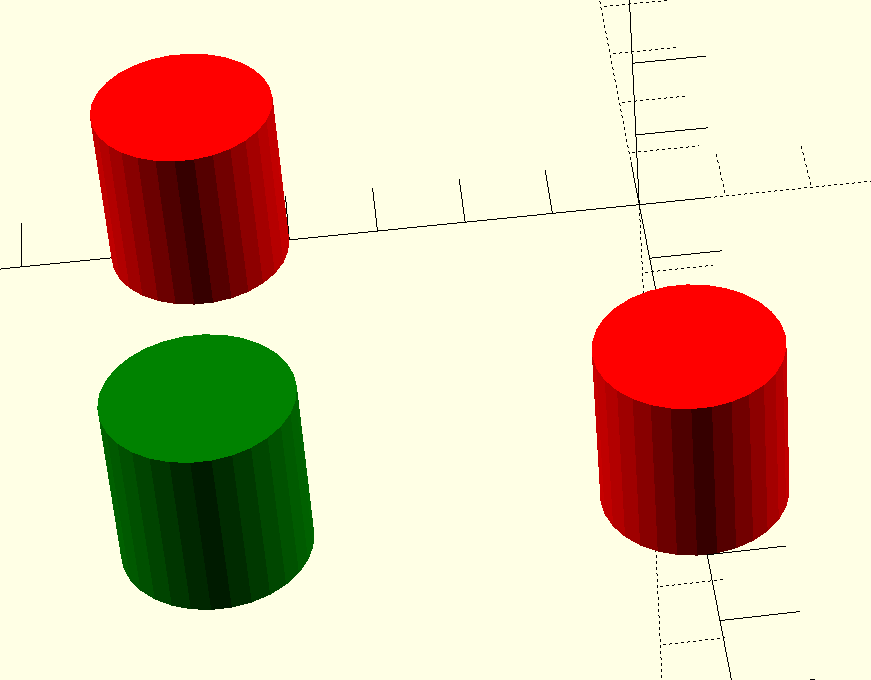
OpenSCAD has a color function, but that just shows you colors on the screen, and doesn’t actually do anything to your printed models. You can fill your screen with color, but the STL file you export will be the same. OpenSCAD is also parametric, so it isn’t that hard to just generate several OpenSCAD files for each part of the assembly. But you do have to make sure everything is referenced to the same origin, which can be tricky.
OpenSCAD Development Version Test
It turns out, the development version of OpenSCAD has experimental support for exporting 3MF files, which would allow me to sidestep the four STLs entirely. However, to make it work, you not only have to run the development version, but you also have to enable lazy unions in the preferences. You might try it, but you might also want to wait until the feature is more stable.
Besides, even with the development version, at least as I tried it, every object in the design will still need its color set in the slicer. The OpenSCAD export makes them separate objects, but doesn’t seem to communicate their color in a way that the slicer expects it. If you have a large number of multi-color parts, that will be a problem. It appears that if you do go this way, you might consider only setting the color on the very top-most objects unless things change as the feature gets more robust.
A Better Way
What I really wanted to do is create one OpenSCAD file that shows the colors I am using on the screen. Then, when I’m ready to generate STL files, I should be able to just pick one color for each color I am using.
We’ve probably all seen some old newsreel or documentary from The Before Times where the narrator, using his best Mid-Atlantic accent, described those newfangled computers as “thinking machines,” or better yet, “electronic brains.” It was an apt description, at least considering that the intended audience had no other frame of reference at a time when the most complex machine they were familiar with was a telephone. But what if the whole “brain” thing could be taken more literally? We’ll have to figure that out soon if these computers powered by miniature human brains end up getting any traction.
Last week, we were talking about how glad we are to be the type who by-and-large understands technology, and how it’s becoming more and more difficult to simply get along otherwise. We thought we had a good handle on the topic.
Then, we were talking about Google’s plans to require an ID for Android developers, and whether or not this will shut down free and open software development on the Android platform. Would this be the end of the ability to run whatever software that you’d like on your phone? Google offered the figleaf that “sideloading” – installing software through methods other than Google’s official store, would still be be allowed. But there’s a catch – you have to use Android Debug Bridge (ADB).
Is that a relief? It surely means that I will be able to install anything I want: I use ADB all the time, because it’s one of the fastest and easiest ways to transfer files and update software on the device. But how many non-techies do you know who use ADB? We’d guess that requiring this step shuts out 99.9% of Android users. If you make software hard to install for the masses, even if you make it possible for the geeks, you’re effectively killing it.
I have long wondered why end-to-end encrypted e-mail isn’t the default. After all, getting a GPG signing key, distributing it to your friends, and then reading mail with supporting software shouldn’t be a big deal, right? If GPG signing were available by default in Outlook or GMail, everyone would sign their e-mail. But there is no dead-simple, non-techie friendly way to do so, and so nobody does it.
Requiring ADB to load Android software is going to have the same effect, and it’s poised to severely restrict the amount of good, open software we have on the platform unless we can figure out a way to make installing that software easy enough that even the naive users can do it.
This article is part of the Hackaday.com newsletter, delivered every seven days for each of the last 200+ weeks. It also includes our favorite articles from the last seven days that you can see on the web version of the newsletter.
Want this type of article to hit your inbox every Friday morning? You should sign up!
The nights are drawing in for Europeans, and Elliot Williams is joined this week by Jenny List for an evening podcast looking at the past week in all things Hackaday. After reminding listeners of the upcoming Hackaday Supercon and Jawncon events, we take a moment to mark the sad passing of the prolific YouTuber, Robert Murray-Smith.
Before diving into the real hacks, there are a couple of more general news stories with an effect on our community. First, the takeover of Arduino by Qualcomm, and what its effect is likely to be. We try to speculate as to where the Arduino platform might go from here, and even whether it remains the player it once was, in 2025. Then there’s the decision by Google to restrict Android sideloading to only approved-developer APKs unless over ADB. It’s an assault on a user’s rights over their own hardware, as well as something of a blow to the open-source Android ecosystem. What will be our community’s response?
On more familiar territory we have custom LCDs, algorithmic art, and a discussion of non-stepper motors in 3D printing. Even the MakerBot Cupcake makes an appearance. Then there’s a tiny RV, new creative use of an ESP32 peripheral, and the DVD logo screensaver, in hardware. We end the show with a look at why logic circuits use the voltages they do. It’s a smorgasbord of hacks for your listening enjoyment.
Discord had a data breach back on September 20th, via an outsourced support contractor. It seems it was a Zendesk instance that was accessed for 58 hours through a compromised contractor user account. There have been numbers thrown around from groups claiming to be behind the breach, like 1.6 Terabytes of data downloaded, 5.5 million user affected, and 2.1 million photos of IDs.
Discord has pushed back on those numbers, stating that it’s about 70,000 IDs that were leaked, with no comments on the other claims. To their credit, Discord has steadfastly refused to pay any ransom. There’s an interesting question here: why were Discord users’ government issued IDs on record with their accounts?
The answer is fairly simple: legal compliance. Governments around the world are beginning to require age verification from users. This often takes the form of a scan of valid ID, or even taking a picture of the user while holding the ID. There are many arguments about whether this is a good or bad development for the web, but it looks like ID age verification is going to be around for a while, and it’ll make data breaches more serious.
This week Jonathan and Aaron chat with Piers Finlayson about One ROM! Why does the retro-computing world need a solution for replacement ROMs? How difficult was it to squeeze a MCU and layout into the original ROM footprint? And what’s next for the project? Listen to find out!