VGA Without A Microcontroller

One of the most challenging projects you could ever do with an 8-bit microcontroller is generating VGA signals. Sending pixels to a screen requires a lot of bandwidth, and despite thousands of hackers working for decades, generating VGA on an 8-bit microcontroller is rarely as good as a low-end video card from twenty years ago.

Instead of futzing around with microcontrollers, [Marcel] had a better idea: why not skip the microcontroller entirely? He’s generating VGA frames from standard logic chips and big ‘ol EEPROMs. It works, and it looks good, too.

VGA signals are just lines and frames, with RGB pixel values stuffed in between horizontal sync pulses, and frames stuffed between vertical sync pulses. If you already know what you want to display, all you have to do is pump the right bits out through a VGA connector fast enough. [Marcel] is doing this by saving images on two parallel EEPROMs, sending the output through a buffer, through a simple resistor DAC, and out through a VGA connector. The timing is handled by a few 74-series four-bit counters, and the clock is a standard 25.175 MHz crystal.

There’s not much to this build, and the entire circuit was assembled on a breadboard. Still, with the clever application of Python to generate the contents of the ROM, [Marcel] was able to build something that displays eight separate images without using a microcontroller.


Open Source Firmware For A Cheap Programmable Power Supply

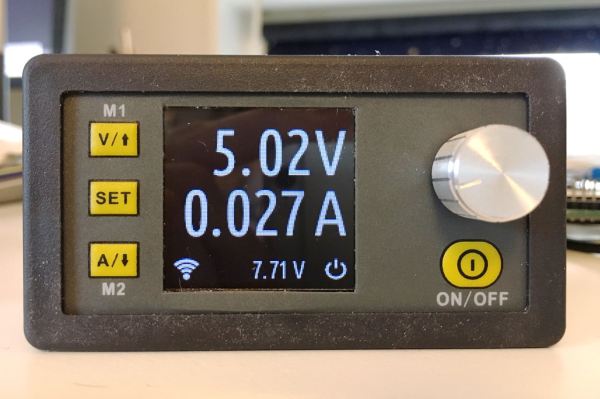
A few months ago, someone clued us in on a neat little programmable power supply from the usual Chinese retailers. The DPS5005 is a programmable power supply that takes power from a big AC to DC wall wart and turns it into a tiny bench-top power supply. You can pick one of these things up for about thirty bucks, so if you already have a sufficiently large AC to DC converter you can build a nice 250 Watt power supply on the cheap.

[Johan] picked up one of these tiny programmable power supplies. His overall impression was positive, but like so many cheap products on AliExpress, there wasn’t a whole lot of polish to the interface. Additionally, the DPS5005 lacked the ability to be controlled over a serial port or WiFi.

This programmable power supply is built around an STM32, with the programming pads exposed and labeled on the PCB. The changes [Johan] wanted to make were all in software, leading him to develop OpenDPS, a firmware replacement for the DPS5005. Continue reading “Open Source Firmware For A Cheap Programmable Power Supply”

Wake Up! The Cat Came Back!

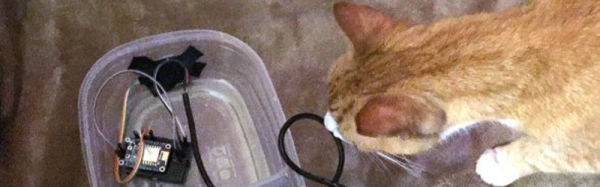
In order to get the most out of the batteries connected to your microcontroller, you’ll probably need to put it to sleep, the deeper the better. [Rgrokett] was curious about the nighttime habits of his cat, and came up with a nice little hack to get more battery life out of the ESP8266 that he was using.

[rgrokett]’s cat enters and leaves through a cat-door. He figured a PIR sensor would let him know when there was movement around the door. He could then tell if the cat was around. Leaving the PIR sensor and the ESP8266 microcontroller (an Adafruit Huzzah) on all the time drained the batteries pretty quickly, so [rgrokett] decided to try putting the Huzzah to sleep.

The trick in this build is that the PIR sensor is used to reset the Huzzah when it triggers. The Huzzah requires the reset switch to go from high to low, but the PIR trigger goes from low to high, so a transistor is used to invert the PIR sensor’s trigger signal. When the Huzzah wakes up, it connects to the WiFi network and sends [rgrokett] an email via IFTTT ([rgrokett]’s description goes over the steps to set up a secure connection to IFTTT.)

It’s a pretty simple hack, but it increases [rgrokett] system’s battery life from a couple of days to more than a month (he’s still waiting to see how long they’ll last) and all that was needed was the microcontroller, the sensor and a couple of parts. We have a couple of older hacks about putting the ESP modules into deep sleep, such as this one, and check out this tutorial on PIR sensors.

Unlocking 12V Quick Charge On A USB Power Bank

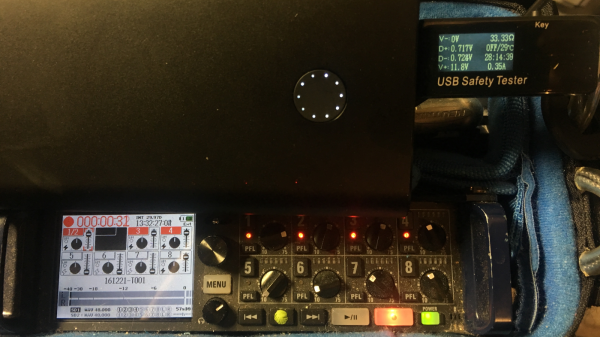
[Robert Nixdorf] frequently needs to use this high-end audio recorder, but it sucks dry a set of eight AA batteries in just a few hours. Obviously a longer lasting solution was required, and he started scouring the web looking for an answer. He bought a Quick Charge power bank and then hacked a Digispark to negotiate with the power bank to provide 12V output to Quick Charge his audio recorder.

Qualcomm’s Quick Charge system is designed to provide increased output voltages to reduce charging time in QC compatible devices such as mobile phones powered by their Snapdragon range of SoC’s. Depending on how the end-point negotiates with the charger, either 5V, 9V or 12V outputs are supported.

You can dig into the details in Qualcomm’s Quick Charge Patent [PDF] which shows how the system works. Quite simply, the voltage provided by the charger depends on the signals set on the D+ and D- data pins during the initial handshaking phase. [Robert] found it easy to get his QC charger to provide the required voltage by using a 3V3 voltage regulator and a resistive divider. But a more permanent solution would be needed if he wanted to use it on the field.

His parts bin revealed a Digispark board and he set about hacking it. He isolated the VUSB from the rest of his board since it would get pulled up to 12V when in use. And then replaced the existing 5V regulator with a 3V3 one. This required several bodges which he has documented on his blog. Some simple code flashed on the ATtiny85 handles all of the handshaking and sets up 12V output to run his audio recorder. A single charge on the power bank now lasts him almost 12 hours, so he’s pretty satisfied with the hack.

Quick Charge is currently at version 4 and supports USB-C and USB-PD hardware such as cables and connectors. But it seems using USB-C hardware outside of the current USB-C specifications is deprecated, with reports suggesting Google is asking OEM’s not to use Quick Charge but stick to USB-PD. Let’s hope this gets settled one way or another soon.

Thanks, [Frank] for the tip.

WiFi Power Bar!

Ever wanted to access a file or run some program on your computer while away from home, but the darned thing is turned off? Finding themselves occasionally working away from home and not wanting to leave their computer on for extended periods, [robotmaker]’s solution was to hack into existence a WiFi-controlled power bar!

esp8266-powerbar-thumbInside the junction box, an eight-channel relay is connected to an ESP8266 module. The module uses MQTT to communicate with Home Assistant and is powered by a partially dismembered USB AC adapter — wrapped in kapon tape for safe-keeping. The entire bar is wired through a 10A fuse, while also using a fire resistant 4-gang electrical box. Once the outlets were wired in, closing it up finished up the power bar.

[robotmaker] controls the outlets via a cheap smartphone — running HADashboard — mounted to a wall with a 3D printed support. Don’t worry — they’ve set up the system to wait for the PCs to power down before cutting power, and the are also configured to boot up when the relay turns on.

The best part — the power bar only cost $25.

[via /r/homeautomation]

IPad Tossed Out For RetroPie Arcade Cabinet Redux

The naming and remixing in this project can get a little confusing to those unfamiliar with the different elements involved, but what [John Gerrard] has done is take a stylish mini arcade cabinet intended as a fancy peripheral for an iPad and turned it into an iPad-free retro arcade gaming cabinet. He also designed his own power controller for graceful startup and shutdown.

The project started with a peripheral called the iCade (originally conceived as a fake product for April Fool’s) and [John] observed it had good remix potential for use as a mini retro gaming cabinet. It was a good starting point: inexpensively purchased off eBay with suitable arcade-style joystick and buttons, a nice layout, and plenty of hacking potential. With a small variety of hardware from familiar sources like eBay and Aliexpress, [John] rounded up most of what he needed.

Continue reading “IPad Tossed Out For RetroPie Arcade Cabinet Redux”

A Solar-Powered Headset From Recycled Parts

Solar power has surged ahead in recent years, and access for the individual has grown accordingly. Not waiting around for a commercial alternative, Instructables user [taifur] has gone ahead and built himself a solar-powered Bluetooth headset.

Made almost completely of recycled components — reducing e-waste helps us all — only the 1 W flexible solar panel, voltage regulator, and the RN-52 Bluetooth module were purchased for this project. The base of the headset has been converted from [taifur]’s old wired one, meanwhile a salvaged boost converter, and charge controller — for a lithium-ion battery — form the power circuit. An Apple button makes an appearance alongside a control panel for a portable DVD player (of all things), and an MP4 player’s battery. Some careful recovery and reconfiguration work done, reassembly with a little assistance from the handyman’s secret weapon — duct tape — and gobs of hot glue bore a wireless fruit ready to receive the sun’s bounty.

Continue reading “A Solar-Powered Headset From Recycled Parts”