A Breakout Board For A Flir Lepton

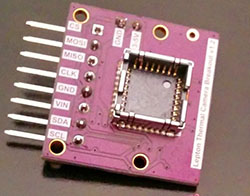
Thermal imaging cameras are all the rage now, and one of the best IR cameras out there is Flir’s Lepton module. It’s the sensor in the FLIR ONE, a thermal imaging camera add-on for an iPhone. Somewhat surprisingly, Flir is allowing anyone to purchase this module, and that means a whole bunch of robotics and other various electronics projects. Here’s a breakout board for Flir’s Lepton.

Electron artisan [Mike] recently got his hands on a FLIR ONE, and doing what he does best, ripped the thing apart and built the world’s smallest thermal imaging camera. Compared to professional models, the resolution isn’t that great, but this module only costs about $250. Just try to find a higher resolution thermal imager that’s cheaper.

With this breakout board, you’ll obviously need a Lepton module. There’s a group buy going on right now, with each module costing just under $260.

The Lepton module is controlled over I2C, but the process of actually grabbing images happens over SPI. The images are a bit too large to be processed with all but the beefiest Arduinos, but if you’re thinking of making Predator vision with a Raspi, BeagleBone, or a larger ARM board, this is just the ticket.

You can check out some video made with the Lepton module below.

This is also project number 3000 on hackaday.io. That’s pretty cool and worthy of mention.

Continue reading “A Breakout Board For A Flir Lepton”

Hands On With The Intel Edison

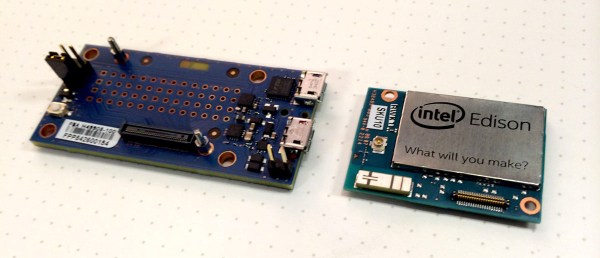
Yesterday the tech world resounded with the astonishing news that Apple can’t run a CMS, rotary encoders were invented just for the Apple Watch, and Intel’s Developer Forum was scheduled well in advance of the Apple media circus. Intel’s smallest computer yet, the Edison, was also announced. Very few people without an Intel employee badge have one of these cool little devices, and lucky for us one of them put up a hands-on review.

With a lot of comments asking what the Edison is good for, [Dimitri] tells us the Edison isn’t meant to be only a dev board. A better comparison would be something like the Raspberry Pi compute module – a small board that product designers can build a device around. This, of course, is not news and should come as a surprise to no one. The 70-pin connector used in the Edison isn’t rated for high-frequency insertions, anyway.

Stock up on level shifters

Compared to even a Raspberry Pi, or even an Arduino Mega, the Arduino breakout board for the Edison is huge. The reason for this is a huge number of level shifters. Where Arduinos can chug right along at 3.3V and 5V, and a Pi uses the somewhat more uncommon (at least for the hobbyist market) 3.3V logic, most of the Edison runs at 1.8V.  All the user-configurable pins on the smaller breakout are 1.8V logic. Someone reading this will fry their Edison, so don’t say we didn’t warn you.

Performance

[Dimitri] was keen to get an idea of how powerful the Edison is. There’s a pretty good chip in there – an Atom Z34XX – that’s underclocked at 500MHz. Still, despite this apparent performance limitation, a few benchmarks reveal the Edison can work at up to 615 MIPS. That’s about twice the performance of the Raspberry Pi B+, and real-world tests of doing FFT along with OpenCV tracking makes [Dimitri] happy. Power consumption? At a medium load, the Edison draws about 200 mA. A lot of number crunching and blasting bits out of the radios increases that to a maximum of 500 mA. Not exactly low power, but very good in terms of performance per Watt.

Wireless

There are two radios on the Edison, one for Bluetooth Low Energy, and another for a/b/g/n WiFi (yes, it supports access mode). The on-chip antenna is acceptable, but for sending signals to the conference room down the hall, you might want to connect an external antenna.

Linux, Programming, and Arduino

Linux on the Edison isn’t a friendly Debian-derived installation like the Raspberry Pi. Instead, Intel is using Yocto, specifically designed for embedded environments. It’s not quite a distribution but instead a build system. There is no apt-get. Right now, this might be seen as a limitation, but enterprising kernel wizards have ported Debian to the Intel Galileo. Full Linux support is coming, but probably not (officially) from Intel.

Edison launched with an Arduino breakout board, but the Arduino compatibility is literally only a facade. Intel reengineered the Arduino IDE so it writes files instead of toggling pins. This means any programming language that can write a file is able to blink a LED with an Edison. It’s only a matter of preference, but if your idea of embedded development is a single chip and a C compiler, you’re better off using an ATMega and a UART.

Closing thoughts

This isn’t a Raspi killer, a Beaglebone killer, a TI CC3200 killer, or an ESP8266 killer. It’s an x86 board, with WiFi, Bluetooth and Linux that can toggle a few pins. It’s something different. Different is good. That means there are more choices.

A Detailed Look At The 7805 Voltage Regulator

We’re quite sure that all hobbyists have used the 7805 voltage regulator at least once in their lives. They are a simple way to regulate 7V+ voltages to the 5V that some of our low power projects need. [Ken Shirriff] wrote an amazingly detailed article about its theory of operation and implementation in the silicon world.

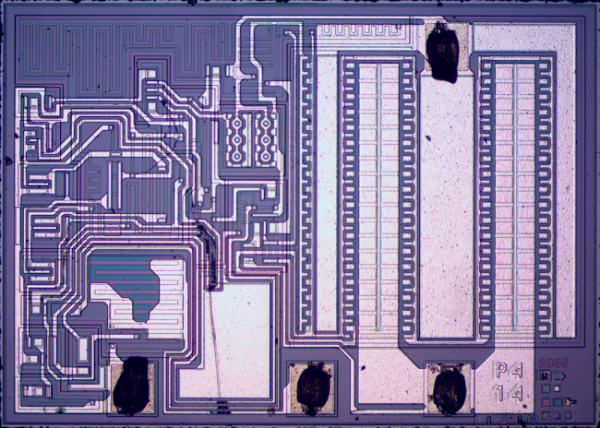
As you may see in the picture above such a regulator is composed of very different elements: transistors, resistors, capacitors and diodes, all of them integrated in the die. [Ken] provides the necessary clues for us to recognize them and then explains how the 7805 can have a stable output even when its temperature changes. This is done by using a bandgap reference in which the difference between transistor base-emitter voltages for high and low current is used to counter the effects of temperature. As some elements looked a bit odd during [Ken]’s reverse engineering process, he finally concluded that what he purchased on Ebay may be a counterfeit (read this Reddit comment for another opinion).

More WiFi Modules For IoT Madness

The last year has brought us CC3000 WiFi module from TI, and recently the improved CC3200 that includes an integrated microcontroller. The Chinese design houses have gotten the hint, putting out the exceptionally cheap ESP8266, a serial to WiFi bridge that also includes a microcontroller to handle the TCP/IP stack and the software side of an 802.11 connection. Now there’s another dedicated WiFi module. It’s called the MT7681, and it’s exactly what you would expect given the competition: a programmable module with the ability to connect to a WiFi network.

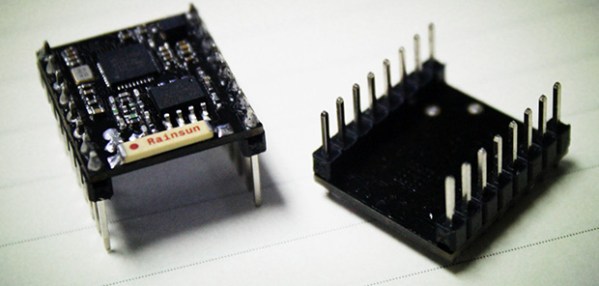
Like TI’s CC3200, and the ESP8266, the MT7681 can be connected to any microcontroller over a serial connection, making it a serial to WiFi bridge. This module also contains a user-programmable microcontroller, meaning you don’t need to connect an Arduino to blink a few pins; UART, SPI, and a few GPIO pins are right on the board. The module also includes an SDK and gnu compiler, so development of custom code running on this module should be easier than some of the other alternatives.

You can pick up one of the MT7681 modules through the usual channels, but there’s an Indiegogo campaign based in China that takes this module and builds a ‘dock’ around it. The dock has a relay, temperature/humidity sensor, a few GPIO pins, and a USB serial connection for use as an Internet of Things base station.

For anyone looking for a little more computational horsepower, there’s also a few mentions and press releases announcing another module, the MT7688, This is a very small (12mm by 12mm) module running Linux with 256 MB of RAM and 802.11n support. This module hasn’t even hit the market yet, but we’ll be on the lookout for when it will be released.

Thanks [uhrheber] for sending this one in.

The Current State Of ESP8266 Development

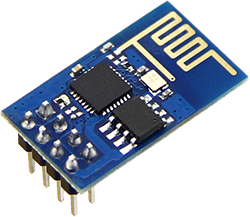
A few weeks ago we caught wind of a very cool new chip. It’s called the ESP8266, and it’s a WiFi module that allows you to connect just about any project to an 802.11 b/g/n network. It also costs $5. Yes, there was much rejoicing when this chip was announced.

Since we learned of the ESP8266, there has been a lot of work done to translate the datasheets from Chinese, figure out how the SOC can be programmed, and a few preliminary attempts at getting this module working with an Arduino. Keep in mind, very few people have one of these modules in hand right now, so all this information is completely untested. Here’s what we have so far:

Over on Hackaday Projects, [bafeigum] has been working to research the capabilities of this module. Most of the comments deal with the AT Command set for the module and figuring out what is actually returned when certain commands are called.

The ESP8266 community forum is about a week old, but already there’s a wealth of information. Most of the efforts seem to be centered on getting GCC to program this chip, something that would make the ESP8266 a single-solution chip for anything that needs WiFi and a bit of processing power. Everyone (including the great [Sprite_TM]) has currently hit a roadblock, so if you have a ton of experience with GCC and the Xtensa microcontroller, check out that thread. Failing that, we’ll have to wait until someone from Tensilica, the company behind the guts of this chip, to chime in and help everyone figure out how this thing actually works.

The Arduino-heads out there will have a much easier time. There’s already a tutorial for using the ESP8266 as a serial WiFi module. Note the ESP operates on 3.3 Volts, so connecting this module to the 5V pin means you’ll be out $5 and several weeks of shipping time.

This is an incredible amount of development in a very short amount of time, made even more remarkable by the fact that no one has one of these WiFi modules yet. When these modules do arrive to workbenches around the world, we’ll expect the Hackaday tip line to be flooded with very small and somewhat battery friendly WiFi builds.

Lots of battery reviews and more!

An Obsessively Thorough Battery (and More) Showdown

There are a number of resources scattered across the Internet that provide detailed breakdowns of common products, such as batteries, but we haven’t seen anything quite as impressive as this site. It’s an overwhelming presentation of data that addresses batteries of all types, including 18650’s (and others close in size)26650’s, and more chargers than you can shake a LiPo at. It’s an amazing site with pictures of the product both assembled and disassembled, graphs for charge and discharge rates, comparisons for different chemistries, and even some thermal images to illustrate how the chargers deal with heat dissipation.

Check out the review for the SysMax Intellicharger i4 to see a typical example. If you make it to the bottom of that novel-length repository of information, you’ll see that each entry includes a link to the methodology used for testing these chargers.

But wait, there’s more! You can also find equally thorough reviews of flashlights, USB chargers, LED drivers, and a few miscellaneous overviews of the equipment used for these tests.

[Thanks TM]

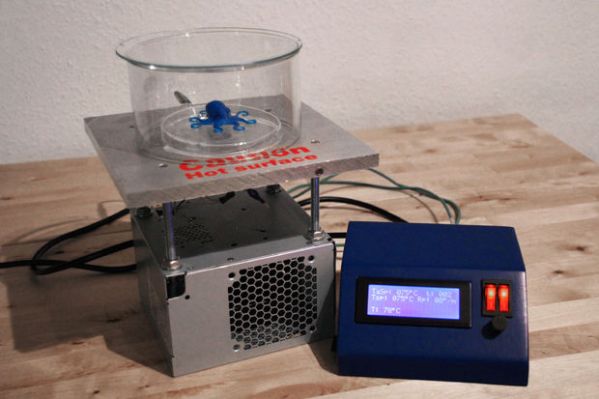
Controlling A Hot Plate’s Temperature For The Lab

When you need precise heating — like for the acetone polishing shown above — the control hardware is everything. Buying a commercial, programmable, controller unit can cost a pretty penny. Instead of purchasing one, try creating one from scratch like [BrittLiv] did.

[BrittLiv] is a Chemical and Biological Engineer who wanted something that performs well enough to be relied upon as a lab tool. Her design utilizes a plain, old hot plate and with some temperature feedback to run custom temperature ramps from programs stored on an SD card.

The system she developed was dealing directly with temperatures up to 338°F. The heating element is driven from mains, using an SSR for control but there is also a mechanical switch in there if you need to manually kill the element for some reason. An ATmega328 monitors the heating process via an MAX6675 thermocouple interface board. This control circuitry is powered from a transformer and bridge rectifier inside the case (but populated on a different circuit board).

She didn’t stop after getting the circuit working. The project includes a nice case and user interface that will have visitors to your lab oohing and aahing.