The Incrediplotter: Voice Controlled Plotter From Repurposed Printer

There’s something uniquely satisfying about a pen plotter. Though less speedy or precise than a modern printer, watching a pen glide across the page, mimicking human drawing, is mesmerizing. This project, submitted by [Jacob C], showcases the Incrediplotter, a brilliant repurposing of a 3D printer built by him and his brother.

Starting with a broken 3D printer, [Jacob C] and his brother repurposed its parts to create a voice-controlled pen plotter. They 3D-printed custom components to adapt the printer’s framework for plotting. An STM32 Blue Pill running Klipper controls two TMC2208 motor drivers for the x- and y-axes, while a small standalone servo manages the pen’s height.

The unique twist lies in the software: you can speak to the plotter, and it generates a drawing based on your prompt without needing to select an image. The process involves sending the user’s voice prompt to Google Gemini, which generates an image. The software then converts this image into an SVG compatible with the plotter. Finally, the SVG is translated into G-Code and sent to the plotter to start drawing.

Thanks to [Jacob C] for sharing this impressive project. It’s a fantastic example of repurposing a broken machine, and the voice-to-image feature adds a creative twist, enabling anyone to create unique artwork. Be sure to check out our other featured plotter hacks for more inspiration.

Continue reading “The Incrediplotter: Voice Controlled Plotter From Repurposed Printer”

A photo of two magnetic bubble memories installed in a circuit board

Scott Baker’s Magnetic Bubble Memory Mega-Post

Over on his blog our hacker [Scott Baker] has a Magnetic Bubble Memory Mega-Post.

If you haven’t heard of magnetic bubble memory before it’s basically obsolete nonvolatile memory. Since the 1970s when it was introduced this type of memory has been outperformed in every dimension including durability, reliability, price, density, performance, and so on. For any given application of bubble memory you will be able to find an alternative technology which is better in many ways. Except if you want some old tech to geek out over, in that case magnetic bubble memory is for you!

Continue reading “Scott Baker’s Magnetic Bubble Memory Mega-Post”

Knob over display

Dialing It In: A 3D-Printed Knob With Touchscreen Flair

Knobs are ubiquitous in technology user interfaces, but touchscreens are increasingly replacing them for interface controls. The latest project from [upir] combines a rotating knob with a touchscreen for a stunning result. The knob-over-display design features a touchscreen where you can place and remove a spinning knob, creating an interface reminiscent of Microsoft’s Surface Dial but at a fraction of the cost.

The core functionality of this device relies on the MT6701 magnetic encoder, which precisely tracks the orientation of the surrounding magnetic field. This encoder is held in place with a 3D-printed jig behind the small touchscreen, hiding the encoder without blocking the magnetic field generated by the magnet above the display. Most circular magnets are axially magnetized, meaning their larger face is one pole. However, diametrically magnetized magnets, where opposite sides of the smaller face are the poles, are used here.

To avoid scratching the screen and ensure smooth turning, [upir] designed a knob that holds the diametrically magnetized magnet slightly above the screen, with a ball bearing connecting the outside of the knob to the center resting on the screen. All the design files needed to recreate this are available on [upir]’s GitHub page; be sure to check them out. Also, browse through our back catalog for other knob-related projects.

Continue reading “Dialing It In: A 3D-Printed Knob With Touchscreen Flair”

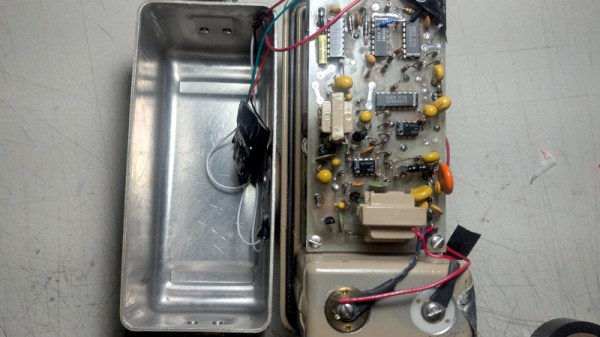
Looking in the back of the Tektronix 577

Repairing A Tektronix 577 Curve Tracer

Over on his YouTube channel our hacker [Jerry Walker] repairs a Tektronix 577 curve tracer.

A curve tracer is a piece of equipment which plots I-V (current vs voltage) curves, among other things. This old bit of Tektronix kit is rocking a CRT, which dates it. According to TekWiki the Tektronix 577 was introduced in 1972.

In this repair video [Jerry] goes to use his Tektronix 577 only to discover that it is nonfunctional. He begins his investigation by popping off the back cover and checking out the voltages across the voltage rails. His investigations suggest a short circuit. He pushes on that which means he has to remove the side panel to follow a lead into the guts of the machine.

Continue reading “Repairing A Tektronix 577 Curve Tracer”

Scott and his Prompt 80

Restoring A Vintage Intel Prompt 80 8080 Microcomputer Trainer

Over on his blog our hacker [Scott Baker] restores a Prompt 80, which was a development system for the 8-bit Intel 8080 CPU.

[Scott] acquired this broken trainer on eBay and then set about restoring it. The trainer provides I/O for programming, probing, and debugging an attached CPU. The first problem discovered when opening the case is that the CPU board is missing. The original board was an 80/10 but [Scott] ended up installing a newer 80/10A board he scored for fifty bucks. Later he upgraded to an 80/10B which increased the RAM and added a multimodule slot.

[Scott] has some luck fixing the failed power supply by recapping some of the smaller electrolytic capacitors which were showing high ESR. Once he had the board installed and the power supply functional he was able to input his first assembly program: a Cylon LED program! Making artistic use of the LEDs attached to the parallel port. You can see the results in the video embedded below.

Continue reading “Restoring A Vintage Intel Prompt 80 8080 Microcomputer Trainer”

A hand holding a One ROM with a Commodore 64 in the background

One ROM: The Latest Incarnation Of The Software Defined ROM

Retrocomputers need ROMs, but they’re just so read only. Enter the latest incarnation of [Piers]’s One ROM to rule them all, now built with a RP2350, because the newest version is 5V capable. This can replace the failing ROMs in your old Commodore gear with this sweet design on a two-layer PCB, using a cheap microcontroller.

[Piers] wanted to use the RP2350 from the beginning but there simply wasn’t space on the board for the 23 level shifters which would have been required. But now that the A4 stepping adds 5 V tolerance [Piers] has been able to reformulate his design.

The C64 in the demo has three different ROMs: the basic ROM, kernel ROM, and character ROM. A single One ROM can emulate all three. The firmware is performance critical, it needs to convert requests on the address pins to results on the data bus just as fast as it can and [Piers] employs a number of tricks to meet these requirements.

The PCB layout for the RP2350 required extensive changes from the larger STM32 in the previous version. Because the RP2350 uses large power and ground pads underneath the IC this area, which was originally used to drop vias to the other side of the board, was no longer available for signal routing. And of course [Piers] is constrained by the size of the board needing to fit in the original form factor used by the C64.

The One ROM code is available over on GitHub, and the accompanying video from [Piers] is an interesting look into the design process and how tradeoffs and compromises and hacks are made in order to meet functional requirements.

Continue reading “One ROM: The Latest Incarnation Of The Software Defined ROM”

Reverse-Engineering Mystery TV Equipment: The Micro-Scan

[VWestlife] ended up with an obscure piece of 80s satellite TV technology, shown above. The Micro-Scan is a fairly plan metal box with a single “Tune” knob on the front. At the back is a power switch and connectors for TV Antenna, TV Set, and “MW” (probably meaning microwave). There’s no other data. What was this, and what was it for?

Satellite TV worked by having a dish receive microwave signals, but televisions could not use those signals directly. A downconverter was needed to turn the signal into something an indoor receiver box (to which the television was attached) could use, allowing the user to select a channel to feed into the TV.

At first, [VWestlife] suspected the Micro-Scan was a form of simple downconverter, but that turned out to not be the case. Testing showed that the box didn’t modify signals at all. Opening it up revealed the Micro-Scan acts as a combination switchbox and variable power supply, sending a regulated 12-16 V (depending on knob position) out the “MW” connector.

So what is it for, and what does that “Tune” knob do? When powered off, the Micro-Scan connected the TV (plugged into the “TV Set” connector) to its normal external antenna (connected to “TV Antenna”) and the TV worked like a normal television. When powered on, the TV would instead be connected to the “MW” connector, probably to a remote downconverter. In addition, the Micro-Scan supplied a voltage (the 12-16 V) on that connector, which was probably a control voltage responsible for tuning the downconverter. The resulting signal was passed unmodified to the TV.

It can be a challenge to investigate vintage equipment modern TV no longer needs, especially hardware that doesn’t fit the usual way things were done, and lacks documentation. If you’d like to see a walkthrough and some hands-on with the Micro-Scan, check out the video (embedded bel0w).

Continue reading “Reverse-Engineering Mystery TV Equipment: The Micro-Scan”