Best Ways To Make PCB Breakaway Tabs, Revealed

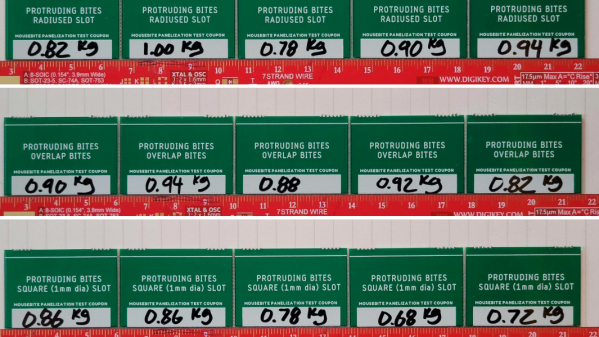
Most of us are familiar with the concept of producing PCBs in a panel, and snapping them apart afterwards. V-grooves that go most of the way through a PCB are one way to go about this, but a line of perforations along which to snap a tab is another. But what’s the best size and spacing of holes to use? Sparkfun’s [Nick Poole] spent some $400 on PCBs to get some solid answers by snapping each of them apart, and judging the results.

The nice thing about creating a perforation line (or “mouse bites”) is that drill hits are a very normal thing in PCB production, which makes creating this kind of breakaway tab a very straightforward and flexible method. However, it can be tricky to get results that are just right. Too sturdy, and breaking apart is a hassle. Too weak, and the board may break or twist before its time. On top of that, edges must also break cleanly. We’ve covered panelizing PCBs in this way before, but this is the first time we’ve seen someone seriously look into how to create optimal breakaway tabs.

Placing holes tangent to the board edge (as shown above) isn’t the prettiest, but keeps PCB edges free from protrusions. This is best for boards that are rail-mounted, or have tight enclosures.

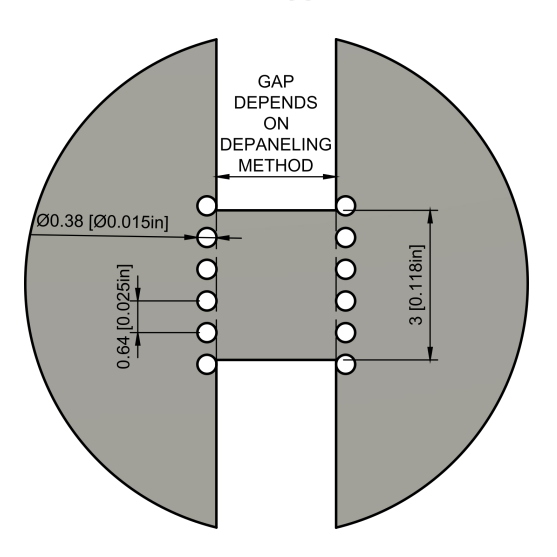
Data on designing mouse bites was sparse and a bit inconsistent, so [Nick] decided to figure it out empirically and share the results. The full details are available in Building a Better Mousebite (PDF download) but the essence of the recommendations are: 0.015″ unplated holes, spaced 0.025″ apart (center-to-center), tabs a maximum of 0.118″ wide (so as to be compatible with depanelizing tools), and holes that extend into the corners of the breakaway tab to avoid sharp edges. Holes should be placed slightly differently depending on whether one wishes to optimize the cosmetic appearance versus the physical smoothness of the board edge, but those numbers are the core of the guidelines.

To fine tune, [Nick] suggests increasing the spacing between holes to add strength, or just adding additional tabs. What about thickness of PCB? [Nick] tested boards both 0.8 mm and 1.6 mm thick, and while different amounts of torque were needed to snap the boards apart, things still worked as expected regardless of PCB thickness.

When it comes down to it, the best numbers will ultimately be the ones that your process or fab house can most efficiently handle, but [Nick]’s numbers should not steer anyone wrong, and it’s fantastic to see this kind of work go into refining such a common PCB feature.

Hacker Dictionary: RS-485 Will Go The Distance

RS485 is a communication standard that should be part of the advanced hardware hacker’s arsenal; it’s not commonly encountered, but powerful exactly when you need it. It’s a physical layer interface for wired communications that uses a single differential pair for noise immunity, has good long-distance properties, and allows many connections to a single bus. Because of that, you will encounter it in security systems and even cameras, wired sensor networks, DMX512 lighting and all sorts of industrial electronics. For our hobbyist goals, you can absolutely use RS485 to build your home (or room) automation system, or a relatively large robot – without all those worries that wireless brings.

The name might remind you of RS232, and that’s because both RS232 and RS485 are standards that come from EIA (Electronics Industries Alliance). It also might remind you of RS422, if you’ve ever seen this name mentioned online – RS422 and RS485 are closely intertwined, sharing most of the physical layer, and I’ll show how exactly they relate. Continue reading “Hacker Dictionary: RS-485 Will Go The Distance”

The BGA chip in question flipped onto a piecce of breadboard, all its pins broken out with magnet wire.

Heroic Efforts Give Smallest ARM MCU A Breakout, Open Debugger

In today’s episode of Diminutive Device Technology Overview, [Sprite_TM] is at it again – this time conquering the HC32L110. A few weeks ago, we have highlighted the small ARM Cortex M0+ microcontroller, which is outstanding because of its exceptionally small size. We also pointed out a few hurdles, among them – hard-to-approach SDK and documentation, and difficulties making and assembling a PCB for such a small BGA. Today, we witness how [Sprite_TM] bulldozed through all of these hurdles for all of us, and added a few pictures to our collective “outrageous soldering” galleries while at it.

First, he figured out an example layout for this MCU that’s achievable for us even on a cheapest 2-layer board from JLCPCB, keeping distances within the generic tolerance standards by snubbing out a few pins. As a result, we only lose access to four GPIOs – those will have to be kept as inputs, so that nothing burns out. However, that’s the kind of tradeoff we are okay making if it helps us keep our PCB small and lightweight for projects where these factors matter. After receiving the resulting board, he also recorded a short tutorial on soldering such packages at home with a mere hot air gun and a few bare necessities like flux and tweezers – embedded below.

It doesn’t end there, however, as he decided to work around the GPIO fanout limitation in a non-intended way. Evidently, [Sprite_TM] decided to have some fun, taking a piece of regular 0.1″ spacing protoboard and deadbugging the chip with magnet wire, much to our amusement. The resulting contraption, pictured above, worked – and this is ever something you’d like to be able to achieve yourself in times of dire need, whether you make something work or simply to be entertained by making use of a cursed mounting technique, there’s an one-hour-long livestream recording of how this magnet wire contraption came to be. And, of course, that wasn’t the last thing to be shared.

Continue reading “Heroic Efforts Give Smallest ARM MCU A Breakout, Open Debugger”

An assortment of MemoryStick cards and devices, some of them, arguably cursed, like a MemoryStick-slot-connected camera.

Hacker Challenges MemoryStick To A Fight And Wins

It’s amazing when a skilled hacker reverse-engineers a proprietary format and shares the nitty-gritty with everyone. Today is a day when we get one such write-up – about MemoryStick. It is one of those proprietary formats, a staple of Sony equipment, these SD-card-like storage devices were evidently designed to help pad Sony’s pockets, as we can see from the tight lock-in and inflated prices. As such, this format has always remained unapproachable to hackers. No more – [Dmitry Grinberg] is here with an extensive breakdown of MemoryStick protocol and internals.

If you ever want to read about a protocol that is not exactly sanely designed, from physical layer quirks to things like inexplicable large differences between MemoryStick and MemoryStick Pro, this will be an entertaining read for hackers of all calibers. Dmitry doesn’t just describe the bad parts of the design, however, as much as that rant is entertaining to read – most of the page is taken by register summaries, struct descriptions and insights, the substance about MemoryStick that we never got.

One sentence is taken to link to a related side project of [Dmitry] that’s a rabbithole on its own – he has binary patched MemoryStick drivers for PalmOS to add MemoryStick Pro support to some of the Sony Clie handhelds. Given the aforementioned differences between non-Pro and Pro standards, it’s a monumental undertaking for a device older than some of this site’s readers, and we can’t help but be impressed.

To finish the write-up off, [Dmitry] shares with us some MemoryStick bit-banging examples for the STM32. Anyone who ever wanted to approach MemoryStick, be it for making converter adapters to revive old tech, data recovery or preservation purposes, or simply hacker curiosity, now can feel a bit less alone in their efforts.

We are glad to see such great hacking on the MemoryStick front – it’s much needed, to the point where our only article mentioning MemoryStick is about avoiding use of the MemoryStick slot altogether. [Dmitry] is just the right person for reverse-engineering jobs like this, with extensive reverse-engineering history we’ve been keeping track of – his recent reverse-engineering journey of an unknown microcontroller in cheap E-Ink devices is to behold.

Run Your Own Server For Fun (and Zero Profit)

It seems there’s a service for everything, but sometimes you simply learn more by doing it yourself. If you haven’t enjoyed the somewhat anachronistic pleasures of running your own server and hosting your own darn website, well, today you’re in luck!

Yes, we’re going to take an old computer of some sort and turn it into a web server for hosting all of your projects at home. You could just as easily use a Raspberry Pi –even a Zero W would work — or really anything that’ll run Linux, but be aware that not all computing platforms are created equally as we’ll discuss shortly.

Yes, we’re going to roll our own in this article series. There are a lot of moving parts, so we’re going to have to cover a lot of material. Don’t worry- it’s not incredibly complicated. And you don’t have to do things the way we say. There’s flexibility at every turn, and you’re encouraged to forge your own path. That’s part of the fun!

Note: For the sake of space we’re going to skip over some of the most basic details such as installing Linux and focus on those that have the greatest impact on the project. This article gives a high level overview of what it takes to host your project website at home. It intentionally glosses over the deeper details and makes some necessary assumptions.

Continue reading “Run Your Own Server For Fun (and Zero Profit)”

Syringe with diluted nail polish used to fill into cursive "FuzzyLogic" letters extruded into a surface of a 3D-printed block of plastic, as a demonstration.

Brighten Up Your Prints With This Nail Polish Approach

It’s not enough to 3D-print a part – there’s a myriad of things you can do from there! [FuzzyLogic] shows us his approach of adding inlay labels, icons and text to a 3D print, by extruding them into the print and filling the resulting cavity with nail polish! This makes for colorful and useful prints, as opposed to dull single-color parts we typically end up with.

The devil’s in the details, and [FuzzyLogic] has got the details down to a technique. Nail polish has to be diluted with acetone so that it flows well, and a particular combination of syringe and needle will be your friend here. Of course, don’t forget to factor surface tension in – even with well-diluted nail polish, you cannot make the grooves too thin. A bit more acetone on a q-tip helps in case of any happy little accidents, and a coat of clear acrylic spray paint seals the lettering firmly in place. The five-minute video tells you all about these things and a quite few more, like the basics of extruding text and icons in a typical CAD package, and has a bit of bonus footage to those watching until the end.

Adding markings to our prints is a lovely finishing touch! If you’re looking for more of that, here’s a custom tool-changing printer with a pen attachment making beautiful custom enclosures for the Pocket Operator.

Continue reading “Brighten Up Your Prints With This Nail Polish Approach”

Mini PC with the mod described, a large tower fan sticking out of a hole in the top cover

MiniPC Surgery Makes It 50% Cooler

[G3R] writes to us about a mod they did on a HP ProDesk/EliteDesk 400 G3 miniPC they use as a home emulation center. The miniPC would overheat as soon as the CPU load increased, resulting in frame drops and stutters, as well as throttling CPU. [G3R] took the original cooling solution, threw out half of it and modified the remaining half to accept a tower CPU cooler.

The modification is invasive in all the right ways. [G3R] shows how to de-fin the current heatsink and smooth it over with a… welder? Our guess is that the heatsink fins were soldered to the heatsink base, and in that case, a heat gun should also work. Afterwards, you’re supposed to cut a hole in the upper case, then re-wire the fan connections, and create custom brackets to attach the tower fan – [G3R] explains how to do it all and what to watch out for.

The results are fascinating. After performing the mod, both idle and under-load temps got cut down by 50%! Idle temps went from 50 to 25 °C, and under-load temps dropped from 79 to 40 °C – surely, with way less throttling involved. Not only this lets [G3R] play Breath Of The Wild without hiccups, it also certainly improves overall lifespan of the mini-PC, despite the intervention being mechanically harsh.

Making our devices, quite literally, cooler is a venerable tradition of hackers. Just a few weeks ago, we covered a simple 3D printable LGA 1700 CPU bracket which can gain you some much-desired thermal contact. Sometimes we encounter proprietary and weird cooling fans that fail, and then we understand their workings and build a substitute. And, even if your GPU was never meant to have a fan, you can add one anyway!