
Thermos Temperature Meter

[youtube=http://www.youtube.com/watch?v=UXsxtEmKgbw]

We’re always a little surprised by how well a vacuum thermos works, but eventually the contents will cool down (or warm up depending on what’s in there). [Gamesh_] added a temperature meter to his thermos using an Arduino and a temperature sensor. The original post is in Portuguese but [Bruno] republished it in English.

The temperature sensor has been repurposed from a digital thermometer meant for taking your temperature. Holes for the LEDs making up the indicator bar were melted in the side of the plastic housing. When the hot liquid is poured out at about 0:45 into the video you can glimpse the Arduino hanging our on the other side of the pot and a power cord running off behind the laptop. It would be nice to see this migrated over to a less powerful chip and run from a small coin cell, but we like the concept.
One Minute Review Of Your Wasted Time

[youtube=http://www.youtube.com/watch?v=GuvR98k5KBU]

It’s easy to throw around the accusation that you waste time throughout the day. Now you can prove it by reviewing everything you did on your computer, all in just one minute. [Dan Paluska] ground out some code to take screenshots and assemble them into a video.

His script ties together the open source tools FFmpeg, ImageMagick, and scrot. It takes a snap every 15 seconds in a 10 hour period for a total of 2400 frames. He even outlines the process to automatically upload these clips to YouTube. Just remember, if you’re doing something naughty, there’ll be a record of it.

Putting On A Show In The Rain

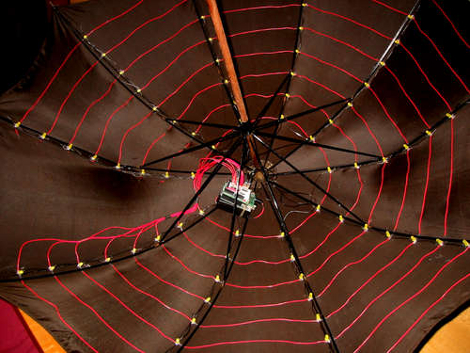
Let’s face it, walking around in the rain sucks. [Matth3w] is trying to add a little whimsy to an unpleasant experience by adding an LED matrix to his umbrella. The array contains 80 LEDs that are individually addressable. This is a mutiplexed array that relies on a MIC2981 source driver for the eight rows (or rings in this case), with the ten columns handled by the Arduino. The effect is quite nice as you can see in the video after the break. Now that he’s proven this works, you might want to etch your own PCB in order to get rid of the Arduino board and prototyping shield, making it easier to waterproof the control circuitry. This would make a nice addition to your illuminated umbrella stock.

Continue reading “Putting On A Show In The Rain”

Headpiece Jabbing For Smiles

Happiness_Hat

[Lauren] has created a facial conditioning device dubbed the Happiness Hat. The hat measures a sensor at the wearer’s cheek to determine if the wearer is smiling. When the hat does detects the wearer is not smiling, it activates a servo that prods the wearer. This project is fairly unique in that it provides haptic bio-feedback of what the body is doing, a similar project to the Happillow. While the Happiness Hat seems to work for treating the outward symptoms of unhappiness, this is but an early step towards the droud.

Vintage Video: Computing Across America

roberts

in 1983, [Steve Roberts] packed up a Tandy 100 laptop and a 5-watt solar panel, fleeing suburbia on his recumbent bicycle on what would become a 17,000 mile journey that forever cemented his place in the geek pantheon…not just as a technology hacker, but as one of the preeminent “life hackers,” pursuing his own dreams on his own terms and inspiring others to do the same.

In this 1989 video, recently unearthed by Hack a Day, [Roberts] reflects on the first 16,000 miles of his voyage, detailing some of the technology that went into his then-current ride, the Winnebiko II.

Continue reading “Vintage Video: Computing Across America”

Homing Pigeon Email

article-1212214-0659F596000005DC-336_468x324[1]

Yes, you read that correctly: electronic mail carried by birds. [Ferdinand] tipped us off to this story, which involves combining new and old methods in transferring data. The Unlimited Group, a firm in a remote section of South Africa, transfers loads of encrypted documents to a second office 50 miles away. A pricey broadband connection would take between 6 hours and two days to transfer a standard load (4GB) of data between these locations. On the other hand, Winston (seen above) can complete an equivalent flight within 45 minutes. A memory card is strapped to his leg, and using his wit and instinct, Winston finds his way home. For those without their calculators on hand, Winston’s bandwidth is between 7x and 63x faster than what they had before. If his flash card were to be upgraded to 16GB, that would be an instant fourfold increase on top of current gains. As [Mark] pointed out on the Daily Mail website, homing pigeons still need to be taken back to their departure point.

This solution still has its advantages over a courier: they are lower in cost, they work over longer hours, and have potentially faster delivery speeds. Multiple pigeons can be transported back at once, and released with data as needed.

Trim The Fat From Gmail

minimal gmail

Google’s Gmail is a highly viable option for email. With numerous features and options like widgets, a task list, labels, and chat, Gmail has a slight tendency to get overwhelming and might force us to loose focus on what it is really all about: email.

What can make Gmail better? For starters, how about no ads; they are cluttering and distracting. What about getting rid of the widgets and unnecessary features like labels and chat that we think are supposed to make us more productive but really only make us lose our focus to send, read and reply to email? Nobody knows Zen better than [Leo] at Zen Habits. We weren’t surprised that he and his friends (with Firefox and Greasemonkey) have found a way to trim all the unnecessary elements from Gmail and make it into an email powerhouse that focuses on a basic productive email client. The minimalist inbox for Gmail consists of Greasemonkey scripts for:

  • Removing gadgets
  • Hiding labels, chat and footer
  • Removing ads
  • Removing stars
  • Getting rid of the Gmail logo and searchbar
  • Removing menu navigation bar
  • Cleaning up and removing unnecessary buttons

To get started focusing on email, and only email, head on over to ZenHabits for a list of associated scripts and what exactly they can do to help you on your road to the minimalist Gmail.









