Programming Without A Toolchain; Crafting PIC Op Code By Hand

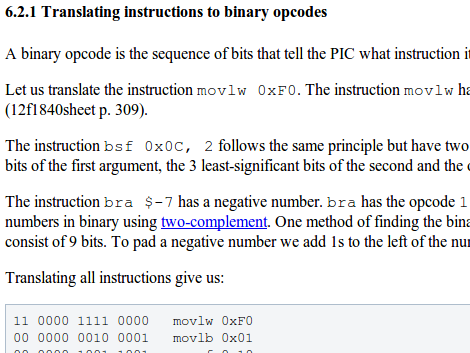
We’ve been living a life of luxury, writing our microcontroller code in a text editor and using — of all things — a compiler to turn it into something the chip can use. [Dan Amlund Thomsen] shows us a different way of doing things. He’s actually crafting the operation codes for a PIC microcontroller by hand. We’re glad he’s explained this in-depth because right now we feel way over our heads.

His program is pretty simple, it blinks a single LED and he’s chosen t work with a PIC 12F1840. The first order of business is to issues the words that configure the chip using 14-bit binary values from the datasheet. From there he goes on to write the program in assembly code. At this point he could pretty much just run this through the assembler, but he’s really just getting started now. He walks through the format necessary to package the configuration words, then goes on to illustrate the translation of assembly commands to binary op codes. We’re not sure we’ll ever get around to trying this ourselves, but it was certainly fun to read about it.
Help Create A Universal ARM Programmer

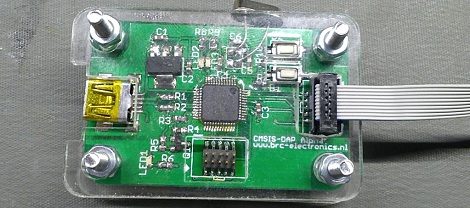
The new crop of ARM Cortex M0/M3/M4 microcontrollers have a lot of interesting features for developers. In addition to supporting drag and drop programming via USB, the same hardware can also be used as a debugger. Setting breakpoints and inspecting memory at any point in the code is a wonderful feature, but not all the new ARM dev boards we’ve seen support this feature.

The folks over on SimpleCortex have a solution to this problem, but they need your help. To get their CMSIS-DAP hardware working with Open Source tools, they’re looking for a few good programmers and hardware developers to build a toolchain.

Right now, the hardware only works with Keil development tools. A closed source development environment is no good to anyone, so if you have some experience writing drivers and such, send the guys at SimpleCortex an email. They’ll give you a free board in return for a contribution to building an open source ARM toolchain.

Common sense requires us to mention that you should probably only send these guys an email if you actually plan on working on this problem. Still, it’s a great opportunity to contribute to open hardware.

Video Preview: New IOIO Prototype

We got our hands on this prototype of the new IOIO design. It’s a breakout board that makes adding hardware to an Android device pretty easy.  [Ytai Ben-Tsvi] sent it our way, and took a bit of time to explain some of the differences between this board and the original version. You can see our video preview embedded after the break.

The size and form factor of the board remain the same, but the choice and layout of parts has changed. Most obviously, the USB-A connector is gone, replaced by a USB mini-B micro-B connector. This makes it possible to use the board as a USB-on-the-go device, or as a USB host device with the help of an adapter that will ship with the board. The JST connector is for external power. The previous revision included a footprint for it but it was never populated. There has also been an upgrade to the voltage regulation circuit, using a newer part as the switch-mode regulator.

There was a last-minute bug discovered in the layout. [Ytai] wants iron-clad 5V to ground short protection and is re-spinning the board to ensure he achieves that goal. He can’t say for sure, but as we mentioned in our previous post about the prototype, a price cut is planned. It could cut the current price of $50 down to just $30, but that won’t be decided until all of the choices have been made for the first production run.

Continue reading “Video Preview: New IOIO Prototype”

AVR Programmer Made Without A Programmer

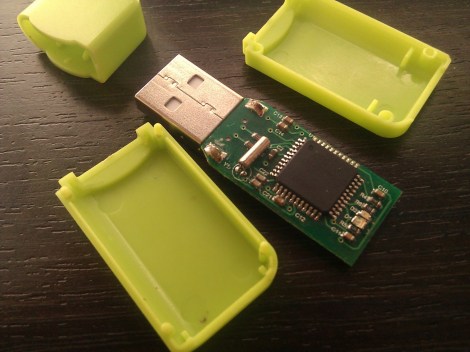
[blueHash] uses this cheap development board as an AVR programmer. What’s interesting to us is that it solves the chicken-or-egg problem that is usually encountered when bootstrapping a programmer. We’ve written about this issue before. Most programmers use microcontrollers, which first need to be flashed using a programmer. But it turns out the chip on this dev board has a DFU mode which gets around that conundrum.

He grabbed a uSD dev board for about $6. It’s got a crystal, an ATmega32u4 chip, and on the other side there’s a MicroSD card slot. We looked around and found an Atmel Datasheet (PDF) which describes the Device Firmware Upgrade mechanism. The AVR devices which support DFU are factory configured to use it. This dev board is designed to use DFU so all [blueHash] needed to do is find and configure a ISP firmware package that worked with this chip.

Dumping A C64 Kernel

[Blark] picked up a couple of Commodore 64 machines on Craig’s List so that he could play around with the SID chips inside. But there’s some other fun stuff in there and his attention was drawn to the PROM which stores the kernel. He thought it would be a fun adventure to build a ROM dumper capable of storing binary images.

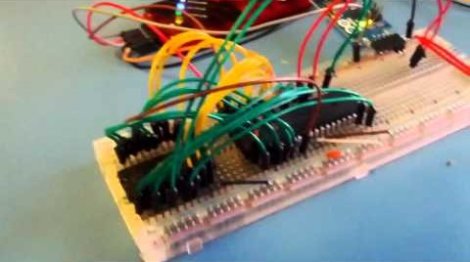
In the video after the break you can see that when powered up the dumper immediately starts streaming hex values to the terminal. The system is set up to feed a Python script which packs the data stream into an image file. The reading is done by a PIC 18F4520, streaming the data in at 9600 baud with a generous delay between each address read to get the cleanest read possible. He had a bit of help from the AVR Freaks to get to this point.

We’d guess he’s going to pull the image off the chip several times and compare results to filter out any possible data corruption. From there we’re not sure what he’ll do with the files but there’s always the possibility of making is own emulator using this kernel image.

Continue reading “Dumping A C64 Kernel”

Art Controller: Relay Board With Switches For Timing

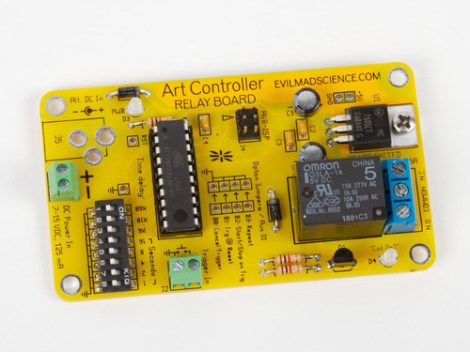
Meet the Art Controller, a new dev board available over at Evil Mad Scientist Laboratories. It provides a drop-in solution for switching higher voltage loads (but not mains). The thing we like most about it is the ability to alter a switching delay without reprogramming the firmware.

The board uses an ATtiny2313 for control. It’s fed regulated 5V power from the on-board 7805 linear regulator. The relay can handle a 24V DC or 40V AC load, which is targeted at an audience that needs electronic switching for art-related devices but doesn’t want the hassle of designing a circuit every time. This offers a single shot, or repeat action, with that bank of DIP switches selecting a delay from once every second, to every 31 hours. It can get its initial trigger from anything that can pull a pin low, like a button, or a coin acceptor.

Keep this in mind. The open source nature of the project means it could come in handy as a reference design.

STM32 F3 Discovery Dev Board Includes Some Extras

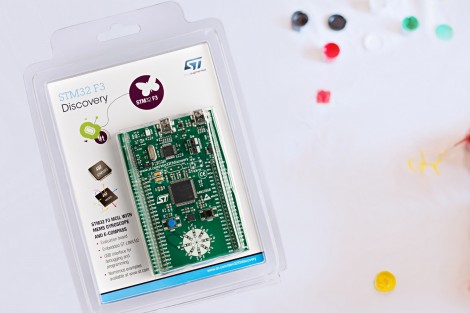
ST Microelectronics keeps kicking out development boards to show off their new ARM processor line. Yesterday they issued a press release announcing the STM32 F3 Discovery Board. As their naming scheme implies, this carries an ARM Cortex-M3 processor, but compared to the F0 Discovery board (which we loved) it’s got several extra goodies built into it.

We took a look at the F3 Discovery product page and it doesn’t look like you can order these quite yet. But click-through to the pricing and you’ll see they’ve set it at $10.90. Digikey lists the board at that price point, Mouser lists it at about $16, but neither supplier has any available. We also didn’t see a link for free boards like when the F0 model was released. If you do come across a giveaway link please tip us off about it.

Okay, now let’s discuss those extras. We think this dev kit could be used as an IMU for applications like a quadcopter or a self-balancing robot. That’s because it has a gyroscope and an accelerometer. It’s also got ten LEDs, eight of which are arranged on that white circle. We’d guess that layout is for displaying orientation data from the IMU sensors. There’s also a second USB port to use when developing USB applications for the chip.

Like the other boards in the Discovery family this has the STlinkV2 built-in to use as a programmer. We don’t know if OpenOCD has support for the F3 chipset yet, which is what we’ve been using to program STM chips in a Linux environment.