Creating A Multimedia Elevator Ride

[Ben Peoples] works in theatrical electronics. Sounds like fun, and here’s an example of the kind of stuff he does. We’re not sure what event this installation was used for, but if the elevator ride needed something flashy just think of what the party room must have looked like. These HDTV screens on the ceiling of the elevator play different clips when the elevator is moving up or down. The challenge for [Ben] was to find a way to make it work without tapping into the elevator electronics or requiring any button presses.

The first attempt at sensing the elevator’s travel was done with an accelerometer. The problem with this approach is that an accelerometer only senses change in acceleration and this method proved to be fairly error prone. [Ben] switched over to a reflective sensor which performed quite well. Since most of these sensors will only work within about an eighth of an inch he ended up building his own with a LDR and a couple of amber LEDs.

[via Reddit]
Arduino PIC Programmer Writes To 18F Family

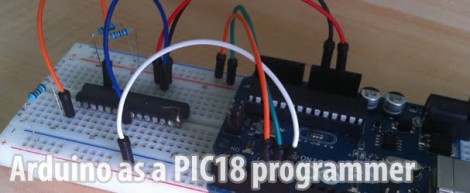
[Kirill] wrote in to share his Arduino-based PIC programmer. It is capable of writing to the 18F family of chips, including 18F2XXX and 18F4XXX. We think that’s pretty exciting because this line of chips has USB functionality and there are bootloaders out there that let you program them via USB. So if you wanted to build your own PIC dev-board (like this one) you can use your Arduino to flash the bootloader.

This post comes hot on the heels of the Arduino being used as a PIC 16F programmer. That hack has a rudimentary programming GUI, something that [Kirill] admits his lacks but has no plans to implement himself. Perhaps someone will do a little porting work to merge the projects, adding to the range of chips supported by this programming technique.

TI Launchpad As AVR ISP Programmer

[Minifloat] is using his TI Launchpad development board as an In-System Programmer for AVR chips (translated). There are a ton of homebrew AVR programmers out there, and using an Arduino for ISP is quite popular. But recently we searched for a way to use the Launchpad as a programmer and didn’t find one. We’d venture to say this is the first.

There is one hardware modification that must be made. An external clock crystal (32.768 kHz) must be populated on the board. But since it was designed with the feature in mind that’s a pretty quick process. [Minifloat] followed Atmel’s ISP app note, and extended some of the code written for a different programmer to get things up and running. At first the device wouldn’t communicate with AVRdude, but that turns out to be a problem with the initialization conversation. AVRdude polls the connected programmer to see if it supports block mode, and the firmware on the MSP430G2211 wasn’t expecting this query. The problem was fixed and it now works.

It sounds like there are a couple of bugs left in the system. The first time AVRdude accesses the programmer after it has been plugged into the USB port it will fail. Subsequent attempts will succeed until the MSP430 chip is reset, or the USB connection is replugged. But if you’re just getting into the AVR line, this will let you figure out if you want to invest in a proper programmer.

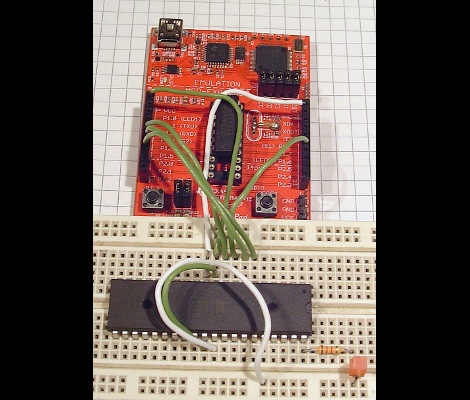
BASIC For Some Beefy AVR chips

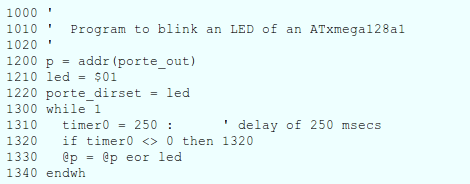
klBASIC is a BASIC interpreter written in C for AVR microcontrollers. [Karl Lunt] developed the project based on an assembly language BASIC interpreter for 68HC11 chips written by [Gordon Doughman]. The transition from assembly to C bulked up the code, so you’ll need a beefy AVR chip in order to store all of it.

The idea is that one AVR chip can run BASIC with just a serial monitor. But like this Arduino BASIC interpreter build, it would be a snap to run this with a keyboard and small LCD screen. We see binaries available for several different AVR devices including ATmega128, ATmega1284, and Xmega128. They range from 1.5k to 16k of program memory. We didn’t find a link to the source code (just these precompiled files) so we inquired with [Karl] to see if that is available. He’s reluctant to release the code because it’s “pretty much a mess” and doesn’t live up to his normal standards. If he codes for a living we can see how that may be embarrassing. If you’d like to lend a hand cleaning up the code, let him know by leaving a comment here and maybe he’ll release it for that purpose.

We find this interesting, but it’s tough to get excited about building one of our own. If this has inspired you, we’d love to hear some of your plans in the comments after the break. Perhaps we’d be prodded into another programming adventure based on your enthusiasm.

Reverse Engineering A Plasma Dot Matrix Display

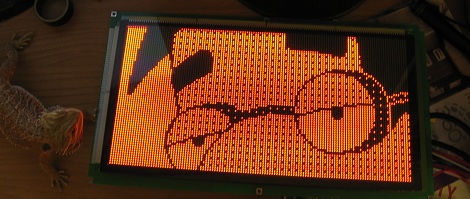
A while back, [DragonMinded] picked up a bunch of old arcade and pinball parts from a guy on Craigslist. These parts sat around for a while until a really neat plasma dot matrix display was found in the corner of a box in his garage. Doing the only reasonable thing, [DragonMinded] figured out how to interface this ancient display with a microcontroller.

After extensive Internet research on his display, [DragonMinded] could only find a one page datasheet for his APD-128G064A-1 display. Luckily, this datasheet had voltage requirements, and since the display only had six input pins he could probe the circuit to see what goes where.

After generating a crude schematic, [DragonMinded] prototyped a driver circuit with an Arduino. When the function of each pin was discovered, the Arduino libraries were discarded and replaced with raw register access.

It was a fair amount of work, but [DragonMinded] eventually got to the point where he could draw anything he wanted on the screen. Next on the to-do list is turning it into a terminal or Twitter machine, as with all good display hacks.

Arduino Can Program PIC Too!

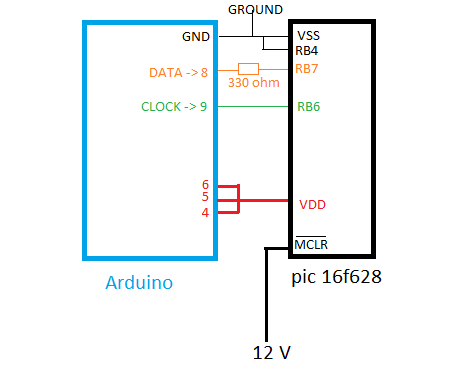
This is a wiring diagram that [Soranne] put together when developing a method of programming PIC microcontrollers using an Arduino board. You can see that he takes care of the 12V issue by connecting the Master Clear (MCLR) pin to an external source. This comes with one warning that the Arduino should always be reset just before making that connection.

He’s tested this with a 16F628 and is happy to report that he can successfully flash the program memory, but hasn’t implemented a way to write to the EEPROM as of yet. This should work for any of the 16F family of chips, but we’d bet this will be extended if some knowledgeable folks decide to lend a hand.

On the PC side of things [Soraane] has been working on a program to push code to the Arduino via the USB connection. He’s developing it in C# and even has a GUI worked up for the project. You can get your hands on the software in the second post of the thread linked above but you’ll have to be logged into the Arduino forum to see the download link.

We think the 12V issue is why we don’t see more roll-your-own programmers for PIC. But there are a few solutions out there like this ATmega8 version.

Playing Pong With Your Mind

It seems [Charles Moyes] and [Mengxiang Jiang] won’t suffer from the sore wrists and thumbs from an Atari controller any longer. They built a version of Pong played by concentrating and relaxing while wearing an EEG headset.

Right now, there’s only enough hardware for one player; when the player operating the red paddle concentrates the paddle moves up – relax, it goes down.

The hardware portion of the build is fairly tricky business. [Chuck] and [Mengxiang] built a circuit to amplify the tiny voltages between their ears into something a microcontroller can read. The circuit is loosely based on this Arduino EEG build, but highly refined as the elegance of an ATMega644 requires.

The EEG amplifier has a cutoff of under 50 Hz, perfect for reading the Alpha waves correlated with concentration. The oscillations from the skull-cap are sent through the ATMega to MATLAB where after a pass through an FFT the brain waves are converted to mouse scroll wheel output.

There’s a demo video available where you can see spectators screaming at the poor test subject telling him to relax and concentrate on command. You can check that out after the break.

Continue reading “Playing Pong With Your Mind”