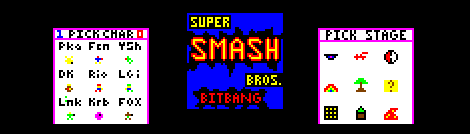
Bitbanging Super Smash Bros.

[Kyle] and an a few of his classmates are wrapping up a microcontroller interfacing class at Purdue and thought it best to send in the results of their efforts. It’s a version of Super Smash Bros. made by just bitbanging pins on a microcontroller.

The hardware for the project is based around a Freescale 9S12c32, an updated version of the 30-year-old M68HC11 microcontroller. For the controls, the guys used a Playstation 2 joystick and buttons housed in an Altoids box, and the actual console is made out of strips of wood stapled together to look like a crate from Super Smash Bros.

There are nine playable characters:  Pikachu, Captain Falcon, Yoshi, Donkey Kong, Mario, Luigi, Link, Kirby, and Fox. Despite these characters being only four pixels high, the game looks extremely playable (at least when two players don’t choose the same character). After the break is the video demo of Super Smash Bros: Bitbang edition, along with a gallery of pics showing the console and gameplay. All the code is up on GitHub for your perusal.
Continue reading “Bitbanging Super Smash Bros.”

Receiving Asynchronous Data Bursts

[Johan’s] been working on a chunk of code for about seven years and he thinks it’s ready to help you with your next project. He calls it D1 (The One) and it lets you receive asynchronous data without the need for a hardware USART. It’s capable of working with signals from an IR or RF remote, as well as tangentially related transmissions like RFID and magstripe readers.

It uses timer and port interrupts to sample the incoming data. Once it’s captured a transmission, the code sets a flag so that you can pull what it got into your own application. If you’re expecting to receive a protocol that sends packets several times in a row a verification module is also included which runs as a precondition of setting the received flag. The package is written in PIC assembly, but with all the information that [Johan] included in his post this shouldn’t be hard to port over to other chip architecture.

Automating Household Devices With Google Calendar

[Shane] is building a new house and wants some, “subtle home automation” as he calls it. His first project is hooking up a small heater to the Internet, and judging from his demo video everything is going swimmingly.

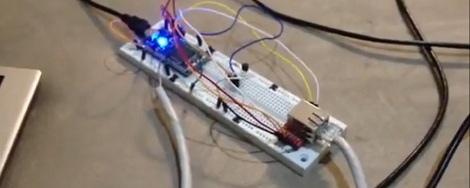
[Shane]’s project is built around an mbed microcontroller that connects to the Internet via an Ethernet connection. The mbed has a temperature controller and a solid state relay to turn the heater on an off; simple enough, but we really like how easily [Shane] connected his project to Google Calendar.

After looking over the Google API, [Shane] was understandably overwhelmed. He figured out that by syncing the mbed’s clock to network time and sending a GET request for one minute in the future, the mbed would always know what was scheduled with a minimal delay.

Now, all [Shane] does to turn on his heater is schedule a time and temperature in Google Calendar. He can do this from across the globe or country and makes for a really slick part of a home automation system.

Continue reading “Automating Household Devices With Google Calendar”

Driving A T6963C Based Graphic LCD

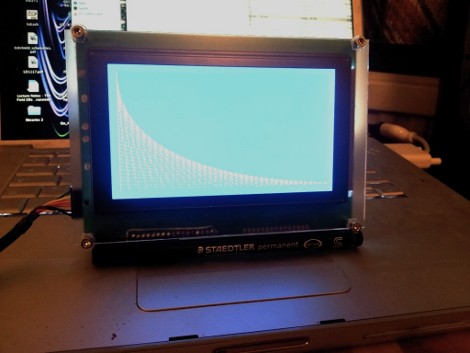
[Tom Fleet] spent the dreary weekend inside learning how to drive this T6963C based graphic LCD controller. Although this is his first time venturing away from HD44780 character displays, the availability of an Arduino library helped him go from being a newbie to coding his own animated graphics.

The hardware setup is straight-forward. The screen has a 20-pin connector and operates at 5V. We don’t see it on his protoboard, but usually these displays also need a potentiometer which serves as a voltage divider for the screen contrast. The data and control pins eat up most of the available I/O on the ATmega328 chip he used, but the I2C and SPI pins are still open and he plans a future project to make this a wireless display for his PC using one of those protocols.

As for fonts and animation, [Tom] links to several tools which will come in handy. There’s a font program that will convert Windows system fonts into a C file for use on the Arduino. The animations start with a 1:1 ratio animated graphic drawn with his favorite image editing software. He then converts those to monochrome bmp files and used bmp2c to convert each frame to a C array. After the break there’s a seven second example that would work well as a boot screen for his project.

Continue reading “Driving A T6963C Based Graphic LCD”

Finding Your Keys With Bluetooth

[doragasu]’s wife is always misplacing her keys. To solve this problem, [doragasu] created a small Bluetooth-enabled key fob that is able to remotely sound an alarm when commanded to by a cell phone.

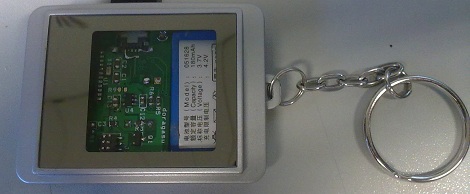
The case and LiPo battery of [doragasu]’s project comes from a small photo frame key fob. The LCD display and PCB of the photo frame were tossed aside for a future project, and the design of the circuit started. The Bluetooth buzzer key fob is based around an MSP430 microcontroller because of their extremely low power requirements.

On the software side of things, [doragasu] built a J2ME app to connect to the key fob and turn the buzzer on. His app is portable to any Android phone, and versions can be ported to Windows, OS X and iOS devices.

How does it work? Well, [doragasu]’s wife sometimes forgets to charge her key fob, rendering the whole project useless. There are ideas for  updating the device to a Bluetooth 4.0 Low Energy device, but no actionable plans. Still, very good work. You can check out [doragasu]’s walkthrough and demo video after the break.

Continue reading “Finding Your Keys With Bluetooth”

Using A Touch Sensor As A Telegraph Key

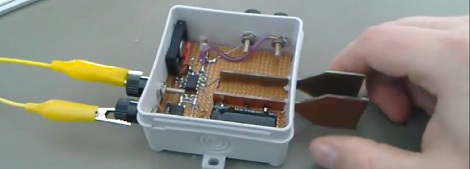
[Sebastian] is learning Morse code and CW radio, and of course he needed a telegraph key. Instead of using the terribly unergonomic paddle style key, he built a capacitive touch iambic key over the course of a few evenings.

An iambic key usually has two switches. When one switch is closed, it will transmit a ‘dit’. When the other switch is closed, it will transmit a ‘dah’. Instead of using mechanical paddles, [Sebastian] brought his iambic key into the 21st century by using a touch sensor. An ATtiny45 measures the time it takes for a single metal plate to fully charge. It’s the same idea behind the wonderful Arduino CapSense library.

This isn’t the first capacitive-touch iambic key we’ve seen; this little guy is just a pair of metal contacts and resistors that plug right into an Arduino. With an ATtiny45, [Sebastian]’s build is a full-blown iambic telegraph key that plugs right into his CW rig. You can check out the walk through of the project along with [Sebastian] trying out his iambic key after the break.

Continue reading “Using A Touch Sensor As A Telegraph Key”

Simple Proximity Sensor

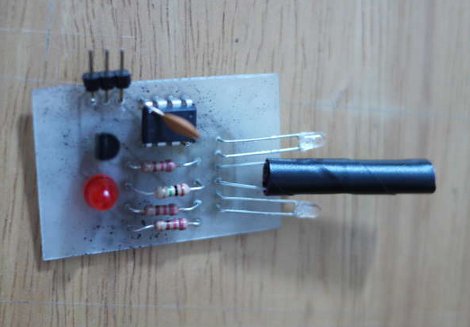
[Dustin Andrews] built this add-on board which works as a proximity sensor. He wanted a standalone sensor for his Arduino projects which would use a single pin as a trigger. This lets him alert the Arduino when an object approaches the sensor without the need for polling or extra code on the Arduino side of things.

As you can see, a single chip on the board takes care of all the work. That’s an ATtiny13, they’re inexpensive and sometimes you can even salvage them from consumer electronics like this color changing light bulb. The microcontroller monitors the phototransistor which is wrapped in electrical tape to isolate it from the IR LED emitters on either side. This setup creates a reflective sensor. When an object nears the board, the infrared light from the emitters reflects off of it and onto the phototransistor. And since the Arduino works as an AVR programmer you don’t need special hardware to program the device.