Chipcon CC1110/CC1111 Serial Bootloader

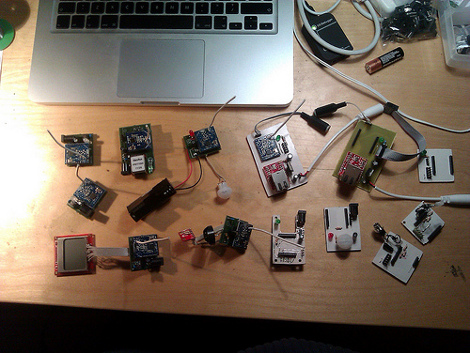
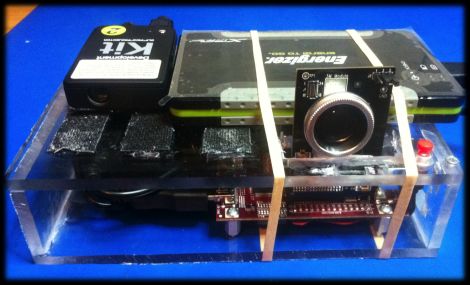
[Joby Taffey] just rolled out a serial bootloader for the Chipcon CC1110/CC1111 processors. The project is called CCTL and aims to make prototyping with the Girltech IM-ME a bit less tedious. Up until now firmware for the device had to be pushed in with a GoodFET or TI proprietary programmer which was quite slow. But this bootloader makes it possible to push your code via the chip’s serial port at 115200 baud. But the pretty pink pager isn’t the only device using these chips and to prove it [Joby] send this picture of all the electronics he has on hand running this architecture.

Once the 1KB CCTL bootloader has been flashed to the chip, a serial port or USB to Serial converter can be used as a programmer. [Joby] warns that the Chipcon processors are not 5V tolerant so you need to either use a 3V serial converter or add a level converter into the mix.

CCTL provides the features you’d expect from a bootloader. It uses the chip’s watchdog timer to guard against failure due to broken code. And there is an upgrade mode available at power up. Instruction for use are included in the Github repo linked at the top.

A Capacitive Discharge Welder/cutter For All Your Lightweight Needs

microspot-welder

[Radu Motisan] wrote in to share a cool project he has been working on lately, a pulsed microspot welder/cutter.

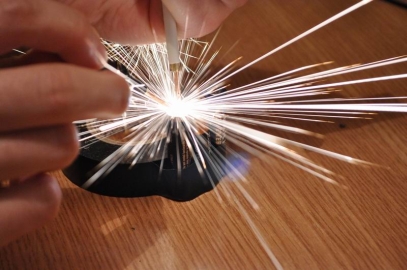
The device is capable of spot welding thin metals such as foils and battery tabs by sending a pair of high current pulses between the two electrodes whenever [Radu] presses the trigger button. The cutting portion of his device uses the same general mechanism, though it requires a far greater number of pulses to get the work done.

The welding/cutting process is controlled by an ATMega16, which is also tasked with taking input from the user and displaying information on the LCD panel. The microcontroller creates quick (in the ten to several hundred microsecond range) pulses for both welding and cutting, with the latter obviously requiring a long series of pulses.

[Radu] started out using a relatively small capacitor array to power the device, but has recently upgraded to a 1.6 Farad car audio capacitor, which works (and looks) much better than before. His blog seems to update every few days with more pictures and details about his welding station, so be sure to check back often for updates.

Be sure to stick around to see a short video of [Radu] adding metal tabs to batteries and tearing down an aluminum can with his cutter.

Continue reading “A Capacitive Discharge Welder/cutter For All Your Lightweight Needs”

$10 Camera Module For Your Next FPGA Project

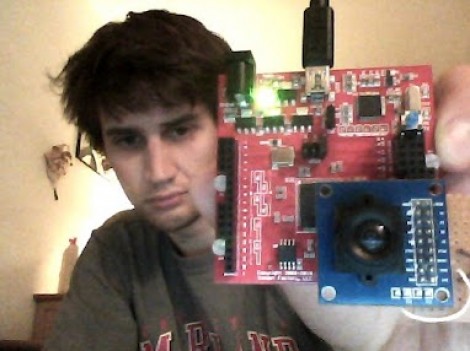
Here is [Voelker] showing off his FPGA-based camera hardware. He picked up an ov7670 camera on eBay for about $10 and set to work pulling pixels and processing the images. He’s now able to grab thirty frames per second and push them to his own Java display application. He’s using the Papilio board and if you want to give this a try yourself you might be able to snag a free breakout board (wing) for the unit.

[Voelker’s] approach is to grab each frame, and get it ready for quick serial transmission. The incoming frames are at 640×480 resolution. He scales that down to 80×60 and transmitted at 3M baud. The hardware resources used are actually quite light-weight. He wrote his own modules for transfer and photo processing using very little RAM for downscaling and one 128 byte buffer for data transmission. It sounds like he plans to use the camera to view and detect a line to create his own line-following robot.

Wondering where you’ve seen the ov7670 module before? It’s the part used on the TRAKR robot.

3D Graphics On An Oscilloscope

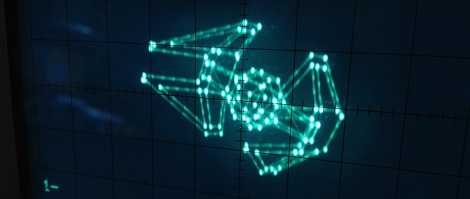
Armed with four wingtip-mounted Sienar Fleet Systems L-s9.3 laser cannons and a SFS P-s5.6 twin ion engine, the TIE Interceptor has become the scourge of the Rebel fleet, nearly capable of out-running and out-maneuvering the beloved A-wings of Nomad Squadron. Because of [Matt]’s tireless work, we can now visualize TIE Interceptors on approach with our targeting computers oscilloscopes.

[Matt]’s oscilloscope visualization of a TIE fighter is a huge improvement on previous scope displays we’ve seen, considering [Matt] used very minimal hardware to display 3D graphics. The build uses an ATMega88 along with a 10-bit DAC to draw lines on the screen. The capacious Mega88 with 8kB of flash and 1kB of SRAM was nearly filled to capacity with [Matt]’s project; to improve the rendering speed of the display, sine & cosine values are pre-computed and stored in flash along with division tables for common values.

The rotation of the TIE fighter is controlled by a serial connection to [Batt]’s desktop. It’s a very impressive piece of work that looks like it would fit into the cinematic aesthetic of The Empire Strikes Back. Check out [Matt]’s video of the TIE rotating in space after the break.

Continue reading “3D Graphics On An Oscilloscope”

Building Your Own Portable 3D Camera

diy-3d-camera

[Steven] needed to come up with a project for the Computer Vision course he was taking, so he decided to try building a portable 3D camera. His goal was to build a Kinect-like 3D scanner, though his solution is better suited for very detailed still scenes, while the Kinect performs shallow, less detailed scans of dynamic scenes.

The device uses a TI DLP Pico projector for displaying the structured light patterns, while a cheap VGA camera is tasked with taking snapshots of the scene he is capturing. The data is fed into a Beagleboard, where OpenCV is used to create point clouds of the objects he is scanning. That data is then handed off to Meshlab, where the point clouds can be combined and tweaked to create the final 3D image.

As [Steven] points out, the resultant images are pretty impressive considering his rig is completely portable and that it only uses an HVGA projector with a VGA camera. He says that someone using higher resolution equipment would certainly be able to generate fantastically detailed 3D images with ease.

Be sure to check out his page for more details on the project, as well as links to the code he uses to put these images together.

BB313 Breadboard Platform Makes ATtiny Prototyping Painless

Johngineer's BB313

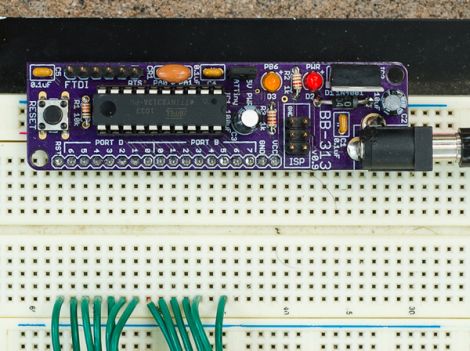
[John De Cristofaro aka Johngineer] uses various ATmega microcontrollers in his electronics projects, but he finds himself reaching for an ATtiny2313 or ATtiny4313 more often than not. He got tired of having to wire up pin headers, capacitors, and the like each time he started a project, so he spent some time designing an easy to use breadboard platform around the chips.

Inspired by LadyAda’s Boarduino, his BB313 board features FTDI pin headers, an ISP programming header, a reset button, along with breakout pins that plug directly into any breadboard. Aside from sharing a similar layout, [John] says that the similarities end there. His board is designed for designers who program in C or C++, so Arduino code won’t run without some substantial modification.

The board looks like a pretty handy benchtop tool, and we’re pretty sure it would be a big time saver for anyone who uses these chips with any frequency. [John] says that the board cost about $6.50 to make when he put it together, but that prices might vary slightly depending on where you have your PCBs made.

Be sure to swing by his site if the design looks like it might be helpful. He has made the schematics, a bill of materials, and all the rest available for the taking.

[via Adafruit blog]

WAV Playback With An ATmega32

[Vinod Stanur] just finished another hobby project by building a WAV audio player using a microcontroller. He had started development a while back using a PIC microcontroller. But the chip he was using didn’t have enough SRAM to allocate as a playback buffer. When he got his hands on an ATmega32 his mind turned back to the project and he saw it through to the end.

He takes advantage of what he learned on several earlier builds. He’s using a TV remote as input, just like his Snake game did. Storage is provided by an MMC card, a trick he perfected with this voice recorder project. Instead of using a FAT library, he uses his own code to read the linked-list (File Allocation Table) for sector addresses, then he parses the WAV header and processes the file accordingly.

Playback uses two 512 byte buffers. One is feeding the output while the other is being populated from the memory card. When the output buffer is exhausted the two are swapped and the process continues. You’ll find [Vinod’s] demo of the project after the break.

Continue reading “WAV Playback With An ATmega32”