Toward The Optionally Piloted Aircraft

Aviation Week and Space Technology, the industry’s leading magazine, has been publishing “pilot reports,” on new aircraft for decades. Its pilot report on an aircraft called Centaur ⁠was the first in which the pilot doing the test never touched the controls. Centaur is an optionally-piloted aircraft, or OPA.

The reporter conducted the test while sitting in the back seat of the small, twin engine aircraft. Up front sat a person acting as the safety pilot, his arms calmly resting on his lap. Sitting beside him, in what is ordinarily the co-pilot’s seat, was an engineered series of linkages, actuators, and servos. The safety pilot pulled a lever to engage the mechanisms, and they began moving the pilot’s control stick and pressing the rudder pedals. The actuators are double and redundant; if one set fails another will immediately take over. The safety pilot can disengage the mechanism with a single pull of the lever if something goes wrong; unless something goes wrong he does not touch the controls.

In the back seat, the “operator,” commanded the plane through a laptop, using an interface identical to that of the ground control station for an unmanned vehicle. Through the screen, he could change altitude, fly to waypoints, takeoff or land. Pushing the “launch” button began an autonomous takeoff. The computer held the brakes, pushed the throttles forward, checked the engines and instruments, and released the brakes for the takeoff roll. The plane accelerated, took to the air, and began to climb out on a semi-autonomous flight.
Continue reading “Toward The Optionally Piloted Aircraft”

Prototype Sodium Ion Batteries In 18650 Cells

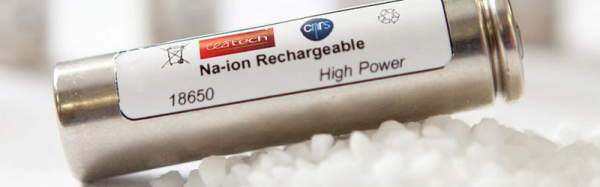
French researchers have announced a prototype of an 18650 sodium-ion battery. If you’ve bought a powerful LED flashlight, a rechargeable battery pack, or a–ahem–stronger than usual LASER pointer, you’ve probably run into 18650 batteries. You often find these inside laptop batteries and –famously– the Tesla electric vehicle runs on a few thousand of these cells. The number might seem like a strange choice, but it maps to the cell size (18 mm in diameter and 65 mm long).

The batteries usually use lithium-ion technology. However, lithium isn’t the only possible choice for rechargeable cells. Lithium has a lot of advantages. It has a high working voltage, and it is lightweight. It does, however, have one major disadvantage: it is a relatively rare element. It is possible to make sodium-ion batteries, although there are some design tradeoffs. But sodium is much more abundant than lithium, which makes up about 0.06% of the Earth’s crust compared to sodium’s 2.6%). Better still, sea water is full of sodium chloride (which we call salt) that you can use to create sodium.

Continue reading “Prototype Sodium Ion Batteries In 18650 Cells”

Storing Energy In Liquid Form

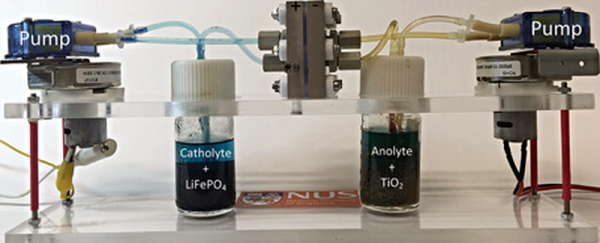
Researchers in Singapore have created a new kind of redox flow battery with an energy density around ten times higher than conventional redox flow batteries. Never heard of a redox flow battery? These rechargeable batteries have more in common with fuel cells than conventional batteries. They use two circulating liquids separated by a membrane as an electrolyte. Each liquid has its own tank, and you can recharge it by pumping in fresh electrolyte. The redox in the name is short for reduction-oxidation and refers to the process that stores energy in the two liquids. You can learn more about flow batteries in the video from Harvard below.

Continue reading “Storing Energy In Liquid Form”

KiCad 4.0 Is Released

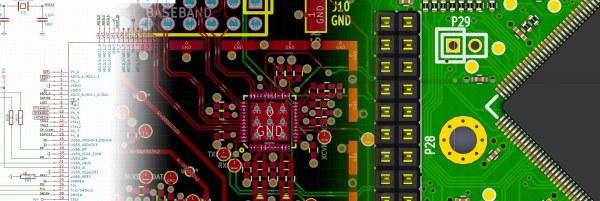
If you’re a KiCad user, as many of us here at Hackaday are, you’ll be elated to hear that KiCad 4.0 has just been released! If you’re not yet a KiCad user, or if you’ve given it a shot in the past, now’s probably a good time to give it a try. (Or maybe wait until the inevitable 4.0.1 bugfix version comes out.)

If you’ve been using the old “stable” version of KiCad (from May 2013!), you’ve got a lot of catching-up to do.

The official part footprint libraries changed their format sometime in 2014, and are all now hosted on GitHub in separate “.pretty” folders for modularity and ease of updating. Unfortunately, this means that you’ll need to be a little careful with your projects until you’ve switched all the parts over. The blow is softened by a “component rescue helper” but you’re still going to need to be careful if you’re still using old schematics with the new version.

The most interesting change, from a basic PCB-layout perspective, is the push-and-shove router. We’re looking for a new demo video online, but this one from earlier this year will have to do for now. We’ve been using various “unstable” builds of KiCad for the last two years just because of this feature, so it’s awesome to see it out in an actual release. The push-and-shove router still has some quirks, and doesn’t have all the functionality of the original routers, though, so we often find ourselves switching back and forth. But when you need the push-and-shove feature, it’s awesome.

If you’re doing a board where timing is critical, KiCad 4.0 has a bunch of differential trace and trace-length tuning options that are something far beyond the last release. The 3D board rendering has also greatly improved.

Indeed, there are so many improvements that have been made over the last two and a half years, that everybody we know has been using the nightly development builds of KiCad instead of the old stable version. If you’ve been doing the same, version 4.0 may not have all that much new for you. But if you’re new to KiCad, now’s a great time to jump in.

We’ve covered KiCad hacks before, and have another article on KiCad add-on utilities in the pipeline as we write this. For beginners, [Chris Gammell]’s tutorial video series is still relevant, and is a must-watch.

Thanks [LC] for the newsworthy tip!

Listen Up: IPhone Hack Diagnoses HVAC

We all know that guy (or, in some cases, we are that guy) that can listen to a car running and say something like, “Yep. Needs a lifter adjustment.” A startup company named Augury aims to replace that skill with an iPhone app.

Aimed at commercial installations, a technician places a magnetic sensor to the body of the machine in question. The sensor connects to a custom box called an Auguscope that collects vibration and ultrasonic data and forwards it via the iPhone to a back end server for analysis. Moving the sensor can even allow the back end to determine the location of the fault in some cases. The comparison data the back end uses includes reference data on similar machines as well as historical data about the machine in question.

Continue reading “Listen Up: IPhone Hack Diagnoses HVAC”

Power Over WiFi Might Not Be A Unicorn After All

There have been a few reports of power over WiFi (PoWiFi) on the intertubes lately. If this is a real thing it’s definitely going to blow all of the IoT fanboys skirts up (sorry to the rest of you *buzzword* fanboys, the IoT kids flash-mobbed the scene and they mean business).

All of the recent information we found points to an article by [Popular Science] titled “Best of What’s New 2015”. The brief write up includes a short summary lacking technical info, and fair play to [PopSci] as it’s a “Best Of” list for which they hadn’t advertised as an in-depth investigation.

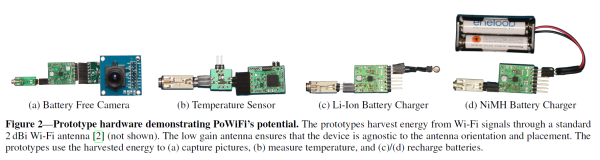
However, we tend to live by the “If you’re gonna get wet, you might as well swim.” mentality, so we decided to get a little more information on the subject. After a bit of digging around we came across the actual article on [Cornell University]’s e-print archive where you can download the PDF that was published.

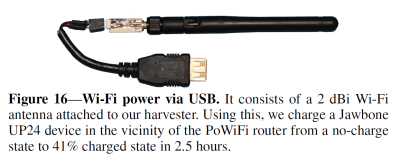
USB energy harvesting dongle.

The paper goes into detailed explanation of the power harvesting theory including a schematic of the receiving end hardware. They had to create a constant transmission for the harvester to get over its minimum required voltage of operation. This was done with one of the wireless router’s unused channels to fill the voids of packet-less silence between normal WiFi communication.

As you can imagine PoWiFi is currently limited to powering/charging very low power devices that are used intermittently. The research team was able to charge a Jawbone headset at a rate of 2.3mA for 2.5 hours which resulted in the battery going from 0-41%. The punchline here is the distance, the device being charged was only 5-7cm from the PoWiFi router which is getting close to inductive charging range. The researchers stated in the paper that they were looking into integrating the harvesting circuitry and antenna into the headset while working towards a larger charging distance.

At the time of writing this article it seems that PoWiFi is best suited for devices such as: low powered sensors and motion activated cameras that have increased energy storage capacity, which the team mentioned as one of the continued research possibilities.

We’ve covered numerous wireless power projects before, some legit and some we still get a kick out of. Where do you think this one falls on that spectrum? Let us know in the comments below.

Thanks to [ScottVR] for the tip.

The $5 Raspberry Pi Zero

Rumors about a new Raspberry Pi have been circulating around the Internet for the past week or so. Speculation has ranged from an upgraded Model A or compute module to a monster board with Gigabit Ethernet, USB 3.0, SATA and a CPU that isn’t even in production yet. The time is now, and the real news is even more interesting: it’s a $5 Raspberry Pi Zero. It’s the smallest Pi yet, while still keeping the core experience.

Continue reading “The $5 Raspberry Pi Zero”