Active Ideal Full Bridge Rectifier Using TEA2208T

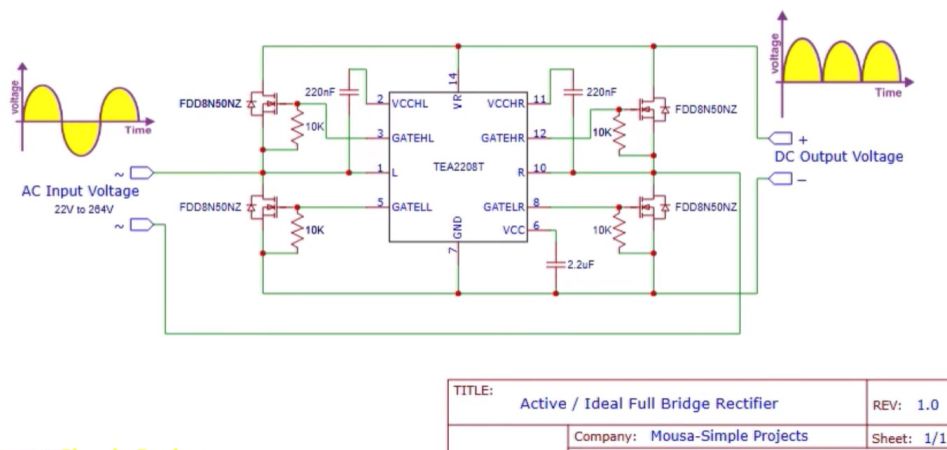
Everyone loves a full-wave bridge rectifier, but there’s no denying that they aren’t 100% efficient due to the diode voltage drop. Which isn’t to say that with some effort we cannot create an ideal bridge rectifier using active components, as demonstrated by [Mousa] with an active bridge circuit. This uses the NXP TEA2208T active bridge rectifier controller, along with the requisite four MOSFETs.
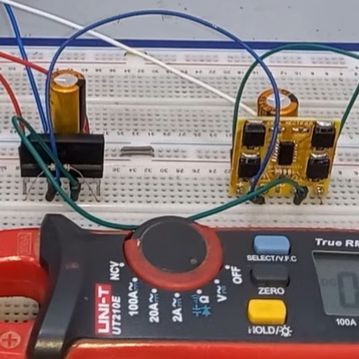
Comparing a diode bridge rectifier with an active bridge rectifier. (Credit: Mousa, YouTube)

Taking the circuit from the datasheet, a PCB was created featuring four FDD8N50NZ MOSFETs in addition to the controller IC. These were then compared to a diode-based bridge rectifier, showing the imperfections with the latter when analyzing the output using an oscilloscope.

As expected, the active rectifier’s output was also one volt higher than the diode bridge rectifier, which is another small boost to overall efficiency. According to NXP’s product page, there’s about a 1.4% efficiency gain at 90 VAC, with the chip being promoted for high-efficiency operations. When you consider that many designs like computer PSUs feature one or more diode bridge rectifiers often strapped to heatsinks, the appeal becomes apparent. As for [Mousa], he put this particular board in his laboratory PSU instead of the diode bridge rectifier, because why not.

Perhaps the biggest impediment to using an active rectifier is the cost, with the TEA2208T coming in at $4 on DigiKey for a quantity of 100, in addition to the MOSFETs, PCB, etc. If power efficiency isn’t the goal, then some wasted power and an aluminium heatsink is definitely cheaper.

Continue reading “Active Ideal Full Bridge Rectifier Using TEA2208T”
Print Your Next LED Bezel

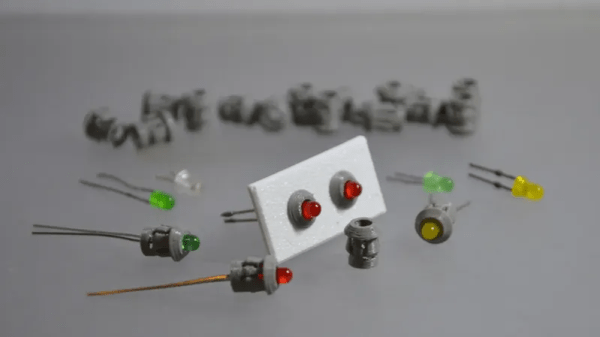
LED bezels (also known as LED panel-mount holders) are great, so how about 3D printing the next ones you need? Sure, they’re inexpensive to purchase and not exactly uncommon. But we all know that when working on a project, one doesn’t always have everything one might need right at hand. At times like that, 3D printing is like a superpower.

Printing a part you find yourself short of can be a lifesaver.

[firstgizmo]’s design is made with 3D printing in mind, and most printers should be able to handle making them. Need something a little different? You’re in luck because the STEP files are provided (something we love to see), which means modifications are just a matter of opening them in your favorite CAD program.

There’s not even any need to export to an STL after making tweaks, because STEP support in slicer programs is now quite common, ever since PrusaSlicer opened that door a few years ago.

Not using 5 mm LEDs, and need some other size? No problem, [firstgizmo] also has 3 mm, 8 mm, and 10 mm versions so that it’s easy to mount those LEDs on a panel. Combined with a tool that turns SVG files into multi-color 3D models, one can even make some panels complete with color and lettering to go with those LEDs. That might be just what’s needed to bring that midnight project to the next level.

Roll Your Own Hall Effect Sensor

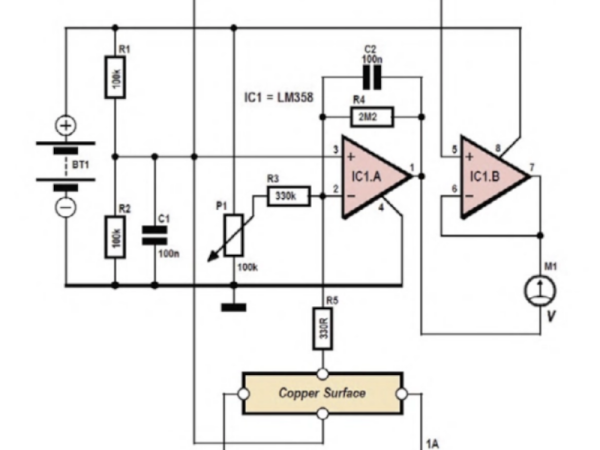
If you read about Hall effect sensors — the usual way to detect and measure magnetic fields these days — it sounds deceptively simple. There’s a metal plate with current flowing across it in one direction, and sensors at right angles to the current flow. Can it really be that simple? According to a recent article in Elektor, [Burkhard Kainka] says yes.

The circuit uses a dual op amp with very high gain, which is necessary because the Hall voltage with 1 A through a 35 micron copper layer (the thickness on 1 oz copper boards) is on the order of 1.5 microvolts per Tesla. Of course, when dealing with tiny voltages like that, noise can be a problem, and you’ll need to zero the amplifier circuit before each use.

The metal surface? A piece of blank PCB. Copper isn’t the best material for a Hall sensor, but it is readily available, and it does work. Of course, moving the magnet can cause changes, and the whole thing is temperature sensitive. You wouldn’t want to use this setup for a precision measurement. But for an experimental look at the Hall effect, it is a great project.

Today, these sensors usually come in a package. If you want to know more about the Hall effect, including who Edwin Hall was, we can help with that, too.

Silicon-Based MEMS Resonators Offer Accuracy In Little Space

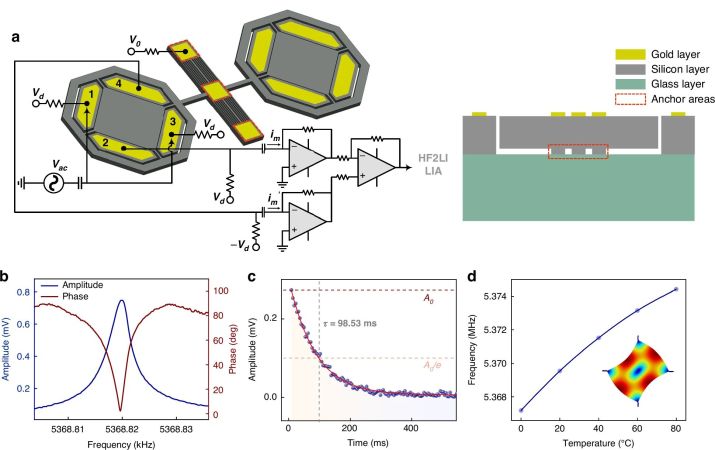
Currently quartz crystal-based oscillators are among the most common type of clock source in electronics, providing a reasonably accurate source in a cheap and small package. Unfortunately for high accuracy applications, atomic clocks aren’t quite compact enough to fit into the typical quartz-based temperature-compensated crystal oscillators (TCXOs) and even quartz-based solutions are rather large. The focus therefore has been on developing doped silicon MEMS solutions that can provide a similar low-drift solution as the best compensated quartz crystal oscillators, with the IEEE Spectrum magazine recently covering one such solution.

Part of the DARPA H6 program, [Everestus Ezike] et al. developed a solution that was stable to ±25 parts per billion (ppb) over the course of eight hours. This can be contrasted with a commercially available TCXO like the Microchip MX-503, which boasts a frequency stability of ±30 ppb.

Higher accuracy is achievable by swapping the TCXO for an oven-controlled crystal oscillator (OCXO), with the internal temperature of the oscillator not compensated for, but rather controlled with an active heater. There are many existing OCXOs that offer down to sub-1 ppb stability, albeit in quite a big package, such as the OX-171 with a sizable 28×38 mm footprint.

With a MEMS silicon-based oscillator in OXCO configuration [Yutao Xu] et al. were able to achieve a frequency stability of ±14 ppb, which puts it pretty close to the better quartz-based oscillators, yet within a fraction of the space. As these devices mature, we may see them eventually compete with even the traditional OCXO offerings, though the hyperbolic premise of the IEEE Spectrum article of them competing with atomic clocks should be taken with at least a few kilograms of salt.

Thanks to [anfractuosity] for the tip.

Magnetic Transformer Secrets

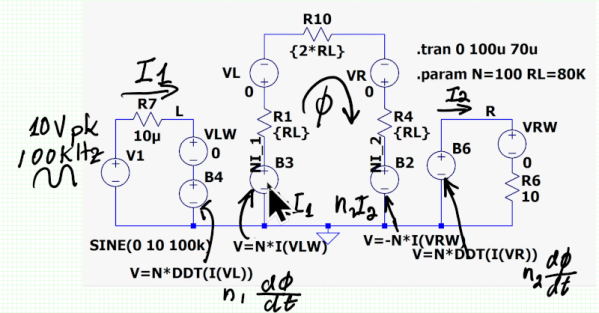
[Sam Ben-Yaakov] has another lecture online that dives deep into the physics of electronic processes. This time, the subject is magnetic transformers. You probably know that the ratio of current in the primary and secondary is the same (ideally) as the ratio of the turns in each winding. But do you know why? You will after watching the video.

Actually, you will after watching the first two minutes of the video. If you make it to the 44-minute mark, you’ll learn more about Faraday’s law, conservation of energy, and Lenz’s law.

Continue reading “Magnetic Transformer Secrets”

Super Simple Deadbuggable Bluetooth Chip

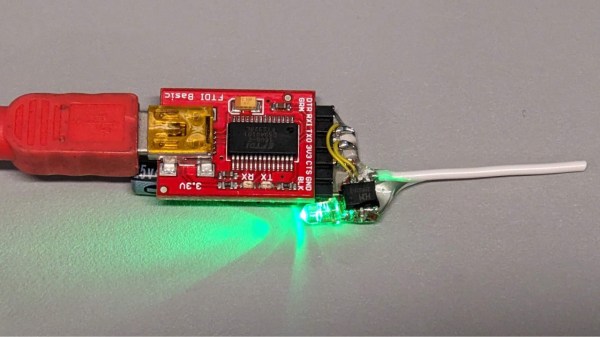
We’re all used to Bluetooth chips coming in QFN and BGA formats, at a minimum of 30-40 pins, sometimes even a hundred. What about ten pins, with 1.27 mm pitch? [deqing] from Hackaday.io shows us a chip from WCH, CH571K, in what’s essentially a SO-10 package (ESSOP10). This chip has a RISC-V core, requires only three components to run, and can work Bluetooth through a simple wire antenna.

This chip is a RISC-V MCU with a Bluetooth peripheral built in, and comes from the CH57x family of WCH chips that resemble the nRF series we’re all used to. You get a fair few peripherals: UART, SPI, and ADC, and of course, Bluetooth 4 with Low Energy support to communicate with a smart device of your choice. For extra hacker cred, [deqing] deadbugs it, gluing all components and a 2.54 mm header for FTDI comms onto the chip, and shows us a demo using webBluetooth to toggle an LED through a button in the browser.

You need not be afraid of SDKs with this one. There’s Arduino IDE support (currently done through a fork of arduino_core_ch32) and a fair few external tools, including at least two programming tools, one official and one third-party. The chip is under a dollar on LCSC, even less if you buy multiple, so it’s worth throwing a few into your shopping cart. What could you do with it once received? Well, you could retrofit your smoke alarms with Bluetooth, create your own tire pressure monitors, or just build a smartphone-connected business card!

Wago’s Online Community Is Full Of Neat Wago Tools

Wago connectors are somewhat controversial in the electrical world—beloved by some, decried by others. The company knows it has a dedicated user base, though, and has established the Wago Creators site for that very community.

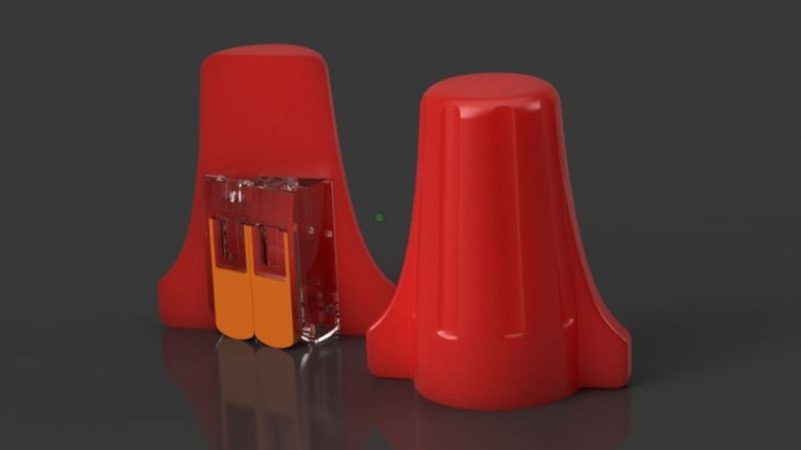
The idea behind the site is simple—it’s a place to discover and share unique little tools and accessories for use with Wago’s line of electrical connectors. Most are 3D printed accessories that make working with Wago connectors easier. There are some fun and innovative ideas up there, like an ESP8266 development kit that has a Wago connector for all the important pins, as well as a tool for easily opening the lever locks. Perhaps most amusing, though, is the project entitled “Hide Your Wago From Americans”—which consists of a 3D-printed wire nut lookalike designed to slide over the connectors to keep them out of view. There’s also a cheerful attempt at Wago art, that doesn’t really look like anything recognizable at all. Oh well, they can’t all be winners.

It’s great to see Wago so openly encouraging creativity among those that use its products. The sharing of ideas has been a big part of the 3D printing movement, and Wago isn’t the first company to jump on the bandwagon in this regard. If you’ve got some neat Wago hacks of your own, you can always let us know on the tipsline!

[Thanks to Niklas for the tip!]