Connecting A Nokia 3310 LCD Using An AVR

In this instructible, [wkter] takes us through the process of running a Nokia 3310 LCD display using an ATmega8.  This instructible isn’t a beginners project as he assumes you already have a strong understanding of how to work with these components and their programming languages. He is very thorough with information though, providing datasheets, pinout diagrams, and source code. Once you get this down, you could go a little further and make  Conway’s game of life.

Microcontrollers Access The Web

[youtube=http://www.youtube.com/watch?v=ExoJDxBGEBU]

[Kenneth Finnegan] is back with another video showing some cool stuff he’s doing to connect his microcontrollers to the internet. Usually, we see this done with a prebuilt module like an iobridge. [Kenneth] is using a Microchip ENC28j60 module for the communication and he’s managed to stuff it all onto a tiny Electroboards piece.  [Kenneth] is starting to become a regular around here.

[via HackedGadgets]

Live Fire Half-life

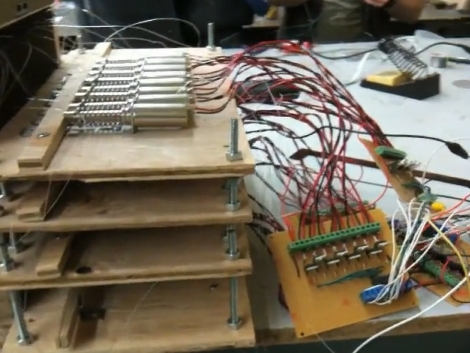
We don’t know how we missed this when it first came out, but there is a hack out there that combines a .22 caliber pistol with the video game Half-life. Simple is best and that motto is in use here. A wall was built down range to use as a projection screen. Accelerometers mounted on the drywall report vibration data from the bullet strike which is used to triangulate its location. This targeting data is then sent to the game interface.

As you can see in the video after the break this works like a charm. The [Waterloo Labs] personnel that developed this are also responsible for that iPhone controlled car. The antics we witnessed in that project carry over to this one as they illustrate using the setup to play Half-life with a couple of shovels at 2:12 into the clip. Continue reading “Live Fire Half-life”

USB Hub Used For In System Programming

Did you order that 4-port USB hub because it was almost free but now it’s just sitting in your junk box? Why not turn it into an In System Programmer for AVR chips? [Paul] came up with HUB ISP as an answer to the chicken-or-egg problem we’ve seen with other diy programmers. It uses the data wires from four different USB cables to program AVR chips, enlisting the help of a 74HC00 NAND gate along the way. You do not need to have a programmed microcontroller as all the magic happens on the software end of things. The one caveat is that [Paul’s] method currently only works on Linux machines.

Printing With Pressure

The video of [Thibault Brevet’s] printer makes it look like he’s actually designed a vinyl cutter (watch it after the break). But at the end of the printing process you see that the top layer was actually a piece of carbon copy paper and the magic was happening underneath. The print head applies enough pressure to transfer the blue-ish printing ink onto the paper giving the result seen above. He’s driving this with an Arduino and feeding data using Processing.

[Thibault] left this link in the comments from the LEGO printer post. Shame on him for not tipping us off as soon as he posted info on this hack. Don’t underestimate yourselves, if you hack it we want to hear about it!

Continue reading “Printing With Pressure”

HID Crafting With A PIC And A Joystick

[Amr Bekhit] converted his gameport joystick to use as a USB joystick. Much like a universal USB joystick interface, this uses an additional microcontroller to talk to the serial bus while monitoring the controls on the stick. [Amr’s] discussion about creating HID descriptors is clear and easy to understand. What he’s laid out can be translated to any custom HID your heart desires. Give it a try with that old peripheral that’s been gathering dust in the corner.

LEGO Printer Built Without NXT parts

[youtube=http://www.youtube.com/watch?v=zX09WnGU6ZY]

[Squirrelfantasy] built a printer using LEGO pieces. It’s not a Mindstorm project but instead depends on some type of development board and some auxiliary components on a protoboard. We couldn’t get a good enough look to tell exactly what makes up the electronics so start the debate in the comments. We feel this is a printer and not a plotter because the stylus moves on just one plane while the paper feeds past it but that’s open for debate as well.

Guess this answers the question of why aren’t we building our own printers? Some folks are.

[Thanks Haxorflex and many others, via DVICE]