The five picos on two breadboards and the results of image convolution.

PentaPico: A Pi Pico Cluster For Image Convolution

Here’s something fun. Our hacker [Willow Cunningham] has sent us a copy of their homework. This is their final project for the “ECE 574: Cluster Computing” course at the University of Maine, Orono.

It was enjoyable going through the process of having a good look at everything in this project. The project is a “cluster” of 5x Raspberry Pi Pico microcontrollers — with one head node as the leader and four compute nodes that work on tasks. The software for both types of node is written in C. The head node is connected to a workstation via USB 1.1 allowing the system to be controlled with a Python script.

The cluster is configured to process an embarrassingly parallel image convolution. The input image is copied into the head node via USB which then divvies it up and distributes it to n compute nodes via I2C, one node at a time. Results are given for n = {1,2,4} compute nodes.

It turns out that the work of distributing the data dwarfs the compute by three orders of magnitude. The result is that the whole system gets slower the more nodes we add. But we’re not going to hold that against anyone. This was a fascinating investigation and we were impressed by [Willow]’s technical chops. This was a complicated project with diverse hardware and software challenges and they’ve done a great job making it all work and in the best scientific tradition.

It was fun reading their journal in which they chronicled their progress and frustrations during the project. Their final report in IEEE format was created using LaTeX and Overleaf, at only six pages it is an easy and interesting read.

For anyone interested in cluster tech be sure to check out the 256-core RISC-V megacluster and a RISC-V supercluster for very low cost.
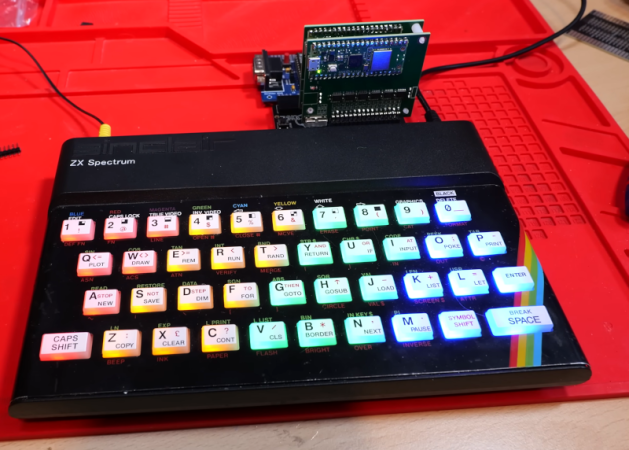
The ZX Spectrum Logic Analyzer

We know [Happy Little Diodes] frequently works with logic analyzer projects. His recent wireless logic analyzer for the ZX Spectrum is one of the oddest ones we’ve seen in a while. The heart of the system is an RP2040, and there are two boards. One board interfaces with the computer, and another hosts the controller.

The logic analyzer core is powered by a common open-source analyzer from [Eldrgusman]. This is one of the nice things about open source tools. Most people probably don’t need a logic analyzer that plugs directly into a ZX Spectrum. But if you do, it is fairly simple to repurpose a more generic piece of code and rework the hardware, if necessary.

Continue reading “The ZX Spectrum Logic Analyzer”

Simulating Cable TV

[Wrongdog Recons] suffers from a severe case of nostalgia. His earlier project simulated broadcast TV, and he was a little surprised at how popular the project was on GitHub. As people requested features, he realized that he could create a simulated cable box and emulate a 1990s-era cable TV system. Of course, you also needed a physical box, which turned into another project. You can see more about the project in the video below.

Inside is, unsurprisingly, a Raspberry Pi. Then you have to pretend to be a cable TV scheduler and organize your different video files for channels. You can interleave commercials and station breaks.

One addition was a scheduler so you could set up things like football games only play during football season. You can also control timing so you don’t get beer commercials during Saturday morning cartoons.

Continue reading “Simulating Cable TV”

An LLM For The Raspberry Pi

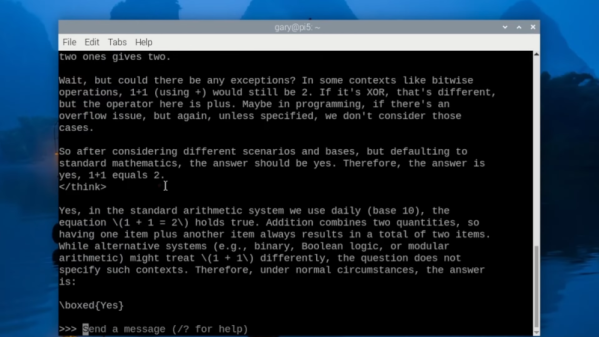
Microsoft’s latest Phi4 LLM has 14 billion parameters that require about 11 GB of storage. Can you run it on a Raspberry Pi? Get serious. However, the Phi4-mini-reasoning model is a cut-down version with “only” 3.8 billion parameters that requires 3.2 GB. That’s more realistic and, in a recent video, [Gary Explains] tells you how to add this LLM to your Raspberry Pi arsenal.

The version [Gary] uses has four-bit quantization and, as you might expect, the performance isn’t going to be stellar. If you are versed in all the LLM lingo, the quantization is the way weights are stored, and, in general, the more parameters a model uses, the more things it can figure out.

Continue reading “An LLM For The Raspberry Pi”

Kaleidoscopico Shows Off Pi Pico’s Capabilities

In the early days of computing, and well into the era where home computers were common but not particularly powerful, programming these machines was a delicate balance of managing hardware with getting the most out of the software. Memory had to be monitored closely, clock cycles taken into account, and even video outputs had to be careful not to overwhelm the processor. This can seem foreign in the modern world where double-digit gigabytes of memory is not only common, it’s expected, but if you want to hone your programming skills there’s no better way to do it than with the limitations imposed by something like a retro computer or a Raspberry Pi Pico.

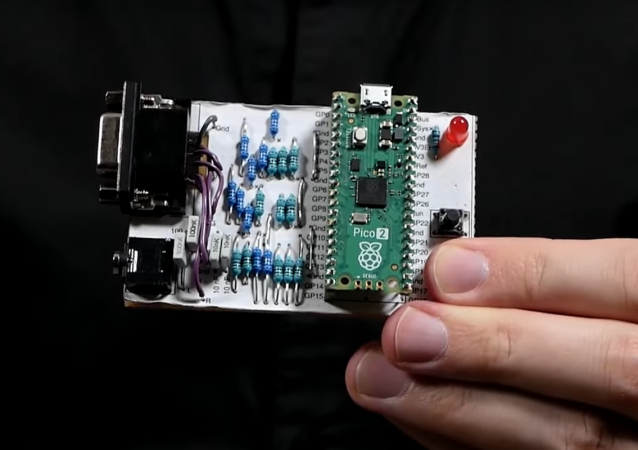
This project is called Kaleidoscopio, built by [Linus Ã…kesson] aka [lft] and goes deep into the hardware of the Pi Pico in order to squeeze as much out of the small, inexpensive platform as possible. The demo is written with 17,000 lines of assembly using the RISC-V instruction set. The microcontroller has two cores on it, with one core acting as the computer’s chipset and the other acts as the CPU, rendering the effects. The platform has no dedicated audio or video components, so everything here is done in software using this setup to act as a PC from the 80s might. In this case, [lft] is taking inspiration from the Amiga platform, his favorite of that era.

The only hardware involved in this project apart from the Pi Pico itself are a few resistors, an audio jack, and a VGA port, further demonstrating that the software is the workhorse in this build. It’s impressive not only for wringing out as much as possible from the platform but for using the arguably weaker RISC-V cores instead of the ARM cores, as the Pi Pico includes both. [lft] goes into every detail on the project’s page as well, for those who are still captivated by the era of computer programming where every bit mattered. For more computing demos like this, take a look at this one which is based on [lft]’s retrocomputer of choice, the Amiga.

Continue reading “Kaleidoscopico Shows Off Pi Pico’s Capabilities”

Going To The Top With A Raspberry Pi Elevator

[BorisDigital] was mesmerised by a modern elevator. He decided to see how hard it would be to design his own elevator based on Raspberry Pis. He started out with a panel for the elevator and a call panel for the elevator lobby. Of course, he would really need three call panels since he is pretending to have a three-floor building.

It all looks very professional, and he has lots of bells and whistles, including an actual alarm. With the control system perfected, it was time to think about the hydraulics and mechanical parts to make a door and an actual lift.

Continue reading “Going To The Top With A Raspberry Pi Elevator”

A Portable Electronics Workstation

You don’t see them as often as you used to, but it used to be common to see “electronics trainers” which were usually a collection of components and simple equipment combined with a breadboard, often in a little suitcase. We think [Pro Maker_101’s] portable electronics workstation is in the same kind of spirit, and it looks pretty nice.

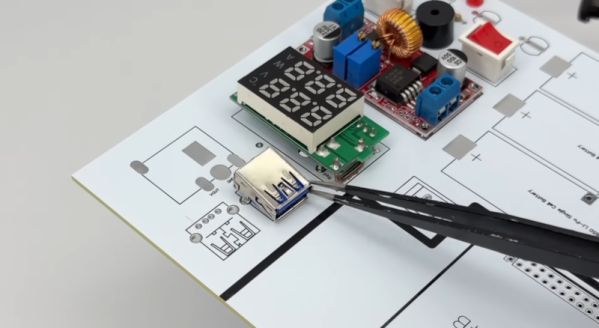
The device uses a 3D printed case and a custom PC board. There are a number of components, although no breadboard. There is a breakout board for Raspberry Pi GPIO, though. So you could use the screw terminals to connect to an external breadboard. We were thinking you could almost mount one as a sort of lid so it would open up like a book with the breadboard on one side and the electronics on the other. Maybe version two?

One thing we never saw on the old units? An HDMI flat-screen display! We doubt you’d make one exactly like this, of course, but that’s part of the charm. You can mix and match exactly what you want and make the prototyping station of your dreams. Throw in a small portable soldering iron, a handheld scopemeter, and you can hack anywhere.

We’d love to see something like this that was modular. Beats what you could build in 1974.

Continue reading “A Portable Electronics Workstation”