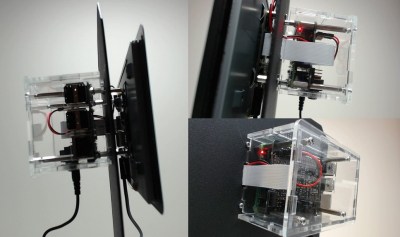
Raspberry Pi Art Frame Using OpenFrame

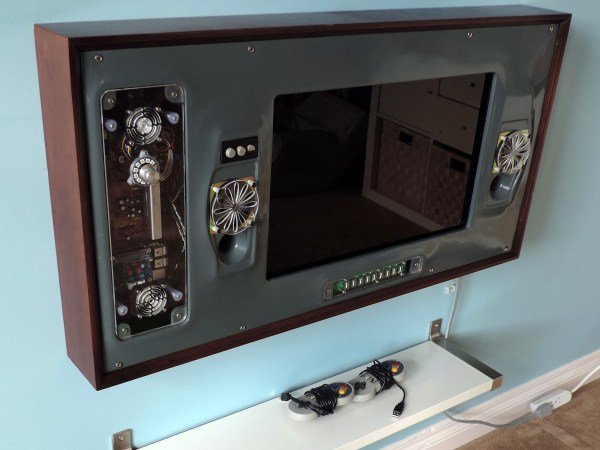
Digital picture frames were a fad awhile back, and you can still pick them up at the local big box store. [Ishac Bertran] and [Jonathan Wohl] decided to go open source with digital frames and create the openframe project. The open-source project uses a Raspberry Pi with WiFi and either an HDMI monitor or a monitor that the Pi can drive (e.g., a VGA with an HDMI adapter).

You are probably thinking: Why not just let the Pi display images? The benefit of openframe is you can remotely manage your frames at the openframe.io site. You can push images, websites (like Hackaday.com) or shaders out to any of your frames. You can also draw on public streams of artwork posted by other users.

Continue reading “Raspberry Pi Art Frame Using OpenFrame”

The Raspberry Pi 3 does Eddystone!

Turn Your RPi 3 Into A BLE Beacon

With the launch of the Raspberry Pi 3, Bluetooth Low Energy (BLE) is now at our disposal. With BLE, there are a few technologies for implementing one-way beacons that broadcast data. Apple has been pushing iBeacon since 2013, and Google just launched their Eddystone solution last year.

If you’re looking to target Google’s Eddystone on your RPi 3, [Yamir] has you covered. He’s put together a guide on setting up an Eddystone-URL beacon within Raspbian. This type of beacon just broadcasts a URL. Users within range will get a notification that the URL is available, and can navigate through to it. Eddystone-URL works on both iOS and Android.

The process for setting this up is pretty simple. The hciconfig and hcitool commands do all the work. [Yamir] was even nice enough to make a calculator tool that generates the hcitool command for your own URL. While is hack is a simple one, it’s a nice five-minute project. It’s also handy for broadcasting the URL of your Raspberry Pi if it’s running a web server as part of a more intricate hack.

The Pi Zero Mass Storage Picture Frame

The Raspberry Pi Zero – and the not-perpetually-out-of-stock Raspberry Pi A+ – only have one USB port, but behind that port is a lot of functionality. This is an OTG USB port, and just like the USB port on your smartphone, this little plug can become any kind of USB device. Transforming the Pi into a USB gadget allows it to be a serial connection, MIDI device, audio source or sink, or a USB mass storage device.

[Francesco] was especially interested in the USB mass storage capability of the Raspberry Pi Zero and built a small project to show off its capabilities. He turned a Pi Zero into the controller for a digital picture frame, constantly displaying all the image files on a small screen.

The build started with [Andrew Mulholland]’s guide for Pi Zero OTG modes, with just a few modifications. When the Pi is plugged into a PC, it automatically becomes a 100 Megabyte USB storage device. You don’t need that much space on a digital picture frame, anyway.

While setting up a digital picture frame is easy enough, there’s still a tremendous amount of untapped potential in using the Pi Zero as a USB gadget. With enough buttons, switches, and sensors, the Pi can become a wearable MIDI device, or with the Pi camera module, an IP webcam. Neat stuff, and we can’t wait to see what the community comes up with next.

Building A Better Game Boy With A Pi

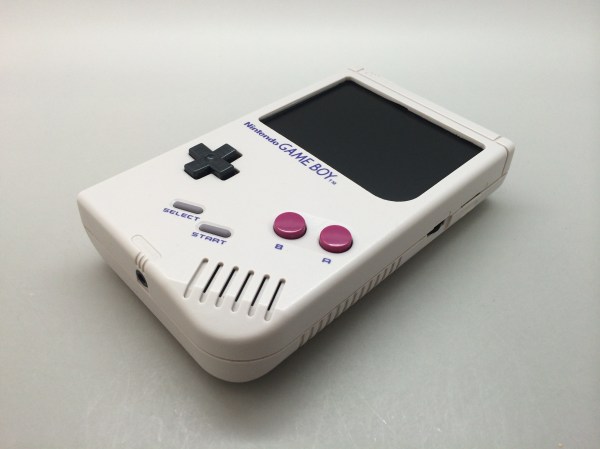
The most collectible Game Boy, by far, would be the Game Boy Micro. This tiny Game Boy is small enough to lose in your pocket. It can only play Game Boy Advance games, the screen is tiny, but just look at the prices on eBay: it’s one of the few bits of consumer electronics that could be seen as an investment in retrospect.

The popularity of the Game Boy Micro, the ability for the Raspberry Pi to emulate old game consoles, and the introduction of the Raspberry Pi Zero could only mean one thing. It’s the PiGrrl Zero, a modern handheld to play all your retro games.

The design goals for the PiGRRL Zero were simple enough: a 2.2 inch 320×240 display, a d-pad, four buttons on the face and two shoulder buttons. There’s a big battery, audio output, and a 3D printed case. This would be somewhat unremarkable if it weren’t for the PCB designed for PiGRRL Zero. It’s designed to be soldered directly onto the Raspberry Pi Zero, taking advantage of the mostly component-free back side of this tiny single board computer.

With this PCB, the Pi Zero is turned into a tiny battery-powered computer running emulations of all the classics. NES, SNES, Sega, and of course Game Boy Advance games are readily playable on this devices, and for a price that’s a fair bit lower than what a mint condition Game Boy Micro goes for. Our judges thought it was cool enough to be one of the winners of the Pi Zero Contest. Check it out!


Raspberry_Pi_LogoSmall

The Raspberry Pi Zero contest is presented by Hackaday and Adafruit. Prizes include Raspberry Pi Zeros from Adafruit and gift cards to The Hackaday Store!
See All the Entries

Mobile Text Reader With OCR And Text To Speech

There are devices out there that will magnify text using fancy cameras and displays, devices that will convert these to Braille, and text-to-speech software has been around for thirty years. For his entry into our Raspberry Pi Zero contest, [Markus] decided to combine all these ideas into a simple device that will turn the printed word into speech.

The impetus for [Markus]’ project came to him in the form of a group of blind computer science  students. These students used a specialized program that used specialized hardware and software such as mobile Braille terminals, OCR, and oral exams that allowed these students to study the same thing as everyone else. [Markus] wanted to produce something similar, using simple text-to-speech software instead of a complicated Braille display.

The physical design of [Markus]’ project is uniquely functional – a hand-held device with a camera up front, a Pi in the middle, and a speaker and headphone jack on the back. The hand grip includes a large battery and a trigger for telling the Pi to read a few words aloud.

The software is built around the SnapPicam and includes a lot of the functionality already needed. OCR is largely a solved problem with Tesseract, and text-to-speech is easy with Festival.

Although [Markus] is just plugging a few existing software modules together, he’s come up with a device that is certainly unique and could be exceptionally useful to anyone with a vision impairment.


Raspberry_Pi_LogoSmall

The Raspberry Pi Zero contest is presented by Hackaday and Adafruit. Prizes include Raspberry Pi Zeros from Adafruit and gift cards to The Hackaday Store!
See All the Entries

Raspberry Pi Zero Contest Grand Prize Winners!

The Raspberry Pi Zero Contest presented by Adafruit and Hackaday came to a close last week, as the clock struck 11:59 am on Sunday, March 13, 2016. Since then our team of judges has been working to pick the top three entries. It was a hard job sorting through nearly 150 amazing creations.  In the end though, the judges were able to pick three grand prize winners. Each winner will receive a $100 gift card to The Hackaday Store.  So let’s get to the winners!

[JohSchneider] and [Markus Dieterle] both won Pi Zero boards and went on to win $100 gift certificates. [shlonkin] didn’t win a Pi Zero, but persevered and continued working on the classroom music teaching aid even without a Zero board. The top winners aren’t the only ones who are doing well. Everyone who entered has a head start on a great project for The 2016 Hackaday Prize.

I’d like to thank Hackaday’s own [Dan Maloney], [Kristina Panos], [Sophi Kravitz] and [Brian Benchoff] who joined me to judge the contest. The entire Hackaday staff is indebted to [Limor Fried] and [Phil Torrone] over at  Adafruit for coming up with 10 live videos, and providing 10 hard to find Pi Zero boards for our winners. The biggest thanks go to the entrants. If I could send a prize out to each and every one of you, I would!

Exercise Wheel Tracks Kitty’s Fitness Goals

A few weeks ago [Jasper Ruben] built his cats a jumbo size hamster exercise wheel. They seemed to like it, so he decided to up the ante and upgrade it. The wheel now features a Raspberry Pi which can track speed, calculate distance traveled, and determine the equivalent running speed of [Jasper’s] feline companions.

To calculate the speed of the wheel, [Jasper] is using a small coil sensor (similar to how bicycle speedometers work). Six nails in the wheel trigger the sensor. Once the data is on-board the Pi, some simple calculations allow [Jasper] to provide a few different metrics on how effective the cat exercise is. A webcam sends a live stream of the wheel online with a data overlay for your viewing pleasure.

The really cool part is that this setup lets [Jasper] track when (and if) the cats actually use the exercise wheel. So far it seems like they use it about six times a day, with an average of a minute per walk — typically early in the morning between 5 and 8AM. That’s better than some of our own exercise habits!

Continue reading “Exercise Wheel Tracks Kitty’s Fitness Goals”