Maybe The Oldest Computer, Probably The Oddest

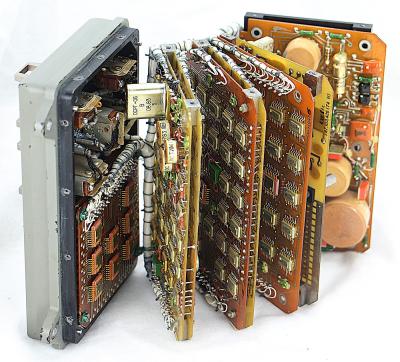
[Tadao Hamada] works for Fujitsu Tokki, a subsidiary of the more famous Fujitsu. In 1956, Fujitsu decided to compete with IBM and built a relay-based computer, the FACOM128. The computer takes up 70 square meters and weighs about 3 tons. By 1959, they’d learned enough to make a FACOM128B model that was improved. [Hamada’s] job is to keep one of these beasts operational at Fujitsu’s Numazu plant. According to the Japanese Computer Museum, it may be the oldest working computer.

Continue reading “Maybe The Oldest Computer, Probably The Oddest”

Creative Limitation And The Super Nintendo Sound Chips

The Super Nintendo recently experienced a surge in popularity, either from a combination of nostalgic 30-somethings recreating their childhoods, or because Nintendo released a “classic” version of this nearly-perfect video game system. Or a combination of both. But what made the system worthy of being remembered at all? With only 16 bits and graphics that look ancient by modern standards, gameplay is similarly limited. This video from [Nerdwriter1] goes into depth on a single part of the console – the sound chips – and uses them to illustrate a small part of what makes this console still worth playing even now.

The SNES processed sound with two chips, a processing core and a DSP. They only had a capacity of 64 kb, meaning that all of a game’s sounds and music had to fit in this tiny space. This might seem impossible if you’ve ever played enduring classics like Donkey Kong Country, a game known for its impressive musical score. This is where the concept of creative limitation comes in. The theory says that creativity can flourish if given a set of boundaries. In this case it was a small amount of memory, and within that tiny space the composer at Rare who made this game a work of art was able to develop a musical masterpiece within strict limitations.

Even though this video only discusses the sound abilities of the SNES, which are still being put to good use, it’s a good illustration of what made this system so much fun. Even though it was limited, game developers (and composers) were able to work within its limitations to create some amazingly fun games that seem to have withstood the test of time fairly well. Not all of the games were winners, but the ones that were still get some playtime from us even now.

Continue reading “Creative Limitation And The Super Nintendo Sound Chips”

Run Your Own Phone To Bring The Dreamcast Back Online

Playing a video game online is almost second nature now. So much so that almost all multiplayer video games have ditched their split-screen multiplayer modes because they assume you’d rather just be alone at your house than hanging out with your friends. This wasn’t always the case though. In the early days of online multiplayer, systems had to rely on dial-up internet before broadband was readily available (and still had split screen if you didn’t even have that). Almost no one uses dial up anymore though, so if you still like playing your old Dreamcast you’re going to have to do some work to get it online again.

Luckily for all of us there’s a Raspberry Pi image to do almost anything now. This project from [Kazade] uses one to mimic a dial-up connection for a Dreamcast so you can connect with other people still playing Quake 20 years later. It’s essentially a network bridge, but you will need some extra hardware because phone lines use a high voltage line that you’ll have to make (or buy) a solution for. Once all the hardware is set up and working, you’ll need to make a few software configuration changes, but it’s a very straightforward project.

Granted, there have been ways of playing Dreamcast games online before, but this new method really streamlines the process and makes it as simple as possible. The Dreamcast was a great system, and there’s an argument to be made that the only reason it wasn’t more popular was that it was just slightly too far ahead of its time.

Thanks to [Rusty] for the tip!

Vintage Computer Festival West Is Almost Here

If you’ve got an interest in technology, a penchant for that particular shade of yellowed plastic, and happen to be located in the California area, then we’ve got the event for you. The Vintage Computer Festival West is happening this weekend, August 3rd and 4th, at the Computer History Museum in Mountain View, California.

The Vintage Computer Festival offers a truly unique experience for anyone with a passion for all the silicon that’s come before. Where else could you sit in on a roundtable of early Apple employees discussing the bevy of authentic ultra-rare Apple I computers that will be on display, or get up close and personal with a restored Apollo Guidance Computer? If you really want to dive in on the deep end, Hackaday’s own Bill Herd will be in attendance giving his lecture about the effects of heat and time on the internal components of decades-old pieces of hardware.

Still skeptical? Perhaps you’ll get a kick out of the exhibit that celebrates more than two decades of Quake by hosting a LAN game where the classic game is running on less common platforms like the RS/6000 series or the Sun Ulta. If you’re interested in seeing modern reconstructions of classic technology, there will be plenty of that on display as well. Eric Schlaepfer will be showing off his transistor-scale replica of the iconic 6502 microprocessor, and you won’t want to miss the Cactus in all its rainbow colored toggle switch and blinkenlight glory.

Of course, if you’re in the market for your very own piece of computing history, there’s no better place to be. The consignment area gives showgoers a chance to buy and sell all manners of vintage and unique hardware, harking back to the days where the best way to get your hands on a computer (or the parts to build one) was by attending a dedicated event. Plus, no shipping fees!

Put simply, there really is something for everyone at the Vintage Computer Festival. Even if you weren’t around to experience Apple II or Commodore 64 in their prime, these events are a rare opportunity to learn about the early days of a technology that today we all take for granted. Have you ever wondered how programs were entered into those early computers with nothing more than a bank of toggle switches and an array of LEDs? One of the passionate exhibitors at VCF will be more than happy to walk you through the process.

At the end of the day, preserving this technology and sharing it with future generations is really what it’s all about. Just as in previous years, Hackaday is proud to sponsor the Vintage Computer Festival and further their goal of ensuring this incredible shared heritage isn’t lost.

Retrotechtacular: The Floppy Disk Orphaned By Linux

About a week ago, Linus Torvalds made a software commit which has an air about it of the end of an era. The code in question contains a few patches to the driver for native floppy disc controllers. What makes it worthy of note is that he remarks that the floppy driver is now orphaned. Its maintainer no longer has working floppy hardware upon which to test the software, and Linus remarks that “I think the driver can be considered pretty much dead from an actual hardware standpoint“, though he does point out that active support remains for USB floppy drives.

It’s a very reasonable view to have arrived at because outside the realm of retrocomputing the physical rather than virtual floppy disk has all but disappeared. It’s well over a decade since they ceased to be fitted to desktop and laptop computers, and where once they were a staple of any office they now exist only in the “save” icon on your wordprocessor. The floppy is dead, and has been for a long time.

The save icon in LibreOffice and other desktop software is probably the last place the floppy exerts a hold over us.

Still, Linus’ quiet announcement comes as a minor jolt to anyone of A Certain Age for whom the floppy disk and the computer were once inseparable. When your digital life resided not in your phone or on the cloud but in a plastic box of floppies, those disks meant something. There was a social impact to the floppy as well as a technological one, they were a physical token that could contain your treasured ephemeral possessions, a modern-day keepsake locket for the digital age. We may have stopped using them over a decade ago, but somehow they are still a part of our computing DNA.

So while for some of you the Retrotechtacular series is about rare and unusual technology from years past, it’s time to take a look at something ubiquitous that we all think we know. Where did the floppy disk come from, where is it still with us, and aside from that save icon what legacies has it bestowed upon us?

Continue reading “Retrotechtacular: The Floppy Disk Orphaned By Linux”

A New Motherboard For Amiga, The Platform That Refuses To Die

If you go out and buy a computer right now, how many choices do you really have? Generally speaking, there’s PC or Mac. If we were being generous you could consider Chromebook and perhaps even mobile, but let’s be honest, computing is a two-party system with the ability to dump the OS and run Linux as the obvious third-party disruptor. It wasn’t always like this.

In the early years of personal computing there were a slew of serious contenders. A PC, a Mac, an Atari ST, an Amiga, and several more that all demanded serious consideration on the general purpose desktop computer market. Of all these platforms, the Amiga somehow stubbornly refuses to die. The Amiga 1200+ from [Jeroen Vandezande] is the latest in a long procession of post-Commodore Amigas, and as its name suggests it provides an upgrade for the popular early-1990s all-in-one Amiga model.

It takes the form of a well-executed open-source PCB that’s a drop-in replacement for the original A1200 motherboard. CPU, RAM, and video are broken out onto daughterboards, with PCMCIA replaced by an SD card slot. The catch: it does require all the custom Amiga chips from a donor board.

The original Amiga 1200 was a significant upgrade to the architecture of the 1980s originals, and this certainly provides a much-needed enhancement to its underwhelming 68EC020 processor. It’s fair to say that this is the Amiga upgrade we’d all have loved to see in about 1996 rather than waiting until 2019. It’s still a delight for a retrogaming enthusiast; many of those who keep it alive remember the Amiga was the best multimedia platform that could be had for a few glorious years.

We’ve brought you a host of Amiga projects over the years, including the resurrection of an A500 and of course another A1200 PCB.

Thanks to [Eric Hill] for the tip.

A PDP Laptop, For Various Definitions Of A Laptop

Digital Equipment Corp.’s PDP-11 is one of the most important computers in history. It’s the home of Unix, although that’s arguable, and it’s still being used in every application, from handling nuclear control rods to selling Ed Sheeran tickets on Ticketmaster. As the timeline of PDP-11 machines progressed, the hardware did as well, and by the time the PDP was eclipsed by the VAXxen, there were PDP-11s on a single chip. The Eastern Bloc took notice and produced their own PDP-11 on a chip. This is the 1801-series CPU, and like most soviet electronics from the Cold War, they’re readily available on eBay.

[SHAOS] has an interesting project in mind for this PDP-on-a-chip. It’s a standalone computer built around the Soviet re-implementation of the PDP-11, built into a form factor that could be described as a single board computer.

This project is the outgrowth of [SHAOS]’ project for last year’s Hackaday Prize, the PDPii. This was a computer built around a backplane that replicated the PDP-11 using a KR1801VM2 CPU, the Soviet not-a-clone clone of the PDP-11. This project is basically a PDP-11/03 system, except it was made in this century, and you can put it in any computer case, with bonus points awarded for RGB lighting and liquid cooling.

This year’s project, the PDPjr, eschews standardization to something that is far more unique. This build is more or less a single board computer with a character LCD display and a real keyboard. Think of this as the PDP-11 equivalent of the TRS-80 Model 100, a machine widely regarded as being the first laptop.

There’s still a lot of work to go, but [SHAOS] has written a ‘Hello World’ for this chip, and is getting those words to display on the character LCD. That’s a great first step and we can’t wait to see where this project ends up.