Up AlphaGoer Five

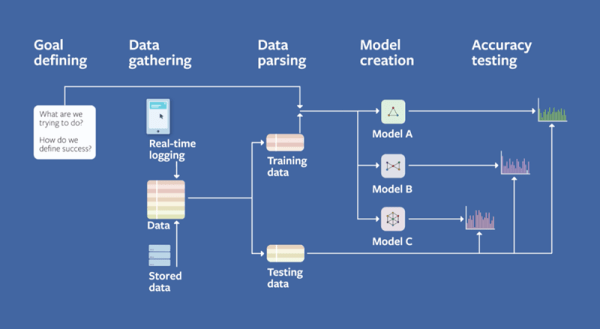
AlphaGo is the deep learning program that can beat humans at the game Go. You can read Google’s highly technical paper on it, but you’ll have to wade through some very academic language. [Aman Agarwal] has done us a favor. He took the original paper and dissected the important parts of in in plain English. If the title doesn’t make sense to you, you need to read more XKCD.

[Aman] says his treatment will be useful for anyone who doesn’t want to become an expert on neural networks but still wants to understand this important breakthrough. He also thinks people who don’t have English as a first language may find his analysis useful. By the way, the actual Go matches where AlphaGo beat [Sedol] were streamed and you can watch all the replays on YouTube (the first match appears below).

Continue reading “Up AlphaGoer Five”

Controlling OctoPrint On The Go

Not too long ago I took the plunge into the world of OctoPrint by shoehorning a Raspberry Pi Zero into a PrintrBot Play, and I have to say, the results were quite impressive. OctoPrint allows you to run your 3D printer untethered from your computer, but without all the downsides of printing off of an SD card. Generally running off of a Raspberry Pi, OctoPrint serves up a very capable web interface that gives you full control over slicing and printing from essentially any device with a modern browser.

That’s all well and good if you’ve got your laptop with you, or you’re sitting at your desktop. But what if you’re out of the house? Or maybe out in the garage where you don’t have a computer setup? OctoPrint is still happily serving up status information and a control interface, you just don’t have a computer to access it. Luckily, there are options for just that scenario.

In this post we’re going to take a look at a couple of options for controlling and monitoring OctoPrint from your mobile device, which can help truly realize its potential. Personally I have an incredible amount of anxiety when leaving a 3D printer running a long job, and in the past I’ve found myself checking every 10 minutes or so to see if it was done. Now that I can just glance at my phone and see an ETA along with status information about the machine, it’s given me the confidence to run increasingly longer and complex prints. Continue reading “Controlling OctoPrint On The Go”

Retrocomputing For The Forgotten

The world runs on marketing hype. Remember the public relations swirl around the Segway? Before it rolled out we were led to believe it was going to be remembered as fire, the wheel, and Segway. Didn’t really happen. Microsoft and IBM had done something similar with OS/2, which you may not even remember as the once heir-apparent to MS-DOS. OS/2 was to be the operating system that would cure all the problems with MS-DOS just as IBM’s new Microchannel Architecture would cure all the problems surrounding the ISA bus (primarily that they couldn’t stop people from cloning it). What happened? OS/2 died a slow agonizing death after the Microsoft/IBM divorce. But for whatever reason [Ryan C. Gordon] decided to write a Linux emulation layer for OS/2 call 2ine (twine).

We like retrocomputing projects even if they aren’t very practical, and this one qualifies. The best analog for 2ine is it is Wine for OS/2, which probably has something to do with the choice of name. You might be ready to click away since you probably don’t have any OS/2 programs you want to run, but wait! The good news is that the post has a lot of technical detail about how Linux and OS/2 programs load and execute. For that reason alone, the post is well worth a read.

Continue reading “Retrocomputing For The Forgotten”

Hack Excel For 3D Rendering

[C Bel] teaches Excel and he has a problem. Most of us — especially us Hackaday types — immediately write a VBA (Visual Basic for Applications) macro to do tough things in Excel. Not only is this difficult for non-technical users, but it also isn’t as efficient, according to [C Bel]. To demonstrate that VBA macros are not always needed, he wrote a 3D game engine using nothing but Excel formulae. He did have to resort to VBA to get user input and in a very few cases to improve the performance of large algorithms. You can see his result in the video below or download it and try it yourself.

The game is somewhat Doom-like. Somewhat. As you might expect it isn’t blindingly fast, and the enemy is a big red blob, but as the old Russian proverb goes, “The marvel is not that the bear dances well, but that the bear dances at all.” (And thanks to [Sean Boyce] for recalling that quote.)

Continue reading “Hack Excel For 3D Rendering”

Create A Discord Webhook With Python For Your Bot

Discord is an IRC-like chat platform that all the young cool kids are hanging out on. Originally intended as a way to communicate during online games, Discord has grown to the point that there are servers out there for nearly any topic imaginable. One of the reasons for this phenomenal growth is how easy it is to create and moderate your own Discord server: just hit the “+” icon on the website or in the mobile application, and away you go.

As a long-time IRC guy, I was initially unimpressed with Discord. It seemed like the same kind of stuff we’ve had for decades, but with an admittedly slick UI. After having used it for a few months now and joining servers dedicated to everything from gaming to rocket science, I can’t say that my initial impression of Discord is inaccurate: it’s definitely just a modern IRC. But I’ve also come to the realization that I’m OK with that.

But this isn’t a review of Discord or an invitation to join the server I’ve setup for my Battlefield platoon. In this article we’re going to look at how easy it is to create a simple “bot” that you can plug into a Discord server and do useful work with. Since anyone can create a persistent Discord server for free, it’s an interesting platform to use for IoT monitoring and logging by simply sending messages into the server.

Continue reading “Create A Discord Webhook With Python For Your Bot”

Curing A Parrot’s Amnesia With BLEAH

[Dandu] recently wrote in to tell us how he managed to revive his Parrot Flower Power after the manufacturer told him it couldn’t be repaired. To save you the trouble of opening Google in another tab, the Parrot Flower Power is a Bluetooth Low Energy (BLE) “smart” device for your flower pot. Because of course that’s a thing.

A healthy Flower Power connected

When [Dandu] noticed his Flower Power was no longer being detected by his iOS devices, he contacted support who told him that sadly this was a hardware failure and that he should just throw it away. But he had his doubts about this diagnosis as other devices such as his Raspberry Pi could still communicate with it. Upon closer inspection, he realized that the Flower Power didn’t have a name, and could only be contacted by its MAC address directly. Reasoning the lack of a name might be upsetting the “It Just Works” sensibility of his iGadget, [Dandu] started researching if there was some way to get the device to take a new name remotely.

Luckily for our hero, BLE is kind of broken. Searching for a solution to his problem brought him to a blog post by the creator of BLEAH which demonstrated exactly what [Dandu] was looking to do. Following along, it took only a single command to push a new name to the Flower Power’s BLE configuration. With that, his “broken” device was brought back to life. Why the device lost its name, or how to prevent it from happening in the future are questions for another day. [Dandu] will take the win.

If you’re interested in the popular new technology that’s compromising our security in the name of convenience and improved battery life, the rabbit hole starts here.

ESP8266 Broadcasts Memorial WiFi Spam

John Perry Barlow, founding member of the Electronic Frontier Foundation and Freedom of the Press Foundation, died on February 7th, 2018. To say that he left his mark on the Internet, and by extension modern culture, is something of an understatement. He may not be a household name, but between this activism (online and off), lectures, written work, and various entrepreneurial projects, his 70 years of life were surely not wasted. Barlow was once quoted as saying “I want to be a good ancestor”, and by pretty much any metric it would seem he made good on that goal.

To mark his passing, [Moritz Metz] came up with a rather unusual memorial. Using a bit of code on an ESP8266 board, he created a device that would broadcast out Barlow’s “A Declaration of the Independence of Cyberspaceline-by-line in the form of 228 WiFi SSIDs. Perhaps not the most effective way to get Barlow’s words out to the people, but we’ll give him extra points for style.

The code itself is based on FakeBeaconESP8266, which as the name implies, allows the user to create fake WiFi networks. to broadcast the manifesto of your choosing, you need only add in the appropriate sendBeacon() lines at the bottom of the code. It would appear that prefixing each line with a number is required to make devices scanning for networks show the lines of text in proper sequence. At least on the devices demoed, anyway.

Just to be clear: you should definitely not do this. Jamming up the local environment with a bunch of fake networks is a pretty terrible idea. But as a memorial for a man who occasionally claimed to be an anarchist, you could do worse. Plus we have to admit “Giants of Flesh and Steel” is an awesome name for a network.

Continue reading “ESP8266 Broadcasts Memorial WiFi Spam”