Illustrated Kristina with an IBM Model M keyboard floating between her hands.

Keebin’ With Kristina: The One With The Really Tall Keycaps

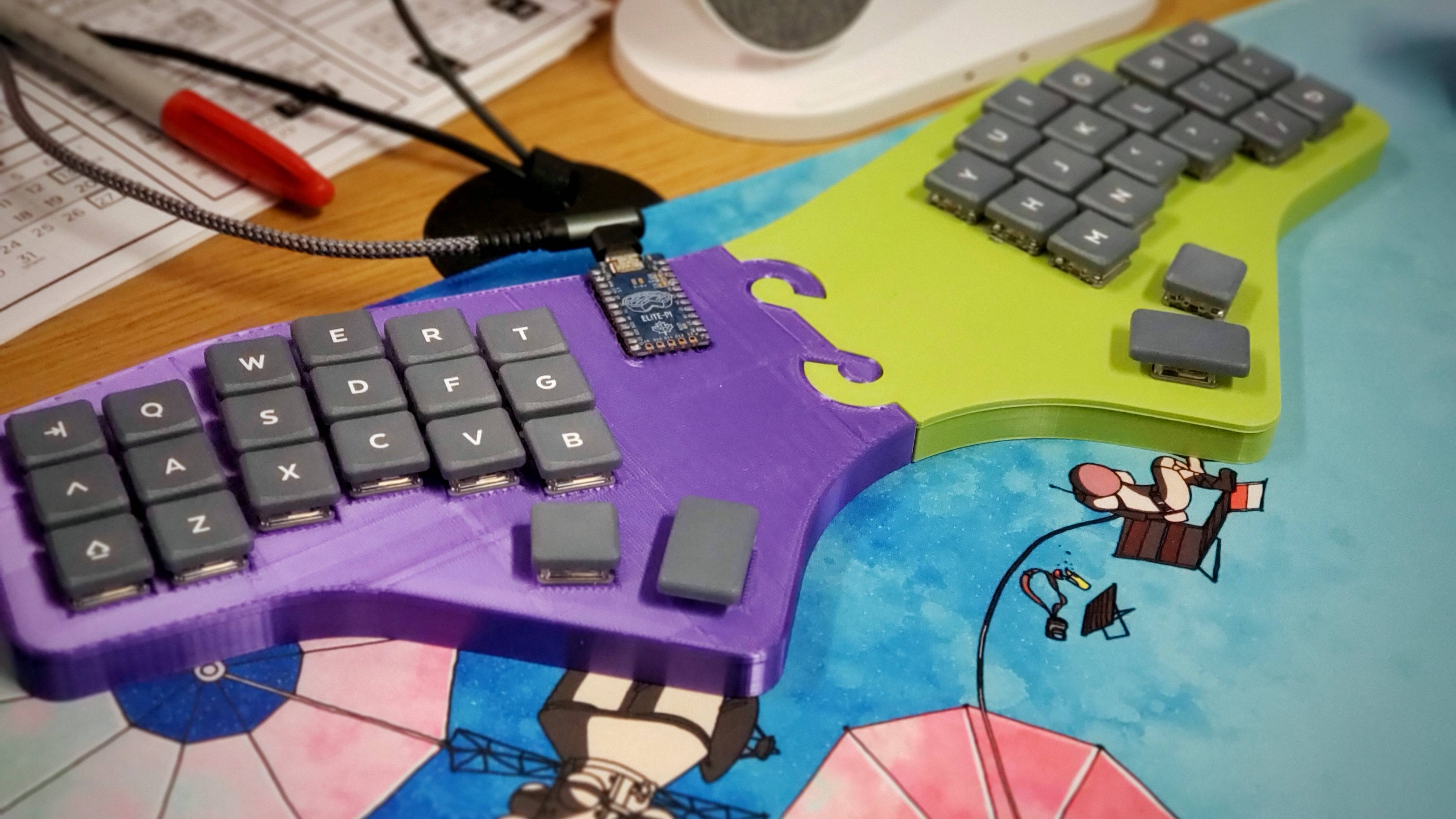
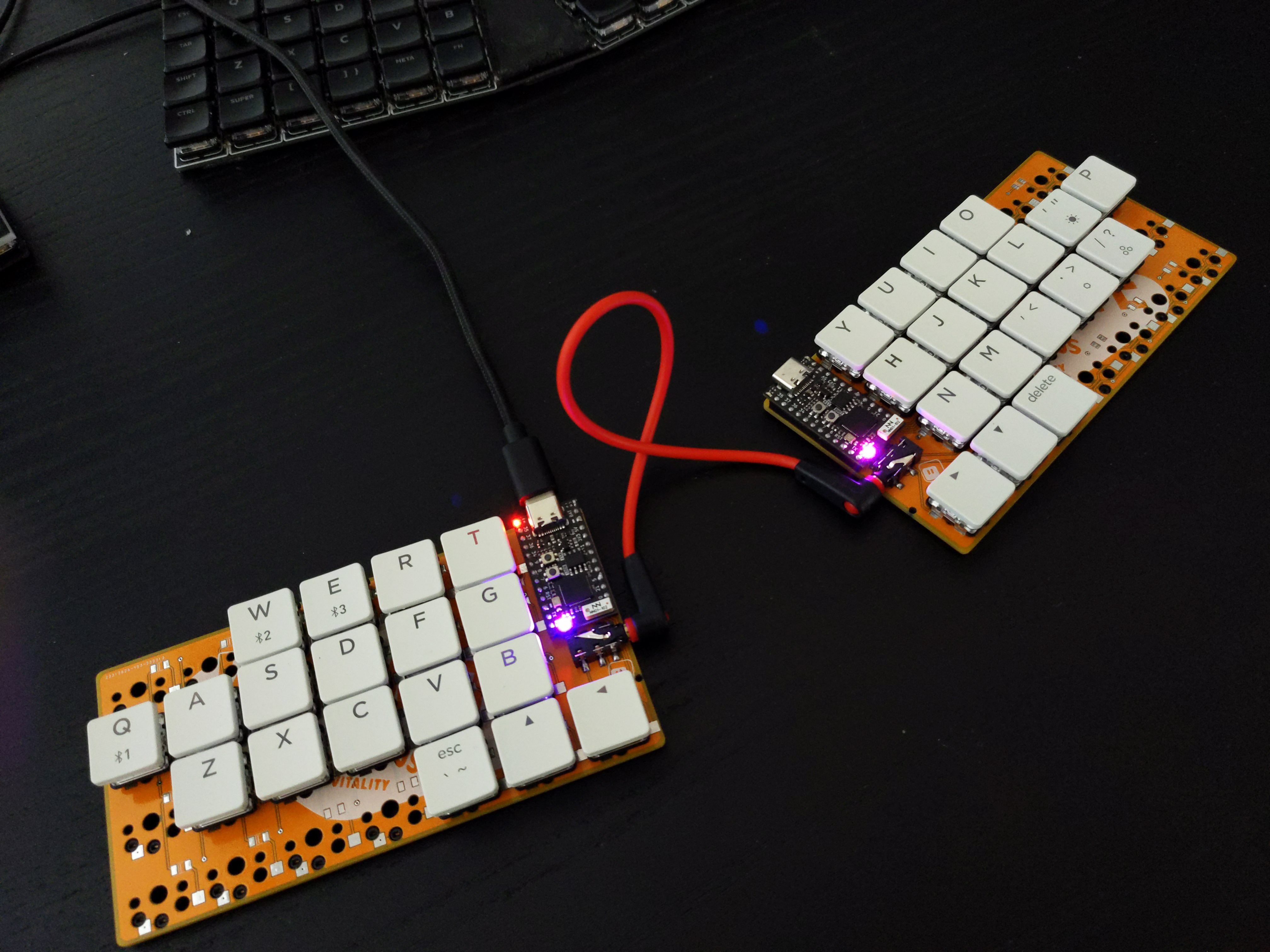
About a month ago, [Unexpected Maker] finished their TinyS3, an ESP32-S3 development board. Since the chip supports both true USB and Bluetooth, [deʃhipu] wondered how well it would work in a keyboard.

Thus, the Vegemite Sandwich was made, perhaps while [deʃhipu] was dreaming of traveling in a fried-out Kombi. But really, it was named so because [Unexpected Maker] hails from Australia.

This is [deʃhipu]’s first time using switch sockets, which is (as far as we know) the only choice when it comes to hot-swappable Kailh chocs. We’ll be watching this one with hungry eyes.

Continue reading “Keebin’ With Kristina: The One With The Really Tall Keycaps”

Illustrated Kristina with an IBM Model M keyboard floating between her hands.

Keebin’ With Kristina: The One With The Ballpoint Typewriters

So you want to minimize finger movement when you type, but don’t have three grand to drop on an old DataHand, or enough time to build the open-source lalboard? Check out these two concept keebs from [SouthPawEngineer], which only look like chord boards.

Every key on the home row is a five-way switch — like a D-pad with straight down input. [SouthPawEngineer] has them set up so that each one covers a QWERTY column. So like, for the left pinky switch, up is Q, right is A, down is Z, and left is 1. Technically, the split has 58 keys, and the uni has 56.

Both of these keebs use KB2040 boards, which are Adafruit’s answer to the keyboard-building craze of these roaring 2020s. These little boards are of course easy to program with CircuitPython, which supports KMK, an offshoot of the popular QMK. Thanks for the tip, [foamyguy]!

Continue reading “Keebin’ With Kristina: The One With The Ballpoint Typewriters”

Illustrated Kristina with an IBM Model M keyboard floating between her hands.

Keebin’ With Kristina: The One With The Tri-lingual Typewriter

Isn’t it just fantastic when a project finally does what you wanted it to do in the first place? [Simon Merrett] isn’t willing to compromise when it comes to the Aerodox. His original vision for the keyboard was a wireless, ergonomic split that could easily switch between a couple of PCs. Whereas some people are more into making layout after layout, [Simon] keeps pushing forward with this same design, which is sort of a mashup between the ErgoDox and the Redox, which is itself a wireless version of the ErgoDox.

The Aerodox has three nRF51822 modules — one for the halves to communicate, one for the control half to send key presses, and a third on the receiver side. [Simon] was using two AA cells to power each one, and was having trouble with the range back to the PC.

The NRFs want 3.3 V, but will allegedly settle for 2 V when times are hard. [Simon] added a boost converter to give each a solid 3.3 V, and the Aerodox became reliable enough to be [Simon]’s daily driver. But let’s go back to the as-yet-unrealized potential part.

Continue reading “Keebin’ With Kristina: The One With The Tri-lingual Typewriter”

Illustrated Kristina with an IBM Model M keyboard floating between her hands.

Keebin’ With Kristina: The One With The Hole-y Keyboard

Can a keyboard get any more aerodynamic than this? Probably not.

According to Google Translate, kleks is Polish for (and I’m cherry-picking definitions here) the word ‘splash’. Well, [deʃhipu]’s hole-ful and soulful Kleks Keyboard certainly made a splash with me. [deʃhipu] knows what I’m talking about. As I said in Discord, I just love the look of those holes. They’re purely aesthetic and do a nice job of showing off [deʃhipu]’s routing skills.

One might argue that those holes also functional in that they increase aerodynamics and remove a not-insignificant amount of weight for travel considerations. But yeah, they mostly are there to look cool. Upon closer inspection, I saw that the two halves are joined with a series of soldered stitches that are made from a [ggconnector] bent into a u-shape. Now it’s a toss-up as to which is my favorite feature.

It seems that [deʃhipu] is never completely satisfied by this or that keyboard build, and that’s okay. That’s normal. That is . . . a big part of what this hobby is all about. Because honestly, what would be the fun in finding The One? We wonder what will happen when the droplets settle. Will [deʃhipu] be satisfied with the Kleks, or will those stylish holes become un-fillable voids?

Continue reading “Keebin’ With Kristina: The One With The Hole-y Keyboard”

Illustrated Kristina with an IBM Model M keyboard floating between her hands.

Keebin’ With Kristina: The One With The Cat Keyboard

Special thanks to [Maarten], who stumbled upon this old gem of a geekhack thread by [suka]. It’s essentially a show and tell of their DIY keyboard journey, complete with pictures. [suka]’s interest started with a yen for ergonomic keyboard layout alternatives. They soon found the geekhack forum and started lurking around, practicing layouts like Neo and AdNW, which [suka] still uses today.

A pair of num pads wired up to a Teensy becomes a keyboard.When it was time to stop lurking and start building something, [suka] got plenty of support from the community. They knew they wanted a split ortho with a trackpoint and plenty of thumb keys. [suka] started by building them from old Cherry keyboards, which are easier to come by in Germany.

The first build was a pair of num pads turned landscape and wired up to a Teensy, but [suka] wanted those sweet, clacky Cherry MX switches instead of MLs. So the second version used a pair of sawed-off num pads from old MX boards.

When the Truly Ergonomic came out, it got [suka] interested in one-piece splits. Plus, they were tired of carrying around a two-piece keyboard. So their next build was a sexy monoblock split with a laser-sintered case and keycaps. But that was ultimately too uncomfortable, so [suka] went back to split-splits.

Everyone takes a different path into and through this hobby, and they’re all likely to be interesting. Is yours documented somewhere? Let us know.

What Could Have Been: The Dygma Raise

I do some streaming here and there, mostly for the sense of focus I get out of being live on camera. I like to find out what my people in chat are clacking on, and one of them told me they have a staggered split called the Dygma Raise. I hadn’t heard of it before that day, but this keyboard has been around for a few years now.

This same person told me that Dygma might make an ortholinear version sometime soon, but apparently Dygma wanted it that way from the beginning. According to the timely video below sent to the tips line by [deʃhipu], Dygma’s original plan was a split ortho with few keys and presumably a layer system.

Continue reading “Keebin’ With Kristina: The One With The Cat Keyboard”

Illustrated Kristina with an IBM Model M keyboard floating between her hands.

Keebin’ With Kristina: The One With The Curved Typewriter

Aerodox Flies on Wireless Wings

Aerodox, a wireless, split keyboard.[Simon Merrett] didn’t know anything about keyboards when he started this project, but he didn’t let that stop him. [Simon] did what any of us would do — figure out what you like, learn enough to be dangerous, and then start fiddling around, taking all that inspiration and making a mashup of influences that suits your needs.

The Aerodox design became a cross between the ErgoDox‘s key layout and the logic and communication of the Redox Wireless, itself a reduced-size version of the ErgoDox. Interestingly, [Simon] chose the ErgoDox’s dimensions and spacing, and not those of the Redox. Like a lot of people out there, I found the ErgoDox to be too big for my hands, mostly in that the thumb cluster is too far away from the mainland. It’s nice to see that it suits some people, though.

[Simon] worked up a custom hot-swap footprint that makes the board reversible, much like the ErgoDox. Each half has an NRF51822 for a brain, and there’s a third one that acts as a receiver. This external NRF board is connected over UART to an Arduino Pro Micro, which acts as the USB HID and runs QMK. It’s an interesting journey for sure, so go dig into the logs.

Continue reading “Keebin’ With Kristina: The One With The Curved Typewriter”

Illustrated Kristina with an IBM Model M keyboard floating between her hands.

Keebin’ With Kristina: The One Where Shift Happens

It’s been an exciting few weeks for me personally on the clacking front. I got a couple of new-to-me keyboards including my first one with ALPS switches, an old TI/99A keyboard with Futaba MD switches, and a couple of what are supposed to be the original Cherry switches (oh man they clack so nicely!) But enough about my keyboard-related fortuitousness, and on to the hacks and clacks!

Putting My Pedals to the Metal

Kinesis Savant Elite triple foot pedal. It's a keyboard for your feet!I picked up this Kinesis Savant Elite triple foot pedal from Goodwill. It works fine, but I don’t like the way it’s programmed — left arrow, right arrow, and right mouse click. I found the manual and the driver on the Kinesis website easily enough, but I soon learned that you need a 32-bit computer to program it. Period. See, Kinesis never wrote an updated driver for the original Savant Elite pedal, they just came out with a new one and people had to fork over another $200 or figure something else out.

I’m fresh out of 32-bit computers, so I tried running the program in XP-compatibility mode like the manual says, but it just doesn’t work. Oh, and the manual says you can brick it if you don’t do things correctly, so that’s pretty weird and scary. It was about this time that I started to realize how easy it would be to open it up and just replace the controller with something much more modern. Once I got inside, I saw that all three switches use JST plugs and right angle header. Then I though hey, why not just re-use this set-up? I might have to make a new board, but it how awesome would it be to plug these pedals’ JSTs into my own board?

Continue reading “Keebin’ With Kristina: The One Where Shift Happens”