Driving A T6963C Based Graphic LCD

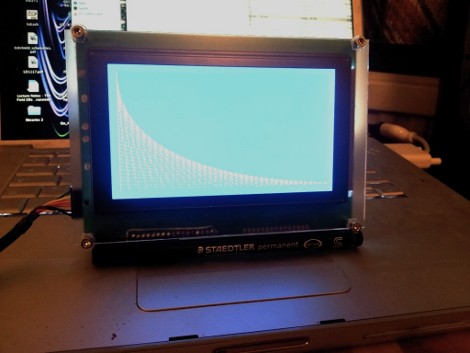
[Tom Fleet] spent the dreary weekend inside learning how to drive this T6963C based graphic LCD controller. Although this is his first time venturing away from HD44780 character displays, the availability of an Arduino library helped him go from being a newbie to coding his own animated graphics.

The hardware setup is straight-forward. The screen has a 20-pin connector and operates at 5V. We don’t see it on his protoboard, but usually these displays also need a potentiometer which serves as a voltage divider for the screen contrast. The data and control pins eat up most of the available I/O on the ATmega328 chip he used, but the I2C and SPI pins are still open and he plans a future project to make this a wireless display for his PC using one of those protocols.

As for fonts and animation, [Tom] links to several tools which will come in handy. There’s a font program that will convert Windows system fonts into a C file for use on the Arduino. The animations start with a 1:1 ratio animated graphic drawn with his favorite image editing software. He then converts those to monochrome bmp files and used bmp2c to convert each frame to a C array. After the break there’s a seven second example that would work well as a boot screen for his project.

Continue reading “Driving A T6963C Based Graphic LCD”

cheap-and-easy-cat-feeder

An Easy To Build Cat Feeder Driven By A DIY Linear Actuator

[Will Finucane] of Revolt Labs/Mad Science Blog was looking for a way to keep his cats happily fed while away on a short vacation, so he put together a cheap and easy automatic feeder to ensure that his pets didn’t go hungry while he was away.

We’ve seen different iterations of automatic pet feeders here before, some relying on rotating false bottoms, while others use crank-style feeders to get the job done. [Will’s] solution is a bit different, employing a cheap linear actuator to deliver feedings.

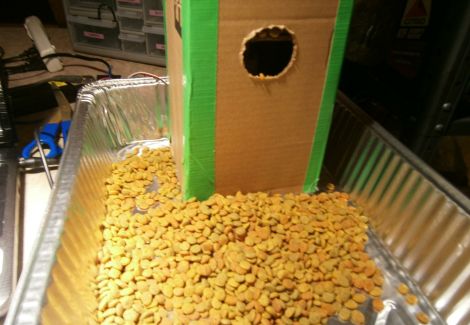
He emptied out a glue stick, replacing the glue with a brass tube. This gives him the rigidity that the glue lacked, allowing him to easily move a platform full of cat food up and down. He mounted the glue stick on a continuous rotation servo, installing the actuator and a feeding platform inside a cardboard box.

Using an Arduino, he lowers the movable platform every 12 hours, allowing a bit of cat food to fall from the hole he cut in the side of the box. While his creation might not stand up to years of use, it’s a quick solution that can cost very little, depending on what you have sitting around.

Check out the video below to see [Will’s] cat feeder in action.

Continue reading “An Easy To Build Cat Feeder Driven By A DIY Linear Actuator”

Building An Arduino Chiptunes Project Inside An FPGA

From time to time we find ourselves in the mood for some Chiptunes. You know, the music that accompanied all of the best 8-bit console games? These days there are a lot of projects that use the audio chips of yore to recreate the sounds, but you’re always faced with the issue of sourcing those parts. [Jack Gassett] took some inspiration from one of those projects, but solved the rare hardware dilemma by building his own Chiptunes MIDI device in an FPGA.

He saw one of our features on an Arduino controlled YM2149 programmable sound generator. He realized that you can already find FPGA libraries out there that mimic this sound generation hardware, and he’s already done extensive work with an Arduino soft processor. Why not combine the two?

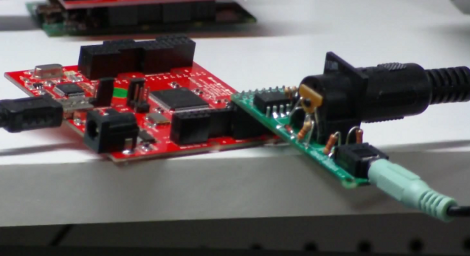
He’s using a Papilio FPGA with a wing that includes a MIDI connector and audio-out jack. As you can hear in the clip after the break this sounds just like the real thing. And he’s got plans to roll as many different types of sound generating chips into the mix as possible. You know, one FPGA synth to rule them all.

Continue reading “Building An Arduino Chiptunes Project Inside An FPGA”

A Locking Chest With A Musical Key

music-detecting-box

[Basil Shikin] was thinking about different types of locks, and was trying to come up with a locking solution that he had yet to see. It dawned on him that he had never come across a lock triggered by music, so he set off to construct one of his own.

He ordered a wooden chest online, then proceeded to piece together the electronics required for the locking mechanism as well as the music detecting logic. Using an Atmega328P paired with an electret mic, his system listens for a particular tune (the Prelude of Light from the Ocarina of Time) to be played , which triggers a tiny servo to undo the latch. To do this, he implemented a version of the Goertzel Algorithm on the Arduino, allowing him to accurately detect the magical tune by frequency, regardless of what instrument it is played on.

Be sure to check out the video below to see his musical lock in action.

Continue reading “A Locking Chest With A Musical Key”

Printing Anything With A Thermal Receipt Printer

Over the last year, [James] has been a part of a few commercial projects that used a thermal receipt printer as part of the build. Something must have cracked in his mind, because [James] spent a lot of time developing a way to print customized content on receipt printers, connecting these printers to the Internet, and sharing content with other Internet-connected receipt printers. Even [James] doesn’t know why he spent so much time on this project; [James] figured he was bound to find something interesting. We’ve got to commend him for that.

[James] had been aware of the Adafruit Thermal Printer Library, but this library is a little kludgy. Text is the Adafruit Library’s forte, and while graphics and non-ASCII characters are possible they’re certainly not easy to print with the existing libraries. With his current system based on HTML, CSS, and Javascript, [James] has a really easy way to print anything he can put on a webpage on receipt paper.

Getting his receipt printer onto the Internet had its own challenges. After wrangling with the Arduino Ethernet library through the month of February, [James] realized larger prints (about 15cm of paper) would fail inexplicably. To get around this, [James] wrote an HTTP client for the Arduino that would fetch data, put it on the SD card, and then start printing.

Right now, [James]’ project is a polished as anyone could hope. We’re a bit concerned – although we completely understand –  that he could get sucked into the black hole of pointless development of receipt printer software so easily. All was not for naught, though; now anyone can make very professional-looking prints on receipt paper very easily.

Stair Accent Lights Made From Cheap LED Strips

We really like [Geert’s] take on accent lighting for his stairs. He built his own LED channels which mount under the bullnose of each step. The LED strips that he used are actually quite inexpensive. They are RGB versions, but the pixels are not individually addressable. This means that instead of having drivers integrated into the strip (usually those use SPI for color data) this strip just has a power rail and three ground rails for the colors. Ten meters of the strip cost him under forty dollars.

He did want to be able to address each step separately, as well as mix and match colors, so he designed the driver board seen above to use a set of TLC5940 LED drivers. These are controlled by the Arduino which handles color changing and animations. It will eventually include sensors to affect the LEDs as you walk up the stairs. Each strip is mounted in a piece of angle bracket, and they’re connected back to the driver board using telephone extension wire.

Floppy Drive As An Audio Sampler

Here’s a floppy drive which is being used as an audio sampler. At first glance we thought this was another offering which drives the stepper motor at a specific frequency to generate that characteristic sound at a target pitch. But that’s not what’s happening at all. The floppy is actually being used as a storage device (go figure).

From what we can tell, it’s being used almost like an 8-track tape. A PWM signal is stored on one circular slice of the disk, then the head can be moved back to that same “track” to play back the wave form. The head doesn’t move during playback, but just keeps reading the same track of bits. To the right you can see an Arduino board. This allows for MIDI control of the track selection. [Alexis] shows off some keyboard control in the video after the break. There’s a buffer chip on the breadboard which allows the audio output to be quickly switched off as the floppy drive head is moved. This keeps garbage out of the sound until the new track can be read.

Continue reading “Floppy Drive As An Audio Sampler”