Minestation – An External Weather Display For Your Minecraft World

minestation

If you’re a big Minecraft fan, the folks at [radikaldesign] have something that might be of interest to you. (Translation) Inspired by some of their Minecraft-loving friends, they have developed Minestation – a weather station for your Minecraft game.

The concept is simple. Here in the real world we have the ability to look out the window and see what it is like outside, but many of us turn to digital weather stations, the Weather Channel, or the local news to get the real scoop. They decided that the world of Minecraft should be no different, so they constructed an Arduino shield that allows players to see weather conditions as they play.

The shield contains a Nokia 6100 LCD screen which displays all sorts of useful information. It features a clock and calendar that reflect in-game time, making it easy to know when night is going to fall. It also continually displays the player’s coordinates as well as what the weather looks like in that region. Having this information at hand when you’ve been slogging away in the mines (losing track of time and weather) seems like it could be pretty useful at times.

You can buy one of the devices at Minestation.me, but the design is completely open, so you can easily construct one of your own without too much hassle.

Continue reading to see a video of the Minestation in action.

[Via HackedGadgets]

Continue reading “Minestation – An External Weather Display For Your Minecraft World”
Rolling Digit Clock Is A Wonderful Piece Of Engineering

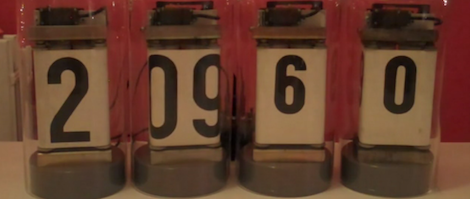
A long time ago and on a scrounging trip he barely remembers, [Victor] bought a quartet of digits from an old Dutch Railways clock. These antique displays used a strip of plastic coated cloth that rolls around itself with the help of a motor to display the digits 0 through 9. It’s been many years, but [Victor] finally got around to building a clock out of these single digit displays and we’re loving the results.

Because these displays were manufactured in a time when mechanical devices were king, [Victor] had to slightly modify each digit so they could display numbers with the help of a continuous rotation servo. The four servos are controlled by an Arduino – each digit changing one at a time to reduce current consumption – and a magnet and reed switch was added to each digit so the numbers could be repeatedly displayed.

Before [Victor] replaced the plastic servo gears with metal cogs, the clock was quite noisy. He’s since put each digit underneath a bell jar (actually a vase turned upside down), and we’ve got to say that [Victor] has a nice clock on his hands. Check out the videos of the clock changing digits to display the time after the break.

Continue reading “Rolling Digit Clock Is A Wonderful Piece Of Engineering”

Semaphore Signal Replica Perfect For The Train Buff In Your Life

semaphore-signal

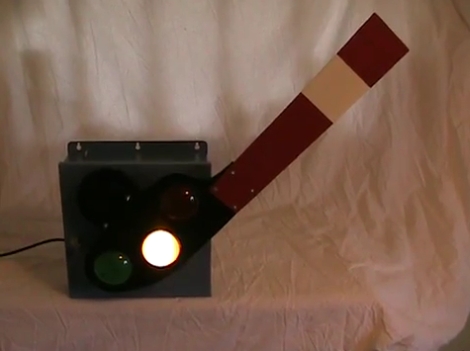
[John Philip’s] brother has a sizable room set aside for his model railroad setup, and he was looking for something interesting to add to his brother’s collection. Rather than construct something for the railroad itself, he decided that an early 1900’s-style semaphore railroad signal would make a great novelty item for the room.

The project started with [John] scouring the Internet for colored signal lenses. Once he found a set that worked for him, he crunched some numbers to ensure that the rest of the semaphore box stayed true to original scale. Inside the signal’s case you will find a small regulator board for his light source, an Arduino, and a motor controller board to actuate the arm.

To ensure that the signal arm is always perfectly positioned, he installed a pair of reed switches on either side of the case, enabling the Arduino to auto-calibrate the signal’s position each time it is powered on. At first, this control scheme might strike you as a bit over the top, but we really like the fact that the signal can always configure itself to function perfectly, even if someone tinkers with/bumps into/moves the arm at any point.

Be sure to stick around to see a short video of the semaphore signal in action.

Continue reading “Semaphore Signal Replica Perfect For The Train Buff In Your Life”

Display Twitter On An Arduino

If you ever wanted your name out on the Internet, now is your time to shine. [Chris] hooked up an Arduino to the Internet and is streaming the results of combing through Twitter live to the entire world.

The SocialBot9000, as [Chris] calls his build, is an Arduino Uno connected to an Ethernet shield and an LCD character display. The firmware uses the Twitter API to search for recent posts containing the phrase, ‘socialbot9000.’ A PHP script on the Arduino does all the heavy lifting and with the great Bildr tutorial on getting the Ethernet shield up and running, [Chris] was off to the races.

Because it’s extremely doubtful that everyone on the Internet could manage typing a message into Twitter that would be correctly parsed by the SocialBot9000, [Chris] put a small form up on the build log that will correctly generate the message and take you to your Twitter account for posting. After all that was done, [Chris] decided to have some fun and set up a live feed from a camera in front of the LCD display for the world to watch.

Winning Video Games By Letting Arduino Push Your Buttons

[Lars] shows you how to get a perfect score on the first four levels of BIT.TRIP RUNNER by using an Arduino to time and send button presses. This is a pretty simple game that uses a couple of buttons to jump or slide past obstacles. The constant speed of the character makes it quite easy to time these movements without any input from the game. This means that the pixel sampling which some web-game bots use isn’t really necessary here. Just work out the timing and hard-code it into the sketch. As you’ll see after the break, it works perfectly

The real value of this hack is the guide he wrote to send key presses from the Arduino hardware. It’s not hard at all, but there are several steps and this will get you up and running in no time. Where might you go from here? It wouldn’t take much to turn this into a keyboard prank that misspells all your words.

Continue reading “Winning Video Games By Letting Arduino Push Your Buttons”

Microcontroller Gives You More Control Of Your Camera Lens

Here’s one way to get more control of your camera lenses. [Vladimir] built an Arduino-based pass-through ring (translated) which intercepts automatic lens controls. It’s meant for use with the Canon EOS lenses which have their own electronics allowing control of things like focus and zoom.

It seems like part of the motivation here was to uses the lenses with other brands of cameras. But [Vladimir] does also talk about the possibility of improving on some of the sensors that don’t perform well in certain climate conditions (think of how crystal oscillators will drift as temperature changes).

The machine translation is a bit rough to follow, but it seems the adapter ring still uses the settings sent in from the camera but has the Arduino clone to translate them into a format that the lens is expecting. In addition to this there is a set of buttons on that small PCB beside the lens which allow for fine tuning the aperture.

This is a lengthy writeup, but there’s two more on the way that will help fill in the gaps of how this hack works with different lens models, and some more tips on how to use it.

[Thanks Vasily]

Autonomous Metal Detector Lets You Sit Back, Get Rich

thunderbird7-autonomous-metal-detector

As a kid, metal detectors seemed like great fun. Every commercial I saw beckoned with tales of buried treasure “right in my own back yard” – a bounty hard for any kid to pass up. In reality, the process was both time consuming and tedious, with little reward to be had. [Gareth] liked the idea of scouring the Earth with a metal detector, but he liked sitting and relaxing even more. He decided he could easily partake in both activities if he built himself an autonomous metal detecting robot.

He stripped down a hand held metal detector, and installed the important bits on to the front of an R/C chassis. An Arduino controls the entire rig via a motor shield, allowing it to drive and steer the vehicle while simultaneously sweeping the metal detector over the ground. He fitted the top of the rover with a camera for remotely watching the action from the comfort of his patio, along with a laser which lets him pinpoint the location of his new found goods.

Continue reading to see a short video of the robot in action, and be sure to check out his site for more build details.

Continue reading “Autonomous Metal Detector Lets You Sit Back, Get Rich”