Building A Creepy Doll Army

Want your very own Chucky doll to scare the crap out of the roommates? [Gzip] shows you how to make this happen by adding servo-based animatronics to old dolls. In the video after the break you can see the doll throw up her arms and turn her head thanks to a motor in each shoulder and one in her melon. You won’t see it in the clip, but the legs are motorized too meaning that some creative coding might have this old gal awkwardly crawling across the room (with knife in hand). Then again, maybe this is just the inspiration you need to get off your bum and finish the Santa-Pede Challenge. Submissions are due a week from today!

Continue reading “Building A Creepy Doll Army”

Amarino Makes Android Controlled Robots A Snap

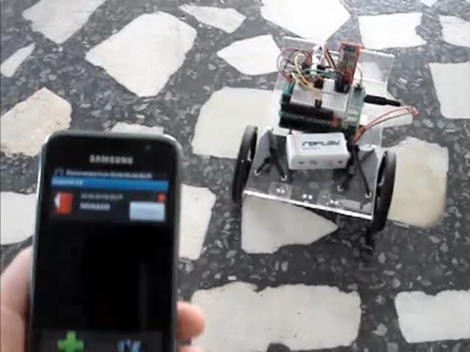
[Lucas Fragomeni] is controlling this robot using the accelerometer on his Android phone (translated). He could have gone through our Android tutorials and developed a custom application but he took the shorter route and used Amarino, an ‘Android meets Arduino’ toolkit, to do it for him. [Lucas] combined an Arduino, a BlueSMiRF Bluetooth modem, and two servo motors to build his robot. Amarino lets him connect to that Bluetooth modem and send sensor data over the connection. In this case it’s only the accelerometer that he chose to use, but he could have gone with the touchscreen, or any other sensor the handheld has to offer. Using this code package got him up and running quickly, only requiring that he writes his own code to turn the received signals into servo motor control routines. See it in action after the break.

Continue reading “Amarino Makes Android Controlled Robots A Snap”

Yet Another Cat Door

Cat Flap Fever

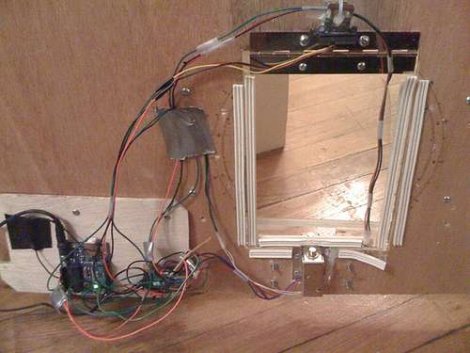
RFID cat flaps are one of those projects we see all of the time. They are generally pretty simple to rig up, not too expensive, and have a good “wow” factor for any non-technical friends or family, not to mention tremendously useful. Why did we decide to share this one? Well, for one, it is simple. It doesn’t tweet, email, or text message, it just gets the job done. Two, it is excellently documented, including a detailed parts list and a step by step schematic just about anyone could use to build their own. [landmanr] does mention that he recommends some sort of project enclosure to protect the electronics from damage, which would be bad for the poor cat stuck outside.

DIY Ultrasonic Range Finder For $5

After finding some ultrasonic transducers online for a dollar each [Kerry Wong] decided to create an ultrasonic range finder. The result is much like parallax’s PING))) sensor but much cheaper. His post is not only a good way to save some money, but also does a good job of explaining how ultrasonic sensors work.  The transmit circuit is essentially an H-bridge, much like what you would use to control a motor. To listen to the returning echo he uses a pair of high gain/low noise op-amps to filter and amplify the signal.  The board he uses to test the range finder (not included in the cost) is an ATMega328 running the Arduino boot loader.  He also provides lots of example code to boot.

Turning Music Into A Light Show

[nickinoki] Made a light show using some amplifiers and an arduino. First he created a microphone circuit based around a LM386 Audio Amplifier. After amplifying the output of the microphone a second time, he uses three bandpass filters to block all but a few desired frequencies from reaching the arduino.  By only letting a few frequencies through the arduino is able to determine if the song is louder at higher or lower frequencies.  Then using the three analogue inputs he created a scheme for generating the light show on an arduino. While he was unable to achieve the exact target frequencies with his bandpass filters they worked well enough to allow him to successfully generate the light show.

No More Blurry Pictures

Say goodbye to ruined images thanks to this add-on hardware. It measures the movement of the camera when a picture is taken and corrects the image to get rid of motion blur. Above you see a high-speed camera which is just there for testing and fine-tuning the algorithm that fixes the photos. Once they got it right, the setup that the camera is attached to only includes an Arduino board, Bluetooth modem, 3-axis accelerometer, gyroscope, and a trigger for the camera. You use the new hardware to snap each image and it takes care of triggering the SLR’s shutter in order to ensure that the inertial data and the image are synchronized correctly.

[Thanks Rob]

Arduino The Documentary

We finally got around to watching “Arduino The Documentary” and it’s a two-thumbs-up kind of film. What did we like? It’s a documentary about open source hardware so what’s not to like? You’ll hear the story of how the Arduino team was formed and the path they took from design to production. There are also interviews with early adopters and we even find out that Sparkfun passed on their chance to sell the original through-hole kit version of the board. It’s well made, and thanks to the Creative Commons license you can download it for free, or watch the embedded version here after the break. It’s only 28 action-packed minutes so finish up that special clock and watch it during lunch today.

Continue reading “Arduino The Documentary”