Range Finder Musical Toy

parallax_arduino_ping_organ

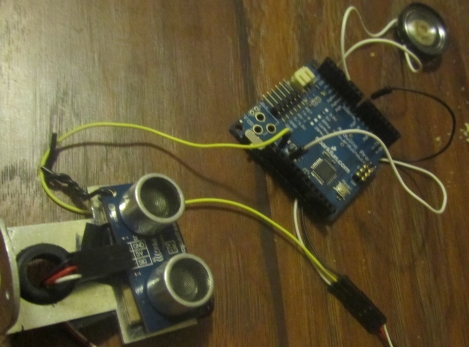
Instructables user [sketchsk3tch] was looking to make a fun toy for his kids using things he had around the house and came up with the Ping Organ. The organ is played by standing in front of the Parallax Ping range sensor, and moving around any which way you please. He interfaced the range sensor with an Arduino, scavenging a small speaker from an old toy for audio output.

The code for the project is fairly straightforward, borrowing most of it from the demo software that shipped with the Ping and the Arduino. He made a few small tweaks in order to get the organ to play frequencies of actual notes, as well as to allow for some flexibility when calculating the specific note to play.

While not the most complex project we have ever featured, [sketchsk3tch] reports that his kids love to spend time flailing around wildly in front of the organ, which is exactly what he intended.
Video of the organ being tested after the break.

Continue reading “Range Finder Musical Toy”

SMS Controlled Irrigation

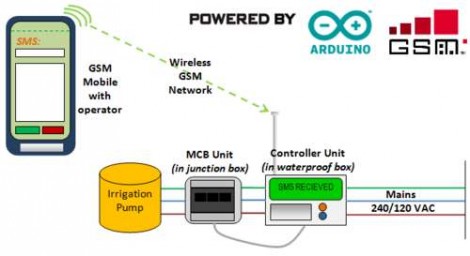
[Mhkabir] built an irrigation system that communicates by text message. The concept is simple, sending a text message to the system will cause it to switch on the water pump.

Many times we see text message manipulation via the Internet, or using a GSM module. But in this case an inexpensive cellphone is used as the communication interface. The vibration motor has been removed and those connections are monitored to signal incoming messages. Wire leads were soldered to the keypad contacts which allow an Arduino to send out text messages when there is a problem with watering. This isn’t an iron-clad system, as any incoming message will trigger the system and outgoing messages are limited to saved drafts. But a bit of creative programming and we’re sure more functionality could be squeezed out of this hardware.

RFID Triggered Presentation Box

blasphemous_bible_box

[Lace] needed to build a “box project” for his college art class and figured he could spice things up a bit by adding some electronic components to the mix. His project, dubbed the ‘Blasphemous Bible Box‘ consists of a bible opened up the section of the book of Revelations that discusses the mark of the beast in an old cigar box. The box is normally locked, but has been programmed to unhook an internal latch when he passes the RFID chip embedded in his hand over it. The effect could have been achieved using a simpler circuit, but the enclosed Arduino seems to do the job decently enough. [Lace] has not mentioned if he has considered revising the box any, but a spring-loaded external latch secured with a magnetic lock would make for a nice effect if version 2 was ever built. Adding a servo to slowly open the box as well as including a speaker blaring Carmina Burana – O Fortuna upon opening would be pretty cool as well (hint, hint). We have video of the box in action after the break.

Continue reading “RFID Triggered Presentation Box”

How The Arduino Won? This Is How We Can Kill It.

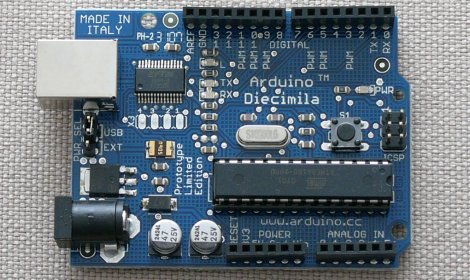
[Phillip Torrone],  has written a piece over at Make entitled “Why the Arduino won, and why it’s here to stay“. While boasting that the Arduino “won” at roughly 100k units in the wild sounds decently impressive at first, lets just ponder for a moment how many bare AVR chips there are out there in home-made projects. Kind of makes 100k sound small doesn’t it.  However, if you look at their definition of the Arduino, targeting fresh and new people to microcontroller projects, that changes things a little bit. That number suddenly starts to seem a little more important if you re-word it as 100,000 new beginner hackers. Sure, they’re only tweeting toilet flushes and blinking lights, but they’re excited and they’ve tasted blood.

[Phil] goes on to talk to manufacturers on how to “beat” the Arduino. He lists features that would help push someone onto a new platform instead of the Arduino. This, is where I think we come in. We can kill the Arduino.

Continue reading “How The Arduino Won? This Is How We Can Kill It.”

Today’s Arduino Minute

Sometimes projects are vast, complicated, and complex. Other times projects are a bit more on the simple. Today we thought we would share a couple projects with something in common that may be familiar sounding to the more experienced crowd, but may inspire a few readers new to the world of microcontrollers.

Continue reading “Today’s Arduino Minute”

Rechargeable Battery Capacity Tester

Rechargeable-Battery-Capacity-Tester

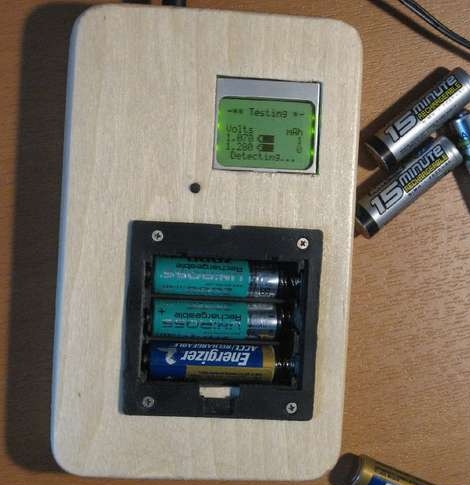
If you are like most people, you likely have a mixed pile of rechargeable batteries sitting around with no idea as to what kind of charge they can hold. You could watch a voltmeter for a few hours while you drain each and every battery, noting when it drops below its stated voltage – but then again, you have a life.  Instead of wasting away in front of his multimeter, [BrianH] decided he would build an automated battery capacity tester to do the job for him.

He created a simple circuit that drains any AA battery, NiMh or NiCd, and records its useful capacity in milliamp hours.  Since the ATMega168 microcontroller used has 6 analog/digital converters on board, he figured that he might as well design his tester to measure the capacity of three batteries simultaneously.  [BrianH] wired the meter up to an old Nokia LCD, then moved his project to a perfboarded ATMega, freeing up his Arduino for other tasks. Once he had things reassembled, he packed it all into a handsome wooden box.

His writeup is chock full of details and source code, so be sure to check it out.  We have video of the charger in action after the jump.

Continue reading “Rechargeable Battery Capacity Tester”

Wireless Arduino Message Board

arduino_message_board

[uhclem] was looking for a novel yet easy way to remind his kids to do their chores, and instead of using a series of post-it notes, he constructed a nice wireless Arduino-powered message board.  The message board is powered by an Arduino Pro, and communicates with his computer via a pair of series 1 Xbee radios which relay a series of canned messages to an attached VFD.  He installed all of the components in an old cigar box, and mounted it on the wall, making for a nice overall presentation.

Programming of the messages does not require any special software as the user interface is handled by the Arduino and accessed via a standard terminal session. [uhclem] mentions that the his code consumes nearly all of the device’s RAM when running, so he keeps a handful of canned messages stored in the Arduino’s flash memory, recalling them when needed.  The optional EEPROM is used to allow for streaming messages to the device as well.