Using An Arduino Or Seeeduino For Its FTDI Chip

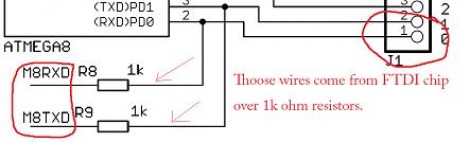
We think of the Arduino as a rapid prototyping tool but we never thought of it as an FTDI breakout board before. [Ihsan Kehribar] wrote a quick post to show how it’s done. You’ll find an FTDI chip on Arduino boards that have a USB connector. It’s used to handle the USB communications on one side, and TTL serial communications on the other. The serial pins from the chip are mapped to the UART on the AVR chip, and in turn they appear on the pin headers for easy connections. Just load up a really simple sketch(available from Ihsan’s post) to make sure the processor doesn’t get in the way and you’ve got yourself an FTDI breakout board. If you happen to have a Seeeduino there’s even more functionality as the board has a selector switch that allows you to choose between 5V and 3.3V levels.

This doesn’t hold true to the newest generation of Arduino, as those board have replaced the FTDI chip with an ATmega8U2. That’s basically and ATmega8 with native USB handling… fancy.

[Thanks Marcus]

Automated Chip Burning

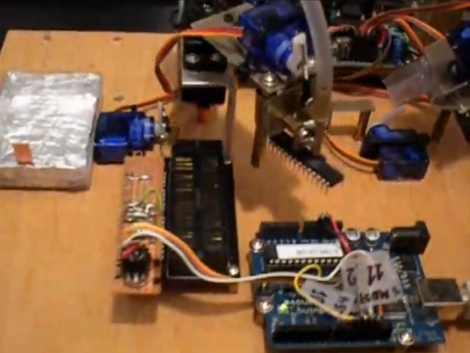
[Alexsoulis] needed to burn the Arduino bootloader to a slew of ATmega328 chips. Instead of sitting there and plugged the chips into a programmer one at a time, he build a robotic microcontroller programmer.

It starts with the DIP package microcontrollers in a tube, with a servo motor to dispense them one-by-one. An arm swings over and picks up the chip with a fish pump powered vacuum tweezers similar to the pick-and-place head we saw recently. From there the chip is dropped into a ZIF socket and programmed by an Arduino. Once the process is complete it is moved to the side and the process repeats.

We’ve reported on using an Arduino as an AVR programmer but we’ve never actually done it ourselves (we use an AVR Dragon programmer). Take a look at the video after the break and let us know if you think the actual programming seems incredibly slow.

Continue reading “Automated Chip Burning”

Arduino, RFID, And You

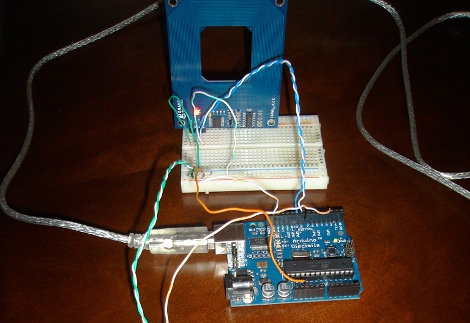
[Matt] has mixed up a batch of two RFID reading door lock systems. While the “door lock” part of the setup has yet to come into existence, the “RFID reading” section is up and running. By using the Parallax RFID readers (for cheap, remember?) and an Arduino, [Matt] is able to parse an RFID tag, look its number up in a database, and then have a computer announce “Access Denied” in a creamy “Douglas Adam’s sliding door of Hitchiker’s Guide” kind of way with Python.

Good books aside, catch a not as exciting as you’re thinking video after the jump.

Continue reading “Arduino, RFID, And You”

From Sign Language To Spoken Language

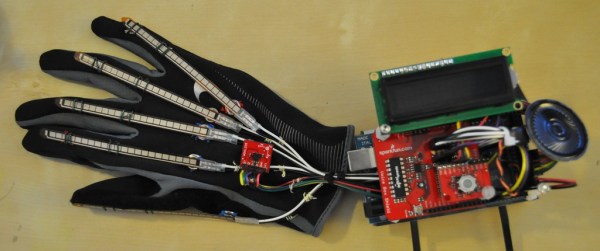
As part of a senior design project for a biomedical engineering class [Kendall Lowrey] worked in a team to develop a device that translates American Sign Language into spoken English. Wanting to eclipse glove-based devices that came before them, the team set out to move away from strictly spelling words, to combining sign with common gesture. The project is based around an Arduino Mega and is limited to the alphabet and about ten words because of the initial programming space restraints. When the five flex sensors and three accelerometer values register an at-rest state for two seconds the device takes a reading and looks up the most likely word or letter in a table. It then outputs that to a voicebox shield to translate the words or letters into phonetic sounds.

Chiptune Instrument From NES

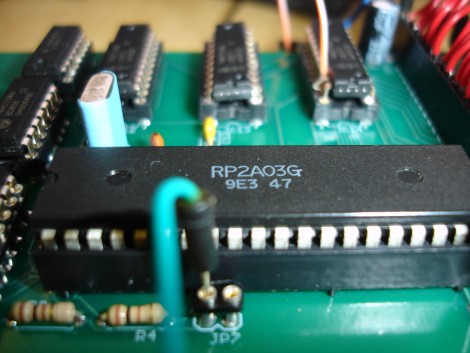
[Jarek Lupinski] wanted an instrument that would let him play chiptunes live, without a need for pre-programming a cartridge for playback during a concert. His preferred hardware is an original Nintendo Entertainment System because of its familiar nostalgic sound. After picking up a lot of 5 broken NES units he set out to build a midi-compliant device.

The five NES units he bought had nothing wrong with them other than the 70-pin cartridge connector. He fixed them all, then de-populated the board on one and tried to build out a circuit on a breadboard. After much trial and error, forum searching, and conversations with others who were familiar with the hardware he got the circuit working. He’s posted a schematic and had a board fabricated which takes the transplanted chips and transforms them into an instrument. Check out the test notes being played by an Arduino Mega after the break.

Continue reading “Chiptune Instrument From NES”

Arduino UNO And Mega 2560

The Arduino Team presented some new products at Maker Faire this weekend. It’s a significant update. The Arduino UNO and Arduino Mega 2560 update the Duemilanove and Mega respectively. They now use an ATMega8U2 instead of an FTDI USB to serial converter chip. Allowing an Arduino to become nearly any kind of USB device. A fourth mounting hole has been added to the UNO for more stable mounting. The booloader is now the Optiboot bootloader. The boards can run firmata out of the box. We are not sure about existing Arduino boards, but the last six bytes of EEPROM have a unique serial number. At this point, the Mega 2560 has some kind of issue with gcc on certain platforms and unable to use the full memory available until there is an update to the IDE.

The team also gave a preview of some works in progress. Arduino Ethernet POE can be power over ethernet and loaded with TFTP. Available October 18, TinkerKit will be released. Geared toward designers, the kit has PCB modules that include a joystick, soft pots, transistor, relay, power MOSFET, push button, LEDs and motor driver. That same day will be the launch of the multi-lingual Arduino Store.

These developments will be a nice addition to the toolset out there that you can use and we look forward to new projects using these tools.

Update: [PT] sent us a link to an ever-growing FAQ about this hardware.

Daft Punk Table With IPod Dock

This beautifully crafted Daft Punk table with iPod dock was built by [Dustin Evans]. The table itself was built with the help of a friend in one day with electronics added a bit later. It features an 8×8 grid of boxes with red LEDs mounted inside. The picture above is not quite the finished product, a diffuser will be added later to augment the scattering of light already provided by cutting the tip off of each LED. On the underside you’ll find a power supply and a set of speakers. The system is controlled by an Arduino which resides in the same drawer as the dock. See the final product in the clip after the break.

Continue reading “Daft Punk Table With IPod Dock”