Bring The Crane Game Home

Everyone’s familiar with the quarter gobbling crane games. More often than not there’s a child nearby begging a parent for more quarters so they can try their hand at the toy-snatching claw. [Marc.Cryan] put his quarters to a better use by building a home version of the crane game.

[Marc] installed a gantry in an archway of his house.  The crane trolley rides on this gantry and uses a spool to raise or lower the tether for the claw. Winning copious style-points, he used the case of an old mouse to form the claw. An Arduino controls the different motors in the system and a toy was repurposed to act as the controller. As you can see after the break, it’s more fun than the cinema-lobby version of the game and your kids can play with it for free.

Continue reading “Bring The Crane Game Home”

Reboot Life In A Heartbeat

This hoodie senses your heartbeat and uses it to control Life. Conway’s Game of Life, popular in all kinds of electronics projects, uses a grid of cells coupled with a set of rules to mimic the life and death of simple organisms. This iteration displays the game over your own heart, then taps into your heart rate, resetting the game at the beginning of each cardiac cycle. We guess you could say that Life goes on only if you do not.

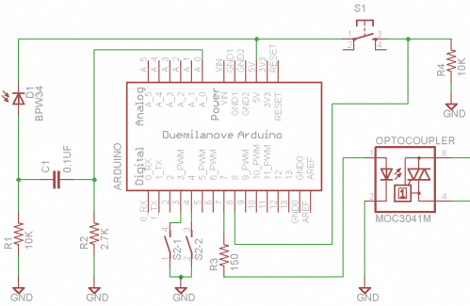
The EKG circuit that detects the heartbeat is made up of an IR transmitter shining through the tip of your finger to a receiver. An ATmega168 running the Arduino bootloader controls the EKG circuit and resets an ATmega48 which is responsible for Life. [Joe] admits that this is overkill but he’s currently without an AVR programmer; he went this route to make it work. The stylishly-geeky hoodie is taken for a test run (er… test-hop?) after the break.

Continue reading “Reboot Life In A Heartbeat”

Binary Clock Uses DS3232 RTC

[Kenneth Finnegan] quenches our clock-a-day compulsion with his Arduino based binary timepiece. The clock uses a 5×7 LED matrix as a display and shows month, day, and time. He sourced a DS3232 real-time clock which automatically compensates for temperature to achieve very accurate time keeping. We like the super-cap circuit he added to keep the RTC running if the power is cut.

Is an Arduino overkill here? Well, the code is certainly not filling the 16k available on the ATmega168. At $4.32, the $1-2 you could save by using a lower-grade chip is not worth having to rewrite the code developed during prototyping. [Kenneth] also mentions that these projects usually only hang around for a few weeks before they’re re-purposed for the next endeavor.

Take a look at [Kenneth’s] superb hardware walk through in the video after the break.  If you’re a fan of clean breadboarding, he’s also made a time-lapse of the circuit building process.

Continue reading “Binary Clock Uses DS3232 RTC”

Ultimate Flame Bait: Liquid Cooled Arduino

[youtube=http://www.youtube.com/watch?v=-U-cc_Qcf-w]

We do so many things around here  just because “we can”. Though this guy cites this as his reason, we somehow can’t help but wonder if he’s doing it just to troll the Arduino hating crowd. He has decided to overclock his Arduino by replacing the crystal and dropping it in some non conductive liquid coolant. Can you guess what sketch he’s running? That’s right, he’s blinking an LED.

Normally we would point out that we have no preference when it comes to Arduino. We simply post what is submitted. Though we are often accused of being Arduino lovers, it is simply just another tool to us. We sometimes delete obnoxious comments that get off topic, threatening, or vulgar because that’s just good house keeping. That being said, we know what to expect here. Go ahead, bash the Arduino. Get it out of your systems. Just keep it non offensive or it will be moderated.

[thanks jfreak09]

Veteran Robot Features Eight Legs And BeagleBoard

This spider-bot was built by [Zhanx] during his deployment in Iraq. He didn’t have prior hardware building experience and started out on this project when he received an Arduino to play with in September. Must be a fast learner! The parts are laser-cut from ABS plastic and connected to 24 servos. He sourced an SSC-32 serial servo control board to take care of the motor connections.

[Zhanx] has since migrated from the Arduino to a BeagleBoard which you can see perched atop the body in the video after the break. This should give him plenty of speed and power to improve the movement routines. There’s some nice work here but adding rubber feet, like on yesterday’s hexapod, wouldn’t hurt.

Continue reading “Veteran Robot Features Eight Legs And BeagleBoard”

The Day After Arduino

There will come a day in every budding hacker’s life that they realize that plopping an entire arduino in their project and leaving it there is a bit of a waste. [Domiflichi] realized this, and has shared his next steps with us. He takes us through the process of removing the ATMega chip and breadboarding it for final use.

For many of you, this is an obvious chain of events. However, there are also many who just haven’t ventured forward and taken this one step that will forever change how their projects are seen by the hacking world.  For the anti-arduino crowd, realize that this is an opportunity not to bash a useful tool but to help nurture and lead people to the next step.

CueCat, Meet Arduino

[youtube=http://www.youtube.com/watch?v=eUO3vn-ivqo]

Have you ever felt like you needed a portable barcode scanner around the house? No? Well, [Mkanoap] did, so he made one. He has hooked his CueCat up to his Arduino to capture barcode data and store it on an SD card. He is using it as an inventory tool for his personal library. Where before he had to carry a laptop around to do his scanning, or lug the books to his desk, he now just scans wherever he pleases.

You may notice some silly sounds dubbed over the video. Take note, these are the actual sounds it plays. The camera didn’t pick them up well enough, so he dubbed them in. You wouldn’t want to miss out on the entire experience would you?