Ez430 Home Automation

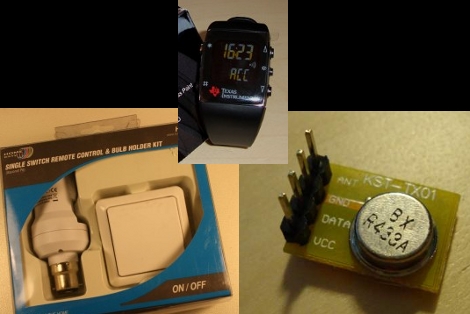
[Oliver] has been doing some work to use his TI ez430 Chronos wristwatch for some home automation. He’s working with a RF controllable lightbulb adapter which operates in the 433 MHz band. A dirt-cheap breadboard-friendly transmitter is available from Seeed Studios and he uses this in conjunction with a computer and an Arduino. Before the trolls get to their thing, YES, this is incredible overkill. But remember that he’s prototyping. We hope that if he intends to actually use this setup he’ll migrate to something like an ATtiny2313 running V-USB. Better yet, you should be able to tap into the watch’s companion receiver and cut the computer out completely.

If you’re easily amused you’ll appreciate the video of a light turning on and off after the break. If you’re a little harder to please then take a look at Oliver’s methods of using Python processing for the watch’s data.

Ok, now we’ve seen this watch turning on lights and unlocking doors. What else ‘ya got?

Arduino To Nintendo DS Interface

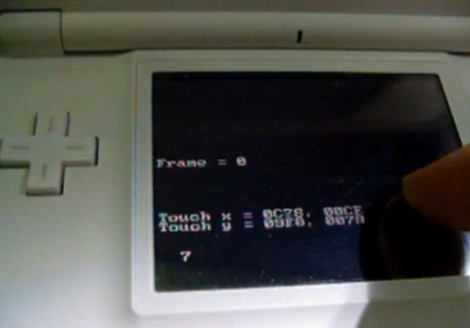
[Hounjini] was poking around at the Game Boy Advanced bus of his Nintendo DS lite and figured out how to use it to connect an Arduino to the DS. For testing he’s soldered an IDC plug to the cartridge cover pin interface but this only requires four connections. The Arduino can both send and receive data from the DS lite as shown in the example videos after the break. The data access is made possible by making the Arduino look like a controller that the DS is happy to talk to.

Continue reading “Arduino To Nintendo DS Interface”

Game Controllers Using USB Host Shield

[I-Bot] has put together some libraries that make it easy to use gaming controllers with an Arduino. They interface through the USB host shield. This means that PS3 controllers connect via USB through a cable or a dongle. With the Wii remote things get a little more interesting. A Bluetooth dongle is used to make the connection wirelessly. What we have here is a cheap and easy way to add Bluetooth connectivity to your projects either through the USB Host shield, or by building your own hardware with the schematics and code that are available from Circuits@Home. There are several pages that walk you through the protocols using as well as a demonstration video you can see after the break. Continue reading “Game Controllers Using USB Host Shield”

Hybrid Analog/binary Clock, The MK2

[Kieran] let us know about his hybrid analog/binary clock. The circuitry behind the clock is nothing too new. An Arduino combined with a Chronodot to produce an accurate clock. What we really enjoyed however was the creative implementation of an old British Telecom Linesman’s Multimeter as the case. The analog meter acts as the seconds hand, while a another display made of LEDs diffused with stripboard is the binary clock. The end product is nothing short of ingenuitive.

10,000 Watt Fluorescent Array

[youtube=http://www.youtube.com/watch?v=C_t2jrSsVXs&NR]

This is an array of flourescent tubes that form a display. The video above is just two modules of a ten module installation that [Valentin] and his team are showing at an exhibition in Berlin tomorrow. The connected modules form something of a scrolling 16-segment display (similar to the 17 segment display modules of the ninja party badges but much larger). They’re using triacs, optocouplers, DMX, and an Arduino to interface a computer with the 182 fluorescent tubes of the display. Check out a second video after the break to see (or be blinded by) all ten modules pulling 10,000 watts.

Continue reading “10,000 Watt Fluorescent Array”

Android G1 Serial To Arduino

With the ability to get root access to some of these new powerful pieces of hardware we call cell phones, we’re a bit surprised we haven’t seen more interfacing with external hardware. Here’s an example of some rudimentary connections between an Android G1 and an Arduino. To do this, you must have your G1 rooted, have the Android SDK installed, and then a custom python program running.  There is also a simple level shifter from 3.3v to 5v necessary for the connection to the Arduino.  You can get all the details from the instructable. They’ve documented the process quite well adn we’re excited to see what kinds of stuff people come up with.

Hackaday Links: Sunday January 24

Everyone Remembers Free day right? [The Ideanator’s] Bus Pirate came in such a nice red box – he decided to make it his permanent case.

[Chico] is in the middle of making a CNC, but decided to make some music with the steppers in the mean time.

What looks like an old wooden box is actually [Ludvig’s] super sweet retro arcade cabinet. Complete with a giant emergency stop red button.

Who says Legos are dead? [Carl] used them to create a simple and cheap diffraction grating projector. Including video!

[Torchris] used an Ethernet shield exactly as it was designed, sending data over Ethernet. Still a nice hack for those needing help working with Ethernet shields and Arduino.

Finally [Robert] let us know about a friends Arduino Binary Clock. But we think his elegant use of tape and a sand blaster to engrave glass is cooler.