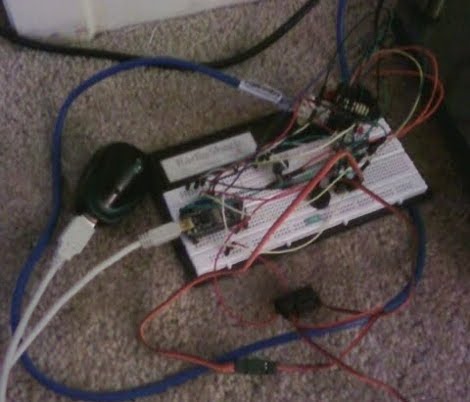
Arduino Based Multiboot Cable For Game Boy Advance

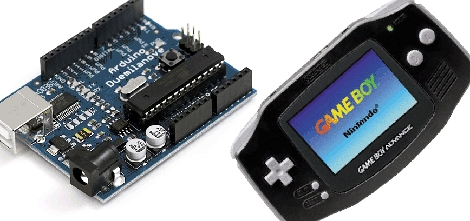
[Steve] wanted to do some ARM development and set his sights on the Game Boy Advance as a development package. In order to get his code onto the device he build an Arduino-based communications cable. It is necessary to have a microcontroller involved because the GBA uses a peculiar 16-bit serial communications protocol. This cable is an adaptation from the 8051-based cable developed by [Matt Evans] several years ago. [Steve’s] got it working by porting the 8051 assembler over for the Arduino, but we’d recommend adding a level converter to his hardware setup to step down from the Arduino’s 5v logic to the 3.3v logic the GBA expects.

He didn’t make up a wiring diagram, but in the code comments [Steve’s] laid out the connections as follows:

Arduino 8 to GBA SO
Arduino 9 to GBA SI
Arduino 10 to GBA SD
Arduino 11 to GBA SC

That’s it, follow the README in his source code package and you’re on your way to some ARM development.

Keep Tabs On Your Car Without OBD-II

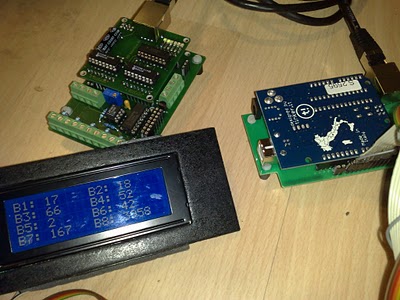
[Steve] let us know about his MultiDisplay car monitoring system. Unlike traditional systems that rely on interfacing with the OBD-II protocol and existing car computer, the MultiDisplay uses an Arduino and custom shield with a combination of sensors; including temperatures, pressures, throttle, Boost, and etc. The data collected can then be displayed on a 20×4 LCD or streamed to a PC with visualization and event recording.

It’s nice to see half a years worth of work finally be complete and presented in such a clean and professional manner, keep up the good work [Steve]

JeeNode Development Platform

It is basically a nice compact layout for an Atmel Atmega 328 with a wireless module.  Fully compatible with the Arduino IDE.  The JeeNode is available in kit form, but also all schematics and CAD files are available to download. It looks like they are mainly using it for home monitoring and control.  So far we’ve seen them put a temp sensor, power metering, and IR LED modules on their flickr set.

Cardboard Androids

Who needs expensive acrylic based, microcontrolled robots with only a few sensors available when cardboard and an Android cellphone will work much better  for much less in cost! The team over at Cellbots have done just that. While they did cheat a little by using a laser cut cardboard for exact measurements and including an Arduino to control the servos, they certainly attained their goal of “cheap” (assuming the already had the cellphone). We’re just wondering why it took them 4 weeks for a little CAD and code.

Regardless, one idea that immediately comes to mind is thousands hundreds a few little cardboard swarm bots ravaging homes everywhere, just don’t step on them.

[Thanks Mashable]

Lucid Dreaming

When we saw [merkz] use of an Arduino to produce lucid dreaming we were quite shocked. Unlike typical setups that just flash a light through sleep, his system monitors eye movement through electrodes and is able to send the data to a computer for graphing and analyzing.  The only problem being we couldn’t find a circuit diagram or code.

Not ones to be shot down so quickly, a Google revealed this thread on making ‘Dream Goggles’, which was really a Brain-Wave Machine based on the parallel port. Some modifications of an ECG collector’s electrodes using sound cards, and you could have your own lucid dreaming.

[Thanks Phil]

RC Truck Source For Robotics Platform

[Michael] sent us a link to his RC robotic platform. He started with the same RC toy as the iPhone Robot (CAR) but ended up with a blank slate waiting for more features. What he has is an Arduino with a motor driver, three bump switches for the front and rear, and a XBee module.  On the other side of things he used a SparkFun USB to FTDI connector to interface another XBee module with a PC in order to use Processing.

In the clip after the break you can see the motor control needs to have more fine-tuning done so the beast isn’t just out of control when running. But there’s a ton of potential here. It should not be a problem to add at lease rudimentary video feedback from the device. The Arduino is currently only being used marginally, leaving plenty of space to add on-board sensing such as IR, proximity, or light.

It’s a clean start, we expect to see updates! Continue reading “RC Truck Source For Robotics Platform”

Smart Flash Synchronization

[Max] designed this circuit to add smart flash synchronization to his photography arsenal. He did this because ‘dumb’ TTL based flashes won’t play nicely with more sophisticated systems like the Nikon Advanced Wireless Lighting. By building a microcontroller into the mechanism, he’s added functionality for several different scenarios, ensuring that he’ll never again have problems with early flash triggering. Now that the kinks have been ironed out in the prototype, the code and hardware can be migrated over to whatever microcontroller suits you.