STM32 F3 Discovery Dev Board Includes Some Extras

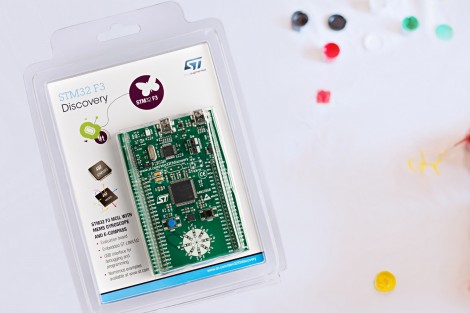
ST Microelectronics keeps kicking out development boards to show off their new ARM processor line. Yesterday they issued a press release announcing the STM32 F3 Discovery Board. As their naming scheme implies, this carries an ARM Cortex-M3 processor, but compared to the F0 Discovery board (which we loved) it’s got several extra goodies built into it.

We took a look at the F3 Discovery product page and it doesn’t look like you can order these quite yet. But click-through to the pricing and you’ll see they’ve set it at $10.90. Digikey lists the board at that price point, Mouser lists it at about $16, but neither supplier has any available. We also didn’t see a link for free boards like when the F0 model was released. If you do come across a giveaway link please tip us off about it.

Okay, now let’s discuss those extras. We think this dev kit could be used as an IMU for applications like a quadcopter or a self-balancing robot. That’s because it has a gyroscope and an accelerometer. It’s also got ten LEDs, eight of which are arranged on that white circle. We’d guess that layout is for displaying orientation data from the IMU sensors. There’s also a second USB port to use when developing USB applications for the chip.

Like the other boards in the Discovery family this has the STlinkV2 built-in to use as a programmer. We don’t know if OpenOCD has support for the F3 chipset yet, which is what we’ve been using to program STM chips in a Linux environment.
Drag And Drop Code Onto This ARM Dev Board

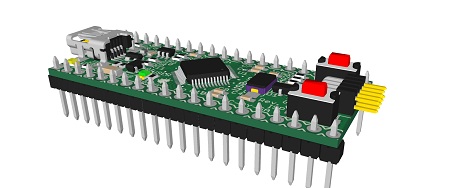
On the continuing list of homebrew ARM dev boards we’ve seen over the past few months, [Squonk42]’s USBug is one of the best we’ve seen. Like many other ARM boards, it breaks out a member of the Cortex M0/M3 family into a 40-pin DIP, but unlike all the others, [Squonk] designed it so you can drag and drop code onto the microcontroller just like a USB thumb drive.

[Squonk]’s trick relies on a certain breed of NXP LPC11xx/LPC13xx microcontrollers. These chips feature a ROM-based mass storage, meaning you can compile code on your desktop and simply shuffle it over to the USBug, no external programmer required. Here’s the relevant app note (PDF in a zip file. Double whammy).

Of course, the USBug features the I/O you’d generally expect from the current crop of Cortex-M3 devices, all while serving up 64 kB of Flash and 12 kB of RAM.

[Squonk] says he’d like to put the USBug on Kickstarter, but unfortunately he’s not a US citizen. In the spirit of Open Hardware, perhaps some maker-based electronics manufacturer will pick up where [Squonk] is forced to leave off.

Bits And Pieces Robotic Arm

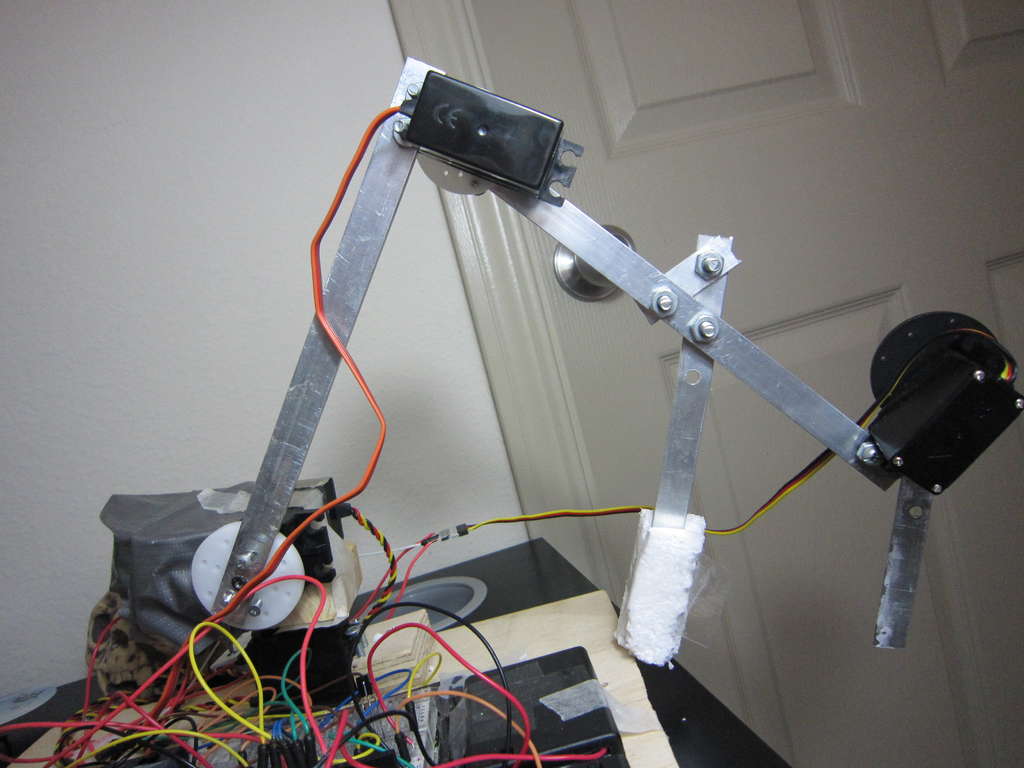
[V0R73X], who is 17  has been working on a project, to build A robotic arm. This project started out as a challenge put forward from one of his school teachers to build a robotic arm for $200.  [VoR73X] accepted, and the challenge began.

He came up with a robotic arm that can be controlled from his mobile phone and other bluetooth enabled devices. He also designed it so that he can control it from the infrared remote control of an old tv set. [VoR73X] decided to kept the design simple, to make it easy for others to build.  [VoR73X] has shared the code and a step by step process of how to build in the hopes that others would also like to take up the challenge.  Watch the video after the break for further details on his project.

via[Instructables]

Continue reading “Bits And Pieces Robotic Arm”

Galago, The Latest In A Series Of Awesome ARM Boards

Long time Hackaday reader [Kuy] sent in a project he’s been working on for the last year and a half. It’s called Galago, and it wraps up all the features we’d like to see in the current crop of ARM microcontroller dev boards into one neat package.

The Galago features an AMR Cortex-M3 microcontroller running at72 MHz. Included on its pinout are 25 digital IO pins, 6 analog input pins, 10 PWM pins, and an I2C and SPI port.

The Galago isn’t simply an exercise in hardware development, though. [Kuy] spent a great deal of time writing proper libraries for his board, allowing you to get started with the Galago very quickly without having to rely on crippled tools.

A proper library isn’t Galago’s only significant developer feature: [Kuy] went as far as to create a browser-based IDE (no Internet connection required, thankfully) that has the ability to upload code directly to the board via a USB cable. Add in a hardware debugger, and the Galago might just be the perfect ARM board for tinkerers weaning themselves off the Arduino.

[Kuy] has released the Galago on a Kickstarter, with a single board costing $25. It’s a cool device, and something we’d really like to come to market.

Programming A Propeller On An ARM

[Stefan] uses a small ARM-powered netbook for his development work, so when he tried to play around with the Parallax Propeller he ran into a few problems. The official tools from Parallax are Windows only, and the available 3rd party dev tools are only compiled for x86. After a lot of futzing about, [Stefan] was able to develop on his ARM netbook and wrote in to tell us how it’s done.

Luckily, Parallax released a GCC port for the Propeller, but unfortunately isn’t completely portable to ARM. The Propeller loader for this architecture ambivalent build uses a little bit of SPIN code, which can only be compiled on Intel machines.

To get around this problem, [Stefan] wrote an installer script to gather all the necessary bits of code to his computer. His ARM/Linux toolchain consists of the Propeller GCC, an open source SPIN compiler, and a Python script used to load code [Stefan] found on the Propeller forums.

Now that [Stefan] has a complete toolchain for programming the Propeller on an ARM device, it’s possible to develop for this very cool multi-core microcontroller on his netbook or even the Raspberry Pi.

DIY ARM Prototyping Board

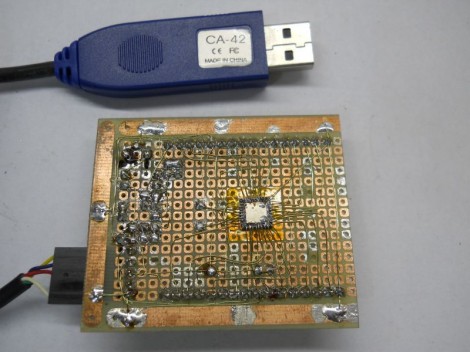
We’re impressed by the ARM prototyping board which [Danjovic] is showing off. He proves that in this day of ever shrinking packages it’s still possible to make your own development tools with protoboard and a soldering iron.

To tell you the truth, if he had designed and etched his own board we probably wouldn’t have featured it. But he didn’t need to spend time on the layout, etching, and reflow. Instead it’s just some enamel wire and a lot of patience. The patience is because the NXP ARM Cortex-M0 chip comes in a HVQFN package. We’re not entirely sure about the HV part (the package alphabet was not entirely clear on this) but QFN means Quad Flat No-Lead. That means no legs on the chip. So [Danjovic] glued it upside down and soldered point-to-point to break out all of the pins.

The top side of the board has a bootloader button, reset button, power regulation, and a crystal oscillator. He doesn’t mention what bootloader he’s using, but a Nokia USB cable gives him the connectivity to push his programs onto the chip.

Frequency Analyzer Built From The New Stellaris Launchpad

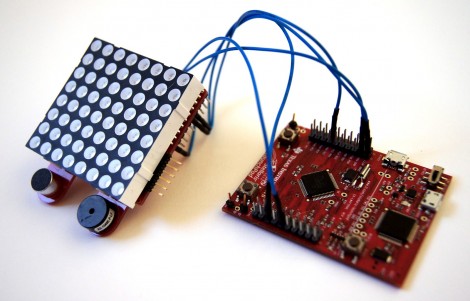
Here’s the first project we’ve seen for the new Stellaris Launchpad. It’s a frequency analyzer which displays a graph on an 8×8 LED module. What’s that you say? You haven’t received your new Launchpad board yet? Neither have we since they don’t start shipping until the end of the month. But [EuphonistiHack] works as a software dev for TI and snagged one of the early development units.

Hardware is rather simple. He uses an OpAmp to feed audio from his laptop to the ARM processor. The 8×8 LED module is an MSP430 booster pack that is addressed via SPI. On the software side of things he’s really taking advantage of hardware peripherals to simplify his work. A timer triggers each ADC reading which in turn writes the values using uDMA. Digital Signal Processing (available as a CMSIS library for many ARM chips) is then used to translate the ADC value to one that can be displayed on the LEDs. Check out the video after the break to see the final version.

The Hackaday writers are looking for an easier name for this hardware than “Stellaris Launchpad”. It doesn’t seem to lend itself to a shorter name, like RPi or Raspi does for the Raspberry Pi. If you’ve got a catchy nick name for the new board please share it in the comments.