Layering Pinball Audio Using Parallel WAV Shields

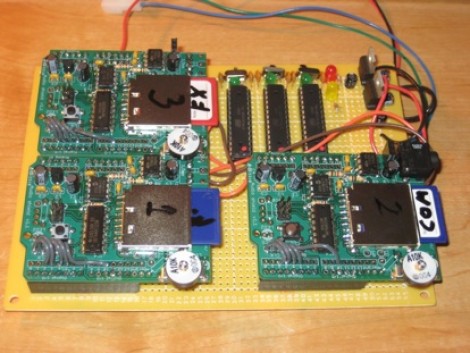
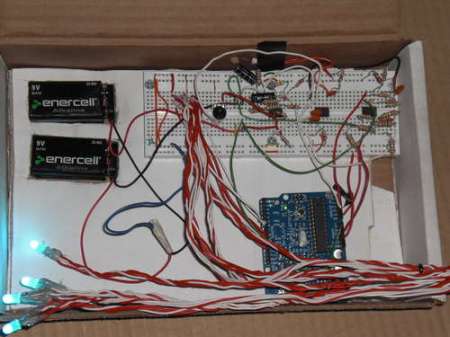
[Ed Zarick] is preparing his pinball project and wants to have authentic sound to go with the game play. The game is modeled after NBA Hangtime and in addition to music he also needs a wide range of sound effects to beef up the experience. To make this all happen at once he developed a set of Arduino WAV shields controlled by an Arduino Mega.

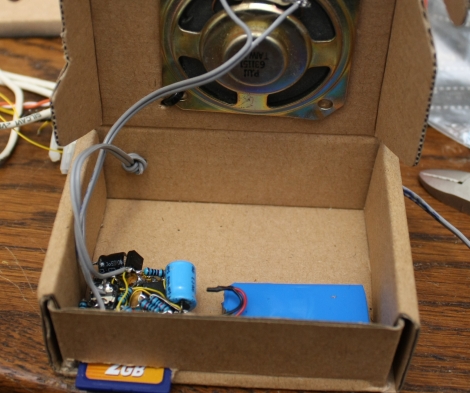
As you can see above, there are three ATmega328 chips which run the Arduino boot loader and each interface with one of the three green WAV shields. That set of chips listens for commands over and i2c protocol, and once they receive instructions they play can play the chosen file without affecting the other shields.

But to have the authentic sounds you first need to acquire the audio samples. [Ed] grabbed a ROM of the original video game and dumped all of the audio samples. From there it was a chore to listen to and catalog the sounds for SD card playback with the pinball version of the game. But it’s well worth the effort as the sound will end up tying the whole experience together.

Continue reading “Layering Pinball Audio Using Parallel WAV Shields”

Recordable SNES Belt Buckle

recordable_snes_controller

[Andrew] recently offered to help out a friend who was looking to get her husband a SNES controller belt buckle. Rather than simply slap one together, he decided that it would be far cooler if the belt buckle played audio as well. He gutted a broken SNES controller, removing most everything inside, leaving just the buttons and a few wires.

To allow for the belt buckle to record sounds, he pulled apart a recordable balloon that would play a 10-second audio clip when shaken. He moved around a few wires, allowing for the audio board to be triggered by a button press rather than motion. Once that was done, he went about fitting it into the SNES controller, drilling speaker and microphone holes in the process. With the electronics components all set, he reassembled the controller shell and mounted it to an old belt buckle he had sitting around.

The final product looks extremely fun, and would make any die hard Nintendo fan’s day.

Modern Freaking: Pull Phone Numbers From YouTube Audio

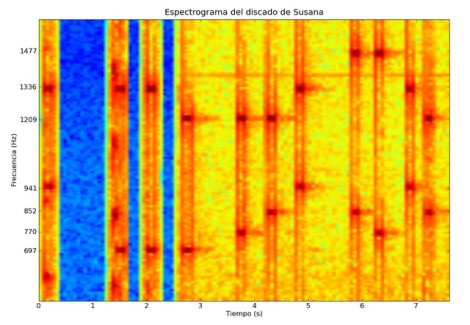
[Charlie X-Ray] is having some modern fun with the phone system by pulling dialed numbers from the audio track of YouTube videos (translated). The first step was to find a video where a telephone is being dialed and the sounds of the keypresses are audible. You can’t tell those tones apart, but a computer can. That’s because each number pressed generates a combination of two out of seven closely related frequencies. [Charlie] isolated the audio using Audacity, then wrote a python script to generate a spectrogram like the one above. By matching up the two dark nodes you can establish which two frequencies were played and decode the phone number being dialed. So how does this work again… find audio of a phone being dialed, decode the number.. profit?

Canon T1i/500d External Microphone Hack

canon_t1i_external_mic

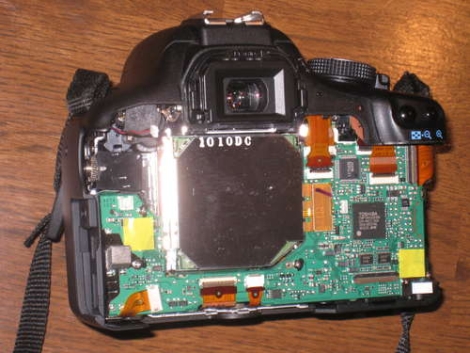
Like most other DSLR cameras that feature video recording, the Canon T1i has a small built-in microphone with limited sound reproduction capabilities. [Robb] wanted better audio performance while taking video, but found the camera’s inability to use an external microphone to be a frustrating limitation. He decided to take matters into his own hands, and disassembled his camera in order to add an external microphone jack. The process is not overly complicated, as it requires little more than the installation of a switching microphone jack. You will however need to get your hands a bit dirty since it involves opening the camera, a bit of drilling, and some epoxy. Doing such things to your camera clearly voids the warranty, and with a $600 camera at stake, this hack is definitely not for the faint of heart. That said, if you desperately want to get better quality audio from your Canon T1i or 500d DSLR, be sure to check out his tutorial.

Turning Music Into A Light Show

[nickinoki] Made a light show using some amplifiers and an arduino. First he created a microphone circuit based around a LM386 Audio Amplifier. After amplifying the output of the microphone a second time, he uses three bandpass filters to block all but a few desired frequencies from reaching the arduino.  By only letting a few frequencies through the arduino is able to determine if the song is louder at higher or lower frequencies.  Then using the three analogue inputs he created a scheme for generating the light show on an arduino. While he was unable to achieve the exact target frequencies with his bandpass filters they worked well enough to allow him to successfully generate the light show.

Tape Delay Made From Recycled Cassette Decks

Professional tape delay units are great fun, but often expensive. You’d think that with so many derelict cassette decks filling the world’s dumpsters someone must have figured out a way to make a cheap tape delay… not only in the interest of saving money (sometimes quality is worth paying for) but also in the interest of re-using otherwise wasted resources.

Forosdeelectronica forum user [Dano] has made just such a device from used cassette decks and miscellaneous parts (translated). First he investigated the operation of the playback, erase, and record mechanisms and broke out the tape heads. The playback head is on a plastic rail so that the delay time can be changed, while the record head is fixed. [Dano] encountered some difficulties in ensuring good quality for the recording and erasure, which is an important consideration when working with magnetic tape.

Continue reading “Tape Delay Made From Recycled Cassette Decks”

Cheap Audio Equipment Makes ATM Theft Easier

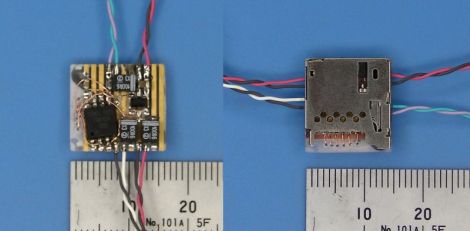
ATM information theft is nothing new. Neither is the use of skimmers to gain access to the data. But it’s a little surprising just how easy it has become to hack together the devices using audio equipment. The images above are samples of a skimmer for sale from an Eastern-European do-no-good. It is the magnetic stripe sniffer portion of the attack which captures card data as an audio recording. That is later turned into the binary code that was read from the card. We’re just speculating, but that looks an awful lot like the PCB from a pen recorder, something you can pick up for just a couple of bucks.

Of course this is used in conjunction with a camera to capture PIN data as the second part of the security protocol, but it really underscores the need for new ATM technology. Some skimmers don’t even require retrieval of the hardware, and you never know where the sketchy machines might pop up next.

[via Engadget and Slashdot]