Building A CNC Router To Call My Own

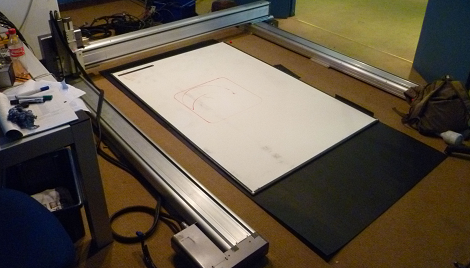
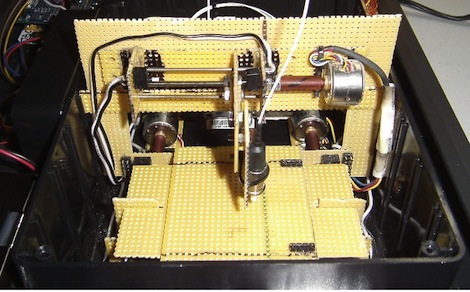
As with most writers for [HAD], I enjoy doing projects as much as I like writing about them. As a mechanical Engineer that writes for a blog mostly about electronics, a CNC router seemed like something I needed in my garage. Building a router like this requires a bit of expertise in both electronics and mechanics, so it seemed like a good challenge.

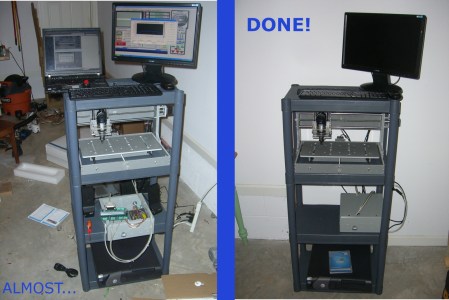
This router kit, made by Zen Toolworks, comes fairly complete frame-wise, but requires a lot of knowledge on the electrical side to get things running correctly. In order to make it look decent and work correctly, I had to rely on some zip-tie and basic diagnostic skills that I’ve honed as a former engineering Co-op and technician. Also, I had to figure out a way to cheaply stack everything in my garage as we park two cars there (the footprint is 14″ x 22″, so I consider that a success).

One of the bigger challenges that I still have to overcome with this project is learning “G-code” and how to use software to generate it.  Although I’ve done some basic programming already, as seen in the video after the break, there’s still much to learn. I’d hope that having this tool around can lead to better projects as I won’t have to be restricted to simple milled lines and circles anymore.

Continue reading “Building A CNC Router To Call My Own”

Etch-a-Sketch Automatically Draws A Tribute To Hack A Day

automated_etch_a_sketch_hack_a_day_logo

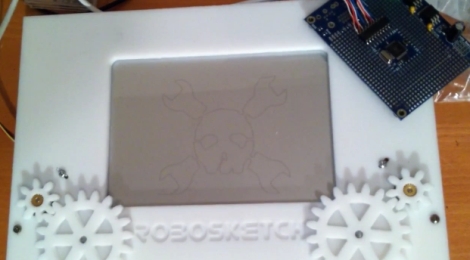
We have seen quite a few automated Etch-a-Sketch machines in our time, but when [Jason] wrote in to share his take on the subject, it came with a nice bribe attached. We are vain. It’s not something we are proud of, but when it comes to seeing the Hack a Day logo drawn out by a robot, consider us sold.

[Jason] has several CNC router builds under his belt, and thought it would be fun to automate his Etch-a-Sketch, a toy he loved as a child. He cut some gears and a face plate for the toy with his new CNC machine, then got busy programming his Propeller microcontroller to do his bidding.

A piece CNC software handles the conversion of a bitmap image to an outline, which is then converted to a CNC cutting path. The cutting path is translated into x/y coordinates by a bit of C++ code, before being fed into the microcontroller, which is running a small SPIN application he calls RoboSketch. The Propeller takes care of the rest, quickly drawing the image or pattern to the Etch-a-Sketch.

Continue reading if you would like to see a video of [Jason’s] tribute to Hack a Day, and don’t miss some of our previous automated Etch-a-Sketch coverage if this is something on your to-do list.

Continue reading “Etch-a-Sketch Automatically Draws A Tribute To Hack A Day”

Creating Halftone Pictures With A CNC Machine

cnc_halftone_images

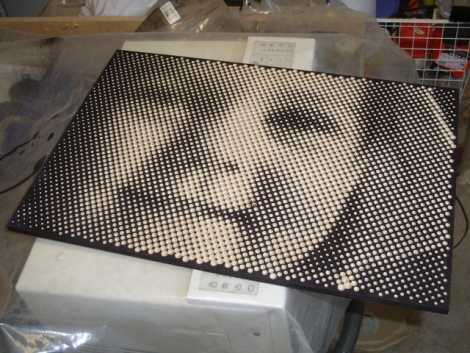
[Metalfusion], built himself a nice looking CNC machine and has been experimenting with some out of the box uses for his new tool. One novel use he is particularly fond of is creating pictures with his machine (Google Translation). While you might imagine that he is simply using the CNC as an engraver, literally drawing images on the surface of his workpiece, what he is doing is far more interesting.

He developed a small application that takes an image (jpeg, gif, or png) and converts it to a set of pixels, which can then be tweaked and skewed to his liking. The application exports the halftone image to a DXF file which can be fed into the CAD application that he uses to control his CNC machine. The CNC does the rest, using a v-shaped router bit to cut holes into his workpiece, generating a physical halftone picture from his digital image.

Thought the process does take some time to complete, the resulting images are well worth it. If you are interested in trying this at home using your own CNC machine, the DXF Halftone application is available on his site for free.

Continue reading to see his halftone generating CNC in action.

[via HackedGadgets]

Continue reading “Creating Halftone Pictures With A CNC Machine”

DIY Segway Recycles Broken Electric Scooters

[Petter] built himself a DIY Segway out of a couple of cheap electric scooters. We’ve seen a couple of very nice Segway builds in the past like the all analog Segway, or the creepy walking version, [Petter]’s Segway build seems like it would be a useful human transport device.

The motors, chains, gears, and wheels are scavenged from a pair of electric scooters. Steering left and right is accomplished by tilting the handlebars left and right. The handlebars themselves are attached to the joint at a base that allows them to be taken on and off. We’re thinking this would be great for throwing a [Petter]’s Segway in the trunk of a car – a design feature the original Segway doesn’t have.

Continue reading “DIY Segway Recycles Broken Electric Scooters”

Hackaday Links: Tuesday, July 19th

Here’s another “useless machine” variant.  The trick to this one is that it has dual “fingers” and can work either way. Which way it turns off is selectable via a switch on the side, and the fingers can both be turned on to “fight” each other. Check out the video here.

This video depicts the assembly of a Gameboy MAME-style cabinet. For those wanting to try something like this, this video may fill you in on some of the required assembly techniques, such as how to put decals on the side of your cabinet.

This video featuring the “Autonomous Ultimate Wall-E” shows this robot’s navigational skills around the house.  Additionally, it has some nicely actuated arms.

The Verbalizer is a microphone designed to be used with Google’s voice search. It’s also designed with Arduino compatibility in mind and is open-source. Could be a good tool for your next hack.

These clever multimeter probes were built using pogo pins used in electrical test equipment. The springs inside of these pins help keep them planted firmly on the test point in question and reportedly gives a very good connection.

Minecraft Is Now A 3d Design Tool

[Cody Sumter] and [Jason Boggess] are students at the MIT Media Lab, and they just came up with Minecraft.Print(), an attempt to create a bridge between Minecraft and the real world via 3D Printers.

The print is first prepared by placing obsidian, diamond, gold, and iron blocks on opposite corners of the model in Minecraft. From there, a Python script takes over and parses the world map to generate an .STL file for a RepRap or MakerBot.

So far, [Cody] and [Jason] have printed a few Companion Cubes and the model of the Enterprise D. We’re pretty impressed with the resolution of the prints, especially considering the original model is voxelated. The prints look very nice, and right now we really want to print out all the cool stuff we’ve seen, like Isengardgigantic CPU, or maybe a Minecraft 3D printer.

Minecraft.Print() sure is a nice program [Cody] and [Jason] have there. It would be a shame if anything happened to it. Check out a video demo after the break.

Continue reading “Minecraft Is Now A 3d Design Tool”

A Plotter Made From Lego Parts

We’re always amazed at what people can come up with using Lego parts, but this hack certainly pushes the limits. Originally conceived as a 3D printer, this plotter is still an impressive proof-of-concept. Ironically, this “3D printer” was build with the hope of winning a Makerbot 3D printer, so be sure to vote for it if you’re impressed.

it’s pretty impressive seeing what [graphmastur] has done using only Lego parts. It’s especially entertaining to see a sheet of Lego “grass” used as the Y-axis table. The build was designed in Lego Digital designer, and the parts are available in “LDD” format or HTML.

This project is explained further in the video after the break. If you’d like to simply see it do a plotting operation, fast forward to around 4:30. The device is not perfect, but as the video says “it worked, pretty well” when drawing a square with an ordinary marker. Continue reading “A Plotter Made From Lego Parts”