A Visual History Of The Computer Mouse

mouse

As we all go about our day to day activities, it’s easy to get lost in technology and take for granted things that have slowly evolved over long periods of time. Take for instance the mouse on your desk. Whether it’s a standard 2-button mouse with a scroll wheel or a magic mouse with no buttons at all, we’re all a bit spoiled when you think about it.

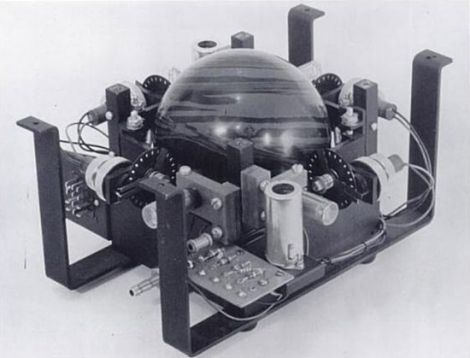
Dvice recently published a visual history of the computer mouse, which is quite interesting. The first pointing device that relied on hand motions to move a cursor was created by the Royal Canadian Navy in 1952. This trackball device, which is predates all other mechanical pointing devices, was crafted using a 5-pin bowling ball and an array of mechanical encoders that tracked the ball’s movement.

As time went on, other mouse-type devices came and went, but it was 30 years ago yesterday that Xerox unveiled the world’s first optical mouse at its PARC facility. The mouse used LEDs and optical sensors along with specialized mouse pads to track the user’s movements. The tech is primitive compared to today’s offerings, but it’s a nice reminder of the humble beginnings something you use every single day.

Be sure to swing by the Dvice site and take a look at how the mouse has evolved over the years – it’s a great way to kill a few minutes.

Cellphone Battery Mouse Modification

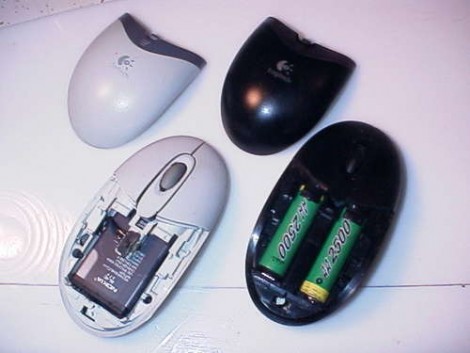
Ever wanted to increase the battery performance in your wireless mouse? [Davetech] shows you the way with this guide for converting a mouse from AA to lithium batteries. We were delighted by his hack-tacular approach that seems to have a nice little work-around at each step in the process. He grinds down the plastic battery housing that is molded into the original mouse body, then uses an old Compact Flash card connector as a set of spring terminals for a Nokia cellphone battery. This battery has more capacity and recharges faster than non-Lithium AA cells. But unfortunately the spring terminals didn’t quite reach the recessed batter contact. No problem, he just builds up solder on the battery to bridge the gap.

[Davetech] manages to fit the entire battery inside the mouse and the pointing-device still works. Your mileage may vary by model (both battery and mouse). It is necessary to take the battery out of the mouse for recharging, but since this only happen about every couple of weeks thanks to the extended capacity it’s not too much of a hassle. Perhaps someone could carry this to the next level by adding a USB port and the necessary charging circuitry?

Fiberoptic Mouse Prevents Stray Magnetic Fields

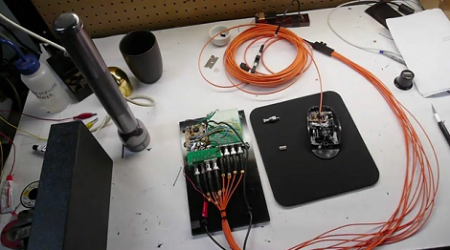
[Ben] needed an input device that would operate where electrical signals and magnetic fields wouldn’t be tolerated, so he ended up running fiberoptics instead of electricity to a mouse.

[Ben] ran some glass fiber from the mouse to quadrature encoders to get the x and y velocity. Mouse clicks are read by modifying the existing buttons with a small shutter to block light from shining through the button frame. This isn’t the first time [Ben] adapted fiberoptics to an input device. Last year, he also built a fiberoptic joystick using the same principles.

We covered [Ben]’s DIY Electron Microscope last month, and we’re wondering if these two projects are related. His project log said he was getting distorted images from the electric field coming from his cooling fan and heater. Maybe he solved that problem and is now just tracking down every last unwanted electromagnetic emission.

Video of the mouse after the break.

Continue reading “Fiberoptic Mouse Prevents Stray Magnetic Fields”

Kinect, Mouse, And Nerf Gun Combine For House Of The Dead

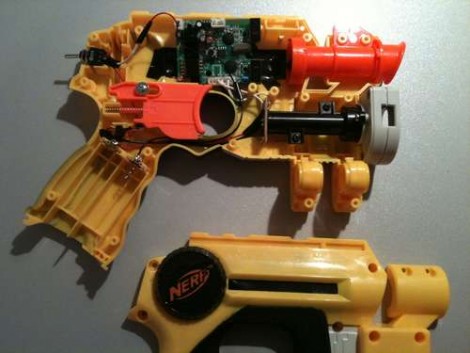
[Tony Blanch] built his own motion controller for playing House of the Dead. It should work with any shooter that follows the ‘rail’ type of game play (your character is not free walking, but moves along a set path beyond your control).

Two parts come together to make this happen. The first is the Nerf dart gun that you see above. The circuit board fitted into the top portion of the plastic housing is from a five-button wireless mouse. The buttons are used to sense trigger pulls from the player. The second portion of the controller is a Kinect. It has been set up to work with a Windows 7 machine. [Tony] used the Flexible Action and Articulated Skeleton Toolkit (FAAST) to bind and track the gun controller, moving the mouse cursor on the screen to match the movements of the weapon. Check out the video after the break to see how responsive this system is.

This is a very interesting departure from the gun controllers we’ve seen before.

Continue reading “Kinect, Mouse, And Nerf Gun Combine For House Of The Dead”

Digital Measuring Tape

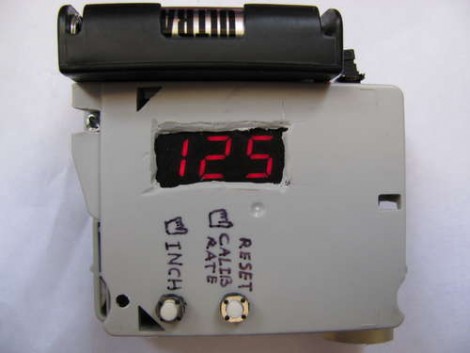
You’ll never come up short with this measuring tape. That’s because there isn’t actually any tape in the device; it measures distance based on the rotation of a wheel. Roll it across the room and you’ll get an accurate measurement of the distance the little bugger traveled. Like the Etch-a-Sketch from Monday this uses the encoder wheel from a mouse as the input. The IR emitter and sensor from the ubiquitous peripheral find a new home on the PCB that hosts the PIC 16F819. It monitors the rotation, turns it into inches, then spits that number out on a 7 segment display. Handy, and cheap!

555s For Your Mouse And R/C Airplane

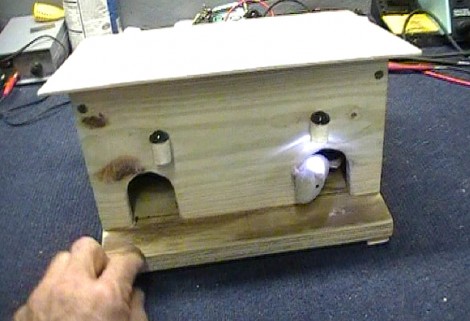
[lenny] decided to build a 555-based auto-firing mouse based on a 555 after seeing a similar PIC-based project we posted earlier. Lenny’s version is self-contained in one mouse without requiring a second mouse to act as the rapid-fire button. It uses only a handful of components, costs less than $5 to build, and doesn’t require any programming.

But then, [wfdudley] shakes things up a bit. He added a 4022 counter IC and some diodes to act as logical “OR” gates in order to create a unique blinking pattern (short-short-long) for the lights on a friend’s RC airplane. While this project involves more components, it’s definitely a trickier problem to solve with a 555 timer IC. We love seeing people choosing simplicity in design over popular off-the-shelf microcontroller frameworks as these two have done.

Don’t forget, the 555 Design Contest is still going strong, and you’ve got the entire month of February to submit your awesome designs. We wanted to highlight two of the more clever 555-based hacks that we’ve had in our backlog for a while, though.

Etch-a-Sketch Computer Is A Surprisingly Simple Hack

We’re not sure whether to call this an Etch-a-Sketch upgrade or a computer interface downgrade but either way it’s unique. [Martin Raynsford] added a familiar red frame to his computer monitor with classic white knobs that control horizontal and vertical cursor movement. There’s even the click option by pressing the buttons in and, as you can see after the break, the modifications result in a perfectly usable digital Etch-a-Sketch. We’ve seen a lot of computer controlled versions of the toy which use fancy parts and take quite a bit of skill to build. This mimicry of the functionality is easy to build and the idea is genius in its simplicity. [Martin] separated the encoder wheels from a mouse. He placed each on one of the knobs and ran wires for sensors and micro-switches back to the original PCB which is stuck to the back of the monitor. From the computer’s point of view it looks and acts like a normal mouse but this is so much more fun (and less productive). Continue reading “Etch-a-Sketch Computer Is A Surprisingly Simple Hack”