NES RAM Replacement

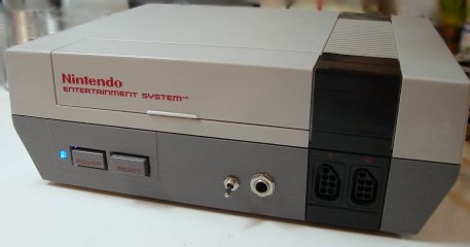
[Spatula Tzar] Turned on her NES one day to find it no longer working. Off went the case and out came the oscilloscope. After probing around for a bit, she found that one of the RAM chips was very hot. She hot aired off the bad chip implementing an “Impenetrable Aluminum Heat Shield of Science” to protect the rest of the components. In the chip’s place she soldered a wide DIP socket for which the NES engineers had thoughtfully left a place. Then, using a 128Mbit SRAM SOIC, she soldered it to 0.100″ headers to fit in the socket. As the original chip was only 16Mbit, unused address lines are tied high or low. The console is now fully functional again. Also checkout the comments on Oldschool NES ‘repair’ how-to.

LEDboy Super Pixel Brothers

[youtube=http://www.youtube.com/watch?v=cB6vSHDDdhI]

We really love this version of super mario brothers that [Brad] is putting together. It is played on an 8×8 RGB LED screen, powered by a pic microprocessor. There aren’t many details on the construction or code yet, but we expect he’ll publish it soon. We’re guessing it is very similar to his other 8×8 game system. If you really want to get a jump start, he has published some great tutorials on working with pic microprocessors.

[via instructables]

Xbox 360 Controller On NES

[youtube=http://www.youtube.com/watch?v=TzW0JAx2lFM]

Some may think that linking an Xbox 360 controller to an original NES console is overkill. [Francois] would not count him self among that group. When the robotics team at his school was done using the controller with one of their projects, [Francois] used a Cortex M3 processor to get it to run with one of Nintendo’s 8-bit consoles. Part of the code for using the controller with the robot and the NES is available. Now all that is left is being able to play Duck Hunt with a Sixaxis controller.

How To Use Wiimotes W/ Linux

[Sprite_tm] has whipped up yet another interesting tutorial – software-based this time. He basically describes how he connected his Wiimotes to an HTPC. A USB Bluetooth receiver, and a little bit of Linux scripting,  was all that was necessary to get the system up and running. To add to the fun, [Sprite_tm] configured a the controllers to work with MAME (an arcade machine emulator), allowing one to play Duck Hunt on a computer in its full glory!

Four Tear-downs For Your Friday Afternoon

We know that feeling, you’ve been up all morning working hard, and now you just want to relax. What better way than to sit back and watch as helpless electronic devices are stripped, forced to show their goods, then put back together only hap hazardly – not that we’re into that or anything. Today, we had one thing on our mind, game systems.

With the release of Pokémon HeartGold and SoulSilver shoppers were also given a device called the PokéWalker. A pedometer that helps your pocket monster gain experience and affection towards you. Here is a tear-down of the device next to Nintendo’s other try at getting children active, the Activity Meter pedometer. [Thanks Arty2]

Sega, while in todays day all we see is more and more rip offs of everyone’s favorite Hedgehog, we do remember a time when you brought more to the game field, especially with your advanced consoles. It does bring a tear to our eyes seeing this beast being torn apart, but its all for the best.

Those keeping up with Nintendo’s DS series will notice one thing, the console keeps getting smaller and smaller. That trend continued until the (Japan) release of the DSi LL. Some think its size can be attributed to an easier to see screen, others feel its jam-packed with more features. Make your own decision after seeing its tear-down. [via engadget]

Finally, we couldn’t decide what a fourth tear down should be, and couldn’t just leave with only three. So how about 10 separate Sony gadgets torn apart!

DS Goes Full Size – Pockets Everywhere Rally In Protest

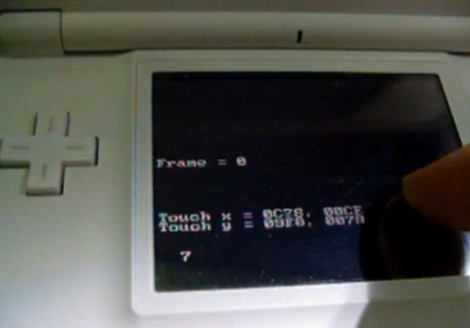
It’s hard to believe we missed this one from a couple of years back but we’re thankful that reader [Christian] tipped us off about it. This a Nintendo DS with two tablet pc screens being used as an external display. He’s using an FPGA but not to emulate the processor. It is translating the video data from the DS board into usable signal for the larger LCD screens. In the video after the break you can see that pen input has been implemented, with the FPGA sending location data back to the DS.

[Neal], the creator, priced the project out at around $580. It’s worth a lot more considering the know-how needed to get the video scaling and pen input right using the FPGA. It won’t fit in your pocket, but it doesn’t have a case either so it’s not going anywhere anytime soon.

Continue reading “DS Goes Full Size – Pockets Everywhere Rally In Protest”

Uzebox In An NES Controller

[David Cranor] has managed to fit a fully working Uzebox system into an old NES controller. Uzebox, an open source gaming platform based on the ATmega 644 and an AD725 NTSC encoder, is one of a couple systems that are becoming more and more widespread and accessible. There are a number of ready-to-go Uzebox kits available, but for the more hands-on types, [David] has been very generous with his schematics and step by step instructions. These schematics can all be readily reshaped, and would easily fit into controllers with less fun applications and sentimental value.