Medium Format, 3 GigaPixel Camera Puts It All On The Line (Sensor)

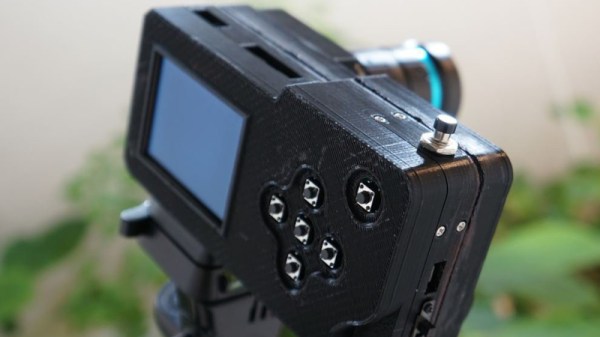
It’s a bit of a truism that bigger sensors lead to better pictures when it comes to photography. Of course everyone who isn’t a photographer knows that moar megapixles is moar better. So, when [Gigawipf], aka [Yannick Richter] wanted to make a camera, he knew he had to go big or go home. So big he went: a medium format camera with a whopping 3.2 gigapixel resolution.

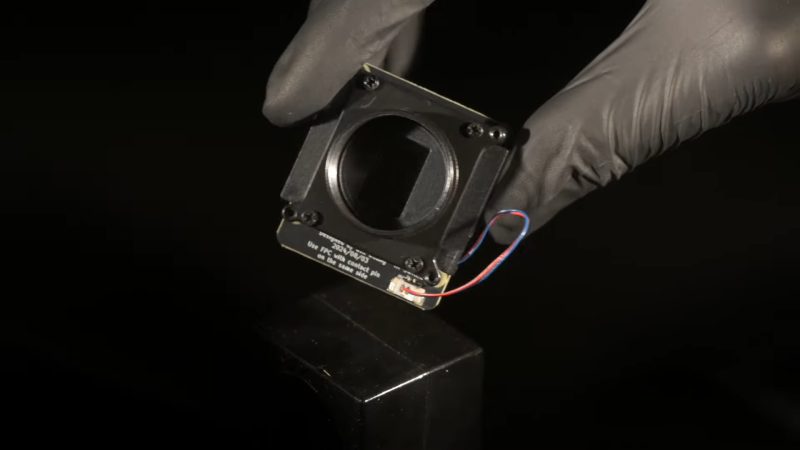
Now, getting a hold of a sensor like that is not easy, and [Yannick] didn’t even try. The hack starts by tearing down a couple of recent-model Kodak scanners from eBay to get at those sweet CCD line sensors. Yes, this is that classic hack: the scanner camera. Then it’s off to the oscilloscope and the datasheet for some serious reverse-engineering to figure out how to talk to these things. Protocol analysis starts about 4 minutes in of the embedded video, and is worth watching even if you have no interest in photography.

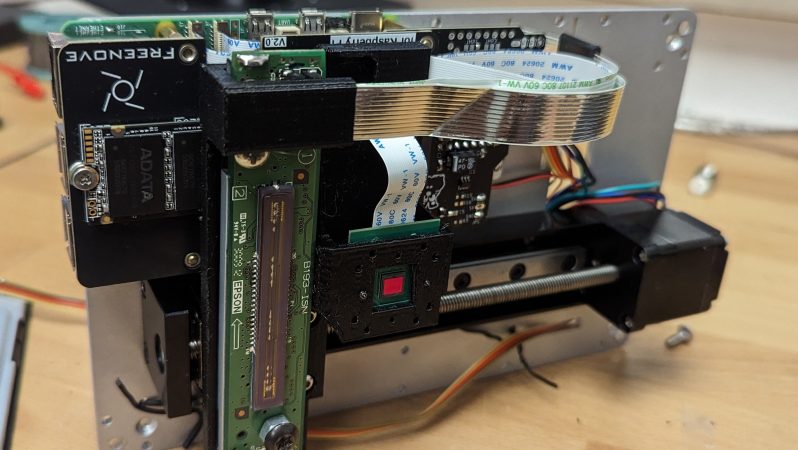
As for what the line sensor will be talking to, why, it’s nothing other than a Rasberry Pi 5, interfacing through a custom PCB that also holds the stepper driver. Remember this is a line sensor camera: the sensor needs to be scanned across the image plane inside the camera, line by line, just as it is in the scanner. He’s using off-the-shelf linear rails to do that job. Technically we suppose you could use a mirror to optically scan the image across a fixed sensor, but scanner cameras have traditionally done it this way and [Yannick] is keeping with tradition. Why not? It works.

Since these images are going to be huge an SD card in the Pi doesn’t cut it, so this is perhaps the only camera out there with an NVMe SSD. The raw data would be 19 GB per image, and though he’s post-processing on the fly to PNG they’re still big pictures.  There probably aren’t too many cameras sporting 8″ touchscreens out there, either, but since the back of the thing is so large, why not? There’s still a CSI camera inside, too, but in this case it’s being used as a digital viewfinder. (Most of us would have made that the camera.) The scanner cam is, of course, far too slow to generate its own previews. The preview camera actually goes onto the same 3D-printed mount as the line sensor, putting it onto the same focal plane as the sensor. Yes, the real-time previews are used to focus the camera.

In many ways, this is the nicest scanner camera we’ve ever featured, but that’s perhaps to be expected: there have been a lot of innovations to facilitate this build since scanner cams were common. Even the 3D printed and aluminum case is professional looking. Of course a big sensor needs a big lens, and after deciding projector lenses weren’t going to cut it, [Yannick] sprung for Pentax 6×7 system lenses, which are made for medium format cameras like this one. Well, not exactly like this one– these lenses were first made for film cameras in the 60s. Still, they offer a huge image, high-quality optics, and manual focus and aperture controls in a format that was easy to 3D-print a mount for.

Is it the most practical camera? Maybe not. Is it an impressive hack? Yes. We’ve always had a soft-spot for scanner cameras, and a in a recent double-ccd camera hack, we were lamenting in the comments that nobody was doing it anymore. So we’re very grateful to [Manawyrm] for sending in the tip.

Continue reading “Medium Format, 3 GigaPixel Camera Puts It All On The Line (Sensor)”

Pi-Powered Camera Turns Heads And Lenses In Equal Measure

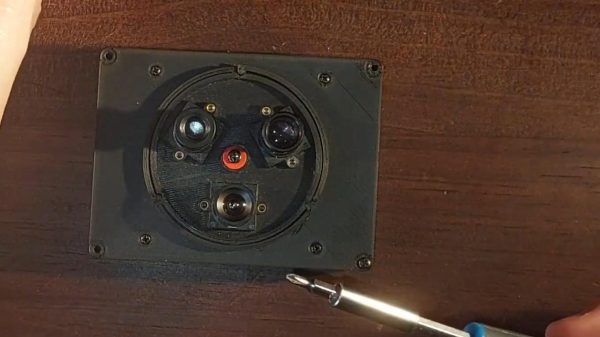
Have you ever seen photos of retro movie sets where the cameras seem to be bedazzled with lenses? Of course you can only film via one lens at a time, but mounting multiple lenses on a turret as was done in those days has certain advantages –particularly when working with tiny M12 lenses, like our own [Jenny List] recently did with this three-lens, Pi-zero based camera.

Given that it’s [Jenny], the hardware is truly open source, with not just the Python code to drive the Pi but the OpenSCAD code used to generate the STLs for the turret and the camera body all available via GitHub under a generous CC-BY-SA-4.0 license. Even using a cheap sensor and lenses from AliExpress, [Jenny] gets good results, as you can see from the demo video embedded below. (Jump to 1:20 if you just want to see images from the camera.)

The lenses are mounted to a 3D printed ring with detents to lock each quickly in place, held in place by a self-tapping screw, proving we at Hackaday practice what we preach. (Or that [Jenny] does, at least when it comes to fasteners.) Swapping lenses becomes a moment’s twist, as opposed to fiddling with tiny lenses hoping you don’t drop one. We imagine the same convenience is what drove turret cameras to be used in the movie industry, once upon a time.

Continue reading “Pi-Powered Camera Turns Heads And Lenses In Equal Measure”

One Camera Mule To Rule Them All

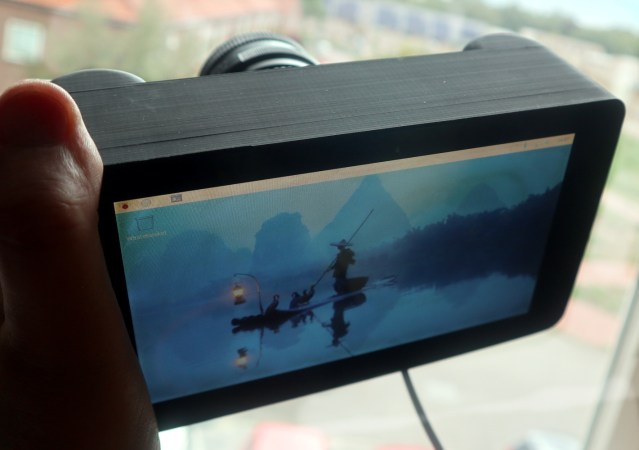
A mule isn’t just a four-legged hybrid created of a union betwixt Donkey and Horse; in our circles, it’s much more likely to mean a testbed device you hang various bits of hardware off in order to evaluate. [Jenny List]’s 7″ touchscreen camera enclosure is just such a mule.

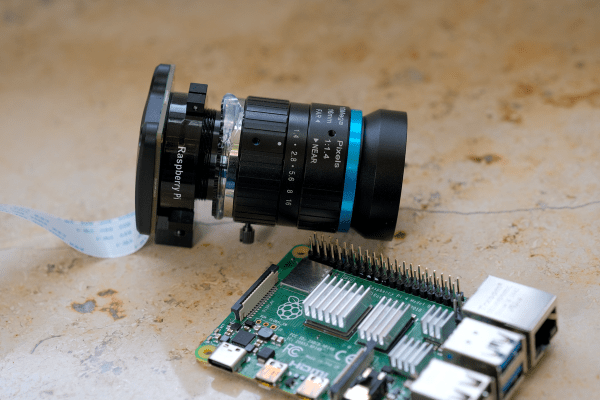
In this case, the hardware to be evaluated is camera modules– she’s starting out with the official RPi HQ camera, but the modular nature of the construction means it’s easy to swap modules for evaluation. The camera modules live on 3D printed front plates held to the similarly-printed body with self-tapping screws.

Any Pi will do, though depending on the camera module you may need one of the newer versions. [Jenny] has got Pi4 inside, which ought to handle anything. For control and preview, [Jenny] is using an old first-gen 7″ touchscreen from the Raspberry Pi foundation. Those were nice little screens back in the day, and they still serve well now.

There’s no provision for a battery because [Jenny] doesn’t need one– this isn’t a working camera, after all, it’s just a test mule for the sensors. Having it tethered to a wall wart or power bank is no problem in this application. All files are on GitHub under a CC4.0 license– not just STLs, either, proper CAD files that you can actually make your own. (SCAD files in this case, but who doesn’t love OpenSCAD?) That means if you love the look of this thing and want to squeeze in a battery or add a tripod mount, you can! It’s no shock that our own [Jenny List] would follow best-practice for open source hardware, but it’s so few people do that it’s worth calling out when we see it.

Thanks to [Jenny] for the tip, and don’t forget that the tip line is open to everyone, and everyone is equally welcome to toot their own horn.

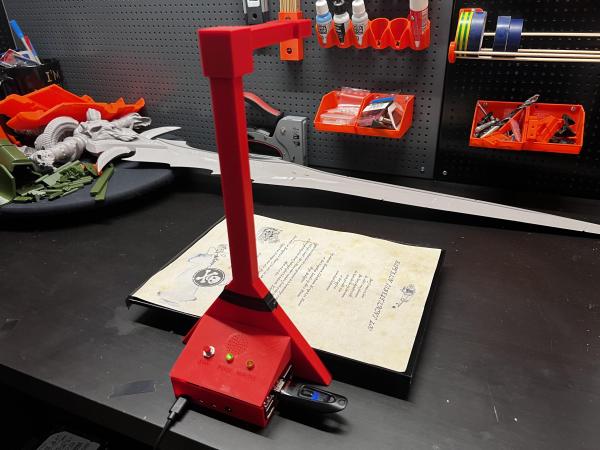
A red 3D-printed Raspberry Pi-based document scanner

Raspberry Pi Scanner Digitizes On The Cheap

It’s pretty important in 2024 to be able digitize documents quickly and easily without necessarily having to stop by the local library or buy an all-in-one printer. While there are plenty of commercial solutions out there, [Caelestis Cosplay] has created a simple document scanner that takes documents, as [Caelestis Cosplay] puts it, from papers to pixels.

The build is probably what you’re expecting — it’s essentially a Raspberry Pi (in this case a 4B), a V2 Pi camera, and a handful of custom 3D-printed parts. [Caelestis Cosplay] says they had never designed anything for printing before, and we think it looks great. There’s also a buzzer to indicate that the scan is starting (one beep) or has completed (two beeps), a ‘ready’ indicator, and a ‘working’ indicator.

Everything you’d need to build your own is available over on Instructables, including document scanner and controller scripts. Be sure to check it out in action after the break, and see it quickly scan in a document and put it on a thumb drive.

Looking for a 3D scanner? Check out the OpenScan project.

Continue reading “Raspberry Pi Scanner Digitizes On The Cheap”

New Raspberry Pi Camera With Global Shutter

Raspberry Pi has just introduced a new camera module in the high-quality camera format. For the same $50 price you would shell out for the HQ camera, you get roughly eight times fewer pixels. But this is a global shutter camera, and if you need a global shutter, there’s just no substitute. That’s a big deal for the Raspberry Pi ecosystem.

Global vs Rolling

Most cameras out there today use CMOS sensors in rolling shutter mode. That means that the sensor starts in the upper left corner and rasters along, reading out exposure values from each row before moving down to the next row, and then starting up at the top again. The benefit is simpler CMOS design, but the downside is that none of the pixels are exposed or read at the same instant.

Continue reading “New Raspberry Pi Camera With Global Shutter”

Do You Need The Raspberry Pi Camera Module V3?

This month came the announcement of some new camera modules from Raspberry Pi. All eyes were on version 3 of their standard camera module, but they also sneaked out a new version of their high quality camera with an M12 lens mount. The version 3 module is definitely worth a look, so I jumped on a train to Cambridge for the Raspberry Pi Store, and bought myself one for review.

There’s nothing new about a Pi camera module as they’ve been available for years in both official and third party forms, so to be noteworthy the new one has to offer something a bit special. It uses a 12 megapixel sensor, and is available both in autofocus and wide angle versions in both standard and NoIR variants. Wide angle and autofocus modules may be new in the official cameras, but these are both things which have been on the third-party market for years.

So if an autofocus camera module for your Pi isn’t that new, what can we bring to a review that isn’t simply exclaiming over the small things? Perhaps it’s better instead to view the new camera in the context of the state of the Pi camera ecosystem, and what better way to do that than to turn a Pi and some modules into a usable camera! Continue reading “Do You Need The Raspberry Pi Camera Module V3?”

ERRF 22: Building A Library Of Filament Colors

If you’ve ever paged through the color samples at the hardware store trying to match a particular color, you know how hard it can be. Not only are there nearly limitless color variations, but each manufacturer has their own formulas and tints. Often times, the only way to get the exact color you need is to get it custom mixed.

Unfortunately, that’s not really an option when it comes to filament for your 3D printer. Will that roll of orange from Hatchbox actually match the orange from Overture? That’s where the Filament Librarian comes in. Created by [Joe Kaufeld], the project aims to catalog and photograph as many 3D printer filaments as possible so you can see exactly what you’re getting.

Now of course, if it was as easy as looking at pictures of filament swatches on your computer, you wouldn’t need this service to begin with. So what’s the trick? A custom automated camera rig, powered by the Raspberry Pi, is used to position, light, and photograph each filament sample in the library. So while [Joe] can’t promise your monitor is showing a perfect representation of each filament’s color, you can at least be sure they will all look correct in relation to each other. So for example, the site can help you figure out if the local Microcenter stocks anything that comes close to matching Prusament’s Galaxy Silver PLA.

[Joe] brought a collection of his samples along with his slick camera setup to the 2022 East Coast RepRap Festival so attendees could see first-hand how he adds a new filament to the database. With an easy-to-use touch-screen interface, it takes just seconds to get the camera ready for the next shot.

Now that he’s got the hardware and the procedure down, [Joe] is asking the community to help out by providing him with filament samples to process. It doesn’t take much: all he asks is you snip him off a couple meters of filament, write down what it is and who makes it on a pre-made form, and drop it in the mail. If you’re in the US, you can send it directly to his address in Indiana, and for those on the other side of the globe, he’s got a drop point in the Netherlands you can use.

We love a good passion project here at Hackaday, so here’s hoping that the Filament Librarian receives plenty of new filament samples from all over the planet to feed into that fancy camera setup of his.