
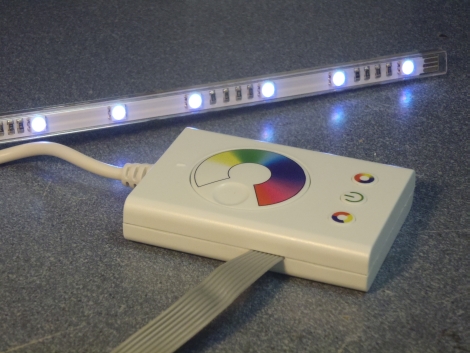
Minimalist DIODER Hack Requires No External Microcontroller

pic_dioder_hack

Hackaday reader [chrysn] picked up a 3-button RGB model DIODER light from IKEA and thought he might as well take it apart to see what he could do with it. Having seen several DIODER hacks featured here, he knew it was easily hackable, but he didn’t want to simply rehash what other had already done.

All of the DIODER hacks we have come across thus far incorporate some sort of AVR chip or add-on board to expand its capabilities. [chrysn] saw that the controller already had a PIC16F684 inside, and thought that installing his own firmware onto the existing hardware would be a far more simple solution. He installed a small programming cable onto the DIODER’s control board, and using his PICkit2 programmer, flashed the chip with a custom firmware image.

His modifications worked great, and [chrysn] says that there is plenty potential in the existing hardware to have all sorts of fun with it. Even so, he notes that there are several AVR-flavored drop-in replacements that can be used if that happens to be your microcontroller family of choice.
Going RGB With 7 Segment Displays

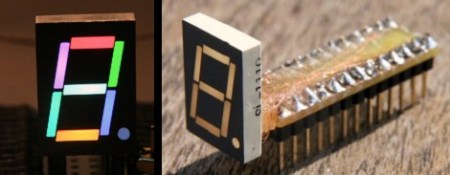
We can order seven segment displays in red, green, yellow, or blue all day long. One thing we haven’t seen is an RGB segmented display, so [Markus]’ project is really interesting. He took a stock seven segment display and modded it into an RGB display.

After taking a Dremel to the back of the stock display, [Markus] was left with a seven segment light mask. A few SMD LEDs were purchased through the usual channels. The RGB LEDs were epoxied into place on the back of the light mask one at a time. Thankfully, the LEDs came with magnet wire already attached – helpful, since these LEDs are only 1.6mm x 1.2mm big.

With 32 pieces of magnet wire, [Markus] needed some sort of socket. A small piece of perfboard and some .100″ headers handled the job very nicely. [Markus] still has to work on some way to drive the 24 cathode lines his LED display. He’d like an I2C interface, but with something like an individual seven segment display, the footprint of the circuit should be pretty small. If you’ve got any tips, drop them in the comments section. [Markus] is sure to catch them there.

RGB LED Spectrum Analyzer Coffee Table

rgb_led_spectrum_analyzer_coffee_table

This year, students working for Texas Instruments as part of their Co-op program were challenged to construct a project around the company’s MSP430 microcontroller. A team of three students, [Max Thrun, Mark Labbato, Ian Cathey] decided to build something that would fit perfectly in any college student’s dorm room – an RGB LED coffee table.

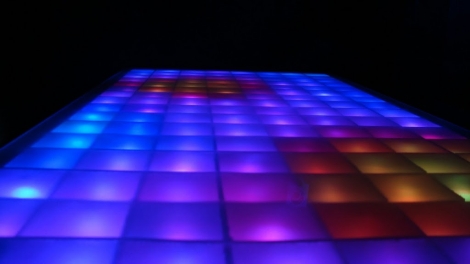
We’ve covered RGB LED tables in the past, but as far as we can tell this is the first MSP430 based unit we’ve seen. Microcontroller aside, the table features a lot of items that are considered “standard equipment” when it comes to these sorts of living room LED installations. The trio installed 128 RGB LEDs into their table, isolating each one using a wooden grid, and used some frosted glass to diffuse the display a bit.

What really makes this table stand out is the software. The team wrote an application that creates a Fast Fourier Transform of whatever music is being played, in order to find beats and generate real-time visualizations for their table. The result is a pleasing display that’s sure to be a hit at parties.

Check out the video below to see their creation in action.

Continue reading “RGB LED Spectrum Analyzer Coffee Table”

ProtoDeck – MIDIBOX Based Controller

[Julien] let us know about his ProtoDeck. A MIDIBOX based controller for Ableton Live using a Big Max for live patch interface.

One thing that we have seen is less and less hacks for are MIDIbox projects. It is no wonder, considering now a days we have touch screen and multiple other interfaces and sound creation tools – MIDI almost seems like a dying art.

The ProtoDeck uses 87 pots, 90 buttons, and 81 RGB LEDs all controlled by 2 PIC 18F4620s. [Julien] says his main goals where to have lots of color and buttons. We think he succeeded.

64 Synchronizing Fireflies

screenshot_007

[Alex] of tinkerlog created a set of 64 RGB fireflies that synchronize to blink all at once. We covered the kit earlier, but he has assembled a set of 64. Each firefly is independently controlled by an ATtiny13 that reads a phototransistor and lights up an RGB LED. The fireflies are programmed to blink a certain rate, but blink faster if they detect other blinks. After a few cycles, the fireflies begin to blink in unison. When the fireflies are arranged in different configurations, different patterns emerge. He is selling kits and has instructions for building your own. Videos of the fireflies after the jump.

Continue reading “64 Synchronizing Fireflies”

Parts: 4×4 RGB Button Pad Controller SPI

cover

We covered SparkFun’s new RGB button pad controller a few weeks ago. This is a full-color clone of the monome interface; a 4×4 grid of buttons with tri-color LEDs underneath. Each LED has 24bits of color control, for more than 16million color combinations. Up to 10 panels can be chained together to create huge button grids, like SparkFun’s Tetris table. We previously used a smaller version in our RGB combination lock.

We asked SparkFun to send us the SPI version of the button controller to test. This is a new product developed in-house at SparkFun, with open source hardware and software. Read about our experience interfacing this board below.

Continue reading “Parts: 4×4 RGB Button Pad Controller SPI”

Temperature Sensing Munny

munny

Here’s another nerdy present that was built for Valentine’s Day. [João Silva] created a temperature sensing Munny. A Munny is a vinyl toy made to be customized. Other than these Munny speakers, we haven’t seen them in many electronics projects. The LM35CZ temperature sensor has an analog output that connects to the ADC on the ATtiny15L. The microcontroller changes the RGB LED’s color based on the temperature: blue for cold, green for comfortable, and red for hot. It only flashes every three minutes to conserve the power in the coin cells. His one-off circuit board also includes an ISP header for programming. The Munny’s head looks like it does a great job diffusing the light.









