Overhaul An Old Mechanical Keyboard

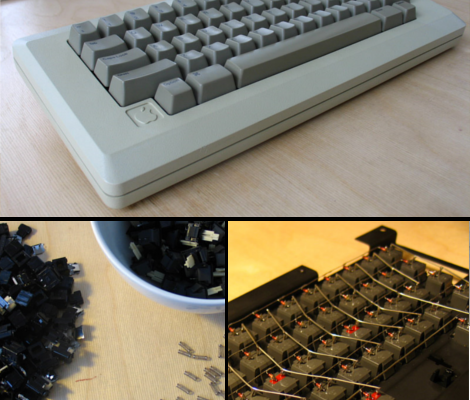
Deskthority forum user [lowpoly] recently posted a writeup on his complete overhaul of an Apple M0110  mechanical keyboard.  Any one familiar with the satisfying clack of a good mechanical key under their fingers can appreciate the effort put into this project.

[lowpoly] removed the keyboard’s PCB, rewired the key matrix adding diodes, built in a teensy USB board, broke apart the mechanical switches and fit replacement springs and finally applied a generous portion of retr0bright to all of the aging plastic. Since the teensy has no mounting holes [lowpoly] had to create a mounting assembly out of some spare plastic. A usb mini cable is even fitted into the original RJ-11 connector.  To compensate for the lack of PCB the key assembly was fitting with some rubber washers. To top off the whole thing some nice new rubber feet were taped to the underside of the M0110.

[lowpoly] reports that with the foam, new springs, and lack of PCB the keyboard is much quieter and easy to use.  The end result is a slick retro looking modern keyboard. If you’ll excuse us we have to go rooting through some old storage bins to find our own ancient keyboards.

We have seen our share of vintage keyboard hacks which can be useful, impressive and sometimes just odd. This build keeps it down to a nice simple, functional, useful retrofit. Nice work!
Here’s A Button, Call Someone Who Cares…

call_someone_who_cares_button

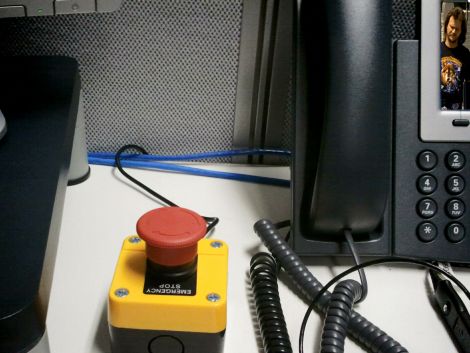
[Les] had thousands of dollars of expensive IP Telephone infrastructure at his fingertips, so he figured he might as well play around a bit – after all, what good is all that equipment if you can’t have a little fun?

Inspired by the “Awesome Button” featured on Make, he started thinking about what sort of feature he would like to have available at the push of a button. He must have had Travis Tritt on the brain the day he started building his creation, since he named it the “The Call Someone Who Cares Button”.

[Les] picked up an “emergency stop” button from eBay, wiring it to a TeensyUSB, just as it was done in the Make article. He mapped the button to the pause/break key, then whipped up a bit of C#code that listens for that key to be pressed. When toggled, the button sets forth a series of events that gets his boss on the line ASAP.

It’s a fun little project, and while I might have built a button that introduces fake static and echo into the line before dumping the call, I think it’s pretty cool all the same.

Since it seems that just about everyone has built some derivation of the Awesome Button, share yours with us in the comments, and be sure to stick around to see a quick video demo of the CSWC button in action.

Continue reading “Here’s A Button, Call Someone Who Cares…”

USB Reddit Upvote/Downvote Button

reddit_upvote_downvote_button

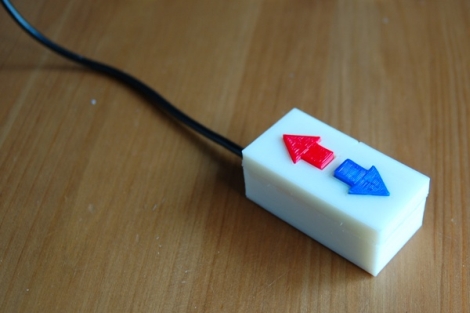
[Chris] has recently become a self-declared Reddit addict and wanted to build something that would streamline the process of voting on posts. Inspired by the Awesome Button hack featured on Make a little while back, he thought that a physical upvote/downvote button would be the ideal peripheral for all of his Reddit needs.

He was a big fan of using the Reddit Enhancement Suite, which allows you to submit votes with a single keystroke. He combined this browser extension with a Teensy development board, and had his voting button prototyped in no time. Once he fine-tuned the Arduino sketch that he used to emulate the required keypresses, he got busy building a case for his creation.

He busted out his 3D printer and had a custom working project box in about 30 minutes. He printed arrows for the upvote and downvote buttons, snapped everything together, and then gave his quick vote box a spin. Everything worked perfectly, and he’s quite happy with his creation.

We imagine that our resident Reddit addict in chief is pretty jealous right about now…

Stick around if you’d like to see a time lapse video of the button’s creation.

Continue reading “USB Reddit Upvote/Downvote Button”

FrankenKindle: Building An Alternate Kindle Keyboard

If you’ve ever thought the Kindle keyboard was a bit cramped you’re not alone. [Glenn’s] been working on developing an external keyboard for the Kindle for quite some time. It may not make easier for everyone to use, but he’s motivated to improve usability for his sister who has Cerebral Palsy.

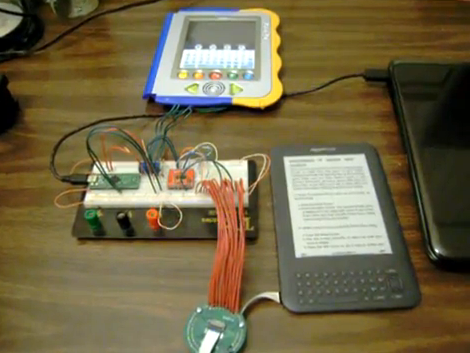
We see a lot of keyboard hacks that solder straight to the pads under the buttons, but for a compact device like the Kindle this would really mess things up. Instead of going that route, [Glenn] sourced a 20-pin Flexible Flat Cable and breakout board that match the internal Kindle connector. The prototype seen above uses a TS3A5017 serial multiplexer chip to simulate the keyboard button presses. That multiplexer is driven by a Teensy++ microcontroller board which is monitoring a larger set of buttons on the V.Reader seen above. Check out the video after the break for a brief demonstration, then look around at the rest of [Glenn’s] blog posts to view different steps of the development cycle.

Continue reading “FrankenKindle: Building An Alternate Kindle Keyboard”

Color Changing EL Wire

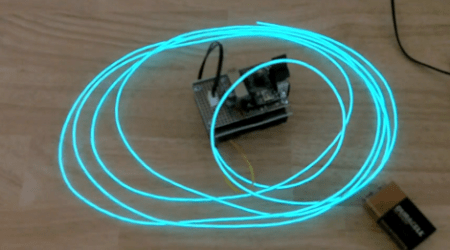
All EL wire drivers use a resonator circuit to supply power to the EL wire. It’s an efficient system, but [Paul] noticed that there was some color change when powering different lengths of wire off of the same driver. He realized that this is because of the changing frequency of the resonator circuit, so the only reasonable thing for [Paul] to do was to build a color fading EL wire driver.

The circuit used to drive the wire is very simple. [Paul] used a Teensy board to switch two transistors and produce AC current. This is sent through a step-up transformer which powers the EL wire. It was necessary to use aqua or ‘Tron blue’ EL wire for this build because of the clear wire jacket. Many colors of EL wire have a fluorescent jacket – much like a fluorescent light bulb – that changes the color produced inside the wire to something different. [Paul] says the color change is subtle, but unique.

Of course the build is nothing without a video of the color changing EL wire. Check it out after the break.

Continue reading “Color Changing EL Wire”

Teensy AVRs Used In Penetration Testing

netragard_penetration_testing_mouse

While some people know that you should be wary of USB drives with unknown origins, the same care is rarely, if ever exercised with USB peripherals. The security firm Netragard recently used this to their advantage when performing a penetration test at a client’s facility. When the client ruled out the use of many common attack vectors including social networks, telephones, social engineering, and unauthorized physical access from the test, the team at Netragard knew they would have to get creative.

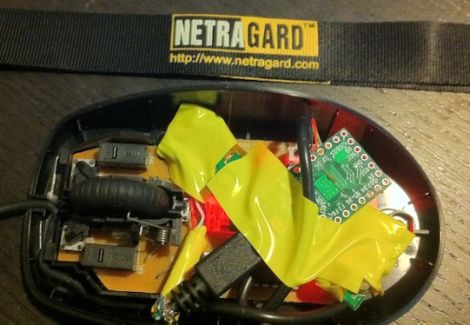
They purchased a Logitech USB mouse and disassembled it in order to add their clever payload. A Teensy uC was programmed to emulate keyboard input, entering commands via the mouse’s USB connection once it had been connected to a computer. Using an undocumented exploit in McAfee’s antivirus suite, they were able to evade detection while their system entered commands to install malware from the flash drive they hid along side the Teensy.

Once the mouse was reassembled, they repackaged it along with some marketing materials to make it look like part of a promotional event. They purchased a detailed list of employees and singled out an easy target, sending their malicious mouse on its way. Within three days, their malware was loaded onto the victim’s computer and their test was deemed a success.

[Thanks, Aaron]

ISS Lamp Tells You When To Look Up

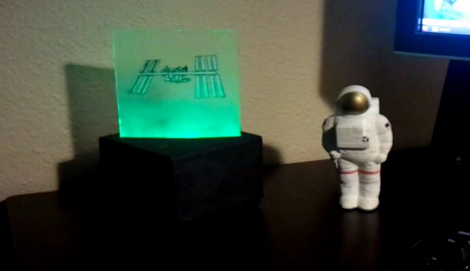
[Nathan Bergey] came up with a really neat desk lamp that provides a visualization of when the International Space Station is overhead.

The lamp uses a Teensy board to light a few LEDs on the edge of a piece of plexiglass. Because the orbit of the ISS decays over time, the time that overhead passes will occur is unpredictable after a few months. A stand-alone satellite tracking lamp will eventually lose it’s accuracy, so [Nathan] needed to parse tracking data the internet. Since he couldn’t find an API to track the ISS, [Nathan] wrote a Python script to parse the data he found on Heavens Above. Everything on the computer runs in the Gnome panel and is passed to the Teensy over the USB connection. [Nathan] posted all of the code is posted on github.

It’s a really great build that provides a reminder that there are people in space, and we think this would be a great way to provide some notification of upcoming Iridium flares, or when it’s most likely to pick up some APRS packets.

Check out [Nathan]’s demo of his ISS lamp after the break.

Continue reading “ISS Lamp Tells You When To Look Up”