The Basics Of Building A Multitouch Table

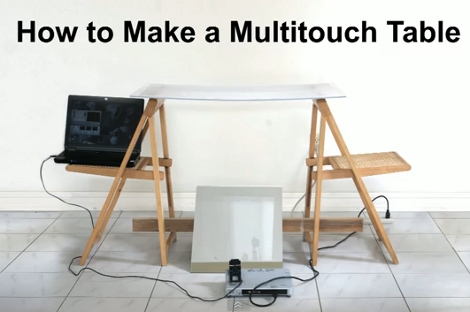
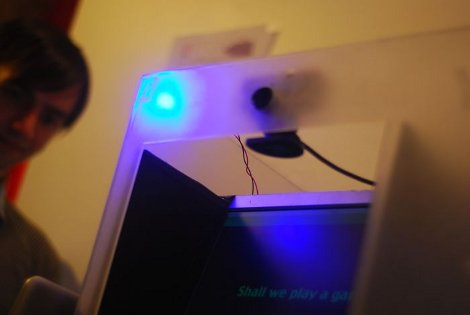
Here is a bare-bones multitouch table setup. We looked in on [Seth Sandler’s] multitouch work a few years ago when he completed the MTmini build. He’s scaling up the size a bit with the MTbiggie, and showing you how easy it is to put together. The demo rig seen above is just a couple of chairs, a sheet of acrylic, a mirror, a projector, a computer, and a diy infrared webcam.

The rig uses ambient infrared light to detect the outlines of your fingers when they touch the acrylic surface. A webcam with an exposed camera film filter feeds an image of the infrared light received below the surface to the computer. The incoming video is processed using Community Core Vision, where each individual point is isolated and mapped. Once the data is available the sky’s the limit on what you can develop. [Seth’s] demo packages include a mouse driver, some physics applications, an Angry Birds implementation, and a few others. See for yourself in the video after the break.

Continue reading “The Basics Of Building A Multitouch Table”

One-eyed, One-armed Metal Rolling Roomba Robot

roomba_robot

[Erik] was looking for a sturdy robotics platform and was initially considering the iRobot Create, until he found that he could score a Roomba Discovery series for a fraction of the price. The Discovery includes a battery, which is missing from the iCreate, though it also has all of the standard vacuum bits included as well.

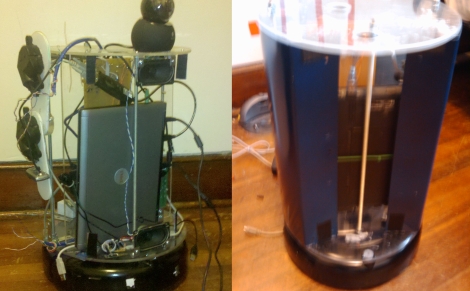
He immediately removed all of the vacuum parts once he got his hands on the Roomba, and began adding the support structure to house the rest of his robot’s components. The robot is controlled via a small laptop which sits on top of the Roomba’s base, and features a panning and telescoping webcam to provide feedback to the operator.

The robot has been under construction for a little over a year now, and has had a few upgrades over that time. The original laptop was swapped out for a newer dual-core model, and the webcam was upgraded to a model featuring motion tracking. The whole thing has been skinned in thin sheet metal for a sleek look, and he has added a servo-driven arm as well.

The project is not quite complete, and he hasn’t really stated what he plans on using the robot for, but it looks good so far – we can’t wait to see it when it’s finished.

A Different Take On A Laser Projection Microscope

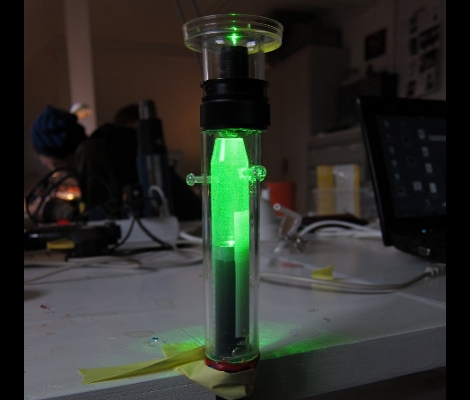
[Dusjagr] has another take on building a laser projection microscope. Last year we saw a laser-based microscope that shined the beam of light through a water droplet which contained the subject to be magnified. The droplet bent the focused beam of light and projected the magnified contents onto a screen. Now that’s pretty neat and [Dusjagr] has used that method himself. But most traditional microscopes use glass slides to contain the subject and this new version now makes that possible.

A bit of experimentation led [Dusjagr] to the discovery that a lens re-purposed from a webcam can achieve similar focus results as a water droplet. The video after the break shows the apparatus seen above in action. The laser shines through the lens, then through a slide that contains a water sample from a nearby pond. The image is clear, albeit completely bathed in green.

For us the most interesting part of [Dusjagr’s] writeup is his discussion of the limits of laser amplification based on the wavelength of light the diode puts out.

Continue reading “A Different Take On A Laser Projection Microscope”

Vanishing Point Robot Guidance

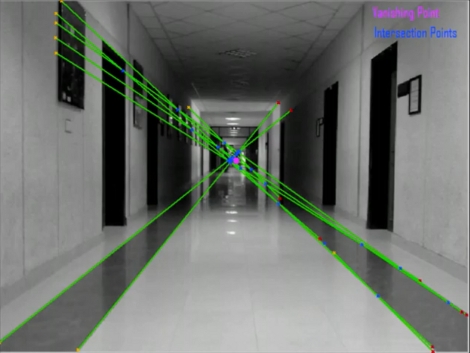
Students at the National University of Computer and Emerging Sciences in Pakistan have been working on a robot to assist the visually impaired. It looks pretty simple, just a mobile base that carries a laptop and a webcam. The bot doesn’t have a map of its environment, but instead uses vanishing point guidance. As you can see in the image above, each captured frame is analyzed for indicators of perspective, which can be extrapolated all the way to the vanishing point where the green lines above intersect. Here it’s using stripes on the floor, as well as the corners where the walls meet the ceiling to establish these lines. From the video after the break you can see that this method works, and perhaps with a little bit of averaging they could get the bot to drive straight with less zig-zagging.

Similar work on vanishing point navigation is being done at the University of Minnesota. [Pratap R. Tokekar’s] robot can also be seen after the break, zipping along the corridor and even making turns when it runs out of hallway.

Continue reading “Vanishing Point Robot Guidance”

Dance For A Dollar With The YayTM

The YayTM is a device that records a person dancing and judges whether or not the dancing is “Good”. If the YayTM likes the dance, it will dispense a dollar for the dancers troubles. However, unless the dancer takes the time to read the fine print, they won’t realize that their silly dance is being uploaded to YouTube for the whole world to see. Cobbled together with not much more than a PC and a webcam,  the box uses facial recognition to track and rate the dancer.

The YayTM was made by [Zach Schwartz], a student at NYU, as a display piece for the schools Interactive Telecommunication Program. Unfortunately there aren’t any schematics or source code, but to be honest, having one of these evil embarrassing boxes around is probably enough. What song does the YayTM provide for dancing, you ask? Well, be sure to check it out here.

EDIT: [Zack] has followed up with an expanded writeup of the YayTM. Be sure to check out his new page with source code and more info. Thanks [Zack]!

Zipitbot

[Nulluser’s] Zipit was fine, but it couldn’t go anywhere on its own. Adding some motors and a microcontroller fixed that issue, and now he’s got a little robot called the Zipitbot. That’s a dsPIC board on top which communicates with the Zipit over an I2C bus. Four servo motors provide plenty of power to the wheels,with some extra battery packs nestled between them.

Since the Zipit is running Linux, and already has WiFi hardware, it’s not too hard to add Internet control. With this in mind there’s a webcam on the front to broadcast a video feed for use when controlling it remotely. See a couple of videos of this hack after the break.

Continue reading “Zipitbot”

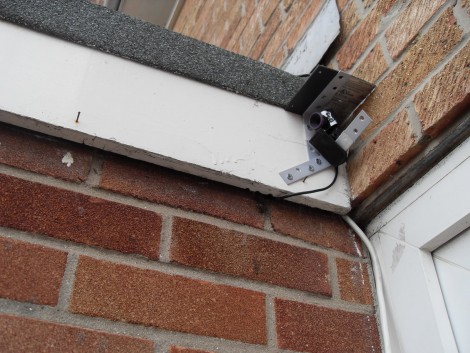
Adding Pan And Tilt To A Webcam

[Brent] and his wife wanted a way to provide more family time for Grandparents that lived far away. They tried a webcam, but their daughter just didn’t oblige by staying in the frame. Instead of chasing her around the room with with the camera he added pan and tilt features to the device. He settled on IR control using a common television remote, similar to our USB remote control receiver tutorial except that it drives servo motors instead of forwarding signals over the serial connection. [Brent] used a Picaxe 08M, connecting two servos together as a base on top of the project box. If you try this yourself there’s a lot of room to grow. Once you’ve assembled the hardware it wouldn’t be too hard to make this web enabled so that Grandpa can click on a web interface to look around the room.