Have You Ever Used A Tick Stick?

Picture this: you have an irregular opening you need to fabricate a piece to fill. Maybe it’s the stonework of a fireplace; maybe it’s the curved bulkhead of a ship. How do you get that shape? The most “Hackaday” answer would be to 3D scan the area, create a CAD model based on the point cloud, and route the shape with CNC. Of course, none of those were options for the entirety of human history. So how do you do it if you don’t have such high-tech toys? With a stick, as [Essential Craftsman] takes great pains to show us in the video below.

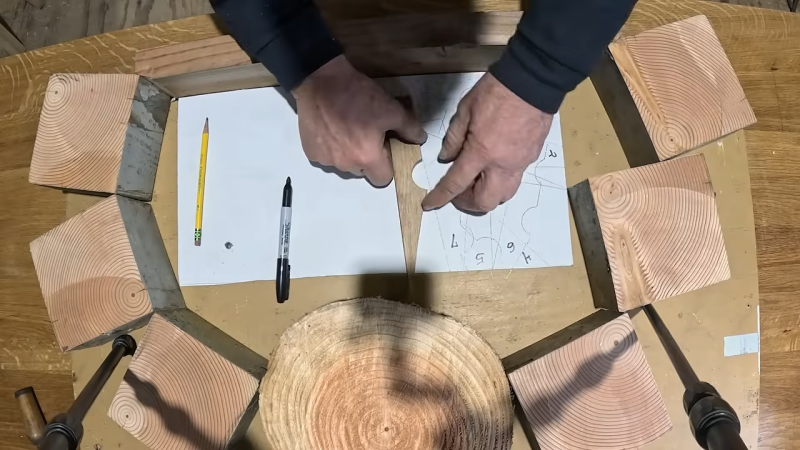
It’s not just any stick, of course. Call it a “tick stick”, a “speil stick”, or a “joggle stick” — whatever you call it, it’s just an irregularly shaped piece of wood. The irregular shape is key to the whole process. How you use it is simple: get some kind of storyboard — cardboard, MDF, whatever — that fits inside your irregular void. Thanks to the magic of the stick, it need not fit flush to the edges of the hole. You put the tick stick on the storyboard, press the pointy end against a reference point on the side of the hole, and trace the stick. The irregular shape means you’re going to be able to get that reference point back exactly later. Number the outline you just made, and rinse and repeat until you’ve got a single-plane “point cloud” made of tick stick outlines.

Your storyboard is probably going to look mighty confusing, but that’s what the numbers are for. Bring your storyboard and your tick stick onto the workbench and whatever you want to cut out– plywood, cardboard, 1/4″ steel armor plate, you name it–and simply repeat the process. Put the tick stick inside outline #1 and mark where the pointy end lands on the material. Then do it again for the other outlines, reproducing the points you measured on the original piece. After that, it’s just a game of ‘connect the dots’ and cutting with whatever methodology works for your substrate. A sharp knife will work for cardboard, but you’ll probably want something more substantial for steel plate.

It’s not often you’re going to need the tick stick– the [Craftsman] reports only needing it a few times over the course of a decades-long career, but when you need it, there’s not much else that will do the job. Well, unless you have a 3D scanner handy, that is. Continue reading “Have You Ever Used A Tick Stick?”

All Projections Suck, So Play Risk On A Globe Instead

The worst thing about the getting people together is when everyone starts fighting over their favourite map projection– maybe you like the Watterman Butterfly, but your cousin really digs Gall-Peters, and that one Uncle who insists on defending Mercator after a couple of beers. Over on Instructables [madkins9] has an answer to that problem that will still let you play a rousing game of Risk– which will surely not drag on into the night and cause further drama– skip the projection, and put the game on a globe. 

The pieces are from a 1960s version. The abstract tokens have a certain charm the modern ones lack.

Most globes, being cardboard, aren’t amenable to having game pieces cling to them. [madkins9] thus fabricates a steel globe from a pair of pre-purchased hemispheres. Magnets firmly affixed to the bases of all game pieces allow them to stick firmly to the spherical play surface. In a “learn from my mistakes” moment, [madkins] suggests that if you use two pre-made hemispheres, as he did, you make sure they balance before welding and painting them.

While those of us with less artistic flair might be tempted to try something like a giant eggbot, [madkins] was able to transfer the Risk world map onto his globe by hand. Many coats of urethane mean it should be well protected from the clicking or sliding magnet pieces, no matter how long the game lasts. In another teachable moment, he suggests not using that sealer over sharpie. Good to know.

Once gameplay is finished, the wooden globe stand doubles as a handsome base to hold all the cards and pieces until the next time you want to end friendships over imaginary world domination. Perhaps try a friendly game of Settlers of Catan instead. 

Jointly Is A Typeface Designed For CNC Joinery

If you have a CNC router, you know you can engrave just about any text with the right tool, but Jointly is a typeface that isn’t meant to be engraved. That would be too easy for [CobyUnger]. His typeface “Jointly” is the first we’ve seen that’s meant to be used as joinery.

The idea is simple: carve mortises that take the shape of letters in one piece, and carve matching letter-tenons into the end of another. Push them together, and voila: a joint! To get this concept to work reliably, the font did have to be specially designed — both the inner and outer contours need to be accessible to a rotary cutting tool. Cutting tools get harder to use the smaller they go (or more fragile, at any rate) so with Jointly, the design spec was that any letters over 3/4″ (19.05 mm) tall needed to be handled with a 1/8″ (3.175 mm) rotary cutter.

This gives the font a friendly curved appearance we find quite fetching. Of course if you’re going to be cutting tenons into the end of a board, you’re going to need either some serious z-depth or an interesting jig to get the end of the board under the cutting head. It looks like [CobyUnger] has both, but he mentions the possibility of using a handheld CNC router as the cheaper option.

Speaking of routing out type, do you know the story of Gorton? You can’t make joinery with that typeface, but you’ve almost certainly seen it.

A before and after with the plank of wood shown and the resulting chair also shown.

Liberating A Collapsible Chair From A Single Piece Of Wood

Over on his YouTube channel our hacker [GrandpaAmu] liberates a collapsible chair from a single piece of wood.

With the assistance of an extra pair of hands, but without any power tools in sight, this old master marks up a piece of wood and then cuts a collapsible chair out of it. He uses various types of saw, chisels, a manual drill, and various other hand tools. His workspace is a humble plank with a large clamp attached. At the end he does use a powered hot air gun to heat the finish he uses to coat the final product.

Continue reading “Liberating A Collapsible Chair From A Single Piece Of Wood”

Two clear acrylic tubes are shown in the foreground. Swirls of sawdust are visible on the inside of the tubes, and the tubes are held in place by grey plastic connectors. Below the tubes, there are two clear plastic tubs containing sawdust.

Optimizing Dust Separation For Extreme Efficiency

[Ruud], the creator of [Capturing Dust], started his latest video with what most of us would consider a solved problem: the dust collection system for his shop already had a three-stage centrifugal dust separator with more than 99.7% efficiency. This wasn’t quite as efficient as it could be, though, so [Ruud]’s latest upgrade shrinks the size of the third stage while increasing efficiency to within a rounding error of 99.9%.

The old separation system had two stages to remove large and medium particles, and a third stage to remove fine particles. The last stage was made out of 100 mm acrylic tubing and 3D-printed parts, but [Ruud] planned to try replacing it with two parallel centrifugal separators made out of 70 mm tubing. Before he could do that, however, he redesigned the filter module to make it easier to weigh, allowing him to determine how much sawdust made it through the extractors. He also attached a U-tube manometer (a somewhat confusing name to hear on YouTube) to measure pressure loss across the extractor.

The new third stage used impellers to induce rotational airflow, then directed it against the circular walls around an air outlet. The first design used a low-profile collection bin, but this wasn’t keeping the dust out of the air stream well enough, so [Ruud] switched to using plastic jars. Initially, this didn’t perform as well as the old system, but a few airflow adjustments brought the efficiency up to 99.879%. In [Ruud]’s case, this meant that of 1.3 kilograms of fine sawdust, only 1.5 grams of dust made it through the separator to the filter, which is certainly impressive in our opinion. The design for this upgraded separator is available on GitHub.

[Ruud] based his design off of another 3D-printed dust separator, but adapted it to European fittings. Of course, the dust extractor is only one part of the problem; you’ll still need a dust routing system.

Thanks to [Keith Olson] for the tip!

Electric Catamaran Sails High Seas Of Inland Canada

There are a number of plans for DIY boats available online, so [Phil] went in search of one for a custom catamaran to travel the inland waterways of Canada. But none of the plans he found had options for electric motors so he modified one popular plan to include not only that, but plenty of other unique features as well throughout a long series of videos.

This isn’t [Phil]’s first electric boat, either. His first was a monohull with a long canopy above, providing shade for the occupants and a platform to mount solar panels. But that one was top heavy and unstable, so he pivoted to this catamaran design instead which has the perk of not only stability but a small draft. The plans were modified to use a similar propulsion system, though, but mounting the heavy panels on the roof of this boat was much less problematic. The roof itself retracts, and also includes some mosquito netting to enclose the cabin. He’s also added a head which is situated inside one of the hulls and has doors which fit into the retractable roof structure as well.

For navigating the peaceful inland waterways of Canada like the famous Rideau Canal, the Trent Severn Waterway which [Phil] frequents, or even quiet Ontario lake towns like Bobcaygeon we can’t imagine a better way to go that a peaceful, small electric boat like this one.

As summer rolls around in the northern hemisphere we’ll hope to see other solar electric boats like these out on the water, like this smaller electric-assisted kayak or this much larger solar electric houseboat.

Continue reading “Electric Catamaran Sails High Seas Of Inland Canada”

3D Printed Spirograph Makes Art Out Of Walnut

Who else remembers Spirograph? When making elaborate spiral doodles, did you ever wish for a much, much bigger version? [Fortress Fine Woodworks] had that thought, and “slapped a router onto it” to create a gorgeous walnut table.

Hands holding a 3d printed sanding block, shaped to fit the grooves routed in the table which is visible in the background.
This printed sanding block was a nice touch.

The video covers not only 3D printing the giant Spirograph, which is the part most of us can easily relate to, but all the woodworking magic that goes into creating a large hardwood table. Assembling the table out of choice lumber from the “rustic” pile is an obvious money-saving move, but there were a lot of other trips and tricks in this video that we were happy to learn from a pro. The 3D printed sanding block he designed was a particularly nice detail; it’s hard to imagine getting all those grooves smoothed out without it.

Certainly this pattern could have been carved with a CNC machine, but there is a certain old school charm in seeing it done (more or less) by hand with the Spirograph jig. [Fortress Fine Woodworks] would have missed out on quite the workout if he’d been using a CNC machine, too, which may or may not be a plus to this method depending on your perspective. Regardless, the finished product is a work of art and worth checking out in the video below.

Oddly enough, this isn’t the first time we’ve seen someone use a Spirograph to mill things. It’s not the first giant-scale Spirograph we’ve highlighted, either. To our knowledge, it’s the first time someone has combined them with an artful walnut table.

Continue reading “3D Printed Spirograph Makes Art Out Of Walnut”