This Giant Hand Made LED Matrix Must Be Ours!

giant-led-matrix

[Martin] wrote in to share a project his company has been working on for some time, a gigantic 1470 pixel LED wall. The group provides lighting for clubs, parties, etc, and their hand-built LED matrix is always certain to be the hit of the show.

The amazing matrix was designed from the ground up and built by hand in [Martin’s] living room. They designed small 32x32mm “pixel” boards, each of which features 6 PLCC6 RGB LEDs driven by a single WS2801 LED controller. The PCBs were populated by hand and each one was reflowed in a small pizza oven that [Martin] owns. After the pixels were completed, they were attached to aluminum bar and combined to build thirty 70x70cm frames which are connected together to form a giant matrix.

As you can see in the collection of videos below, the display is very impressive. We just hope that they will be compelled to release the schematics for their boards so that we can build one of these in the office.

Continue reading “This Giant Hand Made LED Matrix Must Be Ours!”
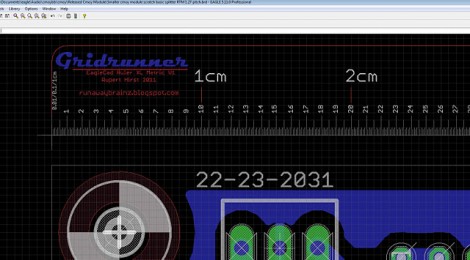
Gridrunner: A Custom Part For Measuring In Eagle CAD

[Koogar] came up with a useful tool for checking the measurements of your layouts in Eagle CAD. He calls it the Gridrunner; a custom part that adds a 200mm ruler to your design. Tick marks are in 1/10th of a millimeter increments for great accuracy when used with the zoom feature of Eagle. Once you’ve got the layout just right, delete the ruler from your design and export it for fabrication. [Koogar] does mention that the beta version of Eagle 6 has a new measuring tool, but he still thinks the Gridrunner offers some things that the built-in tool doesn’t. See just how handy it is in the video after the break. The measuring starts about 1:40 into it.

We found it interesting that [Koogar] is using Eagle for quite a bit more than PCB design. We’ve used it for laying out a drilling template for face plates before, but he’s going far beyond that. He uses the library editor to recreate the parts of his CNC machine which he says are then really easy to align. From there, he exports the CAM files for mounting brackets. Do you use Eagle for something other than PCB design? Let us know about it by leaving a comment. Continue reading “Gridrunner: A Custom Part For Measuring In Eagle CAD”

Experimenting With Bridge Rectifers For AC To DC Power Conversion

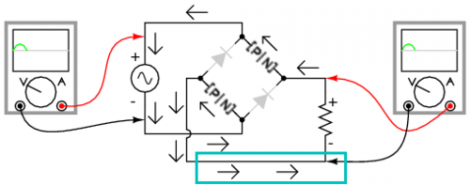
The folks over at Toymaker Television have put together another episode. This time they’re looking at bridge rectifiers and how they’re used in AC to DC converters.

This is a simple concept which is worth taking the time to study for those unfamiliar with it. Since Alternating Current is made up of cycles of positive and negative signals it must be converted before use in Direct Current circuits; a process called rectification. This is done using a series of 1-way gates (diodes) in a layout called a bridge rectifier. That’s the diamond shape seen in the diagram above.

This episode, which is embedded after the break, takes a good long look at the concept. One of the things we like best about the presentation is that the hosts of the show talk about actual electron flow. This is always a quagmire with those new to electronics, as schematics portray flow from positive to negative, but electron theory suggests that actual electron flow is the exact opposite. Continue reading “Experimenting With Bridge Rectifers For AC To DC Power Conversion”

Pushing FPGA Config Files Via Serial Using ‘cat’

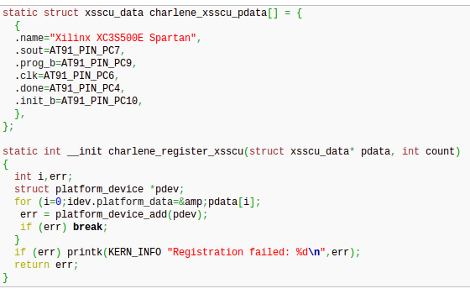
[Andrew] is trying to buckle down and hammer out his PhD project but was surprised by the sorry state of the configuration options for his FPGA/ARM dev board. Using JTAG was painfully slow, so he studied the datasheet to see if there was another way. It turns out the Xilinx FPGA he’s using does have a slave serial mode so he came up with a way to push configuration from the ARM to the FPGA serially.

Four of the connects he needed were already mapped to PortC pins on the AT91SAM9260 ARM System on a Chip. He ended up using the EN_GSM pin on the FPGA, since there is no GSM module on this board; connecting it to the microcontroller with a piece of wire. Now he can SSH into the ARM processor, grabbing information on the FPGA from /dev/fpga0. When it comes time to program, it’s as easy as using the cat command on the binary file and redirecting the output to the same hook.

Nuclear Taco Helmet Measures Reaction To Spicy Food

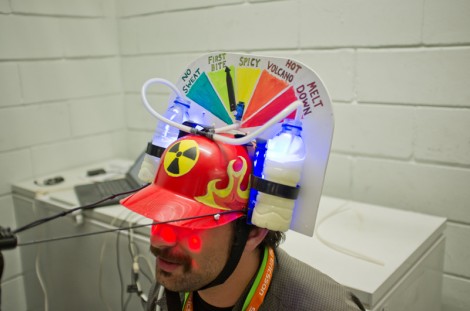
Apparently there was a Nuclear Taco eating contest at the 2010 Codebits Conference. The team from altLab, a Hackerspace in Lisbon, didn’t partake but the discomfort of those that did was burned into their memory. This year, the altLab members decided to build a spciy taco monitoring helmet as part of the conference’s 48 hour hacking competition.

The helmet was inspired by those beer helmets that let you suck down two head-mounted cold ones through a forking straw. In this case, the beer has been replaced by bottles of milk to help quench your burning piehole. But if you do take a sip, observers will know because a flow sensor measures how much you suck down. There’s also a humidity sensor which monitors the sweat building up on your forehead. The Arduino that runs it all tracks this info and uses it to set the discomfort meter on top of the helmet, all while the audience gets a closeup from the camera projecting beyond the helmet’s brim.

We’re happy to say they won 1st place for the creation. Check out their 90-second presentation after the break.

Continue reading “Nuclear Taco Helmet Measures Reaction To Spicy Food”

Getting Useful Data From A Dirt Cheap RFID Reader

cheap-rfid-reader

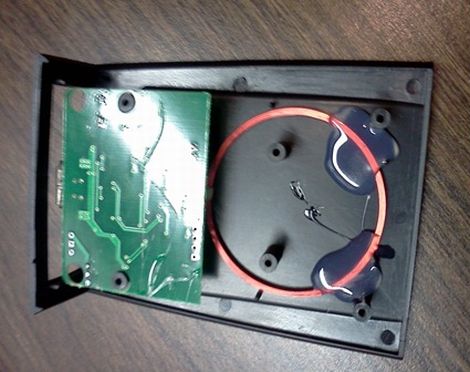
[Aaron] was looking for a cheap RFID reader that had some easy to follow documentation and a standardized interface. Most everything he saw was pretty expensive, so he decided to buy a cheap $10 reader from eBay to see how easy it would be to work with.

The reader came with very little documentation, but [Aaron] did know that the device identifies itself as a USB keyboard, outputting scan tag data into a text editor. That functionality wasn’t incredibly useful, so he took it apart to see if he could interface with it in some other manner. Exposing the PCB revealed an unknown IC for which he could find no documentation, but the board did include some breakout pins, so [Aaron] started by probing those for data.

He tried reading the data in both a terminal program and with a logic analyzer, but nothing seemed to make a whole lot of sense. He turned the sampling rate of the sniffer down, and things started looking a little better. After comparing the data from the sniffer with known tag codes, he noticed that each digit had an offset of 39 applied, so he whipped up a bit of code to correct the numbers.

[Aaron] did a good amount of legwork to get usable data from the reader, but at a cost of $10 it can’t be beat. We certainly know what we’re going to be hunting for on eBay this afternoon…

Strap Yourself In And Let This Robot Arm Shake The Bejesus Out Of You

This man is strapped onto the business end of a huge robotic arm. If you’ve seen videos of industrial robots on automobile assembly lines and the like, you know how fast and strong these machines are. But this isn’t headed for the factory floor, it’s a new flight simulator built do train Australian fighter pilots.

Researchers at Deakin University were looking for a way to give a fighter pilot a more realistic simulator experience. What they ended up with is an apparatus that can spin continuously on two axes. This lets the pilot feel what it might be like to stall and have the aircraft spinning out of control.

The video after the break is not to be missed. You’ll see the test pilot (read: guinea pig) flung this way and that to the point that we almost decided this should be a “Real or Fake” post. But we’re confident that this actually exists. We expect that future renditions will include the front portion of the aircraft and be completely enclosed in a projection dome, just like the Lexus driving simulator.

Continue reading “Strap Yourself In And Let This Robot Arm Shake The Bejesus Out Of You”