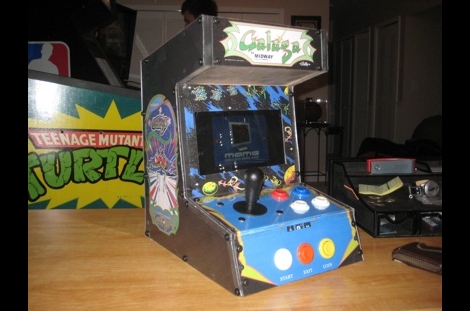
[Ed] had a netbook he no longer needed and decided to make it into a mini MAME cabinet for some of his family members. MAME cabinets are pretty plentiful, but this one was so nicely done, we wanted to share it.
He removed the monitor from an EeePC 901 in order to get some precise measurements, then went about crafting a mini cabinet from MDF. The whole thing was wrapped in sticky label paper adorned with old-school Galaga graphics, then covered in plexiglass for a nice sleek look that also protects the artwork.
He used an iPac 2 controller board to wire up all of the buttons and joystick to the netbook, opting to solder the controller’s wires directly to the USB header on the eeePC’s motherboard. A power switch was added up on top for easy operation, and the cabinet was sealed shut, though the back does open easily in the event that maintenance is required. The system is managed using the Maximus Arcade front end for MAME, which [Ed] claims is incredibly easy.
If you are interested in making your own MAME cabinet, check out some of the otherMAME-basedprojects we have featured in the past, and don’t miss the video below of [Ed's] cabinet in action.
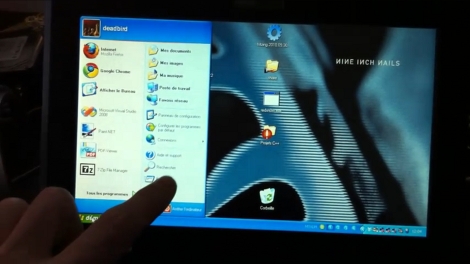
The hardware comes in two parts. There’s the transparent film that covers the screen and the driver board that reads the inputs. The film itself has an adhesive layer on the back that sticks to the LCD panel. But to install it you first must remove the panel from the bezel. You’re also going to need a place to house the driver board. [Deadbird] somehow found enough room inside the case for the controller, but he had to remove the keyboard and motherboard to set it in place. This translates to a complete disassembly of your eeePC. But if you’re used to touch-sensitive devices, and have ever found yourself touching an LCD monitor and wondering why the computer is not following the link, this may be worth it to you. You can see the final product in a clip after the break.
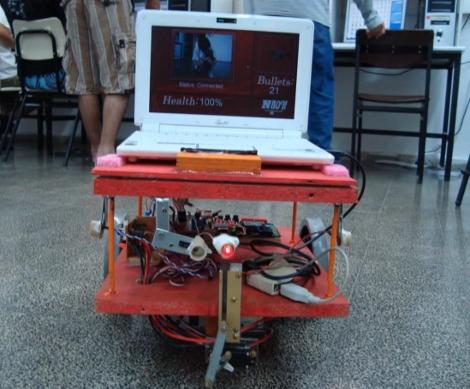
[Shay] and his friend built some battling robots for a school project. Instead of destroying each other’s robots with saws or torches, they are playing laser tag. Each robot sports an eeePC, a laser pointer on a movable arm, and some photoresistors. The goal is to get your laser to hit the other robot’s photoresistor to lower its health towards a kill. A server keeps track of the bout, monitoring shot fired because you won’t find unlimited ammo in this game. As for piloting the rig, the netbook webcam is streamed to a control station with an Xbox 360 controller for motion, aiming, and firing. Check it out after the break.
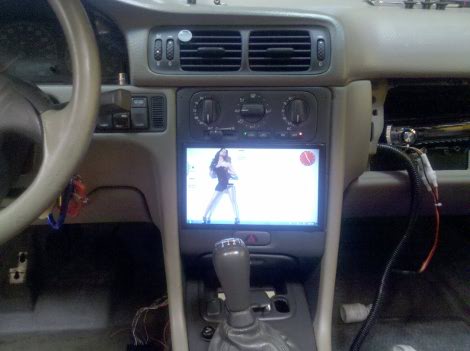
[Ben's] added some nice goodies to his Volvo in the form of an in-dash computer. The system monitors two pressure sensors for boost and vacuum, as well as reading RPM, O2, and exhaust directly. All of this is tied into the touch interface running on an eeePC 900A. But our favorite feature is that the system requires you to enter a PIN to start the ignition. The forum post linked above is short on details so we asked [Ben] if he could tell us more. Join us after the break for a demonstration video as well as [Ben's] rundown on the system.
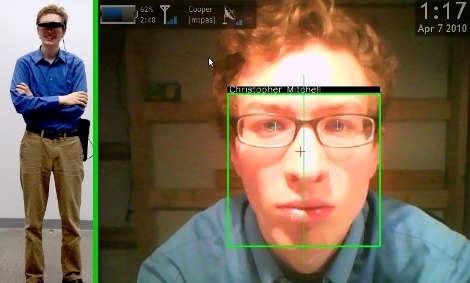
Scouter is a facial recognition system and head-up display that [Christopher Mitchell] developed for his Master’s Thesis. The wearable device combines the computing power of an eeePC 901 with a Vuzix VR920 wearable display and a Logitech Quickcam 9000. The camera is mounted face-forward on the wearable display like a third eye and the live feed is patched through to the wearer. [Christopher's] software scans, identifies, and displays information about the people in the camera frame at six frames per second.
We can’t help but think of the Gargoyles in Snow Crash. This rendition isn’t quite that good yet, there’s several false positives in the test footage after the break. But there are more correct identifications than false ones. The fact that he’s using inexpensive off-the-shelf hardware is promising. This shouldn’t been too hard to distill down to an inexpensive dedicated system.
Giving us a chance to break out the TLAs, [Blair] sent in his latest hack where he embedded an RGB LED into his EeePC to display twitter, pidgin, and email notifications. It is based around the ATtiny45, and requires very few additional parts. He based the project on a foundation of work laid by [Dennis Schulze] on notifications and the work of [Dave Hillier] that used V-USB, a library for implementing USB on AVRs. The entire circuit was done freehand and crammed inside the netbook. He says that it is a lot easier to see notifications, even when the laptop is shut.
[Asier] pointed us to this video of his PC-PIC II acting as a peripheral to his EEepc. You can see him playing pong, using it as a musical input, and even a video game controller. This project seems pretty nice, though we would like some more information. We tried digging around in the “projects” area and couldn’t find anything.