Vintage VT100 Terminal Computing…with A Beaglebone

decbox

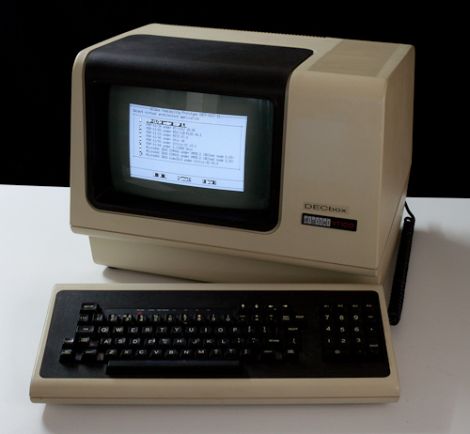
A cool little project came our way, which we thought might be of interest to some of you vintage computer buffs. [Joerg Hoppe] wrote in to share a DEC VT100 terminal he resurrected in a novel fashion.

His “DECBox” system was created with a Beaglebone, which he uses to run a wide array of PDP11/VAX terminal emulators, thanks to the SIMH project. [Joerg] constructed an expansion shield for the Beaglebone that provides several UART connections, enabling him to connect it to his DEC terminal over a serial interface. Since he added several serial plugs to the Beaglebone, he can even run multiple emulator installations in parallel on different terminals without too much trouble.

[Joerg’s] efforts are mainly for a vintage computer display he is constructing, but setting up such a system of your own should be no problem. If you happen to have one (or more) of these boxes sitting around collecting dust, this would be an easy way to get them all up and running without bulky external hardware, since the Beaglebone tucks nicely into the rear expansion slot on a VT100.

Be sure to check out his site for more details on how his DECBox software package works as well as for more pictures of vintage terminal goodness.
Six Foot Speaker Shakes Buildings To Their Foundation

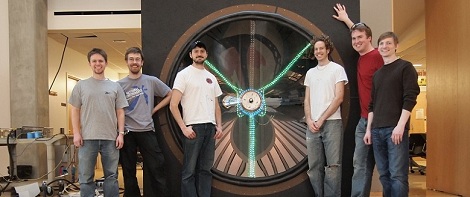
In the first scene of Back to the Future, [Marty McFly] visits the unoccupied laboratory of [Doc Brown]. Seeing an 8-foot-tall speaker connected to a huge array of amplifiers, [Marty] immediately turns on the amps, plugs in an electric guitar, and promptly destroys the amps and speaker while being thrown across the room. This scene must have been a huge inspiration to [Dan] and [Kyle]; they decided to replicate this gigantic speaker for the 2011 UW-Madison  Engineering Expo.

A speaker is a remarkably simple device – they’re usually just a coil of wire, a set of magnets on an iron frame, and a cone. [Dan] and [Kyle] wound hundreds of feet of copper wire around a fiberglass frame for the voice coil, used 8 and 10-inch steel pipe to secure the magnets, and pop riveted two sheets of polycarbonate together to form the cone. The result is a six-foot-diameter speaker in an 8x8x2 foot enclosure.

A speaker this size is only good for one thing: a ton of bass. The speaker can reliably reproduce frequencies from 5 Hz to 50 Hz, frequencies that are better felt than heard. There’s a video of the speaker in action after the break, but we’re pretty sure the best way to experience this insane device is in person.

Continue reading “Six Foot Speaker Shakes Buildings To Their Foundation”

Sensor Rig Finds Out If Motorists Are Sharing The Road With Cyclists

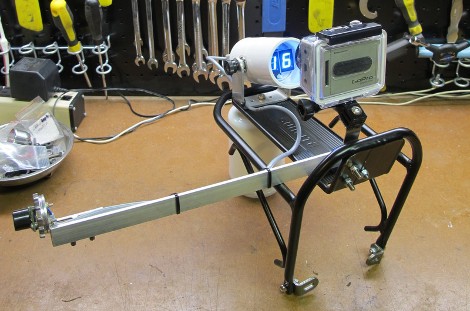
Apparently there’s some cause for concern when it comes to bikes and automobiles sharing the roads in Austin, Texas. [Christopher Stanton] wrote in to tell us there’s a law on the books now that requires motorists to give three feet of space when passing a cyclist. This is pretty difficult to enforce as there’s no solid proof like the radar gun provides when it comes to speed limits. The hardware above is seeking to help by collecting data on passing habits. It measures and records the distance of each vehicle that passes you while on the bike. The goal isn’t to ticket more drivers, it’s to collect statistical data that might help change dangerous driving habits.

As you can see, a front equipment rack hosts the hardware for easy installation on a bike. It has an arm that extends to the side the same distance as the handle bars. The HD camera with wide-angle lens is set to snap a photo which can be used to determine the bike and vehicle positions in the lanes, along with the distance readout from the sensor.

We’d certainly be interested in seeing the numbers for average passing clearance in a heavily traveled urban environment. Even with bike lanes, things can feel pretty tight on a busy day!

Foot-controlled Mouse Keeps Your Hands On The Keyboard

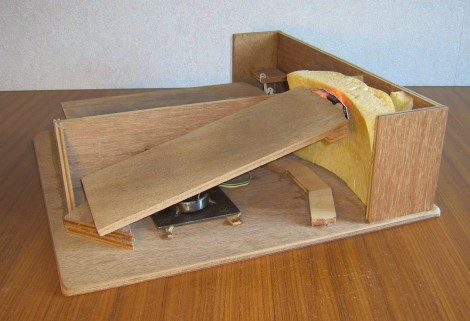
A bit of mechanical ingenuity makes building this foot-controlled mouse into a fun project. It consists of a platform which hosts one pedal for each foot. The right foot controls the movement of the cursor, and the left is responsible for the buttons.

The guts of a wireless mouse do most of the electrical work for this hack. You can see that the optical sensor is mounted on the front of the right foot pedal. A ball bearing combined with a hinge provides motion on two axes. This moves the sensor past a piece of curved foam made by covering a ball with plastic wrap then spraying foam insulation around it. The pedal on the left has four buttons actuated by moving the toes down, up, left, or right. There’s a centering mechanism for this pedal which uses a rubber band

One thing we wonder about here is whether there is a need to lift and re-center the mouse/cursor? There is also no scroll wheel. But those issues are just waiting for someone to pick up the project and make their own improvements.

Your Theme Song Greets You At The Front Door

One thing you can look forward to when arriving at home after a long, arduous day at the office is some peppy theme music when you walk in the door. [Sebastian Sommer] built the system, and shows it off in the video after the break by dancing to James Brown’s I feel good.

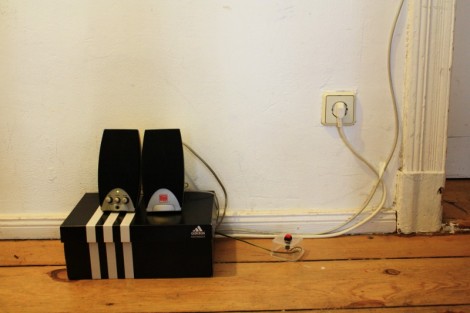
The setup uses an Arduino as a microcontroller. It monitors a hall effect sensor on the jamb which detects a passing magnet on the door. We guess this means the system doesn’t know if you’re coming or going but perhaps a future upgrade would add an infrared beam to detect your legs as head out the door. The music itself is played by an SparkFun MP3 shield which has a decoder chip, microSD slot, and audio jack for the powered speakers. [Sebastian] grabbed a copy of [Bill Porter’s] mp3 shield library to get the project up and running quickly.

This is a pretty cool addition if you’re already using an Arduino for a door lock or vice versa. Or maybe you’re not home enough to make this hack worth it, in which case you simply must take this music playing Tesla coil hat along on your commute.

Continue reading “Your Theme Song Greets You At The Front Door”

Giant Pencil Used As An Etch A Sketch Stylus

The gang over at Waterloo Labs decided to add a team-building aspect to a plain old Etch a Sketch. Instead of just twisting the two knobs with your own mitts, they’re converting this giant pencil’s movements into Etch a Sketch art.

The challenge here is figuring out a reliable way to track the tip of the pencil as it moves through the air. You may have already guess that they are using a Microsoft Kinect depth camera for this task. The Windows SDK for the device actually has a wrapper that helps it to play nicely with LabView, where the data is converted to position commands for the display.

On the Etch a Sketch side of things they’ve chosen the time-tested technique of adding gears and stepper motors to each of the toy’s knobs. As you can see from the video after the break, the results are mixed. We’d say from the CNC ‘W’ demo that is shown there’s room for improvement when it comes to the motor driver. We can’t really tell if the Kinect data translation is working as intended or not. But we say load it up and bring to a conference. We’re sure it’ll attract a lot of attention just like this giant version did.

Continue reading “Giant Pencil Used As An Etch A Sketch Stylus”

Monitoring Home Electricity Usage Via A Tidy Wall Display

power-meter-display

[Janne Mäntyharju] wanted to get an idea as to how much electricity he consumed in his new home, mainly to see if using his fireplace for additional heat had any effect on his bill. Luckily his power meter was mounted in the utility room of his house, making it easy to keep tabs on his usage.

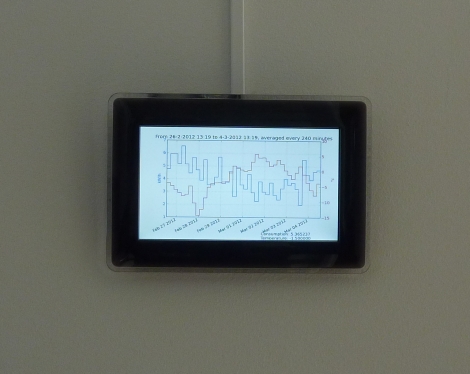
His meter features a small LED that blinks a fixed number of times per consumed Kilowatt hour, so he mounted a photoresistor and ATtiny2313 above it to detect the light pulses. [Janne’s] server polls the microcontroller every 5 minutes over an XBee connection, recording the power usage in an SQL database for further analysis. From this database, he generates graphs showing both the temperature in his home as well as the average electricity usage for the specified time period.

[Janne] also wanted to make the data easily accessible, so he constructed a wall-mounted display using a Beagleboard and digital picture frame. The display not only shows his electricity usage, but it toggles between the weather, calendar events, IRC logs, and pictures from his security camera.

We’ve certainly seen this sort of electric meter monitoring before, but it serves as a quick reminder that given the right tools, watching your power usage (among other things) can be as easy as taking a quick glance over at the wall.