Maximite Harkens Back To The Days Of BASIC

Any self-identified geek that spent some time in the 80s will tell you how they used to type out programs into their ‘microcomputer’ with BASIC. It was a simpler time when a computer’s raison d’etre was simply being a BASIC interpreter. These days are long past us now; you can’t simply turn on a computer and have it load a BASIC prompt anymore. This is where [Geoff]’s Maximite single board computer comes in. It’s a tiny little box that whose only purpose is to play around with BASIC.

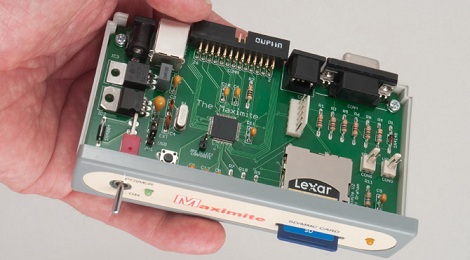
[Geoff]’s used a PIC32MX microcontroller with 128k of RAM for the CPU of his Maximite. Unlike an Apple ][ or TRS-80, the Maximite version of BASIC can do floating point arithmetic out of the box. To connect to the outside world, the Maximite has VGA or composite out to display the BASIC interepreter. A PS/2 keyboard port provides the input, and a USB port and SD card can be used to load and save programs from a PC.

The Maximite includes a 20-pin breakout for whatever IO you can imagine. This is duplicated on [Geoff]’s mini Maximite that is designed to be the retro throwback of an Arduino. We though those were called BASIC stamps, but if it gets kids programming, we’ll let it slide.
3D Printed Helicopter Blades

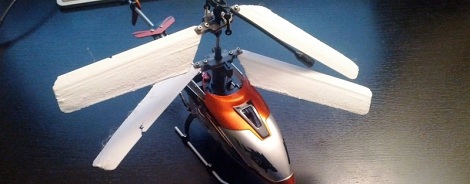
If you’re like us, you’ve been infatuated with the small RC helicopter you picked up on Amazon up until the point where it careened off a wall and broke its blades. Now that you’re wondering about what to do with that small pile of plastic, metal, and electronics, why not print some helicopter blades on your 3D printer?

[Taylor] printed these blades on his Utilimaker, but we don’t see why they couldn’t be printed on a Makerbot or other RepRap. The first set of printed blades worked on the top rotor, but they were too heavy when all four blades were replace. The parts were edited in netfabb using a 0.08mm layer height and now they’re working perfectly. As far as free tools go, Slic3r is the new hotness for .STL to Gcode conversion and now that [Taylor] put the files up on Thingiverse, anyone can print a set of spare blades.

Check out [Taylor] comparing his printed blades to the stock ones that came with his awesome heli after the break.

Continue reading “3D Printed Helicopter Blades”

Shove A Hub Into That Keyboard

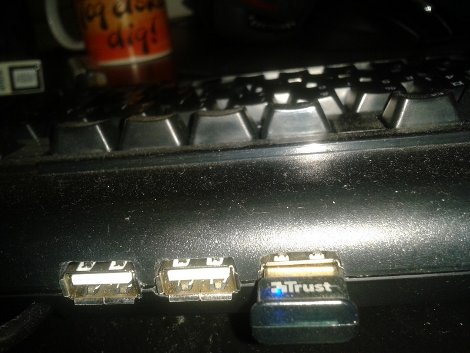
As masters of technology, our desks are often cluttered with odds and ends. We have cables spewing out of every nook, and our computer ports full. The last thing we really want is more stuff getting in the way or buried under piles of technical documentation when adding something like a USB hub. That is where [Michael] comes in, shoving a small USB hub into his Logitech keyboard.

The keyboard is already USB, and the hub has 3 forward facing ports and a fourth single port in the rear. Taking the 2 devices apart he used the already there USB cord from the keyboard replacing the input cord of the hub. Then he removed the rear port and directly wired his keyboard onto the hub.

From there, its just a matter of figuring out where he wanted the hub, and cutting out the plastic. He used a knife, and had fond memories of some minor cuts, which leads us to recommend being (more) careful. A little application of fire to blade goes a long way.

Once the keyboard is back together he has a convenient 3 port hub on the back of his keyboard that looks factory and saves clutter.

Make A Simple O-scope With A FTDI Board And A Couple Of ADC’s

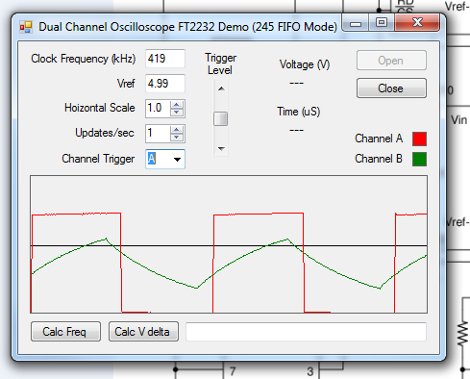
[RandomTask] has posted a nice tutorial on how to use a FTDI serial to usb converter, and a couple analog to digital converters to make a simple software oscilloscope. Using a “Universal Serial to USB converter” and one of many FTDI break out boards, he first reprograms the chip using FTDI’s programming software to put the device into a FIFO (first in first out) mode.

From there a pair of ADC0820 8 bit digital to analog converters are wired up, and input is fed to a couple 555’s for testing. It should be noted that there is no input protection, so things like voltages above 5 volts, or negative voltages are a big no-no with this setup. It still could be very handy while working with micro controllers or other digital circuits.

Data is then sent to the computer and displayed using a VB.net program, which has some basic features like scale and triggering, but also contains a couple bonuses like Calc Freq and Calc V delta calculation.

Many people have these little serial to usb converters, and might be in need of a simple scope. If you’re one of them, then you can cobble this together pretty darn quickly, and cheaply.

Weekly Roundup 1/21/12


In case you were asleep at the wheel, here are our top stories of the week.

Our most popular post was one that shows you how to make your own ‘personal assistant’ using Wolfram Alpha, text to speech software, and the phone network. It still won’t get your coffee though. You’ll just have to do that yourself.

Coming in at second place was a post about how to use your Android camera phone as a Geiger counter. Of course, this hack will work with any device that uses a CMOS sensor to do its imaging but they have gone and wrapped it up into a nice app.

Do you have access to a laser cutter and a burning desire (pun intended) to make gears? In this post Alex makes some acrylic gears using an Epilog laser cutter.

When is our government going to get it through their heads that we don’t want the internet to be controlled by a small group of corporations? Probably when the lobbyists stop giving them money by the boat load to do just that… It seems like several times a year a bill comes through that would severely restrict the internet or would at least allow someone to shut down a website without any sort of due process. Luckily, groups like the EFF are paying attention and are well organized for getting the word out there. This post was our stand against the current bills that threaten our internet freedom.

Finally, on a lighter note, we have a post about how to do ultrasonic welding on the cheap using a ‘heat staker’ and a small drill press.

PVC Magnetometer To Measure Magnetic Storms

In the hopes of getting a heads up on when the aurora borealis will be visible from his back yard, [Alex] built a magnetometer to measure disruptions in Earth’s magnetic field. The build is extremely simple, too. It’s amazing what you can build with a few components and a trip to the dollar store.

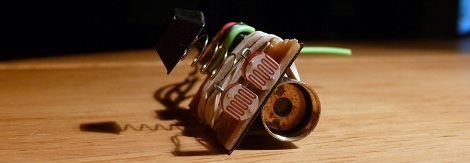
The design or [Alex]’s project is called a torsion magnetometers. In this setup, two mirrors are affixed to a permanent magnet connected to a string. A laser is shone onto the mirror and is reflected back to an array of sensors. In [Alex]’s case he used a simple laser pointer and a pair of photoresistors encased in a PVC tube.

[Alex] has been running his magnetometer in his back yard for over a month now and has the data to prove it. Luckily for [Alex], those graphs he has been generating may get a little more interesting. A coronal mass ejection is coming our way and is expected to hit today around 22:30 UTC. We’ll go outside to look for an aurora, but we’re sure [Alex] will be glued to his laptop tonight.

Check out the CGI visualization of [Alex]’s magnetometer after the break

Continue reading “PVC Magnetometer To Measure Magnetic Storms”

Overlaying Video On Encrypted HDMI Connections

[bunnie] is up to his old tricks again. He successfully implemented a man-in-the-middle attack on HDCP-secured connections to overlay video in any HDMI video stream. There’s a bonus, too: his hack doesn’t use the HDCP master-key. It doesn’t violate the DMCA at all.

HDCP is the awful encryption scheme that goes into HDMI-compatable devices. Before HDCP, injecting video overlays or even chroma keying was a valid interpretation of fair use. [bunnie] thinks that HDMI devices should have the same restrictions analog devices have, so he decided to funnel his own video into his TV.

The build uses the NeTV, a handy and cheap FPGA board with an HDMI input and output. [bunnie] got the FPGA to snoop the HDMI bus and decide if a pixel needs to be changed or not. This isn’t much different from what researchers in Germany did a few months ago, but unlike the academic security researchers, [bunnie] gives you a shopping list of what to buy.

As an example of his work, [bunnie] implemented something like a ‘tweet ticker’ on HDCP-encrypted video. There’s very little the NeTV setup can’t do from chroma keying, filters, or simply dumping the HDMI stream to a hard disk. Check out the slides from [bunnie]’s talk to get better idea of what he did.

[PAPPP] found a video of the talk in question. Check that out after the break.

Continue reading “Overlaying Video On Encrypted HDMI Connections”